Migrating to Shopify Plus is a strategic decision that requires more than just launching a new storefront. It involves evaluating platform fit, restructuring workflows, adapting integrations, and managing costs and risks. This guide will help you decide if Shopify Plus aligns with your business and provide a strategic migration process. By the end, you’ll have a practical framework to evaluate, plan, and execute your Shopify Plus migration, minimising disruption and maximising long-term value.
Should you migrate to Shopify Plus? A strategic evaluation framework
If you're asking, "Should I migrate to Shopify Plus?", the answer depends on a structured assessment of your business architecture, operational workflows, and financial models. Beyond generic benefits, this section highlights how to evaluate Shopify Plus in the context of your existing growth strategy, technical stack, and cost expectations.
Business model compatibility
This section helps you assess whether Shopify Plus aligns with the structural complexity of your business model, whether you're managing hybrid B2B/DTC sales, expanding internationally, or operating multiple brands. Each question reflects a real-world challenge and is followed by what Shopify Plus provides to solve it, as well as the practical constraints you’ll need to consider.
Key questions to ask:
These questions are designed to help uncover how well Shopify Plus fits your operating model. They represent common pain points merchants face as they scale and diversify.
- Do you run multiple business models side-by-side?
For example, combining direct-to-consumer (DTC) and B2B within the same backend, or layering subscription models on top of wholesale. - Do you require international selling with region-specific content, pricing, tax handling, or storefront logic?
- Do you require multiple brands or catalogues that require storefront separation or tailored customer experiences?
- Do your products rely on advanced selling models such as bundles, build-your-own kits, or custom configurators?
What Shopify Plus offers
Shopify Plus includes several native features that directly address the structural needs outlined above:
- Expansion Stores → supports brand and market separation
You can run up to 9 additional storefronts under one Plus license. Each can have a unique domain, themes, catalogue, app configuration, and team - ideal for managing different brands, regional stores or separating B2B from DTC operations. - Shopify Markets → facilitates international selling from a single storefront
Markets let you localise core commerce elements—such as pricing, currency, tax and duty display, and translated content—within a single storefront. This helps you serve multiple regions without duplicating stores, reducing overhead for global expansion. - Built-in B2B suite → enables hybrid DTC and wholesale models
Shopify Plus supports wholesale selling with native features like company accounts, volume pricing, payment terms, and B2B-only checkout flows—all managed from the same backend as your DTC site. - Subscription APIs and partner apps → support recurring revenue models
Shopify Plus includes APIs and an ecosystem of certified apps (like Recharge) that make it easy to introduce subscription logic on top of existing product models—especially valuable for brands layering subscriptions on B2B or DTC channels.
Limitations to be aware of
While Shopify Plus addresses many structural needs, it also has boundaries that may affect how easily certain models can be executed:
- Shared catalogue logic in Shopify Markets → limits regional autonomy
Within a single store, all Markets share the same product catalogue and navigation. If you need distinct catalogues, pricing structures, or merchandising per region, you’ll need to use Expansion Stores instead. - No native catalogue scoping by brand or customer group → limits single-store flexibility
You can’t assign different product sets to customer types (e.g., B2B vs. DTC) or to brands within one storefront. Expansion Stores or third-party solutions are required to work around this. - Advanced selling models (e.g., bundles, build-your-own kits) → require third-party apps
Shopify Plus does not natively support complex product logic often used in B2B or configurable DTC sales. These scenarios require additional apps or custom development to implement effectively.
Summary: When Shopify Plus is a good fit
Shopify Plus is best suited for merchants seeking centralised control with flexibility to run multiple storefronts across regions, customer types, or brands. It natively supports hybrid models like B2B/DTC and global expansion. However, merchants requiring regional product segmentation, multi-catalogue logic within a single store, or complex selling models should expect to combine Plus with Expansion Stores, certified apps, or custom workarounds to achieve full flexibility.
Operational agility and team autonomy
This section helps evaluate whether Shopify Plus allows your business, marketing, and customer experience teams to make independent changes to the storefront without relying on developers for day-to-day execution. For large enterprises, operational agility reduces delays, increases testing velocity, and enables rapid response to market opportunities.
Key questions to ask
These questions reflect common enterprise needs around agility and cross-functional efficiency. They help clarify whether Shopify Plus supports business teams directly or whether technical intervention is still required.
- Can your non-technical teams currently launch campaigns, update content, or test offers quickly, without engineering support?
Marketing agility is critical for time-sensitive campaigns, product launches, or seasonal merchandising. - Do you want to reduce reliance on developers for merchandising workflows or UI changes?
Especially relevant for brands with limited internal dev resources or those aiming to decentralise routine work.
What Shopify Plus offers
Shopify Plus includes several features designed to empower non-technical teams and reduce operational bottlenecks:
- Online Store Editor + Sections Everywhere → supports no-code content changes
Merchandising, landing page content, and layouts can be updated directly in the admin, allowing marketers and designers to move faster without dev support. - Shopify Flow and Launchpad → supports custom workflows and automated campaigns
Enables business teams to automate promotions, product publishing, tagging, and more, reducing manual steps and engineering involvement. - User-friendly admin interface → supports distributed team operations
Clean, intuitive UX makes it easier for multiple teams across departments or regions to manage store operations without requiring platform expertise.
Limitations to be aware of
While Shopify Plus excels in frontend and operational tooling, certain backend capabilities remain limited:
- No built-in server-side scripting → limits advanced business logic
Shopify Functions (the replacement for Shopify Scripts) must be used to customise backend logic. This requires developer input or app-based solutions for non-standard promotions or pricing logic. - Complex merchandising logic (e.g., bundles, tiered pricing, logic-driven content) → may require custom apps or middleware
If promotions depend on multiple conditions or if content needs to change dynamically based on customer group, location, or cart value, Shopify Plus may require workarounds that reduce team autonomy.
Summary: When Shopify Plus is a good fit
A Shopify Plus upgrade is a strong fit for marketing-led or fast-moving teams that want to operate independently, launching promotions, adjusting content, and automating workflows without technical bottlenecks. However, businesses that rely on complex backend logic, dynamic merchandising rules, or deeply personalised content experiences may encounter limitations. These use cases are typically addressed through a combination of Shopify Functions, third-party apps, or custom development layered on top of Shopify Plus.
Integration requirements and system compatibility
This section helps assess whether Shopify Plus can support your integration needs across critical systems like ERP, OMS, PIM, CRM, etc.
Key questions to ask
Enterprises should clarify their integration landscape by considering:
- Are your core systems (ERP, OMS, CRM, PIM, or CDP) cloud-based or legacy?
Legacy systems may require middleware to translate data formats, while cloud-based platforms with REST or GraphQL APIs are generally easier to integrate. - Do you require real-time, bi-directional data synchronisation?
- Do your systems trigger automated workflows such as pricing updates, inventory management, or order routing?
What Shopify Plus offers
Shopify Plus includes various features that support scalable, enterprise-grade system integrations, particularly for businesses built on modern, API-compatible platforms.
- Fast integration for cloud-based systems via API-ready architecture
If your business runs on modern, cloud-native platforms (e.g. NetSuite, Salesforce, Akeneo), Shopify Plus offers rapid integration via its REST and GraphQL APIs. It also provides extensive webhooks for event-driven data flows. These support real-time or near-real-time communication, enabling data synchronisation across inventory, pricing, customer profiles, orders, etc. - Middleware partners → supports legacy system integration
For older, on-premise systems that lack native API support, Shopify Plus partners with middleware providers (e.g., Celigo, VL OMNI, Patchworks) to bridge compatibility gaps. These platforms offer prebuilt connectors and transformation layers, reducing custom development time. - Automation tools (Shopify Flow, Functions, and API triggers) → replicate business workflows
Shopify Flow supports rule-based automation for inventory routing, tag management, and order segmentation. Shopify Functions allows checkout logic customisation without needing direct server access, bridging some gaps where server-side scripting is restricted.
Limitations to be aware of
While Shopify Plus offers robust integration capabilities, some constraints must be considered, especially for brands with legacy systems or requirements that demand server-level control.
- API rate limits → restrict high-frequency or high-volume synchronisation
Shopify Plus’s REST API allows approximately 40 requests per second per store, which may limit real-time operations in high-volume environments such as flash sale sites. - Legacy system integration requires middleware investment
Enterprises using legacy ERPs or deeply customised OMS/PIM setups may need to invest in middleware platforms or custom-built APIs to bridge functionality gaps.
Summary: When Shopify Plus is a good fit
Shopify Plus works best for brands with modern, API-capable systems that support structured, event-based data exchange. Enterprises with legacy infrastructure should budget for middleware solutions and consider gradual system modernisation to maximise integration efficiency.
Total cost of ownership (TCO)
Before you upgrade Shopify to Shopify Plus, make sure to take a long-term view of both upfront and ongoing costs. Costs must also be considered relative to the business impact and operational efficiency the platform delivers. Below is a breakdown of key cost categories that should be included in a 2-3 year TCO model.
- License fees: $2,300 to $2,500 per month, including cloud hosting, security, maintenance, and access to enterprise features such as multi-store management and dedicated account support. When comparing platforms, it is important to factor in whether competitors include these services within their license or charge separately.
- Implementation and setup costs: Initial setup costs depend on business complexity and project scope, covering theme design or rebuilds, configuration of third-party apps or integrations, and project management. Shopify Plus’s structured ecosystem enables faster time-to-market, reducing project lead times compared to fully custom platforms. To compare accurately, benchmark implementation cost and timeline against other platforms, factoring in developer availability, ease of setup, and dependency on external vendors.
- Migration costs: Key components include data migration services, SEO preservation work, integration development, quality assurance testing, and project management oversight. The complexity of your current platform architecture directly impacts these costs, with highly customised systems typically incurring higher expenses. However, these upfront costs should be weighed against long-term benefits such as simplified operations and reduced technical debt.
- Ongoing operational costs: Shopify Plus requires additional budget for paid apps, third-party integrations, and agency retainers, but eliminates costs for server infrastructure, maintenance, and platform upgrades. To assess true ongoing costs, compare Shopify Plus’s app and partner ecosystem with the development and maintenance burden typical of traditional eCommerce platforms (e.g., those requiring in-house hosting or manual security patches).
Business impact: ROI and performance uplift: Shopify Plus offers fast site performance and high conversion rates (e.g., Shopify Checkout’s conversion rates exceed other platforms by up to 36% (15% on average). Faster time-to-market, sometimes launching new stores or features within 3 to 8 weeks, enables quick market adaptation. While other platforms can also handle peak traffic, Shopify Plus’s cloud infrastructure and scalability reduce the complexity and cost of maintaining performance during high-demand periods.
Conclusion
Shopify Plus’s SaaS model consolidates hosting, security, and maintenance, reducing infrastructure overhead compared to traditional eCommerce platforms that require in-house management. However, budgeting for ongoing development and optimisation remains essential to sustain competitive performance.
Technical and architectural fit
This section evaluates whether your current technology setup aligns with Shopify Plus's cloud-based architecture and operational model. Large enterprises must assess their technical requirements and development preferences to determine compatibility with Shopify's structured platform approach.
Key questions to ask
These questions help identify potential technical alignment issues and implementation challenges before committing to migration:
- How well does your technology setup align with a fully hosted, cloud-based platform like Shopify Plus?
Traditional on-premise or self-hosted solutions require different management approaches compared to SaaS platforms, where infrastructure, security, and updates are handled automatically. - Do you rely on custom-built processes or integrations that could be challenging to replicate?
Heavily customised backend workflows, unique data processing logic, or proprietary integrations may require significant reconfiguration or third-party solutions. - Are you planning to separate your storefront from the backend for greater flexibility?
Headless commerce implementations require robust API capabilities and may influence platform selection, particularly for brands seeking custom frontend experiences or multi-channel deployment. - Do you require control over infrastructure, custom URL structures, or unique product configurations?
What Shopify Plus offers
- Fully managed infrastructure → supports hosting, updates, and performance at scale
Merchants avoid server management overhead, as Shopify handles uptime, traffic surges, and PCI compliance as part of its subscription model. - Shopify Functions + app ecosystem → supports custom backend logic without server access
Use Shopify Functions to implement complex discounting, shipping logic, or checkout flows. Paired with thousands of vetted apps, the ecosystem offers low-code paths to replicate legacy workflows. - Storefront API → supports headless commerce and composable architecture
Merchants can build fully customised frontend experiences while retaining Shopify Plus’ robust backend, enabling flexibility without abandoning stability. - Metafields, custom data models, and extensible product taxonomy → supports structured customisation
For brands requiring additional data points or conditional logic across products, orders, or customers, Shopify Plus supports extensibility without resorting to middleware.
Limitations to be aware of
- Restricted backend access → limits use of traditional server-side scripting
Custom logic must be re-engineered using Shopify Functions or third-party apps. Brands that rely on bespoke backend processes may face additional development effort during migration. - Product model limitations → 100 variants and 3 options per product
Merchants with large catalogues need to split products or use third-party PIM tools to manage configurability at scale. - Fixed URL structure → limited control over on-page SEO architecture
Shopify enforces predefined URL paths (e.g. /products/, /collections/), which may limit SEO strategies requiring granular URL customisation. Redirect mapping and structured SEO planning are essential during migration.
Summary: When Shopify Plus is a good fit
Shopify Plus is best suited to merchants who can adapt to a structured and scalable model. If you embrace flexibility, seeking creative ways to achieve outcomes using Shopify Plus’s native features and ecosystem, the platform will cover most of your needs. However, if you rely on deeply embedded, inflexible backend processes that cannot be replicated within Shopify’s framework, further due diligence is advised.
If you’re weighing up these considerations and want a clearer picture of how they apply to your own setup, our Shopify Plus development service can help map business requirements into a practical migration plan.
How to structure your Shopify Plus migration: In-house, assisted, or full-service?
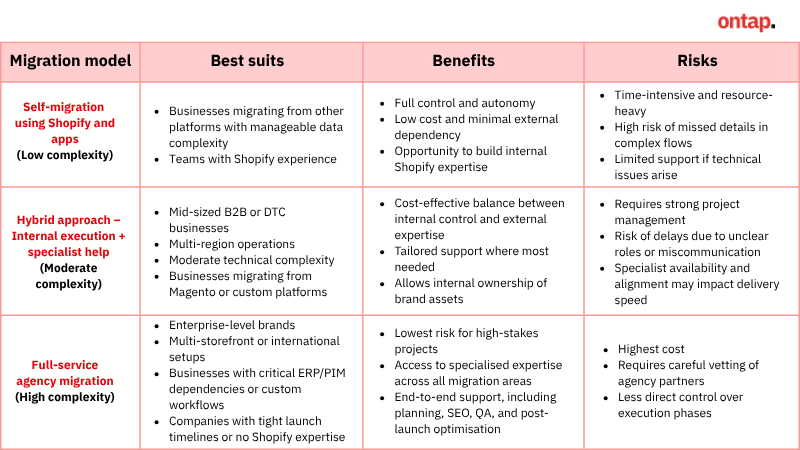
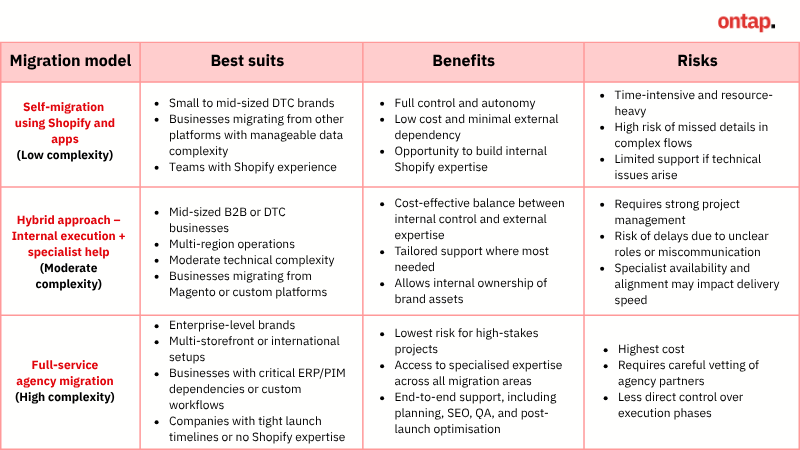
This section offers an objective, criteria-based comparison of three pathways to migrate to Shopify Plus: managing the migration in-house, adopting a hybrid model (combining internal execution & specialist support), or outsourcing to a full-service Shopify migration services provider or Shopify Plus Partner.
Option 1: Self-migration using Shopify and apps (low complexity)
This option might only fit a small number of Shopify Plus merchants. It’s best for brands with a simple setup, moving from platforms like WooCommerce, BigCommerce, or Wix, where data is easier to export and the store doesn’t rely on complex logic or integrations. It may be viable when the internal team has practical experience with Shopify, understands how to manage data imports, theme configuration, and app setup.
How to apply:
The internal team manages the migration using native Shopify tools and trusted third-party apps:
- Use Shopify's native CSV import/export and admin tools to handle structured data imports.
- Use trusted Shopify migration apps such as Matrixify, LitExtension, and Rewind Copy to:
- Transfer structured data (products, customers, historical orders) from your legacy platform.
- Ensure imported orders are archived (they won’t trigger emails, affect inventory, or appear in reports).
- Duplicate theme content, static pages, and blogs (Rewind Copy)
Requirements: You'll need Shopify-knowledgeable developers (or trained marketers) who understand how to structure data for Shopify's import requirements, configure theme settings, and troubleshoot common migration issues. Additionally, you'll need adequate time for quality assurance testing across all store functionalities.
Benefits: Self-migration offers full control, reduces costs by minimising external dependencies. It allows your team to build internal expertise and tailor the migration pace to your operational capacity.
Risks: Self-migration can be time-consuming, especially with larger catalogues or multiple storefronts. Limited external support means your team must troubleshoot data issues and integration gaps independently, which can introduce delays or errors if overlooked.
Option 2: Hybrid approach – Internal execution + specialist help (moderate complexity)
This option suits mid-sized or upper mid-market brands that have structured internal teams and moderate complexity. Internal teams lead content, merchandising, and theme configuration, while external experts handle challenging tasks such as API integrations, Shopify Functions, B2B setup, or SEO preservation. This model works best when the brand has modern, API-compatible systems and wants to balance cost control with expert execution.
How to apply:
Responsibilities are split between your internal team and external Shopify Plus experts. For example:
- Internal teams may handle theme configuration, product and content preparation, SEO asset management (e.g., metadata, redirects), and ongoing visual or merchandising updates.
- External specialists are often engaged for theme development or rebuilds, data transformation and migration, complex integrations (e.g., ERP, OMS, PIM), Shopify Functions implementation, QA, and launch readiness.
Requirements:
To execute this model effectively, you will need:
- An internal project manager coordinates internal and external resources.
- In-house developers or technical marketers familiar with Shopify Plus admin tools and front-end configuration.
- A vetted Shopify Plus Partner with proven experience in your industry and region.
Benefits: The hybrid model offers cost-effectiveness and flexibility to scale external support based on project needs. It retains internal ownership of brand assets and data while leveraging Shopify-specific expertise to ensure a smooth migration.
Risks: Without clear planning, the hybrid model can lead to missed dependencies or delays:
- Coordination risk: Misaligned timelines or unclear handoffs between internal and external teams may delay milestones.
- Partner mismatch: Hiring consultants without deep Shopify Plus experience or relevant vertical knowledge can result in poor outcomes.
- Scope creep: As the project progresses, more tasks may fall on internal teams than expected, stretching resources and timelines.
To mitigate these risks, set clear scopes of work, ensure regular reviews, and define escalation processes before migration begins.
Option 3: Full-service agency migration (high complexity)
This option suits enterprise-level brands with complex eCommerce ecosystems, high revenue exposure, and critical system dependencies. It is ideal for businesses operating multiple international storefronts, requiring deep ERP or PIM integrations, or custom checkout workflows (e.g., B2B quotes or subscription).
How to apply: Hire a certified Shopify Plus agency to manage the entire process:
- Discovery & planning: Platform audit, data, and feature mapping.
- Technical execution: Data migration, theme and checkout logic redevelopment, SEO preservation, and UAT.
- Go-live: Launch coordination and post-launch optimisation
Requirements: Prioritise an agency with:
- Shopify Plus certification and migration experience
- Proven success with enterprise integrations (NetSuite, SAP, or Microsoft Dynamics).
- Strong track record in SEO preservation and performance optimisation.
- Transparent project management processes, clear communication, and robust post-launch support.
- Positive case studies or client references confirming successful outcomes.
Benefits: Full-service agency migration minimises risk by entrusting your replatforming to experts who handle strategic planning, technical execution, and ongoing support. This approach safeguards revenue, preserves SEO equity, and delivers a scalable, optimised Shopify Plus store. It frees your internal teams to focus on business growth while ensuring a smooth transition.
Risks: This option requires significant investment and depends heavily on choosing the right agency. Poor partner selection can lead to misaligned expectations, project delays, or technical issues. Rigorous vetting, a defined scope, and strong collaboration are essential to keep the project on track.
Step-by-step guide for Shopify Plus migration
Executing a Shopify Plus migration demands a structured approach that covers initial audits to post-launch optimisation. Whether you lead the effort in-house or engage specialists, understanding each phase’s actionable priorities, platform-specific notes, and risk-mitigation tips is essential for a seamless transition.
If you’re preparing to upgrade Shopify to Shopify Plus or from other platforms, this step-by-step guide outlines the key phases, risks, and tools involved in a successful replatforming.
Step 1: Audit your existing store and define migration requirements
The goal of this step is to establish a clear understanding of what needs to move, what needs to change, and where Shopify Plus might require a different approach.
Key actions
Catalogue your data structures: Take stock of all key data types, including products, variants, collections, customer accounts, and order history. Pay close attention to products with more than 100 variants, as Shopify enforces a hard cap per product. Since Shopify doesn't support nested category trees, plan how to restructure your taxonomy using collections, tags, and navigation menus.
Identify business rules and compliance workflows that may need rebuilding on Shopify Plus:
List any features your current platform handles with backend logic, such as:
- Customer-specific pricing or catalogue visibility
- Tiered or dynamic discount structures
- Custom tax or shipping calculations
- Region-based content or pricing rules
Also, review any compliance-driven processes:
- Custom VAT or sales tax handling
- Age verification or regional access restrictions
- Consent tracking, data retention, or audit trail requirements
Shopify Plus may not support these natively and could require reimplementation using Shopify Functions, third-party apps, or custom development.
Step 2: Set up your Shopify Plus environment and global configuration
Configure your base Shopify Plus environment and foundational setup across currencies, regions, and teams.
Key actions
Activate Shopify Plus admin and assign roles/permissions:
- Log in to your organisation admin at Shopify Plus Admin.
- Add users under Organisation Settings > Users.
- Assign role-based permissions (e.g., access to orders, themes, Markets, analytics).
- Repeat for each store within your organisation, if using Expansion Stores.
Configure Shopify Markets for cross-border support:
Use Shopify Markets when you have a shared catalogue and pricing model across regions, but want to localise the customer experience.
- Go to Settings > Markets in your primary store admin.
- Create market regions (e.g., EU, UK, US, Rest of World).
- For each market, configure:
- Currencies and rounding
- Languages and translations
- Custom pricing (if needed)
- Tax and duty settings
- Market-specific domains or subdomains
- Review market-specific checkout, shipping, and payment settings.
Register and set up Expansion Stores if needed:
Use separate stores when your business requires unique product catalogues, legal separation, or localisation at the store level.
- Request additional Expansion Stores through your Plus support manager or Shopify Partner.
- For each store:
- Create a new Shopify store instance via the Plus dashboard
- Assign a unique store name, domain, and storefront structure
- Configure Shopify Markets, taxes, shipping, and currencies independently
- Set up separate product catalogues, apps, and workflows as required
Set up B2B features:
- Activate company accounts to manage wholesale customers.
- Configure custom price lists tailored to different customer groups.
- Set net payment terms to manage invoicing and payment schedules.
Step 3: Structure and migrate your data
Transform and migrate your store data to align with Shopify’s architecture, ensuring accuracy, performance, and long-term scalability.
Key actions
Restructure product data: Prepare your catalogue to comply with Shopify’s product data model:
- Split SKUs with more than 100 variants or more than 3 options (e.g. size, colour, material).
- Use third-party apps such as Bold Product Options or Bundler for complex configurations like bundles or customisable products.
- Ensure all products include required fields: title, description, SKU, price, and images in the correct format.
Clean and validate customer data:
- Export your customer list with relevant fields (names, emails, phone numbers, address, marketing consent, and tags)
- Standardise data formats, ensuring phone numbers include country codes (e.g. +44 for UK) and email addresses follow proper formatting.
- Use tags to replicate customer groups (e.g. VIP, Wholesale).
Determine essential order history retention:
- Prioritise importing the last 2–5 years of order data.
- Use tools like Matrixify or LitExtension for bulk import.
- Include key fields (order status, line items, customer ID, payment method, fulfilment status, and timestamps).
- Archive older data in a secure off-platform system for reference.
Map custom attributes to Shopify Plus metafields: Custom fields from your previous platform must be converted to Shopify's metafield structure to preserve essential product and customer information.
- In the Shopify admin, go to Settings > Custom data > Metafields.
- Configure metafields for products, variants, and customers (e.g. product dimensions, care instructions, B2B-specific attributes).
- Use Shopify’s Online Store 2.0 features to display metafields on product pages without additional code.
Step 4: Plan and implement system integrations
Connect your key business systems to Shopify Plus to ensure accurate, automated data flow across product, customer, inventory, order, and fulfilment processes.
Key actions
List all core business systems that need to connect to Shopify Plus: Identify the systems your teams use to manage products, inventory levels, pricing, customer data, orders, and shipping, such as stock control platforms, customer databases, accounting tools, or warehouse software.
Choose how each system will connect to Shopify Plus:
- Use Shopify-native apps where available.
- Use integration platforms (e.g., Patchworks, Celigo) to connect third-party systems with minimal custom development.
- Use custom-built API or webhook connections for systems that require tailored logic or aren’t supported by existing connectors.
Choosing the right method ensures each integration is efficient, cost-effective, and maintainable.
Define sync frequency, data volume, and error handling rules:
- Set how often each system should update Shopify (e.g., real-time for orders, hourly for inventory, daily for catalogue updates).
- Estimate the volume of data each sync (e.g., number of SKUs, orders, or customer records).
- Set up automatic retry processes and error logs to catch and resolve failures quickly.
This prevents breakdowns in data flow and ensures smooth day-to-day operations.
Ensure integrations comply with Shopify API request limits: Shopify Plus allows up to 20 API requests per second for most admin-level operations. Exceeding this limit can cause Shopify to throttle your integrations, delaying data syncs or interrupting order processing.
- Spread out sync processes across the day and batch large data updates where possible.
- Avoid scheduling all system updates at the same time (e.g., catalogue, inventory, and customer syncs running simultaneously).
This ensures your connected systems run smoothly without slowing down critical store operations.
Step 5: Rebuild checkout and storefront functionality
Recreate your store’s checkout logic and storefront features on Shopify Plus using its modern customisation tools to maintain consistency with your previous platform while aligning with Shopify’s architecture and best practices.
Key actions
Rebuild checkout logic with Shopify Functions and Extensibility:
- Use Checkout Extensibility to modify the layout, UI, and messaging.
- Navigate to Settings > Checkout in the admin to access extensibility features.
- Add custom branding, field logic, and conditional content using extensions.
- Use Shopify Functions to customise backend checkout logic (e.g., discounts, shipping rates, payment routing).
Replicate pricing and discount rules:
If your previous platform supported complex pricing rules, replicate these using Shopify Functions for dynamic pricing logic like:
- Volume-based discounts
- Customer group-specific pricing
- Exclusions for certain promotions
Rebuild front-end interactive features:
- Use Liquid templates and Sections Everywhere to build interactive UI elements (e.g., product configurators, store locators, “frequently bought together” modules)
- Replace custom widgets with trusted apps:
- Yotpo for user reviews
- Bold Product Options for product customisation
- Rebuy for personalised product recommendations
Optimise for mobile performance
- Minimise render-blocking scripts and prioritise above-the-fold content using native Shopify performance tools
- Use lazy loading, image compression, and optimised video embeds to reduce load time on mobile
Step 6: Set up SEO redirects, analytics, and performance foundations
Ensure your new Shopify Plus site retains organic search visibility and accurate data tracking by implementing SEO redirects, migrating critical content, and rebuilding analytics infrastructure from the ground up.
Key actions
Map legacy URLs and implement 301 redirects:
To preserve search rankings and avoid broken links:
- Export a full list of legacy URLs from your previous platform.
- Map each URL to its new Shopify format (e.g.,
/products/, /collections/). - Upload 301 redirects via Shopify Admin > Settings > Domains > URL Redirects, or use Matrixify for bulk uploads.
Migrate and optimise on-page SEO elements:
- Export and review all existing meta titles, meta descriptions, H1 tags, and alt text.
- Import these into Shopify’s product, collection, and page editors or via CSV.
- Add structured data (JSON-LD) for products, reviews and FAQs using trusted SEO apps or custom Liquid code to support rich search results.
Transfer valuable content and blog articles:
Preserve content-driven traffic by migrating high-performing content:
- Export top blog posts, guides, and landing pages based on traffic and backlinks.
- Recreate content using Shopify’s native blog engine or a headless CMS (e.g., Contentful, Sanity) for more advanced content workflows.
- Update internal links and cross-reference URLs to reflect the new Shopify structure.
Rebuild analytics and tracking infrastructure:
Set up tracking tools from scratch to capture conversion and behavioural data:
- Create and connect a new Google Analytics 4 (GA4) property.
- Add the GA4 tag manually via the theme code or use Google Tag Manager (GTM).
- Reinstall and configure Meta Pixel or other ad platform trackers.
- Rebuild conversion goals and funnels based on Shopify’s new URL paths.
Step 7: QA, UAT, and launch readiness
Before going live, run structured QA and UAT to validate your Shopify Plus store’s performance, accuracy, and readiness under real-world conditions.
Key actions
Conduct UAT across critical workflows
- Test checkout processes on desktop and mobile, covering guest and logged-in users, and multiple payment methods.
- Verify order synchronisation with backend systems and confirm accuracy of post-purchase email flows such as order confirmations and shipping updates.
Validate tax, shipping, and international configuration
If using Shopify Markets, confirm accuracy across different regions:
- Check international pricing logic and shipping thresholds
- Review local tax rules and duties (especially for B2C cross-border sales)
- Test translation accuracy and localisation of currencies and domains
Run staging versus production environment comparisons
- Check that theme versions, navigation, and content are identical.
- Simulate high-traffic scenarios, such as flash sales or product drops, to test site performance and checkout stability.
Create a detailed issue log with severity levels and assigned owners
- Document all bugs, inconsistencies, and edge cases discovered during testing.
- Assign clear ownership and prioritise issues by impact to streamline resolution before launch.
Step 8: Launch and monitor
When it’s time to migrate to Shopify Plus live, execute systematic deployment, monitor in real-time, and ensure immediate response protocols
Key actions
Go live and activate core systems:
- Remove password protection from your storefront.
- Update DNS records to point your primary domain to Shopify Plus (typically done via your domain provider's DNS settings).
- Confirm your primary domain is active and secured with an SSL certificate.
- Enable live payment gateways and verify they are processing transactions.
- Perform a real transaction to confirm checkout, order capture, and email notifications are functioning end-to-end.
Monitor critical flows in real time
Track key business systems during the first hours post-launch:
- Monitor new orders in the Shopify Plus admin and check for accurate syncing with ERP, OMS, or fulfilment platforms.
- Use Search Console and crawl monitoring tools to catch redirect issues and missed 301s.
- Track live metrics via Google Analytics and Shopify’s real-time dashboard to ensure sessions, conversion rates, and bounce rates are within expected ranges.
- For performance insights, use tools like Google Lighthouse to check site speed and technical health.
Communicate across internal teams and customers:
- Brief customer service, fulfilment, and operations teams on expected changes in admin workflows or customer issues.
- Prepare FAQs and internal scripts to address common questions.
- Announce the launch to your customer base via email, banners, or social media.
Implement rollback readiness protocols
Even with rigorous testing, issues may arise:
- Keep a rollback plan in place, such as restoring DNS to the old platform or rolling back to a pre-launch theme version.
- Assign a launch lead to coordinate rapid fixes and activate recovery measures.
- Have development or agency teams on standby to address critical issues immediately (e.g., checkout or payment failures).
Enter a hypercare support period
- Establish a structured incident log to capture, triage, and prioritise launch issues.
- Focus on resolving blockers first, such as failed orders or incorrect pricing.
- Maintain close monitoring of integrations, customer tickets, and analytics performance for at least 7–14 days post-launch.

Essential apps that streamline your Shopify Plus migration
A successful Shopify Plus migration depends not just on planning and execution, but on using the right tools to reduce risk, maintain SEO continuity, and ensure accurate data transfer. Below are Shopify-recommended apps that directly support your Shopify Plus upgrade - each selected by Shopify migration experts to improve control, automation, and reliability during the process.
Data migration tools: Reliable apps for structured, accurate, and testable imports
When to use: During initial setup and staging
Why it matters: Shopify’s native CSV import tools are limited. Dedicated Shopify migration apps offer more robust control over product catalogues, customer data, and custom fields.
- Matrixify: Advanced import/export for products, customers, orders, redirects, metafields, and more; supports incremental updates and error reconciliation.
- LitExtension: Automated, assisted migration from WooCommerce, Magento, BigCommerce, and other platforms; includes rollback and support options.
- Cart2Cart, Next-Cart, Migration Pro: Platform-specific solutions for rapid store migration with moderate complexity
These apps and services are recommended for stores replatforming from non-Shopify platforms with medium to high data complexity. Leveraging them can save time, minimise manual errors, and provide repeatable, testable migration processes.
Risk mitigation tools: Backup, recovery, and testing environment apps
When to use: Before initiating any data transfer, throughout testing, and pre-launch.
Why it matters: Migration introduces the risk of data loss, broken configurations, and theme issues. These tools act as an insurance policy for those preparing to migrate to Shopify Plus.
- Rewind Backups: Continuous backup for products, themes, content, customers, and configurations. Enables rapid restore in case of data loss or error.
- Rewind Copy: Clone an existing store to create a staging environment or regional storefront. This is useful for QA, UAT, and phased launches.
- Duplicator and other cloning apps: Simpler alternatives for one-time cloning tasks
These tools are recommended for any store with a sizable catalogue, multi-store setup, or complex launch timeline. They reduce migration risk by enabling rollback options and parallel environment testing, ultimately safeguarding your business continuity.
SEO support tools: Apps to preserve redirects, organic traffic and link equity
When to use: After your theme is finalised and just before launch
Why it matters: Shopify enforces a fixed URL structure. Without proper redirects, you risk losing SEO rankings and inbound traffic.
- SC Easy Redirects: Manages bulk 301 redirects with wildcard support and validation
SEOAnt: 404 Link Redirect, Sherpas Smart SEO, Avada SEO: Tools for resolving broken links, managing metadata, and configuring structured data.
Stores migrating from platforms like Magento, WooCommerce, or custom builds often have vastly different URL structures. Employing dedicated redirect and SEO apps ensures a smooth transition, preserving your site’s organic visibility and link equity throughout the migration process.
Conclusion
Migrating to Shopify Plus represents a strategic investment that delivers scalability, operational efficiency, and growth potential when implemented correctly. Our guide has outlined the essential evaluation criteria alongside three implementation approaches tailored to different complexity levels.
Knowing when to move to Shopify Plus—and following our structured Shopify migration checklist and leveraging purpose-built apps, you can ensure a methodical transition that preserves your data integrity, SEO value and business continuity throughout the process.
At On Tap, we specialise in helping brands navigate complex Shopify Plus migration. Our proven methodologies ensure data accuracy, SEO continuity, and on-time project delivery. Whether you require full-service migration or expert support in specific areas, we tailor our Shopify Plus development solutions to your unique business needs, helping you transform your commerce capabilities and fully leverage Shopify Plus’s powerful platform. Contact us today to explore how we can help you migrate to Shopify Plus, accelerate growth, and achieve your eCommerce goals.