Comparing Shopify vs Shopify Plus is less about features, and more about whether your current setup can support your next stage of growth. This article examines the key differences between Shopify vs Shopify Plus, comparing their features, pricing, scalability, and overall value for businesses.
In this article, “Shopify” refers to the standard plans - Basic, Grow, and Advanced - designed for small to mid-sized businesses, while Shopify Plus is built for high-growth and enterprise-level needs.
You'll get:
-
A feature-by-feature comparison of Shopify Plus vs Shopify
-
A pricing and ROI analysis to assess whether Plus justifies its cost
-
Clear criteria to help you decide when to upgrade - and when it’s better to wait
By the end, you’ll have a clear understanding of what sets Plus apart - and whether it aligns with your current growth stage and operational needs.
Overview: What are the main differences between Shopify and Shopify Plus?
Shopify Plus and Shopify share the same core platform - including the admin dashboard, storefront structure, checkout architecture, and access to Shopify’s app ecosystem. Core features like unlimited products, multi-channel selling, and 24/7 support are consistent across all plans.
The key differences between Shopify and Shopify Plus lie in scalability, extensibility, and access to advanced capabilities. Shopify Plus is designed for fast-growing and high-volume businesses that need enterprise-grade scalability. It can handle millions of SKUs and process up to 10,000 checkouts per minute. In addition, Shopify Plus includes advanced capabilities such as native B2B functionality and greater control over customisation, allowing you to tailor how your store operates at scale. Shopify, on the other hand, is tailored for small to mid-sized businesses, offering more basic features focused on essential eCommerce needs with more limited scalability and customisation options.
If you’re considering Shopify Plus and want to understand how to leverage its enterprise features in practice, explore our Shopify Plus development service. We help brands translate platform capabilities into real business outcomes.
Pricing Comparison: Is Shopify Plus worth the higher cost?
The gap in Shopify vs Shopify Plus pricing is significant — from $39–$399/month on standard plans to $2,300/month+ for Plus. But the real question is how that cost translates to value.
This section breaks down the true Shopify Plus vs Shopify cost by looking at licensing, transaction fees, app dependencies and operational overhead. It also explores where Plus can deliver measurable ROI across areas like checkout, B2B, international expansion, and omnichannel selling.
Overview of Shopify vs Shopify Plus pricing
| Pricing | Shopify | Shopify Plus |
| License | $39–$399/month | From $2,300/month (GMV-based) |
| Shopify Payments |
➖ Card rates: 2.9–2.5% + 30¢ ➖ Third-party fee: 2.0–0.6% ➖ Basic multi-currency |
✔ Most competitive card rates ✔ 0.2% third-party fee ✔ Advanced FX and multi-currency control |
| Shopify Tax | ➖ First $100K free, then 0.35% | ✔ First $100K free, then 0.25% |
Licence
Shopify (Basic, Grow, Advanced)
-
Basic: $39/month
-
Grow: $105/month
-
Advanced: $399/month
Note: All standard plans are based on fixed monthly fees.
Shopify Plus
From $2,300/month (GMV-based)
Note: Shopify Plus uses a GMV (Gross Merchandise Volume)-based pricing model, which scales with your store’s revenue.
Platform fee
Third-Party Gateway Fees
All Shopify plans apply an additional fee when using a third-party payment gateway (e.g. Stripe, Adyen) instead of Shopify Payments. The rates vary by plan:
-
Basic: 2.0%
-
Shopify (Grow): 1.0%
-
Advanced: 0.6%
-
Shopify Plus: 0.2%
This fee reduction can become material as order volume increases. For example, a merchant processing £500,000/month through a non-Shopify gateway would pay approximately £3,000/month on Advanced (0.6%) versus £1,000/month on Plus (0.2%) — a difference of £24,000/year.
However, when a merchant uses Shopify Payments as their primary gateway, third-party transaction fees no longer apply. In this case, the financial value of Shopify Plus depends more on the card processing rates, which can be negotiated. While Plus is often associated with more favourable rates for high-volume merchants, exact terms are determined on a case-by-case basis.
Tax automation fees
Shopify Tax applies to US-based stores, calculating sales tax on orders. All plans receive the first $100,000 in order calculations per year at no charge. After that:
-
Standard Shopify plans are charged 0.35% of the order value
-
Shopify Plus merchants pay a reduced rate of 0.25%
For a merchant processing $1 million in taxable orders annually, this translates to a $900/year difference. While relatively modest, the reduction may be relevant for high-volume, multi-state operations that rely on Shopify for automated tax compliance.
For a deeper breakdown of Shopify Plus pricing — including license fees, transaction costs, and hidden total cost of ownership considerations — see our full guide: How much is Shopify Plus: Detailed total cost of ownership breakdown.
Shopify vs Shopify Plus: Evaluating the cost vs. value
While the upfront cost of Shopify Plus is higher than the standard plans, the real question is whether it delivers sufficient value to justify the investment. The Shopify vs Shopify Plus cost equation goes beyond license fees — it includes factors like transaction rates, app dependencies, and operational complexity. Shopify Plus offers advanced features designed to help businesses scale efficiently, but the decision to upgrade is not just about price—it’s about understanding the long-term impact on your business’s growth and operational efficiency.
In this section, we’ll explore how Shopify Plus adds value in key areas such as conversion optimisation, international expansion, B2B sales, and operational efficiency. We’ll also compare these benefits to the features available on standard plans, helping you assess where you’ll see the most return on investment (ROI).
These insights are based on typical merchant setups, common third-party tool costs, and real-world constraints of scaling on standard Shopify plans.
Customise checkout for conversion
When it comes to increasing Average Order Value (AOV) and improving conversion rates, optimising the checkout process is one of the most critical aspects of your sales funnel. Shopify Plus offers greater flexibility and customisation in this area, which can lead to significant improvements in conversions. However, it’s important to consider both the cost and the value of these advanced features before deciding if the upgrade is right for your business.
On Shopify, core checkout flows — including the information, shipping, and payment steps — cannot be modified. This means any customisation beyond basic branding or post-purchase messaging requires:
-
Third-party apps - e.g., Rebuy, CartHook
-
Development to integrate apps and align them with your brand’s checkout experience
For example:
A brand implementing region-specific pricing might incur:
-
Webrex – Pricing By Country, enabling multi-currency and regional pricing logic: ~£275–£2,900/year
-
Custom development for app integration, country-based logic, and UX adjustments: ~40–60 hours at £24–£35/hour → £960–£2,100 (Estimated from ITJobsWatch – Shopify Developer UK)
-
Total estimated cost: ~£1,235–£5,000/year for functionality that Shopify Plus includes natively
On Shopify Plus
As mentioned in the previous section, Shopify Plus allows control over core checkout flow, leading to potentially higher conversions without the need for third-party apps or custom development.
Value impact after moving to Shopify Plus
-
Increase conversions: Checkout is often the highest-friction point in the funnel, and the highest-leverage one. Shopify Plus gives you the flexibility to remove that friction through embedded logic and tailored experiences, leading to measurably higher conversion rates and stronger revenue performance from your existing traffic.
-
Removes the need for third-party apps and custom development: As shown above, implementing regional pricing and logic at checkout using third-party tools (e.g. Webrex – Pricing By Country) can cost ~£1,235–£4,900/year. Shopify Plus delivers this functionality natively, reducing ongoing integration and maintenance costs.
Illustrative ROI Scenario
A store generating £1M/month that improves checkout conversion by 1% could see an additional £120,000+ in annual revenue, significantly surpassing the £24,000/year Shopify Plus fee. By using native checkout tools instead of third-party apps and custom development, the business could also reduce costs (for example, up to £4,900/year as shown in the example above), further improving overall ROI.
Expand into B2B
As businesses scale, many look to expand into wholesale alongside their direct-to-consumer (DTC) sales. Shopify Plus offers a native B2B suite that is not available on other standard plans. On the other hand, enabling B2B functionality on Shopify requires third-party apps and custom development, which can quickly add to both cost and complexity.
On Shopify, enabling wholesale typically requires:
-
Third-party apps for customer-specific pricing, terms, and order portals
-
Custom development to support buyer roles and logic not available in standard Shopify
For example, A brand expanding into B2B might incur:
-
SparkLayer, an app that enables customer-specific pricing and B2B order workflows, costs between $49 and $299/month → ~£470–£2,900/year
-
Custom development: ~32 hours at £24–£35/hour → £768–£1,120 (Estimated from ITJobsWatch – Shopify Developer UK)
Shopify Plus offers a built-in B2B suite that helps you serve business buyers without duplicating stores or building custom logic from scratch.
Value impact after moving to Shopify Plus
-
Eliminates the need for third-party B2B apps and custom logic. As shown in the example above, a merchant might otherwise spend ~£1,200–£4,000/year to enable similar functionality using apps and custom code.
-
B2B AOV is often higher than DTC.
-
Faster purchasing, easier reordering = higher retention and larger order sizes.
Illustrative ROI Scenario
A store adding £200K/month in B2B orders increases average order value from £60 to £180, leading to an additional £2.4M/year in higher-quality revenue.
By using native B2B features instead of third-party apps and custom code, the business could also reduce operational costs (for example, up to £4,000/year, as shown in the example above), further improving overall ROI.
Expand internationally
Expanding internationally is a critical growth strategy for many businesses, but it introduces complexities that Shopify and Shopify Plus handle differently. Shopify offers tools like Shopify Markets to help merchants expand into new regions, but selling globally often requires additional add-ons, third-party apps, and development work to handle localisation, tax, currency, and compliance needs.
On the other hand, Shopify Plus provides native features that simplify and streamline international expansion by consolidating the tools and resources needed for global selling.
On Shopify, selling internationally often requires:
-
Shopify Markets add-ons at £59/month per additional market beyond the included limits
-
Apps to cover duties, tax, currency, and localisation gaps
-
Development to duplicate and manage regional stores for catalogue, language, and tax control
-
Duplicated stores to support different catalogues, legal entities, or regional teams when Shopify Markets can't meet compliance needs
Illustrative example:
A business expanding to 7 regions, without needing a separate legal entity per region, may use Shopify Markets to manage multiple localised experiences from a single store.
-
3 Shopify Markets add-ons at £59/month → £2,124/year
(Shopify Advanced includes 3 markets. Supporting 7 regions would require 3 additional markets at £59/month each.)
-
Third-party localisation tools (e.g., Zonos for duties, translation apps) → ~£2,000–£2,500/year
-
Development for setup and configuration (e.g., domain redirects, pricing rules) → ~£576–£840
Assuming 24 hours at £24–£35/hour, based on UK Shopify developer rates.
-
Total estimated cost: ~£4,700–£5,500/year
However, if each region requires a separate business entity, local tax registration, or a distinct product catalogue, Shopify Markets alone becomes insufficient. In these cases, merchants often resort to duplicating their store to meet region-specific compliance, operational, or merchandising requirements.
→ 6 duplicated Advanced stores at £1,596/year each → £9,576/year
This figure excludes additional app subscriptions and custom development per store, which can significantly increase total operational overhead.
Shopify Plus simplifies international expansion by offering 50 markets, 9 expansion stores, custom tax entities, and native FX/DDP capabilities, enabling businesses to scale globally without duplicating stores or relying on third-party tools.
Value impact
-
Cost savings: Shopify Plus eliminates the need for third-party apps and duplicated stores, reducing operational costs by £4,700–£5,500/year (as shown in the example above).
-
Streamlined global expansion: Manage multiple regions from a single store, significantly reducing both the complexity and cost of international growth.
Grow Physical Retail with POS
If you're operating physical stores, pop-ups, or showrooms, Shopify Plus makes it easier and more cost-effective to scale your retail footprint. It includes POS Pro for up to 200 locations (when using Shopify Payments), and unifies customer data, staff roles, inventory, and analytics across all online and offline channels.
On Shopify, enabling POS Pro on standard plans typically requires:
-
Paid POS Pro add-on at £89/month per location
-
Manual configuration of staff roles, app settings, and reporting per store
For example:
A brand operating 12 physical retail locations might incur:
-
POS Pro add-on: 12 × £89/month → £1,068/year per store → £12,816/year total
-
Additional staff setup and analytics overhead
Shopify Plus includes POS Pro for up to 200 locations (when using Shopify Payments), and unifies customer data, staff roles, inventory, and analytics across all online and offline channels.
Value impact:
-
Eliminates the need for separate POS Pro licensing and configuration. As shown above, a merchant might otherwise spend ~£12,800 on fees (not to mention additional costs for setup) to enable similar in-store functionality across 12 locations.
-
Improves operational efficiency and accelerates expansion into new retail locations.
-
Enhances the customer experience with integrated loyalty, returns, and fulfilment across touchpoints.
Operational efficiency
On Shopify, achieving advanced operational efficiencies, such as automating flash sales, requires:
-
Third-party apps: £100–£400/month for sale scheduling, pricing, and theme changes.
-
Custom development: Additional costs for integrating automation and workflows.
Shopify Plus offers native tools like Launchpad, automating sale timing, pricing, and themes, which reduces the need for third-party apps and manual effort.
Value Impact:
-
No third-party apps: Eliminates £100–£400/month in app fees.
-
Automation: Campaigns go live without manual intervention.
Illustrative ROI Scenario:
For a brand running 6 product drops/year, Shopify Plus saves ~£3,000 in app and development costs, while automating campaign management.
Shopify vs Shopify Plus feature comparison: What sets Shopify Plus apart
To understand the main differences between Shopify and Shopify Plus, it’s helpful to start with a side-by-side view of the key features that go beyond what’s available on standard plans. The Shopify vs Shopify Plus comparison table below outlines the most important areas where Shopify Plus features either unlock entirely new capabilities or significantly extend existing ones.
Following the table, each feature will be broken down using a consistent structure:
-
Availability: Whether the feature is exclusive to Shopify Plus or enhanced beyond what standard plans offer
-
What it enables: A clear explanation of the business capabilities on both Shopify and Shopify Plus
-
Why this feature is a competitive edge of Shopify Plus
Feature comparison table: Shopify vs Shopify Plus
| Feature Category | Shopify | Shopify Plus |
| 1. Checkout Customisation |
➖ Basic branding & Thank You page ✘ No UI extensions ✘ No advanced logic |
✔ Full Checkout Extensibility ✔ Shopify Functions ✔ Branding API |
| 2. B2B Features (native) | ✘ Requires third-party apps | ✔ Built-in B2B suite: price lists, net terms, buyer permissions |
| 3. Expansion Stores | ✘ Not included | ✔ Up to 9 additional storefronts included |
| 4. Shopify Markets | ➖ Basic/Grow: 3 markets
➖ Advanced: 3 included, up to 50 with add-on ✘ No business entities |
✔ Up to 50 markets included ✔ Full localisation ✔ Assign business entities per market |
| 5. POS Pro | ➖ Not included, can be purchased for $89/month per location | ✔ Included for up to 200 locations (with Shopify Payments) |
| 6. Headless Storefronts | ➖ 1 included | ✔ Up to 25 Hydrogen storefronts with Oxygen hosting |
| 7. Launchpad | ✘ Not available | ✔ Included |
| 8. Shopify Audiences | ✘ Not available | ✔ Included (US/Canada only, Shopify Payments required) |
| 9. Analytics & Insights | ➖ Standard reports only | ✔ ShopifyQL Notebooks for advanced commerce analysis |
| 10. API Access & Rate Limits | ➖ REST API: 2 req/sec
➖ GraphQL: 100 points/sec |
✔ REST API: 20 req/sec ✔ GraphQL: 1,000 points/sec ✔ Access to exclusive APIs |
| 11. Security & Uptime |
✔ PCI Level 1 ✔ SSL certificates ➖ 99.9% uptime |
✔ 99.99% uptime SLA ✔ SAML-based SSO ✔ Built-in bot protection |
| 12. Support & Enablement | ➖ Standard support only |
✔ Dedicated Launch Engineer ✔ Success Manager ✔ Access to Plus Academy |
| 13. Admin & Governance |
➖ Staff accounts: Basic (1), Grow (5), Advanced (15) ➖ Basic permission controls |
✔ Unlimited staff accounts ✔ Advanced, role-based permissions |
| 14. Development & Testing |
✘ No staging environment ➖ Theme previews only |
✔ Unlimited development stores ✔ Full staging environments |
The following sections break down each difference between Shopify and Shopify Plus in detail, showing what it enables, how it compares to standard plans, and why it matters.
Checkout customisation
Availability: Enhanced on Plus
Shopify’s checkout is fully hosted, secure, and optimised for performance, and all plans support some degree of customisation.
What it enables:
- On Shopify: Checkout customisation is limited to basic post-purchase, branding, and simple logic. Merchants can add content on the Thank You page such as confirmation messages, upsells, or loyalty prompts, apply simple discount rules using Shopify Functions, and implement marketing and analytics pixels (e.g. GA4, Meta, TikTok) to monitor user behaviour and evaluate campaign performance.
-
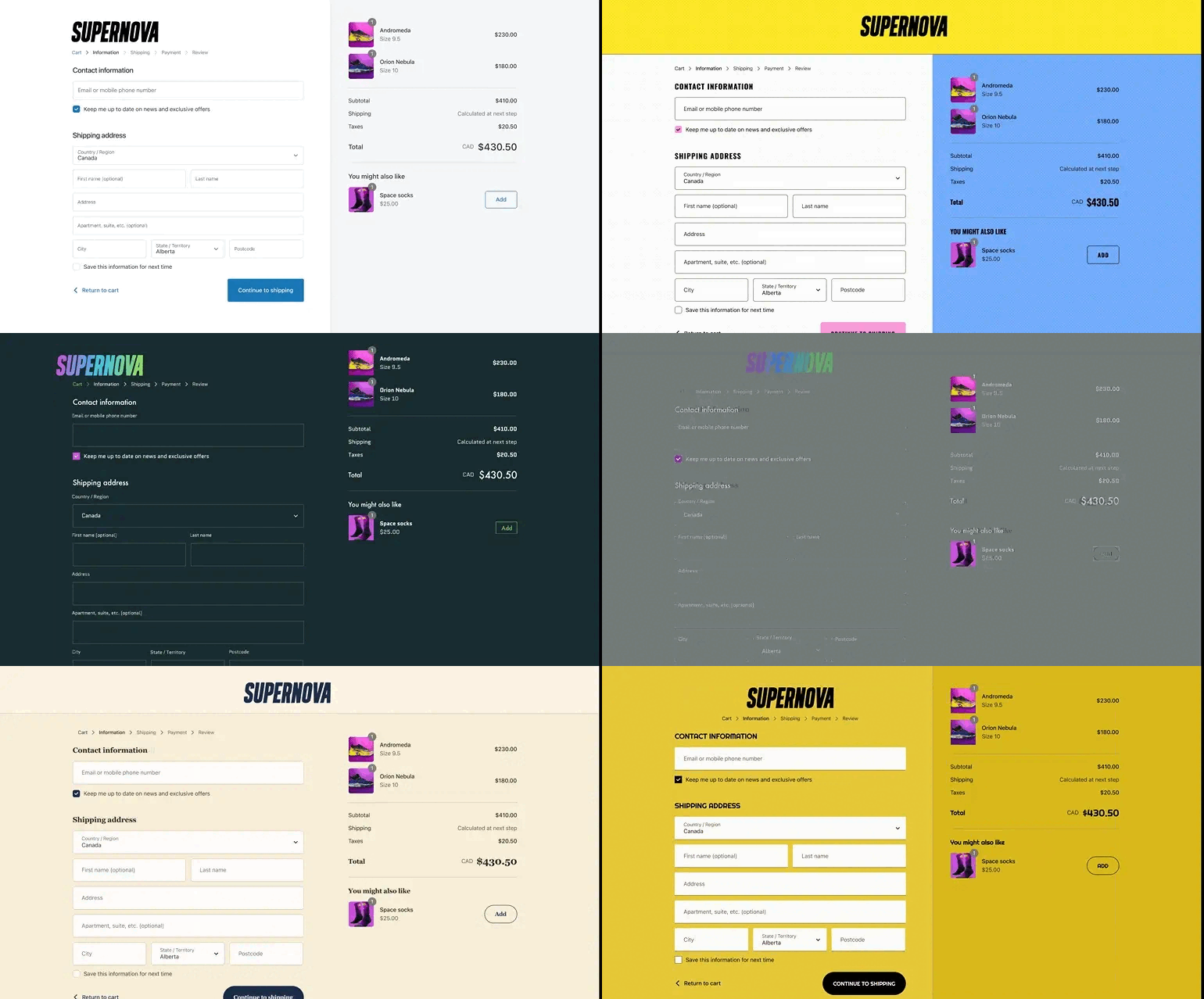
On Shopify Plus: In addition to what’s available in Shopify, Shopify Plus unlocks advanced checkout customisation features, including the ability to customise the main checkout flow. This enables deeper control over both visual layout and functional business logic.
-
Checkout UI Extensions (full access): Add interactive elements — such as upsell modules, trust badges, loyalty prompts, or contextual messages — directly into the information, shipping, payment, and review steps of checkout.
-
Shopify Functions (full access): Implement advanced logic to control discount rules, shipping rate visibility, and payment method availability based on real-time customer, cart, or location data.
-
Checkout Branding API: Customise fonts, layout spacing, and visual hierarchy within Shopify’s hosted checkout to deliver a seamless, on-brand experience from cart to confirmation.
-
Why is this a competitive advantage of Shopify Plus, in comparison to Shopify
Shopify supports limited checkout customisation, primarily on the Thank You page and through basic branding elements like logos and colours, restricting the extent to which merchants can influence customer behaviour at the most critical stage of purchase.
By contrast, Shopify Plus provides direct control over both checkout behaviour and visual presentation. This expanded capability allows merchants to:
-
Optimise conversion by tailoring the checkout experience to specific customer types or order contexts.
-
Lift average order value (AOV) with context-aware upsells and tiered discounting applied directly at checkout.
-
Align checkout with brand identity through custom styling, layout control, and messaging consistency.
-
Reduce operational complexity by replacing third-party checkout tools with native, secure, and upgrade-safe customisations.
With these advantages, Shopify Plus merchants can deliver a checkout experience that is not only faster and more scalable, but also personalised, efficient, and aligned with long-term growth strategies — all while staying within Shopify’s secure hosted environment.
Native B2B features
Availability: Exclusive to Plus
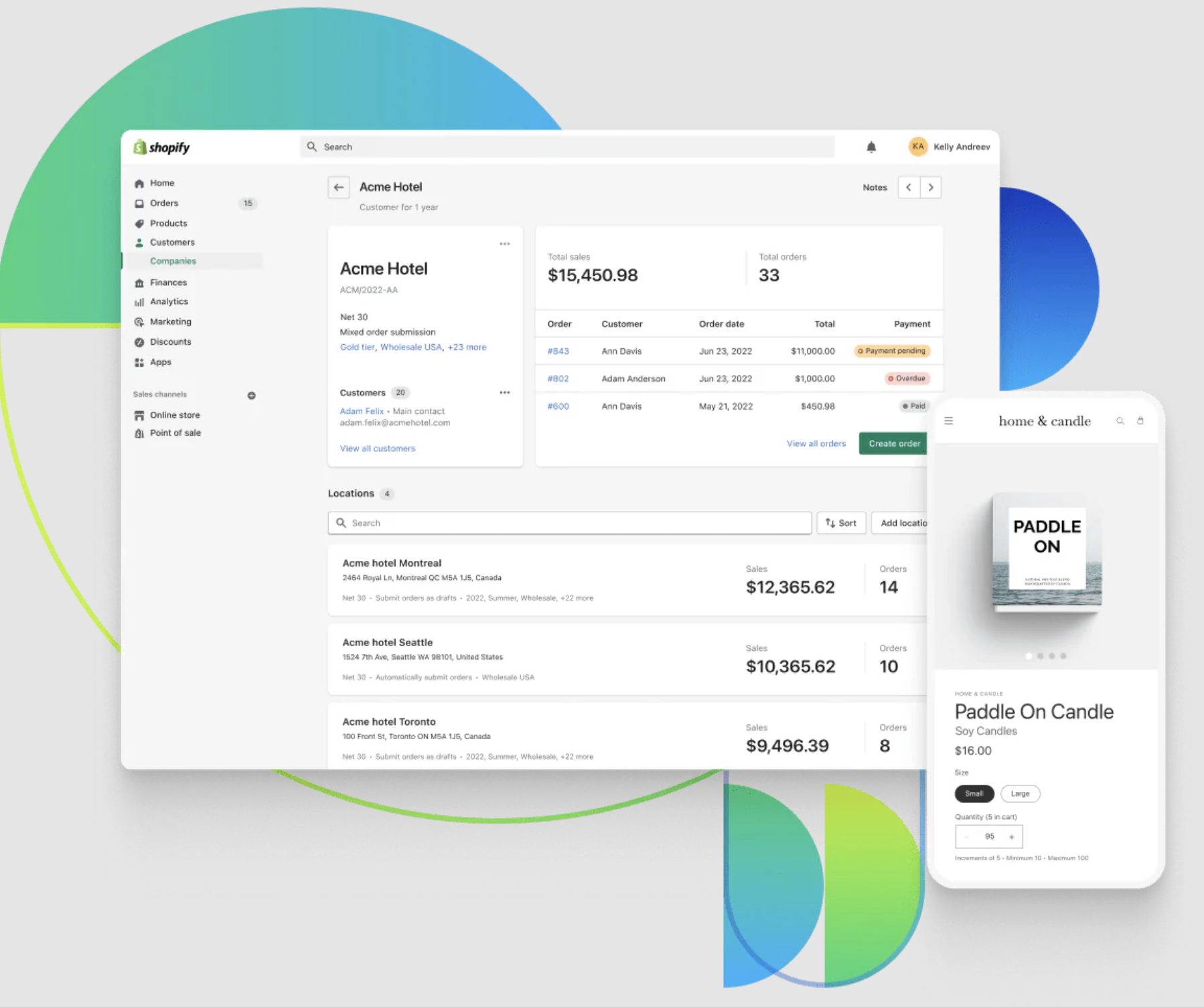
Standard Shopify plans support B2B workarounds via third-party apps, but only Plus provides built-in, fully integrated B2B functionality within the admin — including customer-specific pricing, payment terms, and purchase workflows.
What it enables: Native B2B features overview
| B2B Feature | What it Enables |
| Company profiles | Create multi-user buyer accounts with custom permissions, tax exemptions, payment terms, and payment methods. |
| Customer-specific catalogues | Assign curated product catalogues to specific buyers or locations. |
| Quantity rules | Set buyer-specific minimums, maximums, case packs, and increment rules per product/variant. |
| Volume pricing | Implement quantity-based pricing tiers. |
| Store personalisation | Display personalised content for B2B customers within a single storefront. |
| Workflow automations | Automate B2B logic using Shopify Flow (terms, invoicing, approval flows, etc.). |
| Company account requests | Allow buyers to apply for company accounts via Shopify Forms. |
| Sales rep permissions | Limit staff account access to only assigned customers/orders. |
| Checkout to draft | Submit checkout as a draft for manual review before fulfilment. |
| PO numbers | Buyers can input PO numbers at checkout, visible in admin and API. |
| Quick bulk ordering | Buyers can order large quantities directly from product pages or order forms. |
| Flexible payment options | Shopify Plus allows merchants to set custom payment terms for B2B customers, such as Net 30, Net 60, or Net 90. |
| Easy reordering | Buyers can reorder past purchases from their customer account. |
| Vaulted credit cards | Securely store customer credit cards for use across orders, invoices, and drafts. |
| PayPal payments | Allow PayPal as a method for invoice and draft order payments. |
| Custom discounts | Create targeted wholesale discounts for specific B2B buyers. |
For merchants evaluating B2B at scale, we’ve mapped out the complete feature set and practical implications in this article: Shopify B2B: In-depth evaluation of features, limitations, and business fit.
Why is this a competitive advantage of Shopify Plus, in comparison to Shopify
Shopify Plus is designed for merchants managing high-volume wholesale or B2B operations, with native capabilities that standard Shopify plans cannot support at scale. Its built-in B2B suite enables personalised catalogues, net payment terms, saved payment methods, and self-serve reordering, creating a faster and more relevant purchasing experience that reduces friction and improves order completion and long-term account value.
Standard Shopify plans, by contrast, can support basic B2B use cases through workarounds such as discount rules or separate storefronts. However, these approaches are not designed for scale and can quickly become operationally inefficient as order volume, customer complexity, and account management requirements increase.
Expansion Stores
Expansion Stores are fully independent stores that share the same Shopify organisation — each has its own apps, integrations, inventory, and settings that must be managed separately.
Availability: Exclusive to Plus
On Shopify Plus, this feature enables:
- You can run up to 9 additional storefronts (10 total, including the primary) on a single Shopify Plus plan without managing separate logins.
- Unique themes and design per store — essential for local relevance and brand differentiation.
- Offer region-specific products, variants, collections, and pricing strategies — including exclusive bundles, shipping rules, and payment options.
- Localised tax, compliance, and fulfilment logic without complex workarounds.
- Operate all storefronts under one organisation, sharing staff accounts, apps, and integrations — reducing complexity and license costs.
For merchants on Shopify, opening additional stores — whether for new regions or separate brands — typically requires registering new accounts and paying full subscription fees per store. With this option, you have to manage inventory, customers, and performance data individually across stores, with no centralised admin.
Why is this a competitive advantage of Shopify Plus, in comparison to Shopify
With Shopify Plus, Expansion Stores give you a scalable and cost-efficient way to grow across regions, brands, or customer types — without the overhead of managing separate accounts. You can launch fully localised stores under one contract, maintain distinct experiences per market, and still control users, apps, and reporting from a central admin. This enables faster global rollouts, stronger brand alignment, and operational flexibility that standard Shopify plans simply can’t match.
Shopify Markets
Shopify Markets allows you to manage how your store is experienced across countries or regions — all from a single store. It lets you define markets as customer groups, customise pricing, currencies, languages, domains, product visibility, and tax settings — helping you scale globally without duplicating stores.
Availability: Enhanced on Shopify Plus
Shopify Markets on Shopify:
-
Basic and Grow plans: Merchants can activate up to 3 markets with localisation features for currency, language, and pricing, along with access to submarkets and catalogue selection, though all markets share the same product catalogue and theme.
-
Advanced plan extends this to up to 50 active markets (3 included, with each additional at $59/month) and adds support for custom catalogues, submarket overrides, custom domains, and more detailed tax and duty configuration.
Shopify Markets on Shopify is often sufficient for merchants selling into a limited number of international markets (e.g. up to 5 regions) where one business entity is adequate. If your localisation needs are focused on currencies, languages, product visibility, and pricing adjustments, and you don’t need separate tax registrations or regional compliance structures, standard plans offer a cost-effective and operationally simple solution.
It’s ideal for brands testing new regions, expanding gradually, or maintaining a unified global storefront with minimal administrative complexity. For example, a skincare brand shipping globally from a single US fulfilment centre can use Markets on the Advanced plan to:
-
Sell in GBP, EUR, and AUD
-
Translate its store into English, French, and German
-
Show or hide products by region
-
Route customers to brand.co.uk, brand.fr, or brand.com/us
As long as all sales are processed under the same legal entity, standard plans offer a cost-effective and operationally lean approach to internationalisation.
Shopify Markets on Shopify Plus: Shopify Plus includes the full capabilities of Markets and submarkets, providing up to 50 active markets at no additional cost. This allows brands with diverse customer bases across multiple continents to manage international expansion efficiently within a single store setup. In addition, Shopify Plus also offers 2 distinctive advantages that support global compliance and tailored customer experiences:
-
Custom business entities per market: On Shopify Plus, you can assign a different legal business entity — including a unique company name, VAT number, and tax registration — to each market. This is essential for:
-
-
Displaying region-specific invoicing details: Customers in the EU, UK, or other regions often require invoices that match the local entity selling to them. Without this, your business may appear non-compliant or ineligible for tax deductions.
-
Maintaining local tax registrations: If you're VAT-registered in multiple countries, you must issue orders and collect taxes under the correct legal entity. Standard plans can only support a single global entity, forcing merchants to either operate incorrectly or manage this manually off-platform.
-
Supporting cross-border audits and reporting: Shopify Plus allows clean separation of order data and revenue attribution by entity, streamlining financial reporting and satisfying local tax authorities.
-
-
Custom B2B experiences: Previously, markets were composed only of specific countries or regions. Markets have now been expanded, and can be used to represent specific sets of customers by creating markets and submarkets. You can group your B2B customers to create a customised store experience for each group. For each market, you can customize currency, theme, pricing, and product availability with catalogs.
Business impact:
With Shopify Plus, merchants can expand globally without duplicating stores or relying on manual workarounds. Centralising international operations lowers costs and complexity, while native entity management ensures compliance across regions. At the same time, tailored B2B and regional experiences improve buyer trust, increase conversion, and support long-term brand growth in multiple markets.
For the latest update on Shopify Markets and other features, check out Shopify Summer ’25 Edition: Horizons - The Hottest Highlights.
Shopify POS
Shopify POS (Point of Sale) is Shopify’s in-person selling solution for retail businesses. It comes in two versions: POS Lite and POS Pro, each offering different capabilities to support physical retail operations.
Availability:
-
POS Lite is included for free with all Shopify plans.
-
POS Pro is included at no additional cost with Shopify Plus and is available for an additional $89/month per location on standard Shopify plans.
What Shopify merchants get from POS Lite:
POS Lite provides basic in-person selling capabilities, including:
-
Basic checkout functionality
-
Basic inventory tracking
-
Limited staff access and permissions
While POS Lite offers the essentials for small-scale retail, it lacks the advanced features required for multi-location, omnichannel retail environments. Merchants with growing needs may find the functionality limiting as they scale.
What Shopify Plus with POS Pro enables:
Shopify POS Pro provides advanced in-store selling capabilities designed to support multi-location retail, operational efficiency, and omnichannel fulfilment. While all Shopify plans include POS Lite for basic point-of-sale needs, POS Pro expands the functionality significantly in the following areas:
-
Omnichannel fulfilment options: POS Pro supports in-store pickup, ship-from-store, and cross-location fulfilment, allowing customers to order online and receive their items in ways that suit their needs. These options are not available in POS Lite.
-
Integrated returns and exchanges across channels: POS Pro allows seamless return or exchange of orders placed online or in-store — a unified experience that POS Lite does not offer. This reduces friction for customers and simplifies post-sale workflows.
-
Role-based staff permissions: POS Pro lets retailers define granular permissions for each staff role — such as access to discounts, refunds, or reports — improving control and compliance. POS Lite offers only a basic staff login with limited controls.
-
Advanced analytics and reporting: Pro provides access to detailed, retail-specific reports on staff performance, inventory movement, and store-level metrics. These insights support more informed operational and merchandising decisions. POS Lite offers only basic reporting.
On Shopify Plus, POS Pro is bundled at no additional cost for up to 200 locations (when using Shopify Payments). Beyond eliminating add-on fees, it offers significant advantages: stronger sales enablement through flexible fulfilment and seamless omnichannel returns, improved team management with role-based controls and staff-level visibility, and greater operational efficiency through real-time insights and multi-location inventory coordination — capabilities that go well beyond what’s available in POS Lite.

For merchants on Shopify considering adding POS Pro, adding POS Pro at $89/month per location can support advanced retail needs, but the model doesn’t scale efficiently. At 10 locations, that’s over $10,000/year in add-on fees alone, not including the overhead of managing separate staff permissions, reporting structures, and app setups per store.
By contrast, the advanced advantage on Plus isn’t just cost — it’s control. Plus simplifies governance, reduces fragmentation, and eliminates the need for third-party workarounds when managing large or growing store networks.
Headless storefronts (25 stores)
Headless commerce separates the front-end (what users see) from the back-end (where data and logic live). This gives developers complete control over storefront design and interactivity, enabling businesses to deliver ultra-fast, highly customised experiences without being limited by Shopify’s Liquid theme framework.
Availability and what it enables:
Headless storefront capabilities are available across all Shopify plans via Hydrogen (Shopify’s React-based headless framework) and Oxygen (Shopify’s serverless hosting platform). On Shopify Plus, merchants can host up to 25 Hydrogen storefronts on free Oxygen hosting at no additional cost, whereas on standard Shopify plans, Oxygen hosting is limited to one Hydrogen storefront per store.
What it enables:
-
On Shopify Plus: Merchants can launch and manage multiple Hydrogen storefronts for different regions, brands, or customer segments, each customised independently on Oxygen. Each storefront can be customised independently with its own design, content, and logic, while still benefiting from Shopify’s secure, scalable infrastructure. A centralised backend reduces technical overhead and total cost of ownership, while high-performance UX control empowers both developers and marketers to optimise design and functionality. This makes Plus ideal for businesses with an international scale, multiple sub-brands, and a focus on personalised customer experiences.
-
On Shopify: Merchants can host a single Hydrogen storefront on Oxygen, customised with its own design and content for a basic headless setup. However, they must often pay for and maintain separate hosting or orchestration tools, and manually sync customer, inventory, and analytics data across systems. Replicating Shopify Plus–level scale on standard plans ultimately drives up costs, strains development resources, and complicates daily operations.
Launch Pad
Availability: Launchpad is an automation tool available exclusively on Shopify Plus.
What it enables
Launchpad allows Shopify Plus merchants to pre-schedule and coordinate multiple changes tied to a specific event. These include:
-
Scheduled product releases: Automatically make selected products available across your chosen sales channels at a specific date and time.
-
Timed price changes: Set promotional prices or discounts that activate and expire automatically as the event progresses.
-
Automated inventory adjustments: Increase product inventory levels just before an event starts to ensure availability.
-
Theme switching by event: Switch to a campaign-specific theme at the beginning of an event and revert to your default design afterwards.
-
Store password control: Automatically password-protect your store before a product drop or campaign to build anticipation and limit early access.
-
Real-time event analytics: Track campaign performance live via Launchpad’s built-in dashboard, including sales, traffic, and conversion data.
These features are all native to Shopify Plus and require no additional apps, coding, or manual intervention once configured.
Why is this a competitive advantage of Shopify Plus in comparison to Shopify?
By automating product releases, pricing changes, inventory adjustments, and theme or script activation, Launchpad helps businesses:
-
Reduce operational overhead by eliminating manual updates across teams
-
Minimise risk through pre-tested, scheduled execution
-
Accelerate campaign delivery without developer bottlenecks
-
Maintain consistency across pricing, content, and checkout logic
Shopify Plus with Launch Pad addresses a core need for fast-moving, high-growth businesses: operational control at scale. It enables faster execution, reduces friction, and allows teams to focus on strategy rather than coordination.
Shopify may support smaller campaigns, but they lack the scalability and control needed for high-frequency, high-volume events. Achieving similar outcomes would require a business to integrate multiple apps, use developer-built workarounds, or rely on staff to manually execute updates, adding cost, complexity, and risk.
Shopify Audiences
Availability
Shopify Audiences is available exclusively to Shopify Plus merchants based in the United States or Canada who use Shopify Payments as their payment processor. It is not accessible on Shopify.
What it enables
Shopify Audiences allows eligible Shopify Plus merchants to generate high-intent audience segments for paid advertising.
-
Audience list generation: Build custom audiences from pooled performance data to target potential buyers with a higher likelihood of conversion.
-
Cross-platform delivery: Push audience segments directly to connected ad platforms such as Meta (Facebook, Instagram), Google, TikTok, Pinterest, Snapchat, and Criteo.
-
Performance-informed targeting: Improve targeting precision by leveraging data from across the Shopify ecosystem to inform lookalike and retargeting strategies.
-
Retargeting tools: Reach users who have interacted with your brand, aiding in recovering lost sales or encouraging repeat purchases.
Why is this a competitive advantage of Shopify Plus in comparison to Shopify?
Shopify Audiences addresses a common challenge for growing direct-to-consumer brands: reducing customer acquisition costs without compromising targeting quality. Here's how it provides a competitive edge:
-
Improved advertising efficiency: Access to high-quality audience data leads to better targeting and stronger campaign performance.
-
Reduced acquisition costs: Enhanced match quality and data depth can lower cost-per-acquisition (CPA) and increase return on ad spend (ROAS).
-
Streamlined campaign setup: Eliminates the need to manually source, clean, and upload audience data across platforms.
Shopify Plus with Audiences offers a built-in path to smarter acquisition, directly within the commerce platform.
In contrast, merchants on Shopify must rely entirely on native tools within each ad platform or invest in external data partnerships to achieve similar targeting sophistication, adding both cost and complexity.
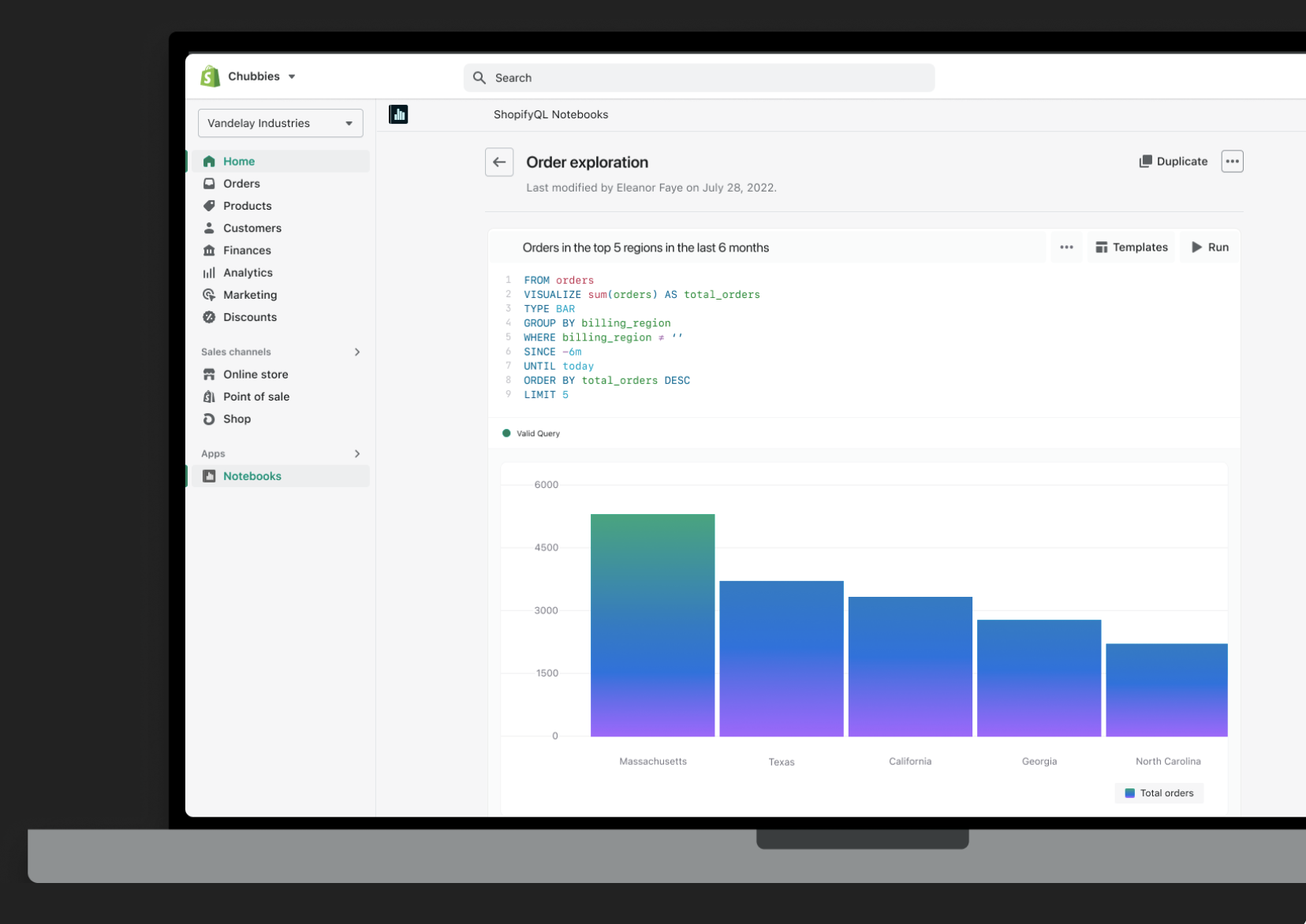
Advanced Analytics (ShopifyQL Notebooks)
Availability
ShopifyQL Notebooks offers advanced analytics tools that go beyond basic Shopify Analytics, providing deeper insights through customisable queries, predictive analytics, and visualisations. It enables a more detailed exploration of sales, customer behaviour, and marketing effectiveness, helping businesses make data-driven decisions to optimise performance.
What it enables
ShopifyQL Notebooks empowers Shopify Plus merchants to explore, analyse, and visualise their commerce data more effectively. Key features include:
-
Unified data access: Combine data from multiple business domains—such as sales, products, and inventory—into a single interface for comprehensive analysis.
-
Commerce-specific query language: Utilise ShopifyQL, an intelligent query language designed specifically for commerce, enabling intuitive data queries without requiring advanced technical skills.
-
Interactive visualisations: Create dynamic charts and graphs to visualise key performance indicators (KPIs) and trends, facilitating better decision-making.
-
Customizable reports: Build tailored reports that align with specific business needs, incorporating text, images, and visualisations to tell a cohesive data story.
-
Enhanced collaboration: Share insights across teams with presentation-ready formats, ensuring stakeholders are aligned with data-driven strategies.
These capabilities allow merchants to transform raw data into actionable insights, streamlining the decision-making process.
Why is this a competitive advantage of Shopify Plus in comparison to Shopify?
ShopifyQL Notebooks gives high-growth brands the ability to analyse commerce data in real time, without exporting to external tools or relying on developers. Unlike Shopify, which require third-party BI platforms for deeper insights, Plus merchants can generate advanced, commerce-specific reports directly within Shopify.
This enables leaders to:
-
Make faster, data-driven decisions with unified reporting across sales, products, and inventory
-
Reduce tool and team overhead by eliminating the need for external analytics platforms
-
Tailor insights to strategic goals using custom queries and visual dashboards built for commerce
For scaling businesses that rely on speed, precision, and shared visibility, ShopifyQL Notebooks transforms analytics from a bottleneck into a growth enabler.
API Access & Rate Limits
Availability: Significantly enhanced in Plus
Shopify:
-
GraphQL Admin API: 100 points/second
-
Storefront API: No rate limit
-
Payments Apps API (GraphQL): 27,300 points/second
-
Customer Account API: 100 points/second
Shopify Plus
-
GraphQL Admin API: 1,000 points/second
-
Storefront API: No rate limit
-
Payments Apps API (GraphQL): 54,600 points/second
-
Customer Account API: 200 points/second
Why is this a competitive advantage of Shopify Plus, in comparison to Shopify
As businesses scale, the need for more robust data integration increases. Shopify Plus offers significantly higher API rate limits, particularly with the GraphQL Admin API, which increases from 100 points/second on Shopify to 1,000 points/second on Shopify Plus. This enhancement ensures more efficient and real-time syncing with external systems like ERPs, PIMs, and OMS, which is critical for large-scale operations.
Additionally, Shopify Plus supports Payments Apps API and Customer Account API at higher rates, enabling businesses to handle larger volumes of transactions and customer data seamlessly.
Security & compliance
All Shopify plans benefit from the platform’s baseline security - PCI DSS Level 1 compliance:
-
99.9%+ uptime: Provides reliable platform availability across all Shopify plans.
-
Automatic SSL certificates: Encrypts data in transit and secures storefronts without manual setup.
Shopify Plus offers additional enterprise security layers:
-
SAML-based Single Sign-On (SSO): Integrates with identity providers for centralized user authentication.
-
99.99% uptime SLA: Guaranteed service availability for Plus merchants (not available on Advanced).
-
Built-in Bot Protection: Mitigates automated threats and fraudulent activities.
Why is this a competitive advantage of Shopify Plus in comparison to Shopify
Shopify meets general security requirements but lacks the compliance depth and operational guarantees large or regulated businesses often need.
Shopify Plus fills these gaps, offering a more robust foundation for enterprise teams where compliance, IT governance, and service-level reliability are non-negotiable.
Dedicated support & enablement
Shopify provides basic support — Help Center access, community forums, and 24/7 chat and email for troubleshooting.
Shopify Plus provides enhanced, hands-on support for enterprise growth:
-
Launch Engineer: Assists with setup, integrations, and go-live planning.
-
Dedicated Success Manager: Offers strategic guidance to support ongoing growth and platform adoption.
-
Shopify Plus Academy: Exclusive training content for merchant teams on scaling, optimisation, and best practices.
Why is this a competitive advantage of Shopify Plus in comparison to Shopify?
Shoify offers reactive support, but fast-scaling businesses often need direct, expert-led enablement.
Shopify Plus provides proactive onboarding, strategic account management, and tailored education — helping enterprise teams ramp faster, execute better, and get more value from the platform.
Organisation-level admin & governance
Shopify includes:
-
Staff accounts: Basic (1), Grow (5), Advanced (15)
-
Basic permission settings: Limited control over staff access to functions and data
Shopify Plus enhances administrative control for multi-team, multi-store operations:
-
Unlimited staff accounts: Add users freely as your teams expand, without incurring additional charges.
-
Advanced permission settings: Assign detailed roles and restrict access to specific functions (e.g. limit access to financial data, theme editing, or app installations).
-
Organisation-level user management: Manage staff access across multiple Plus stores from a single dashboard.
Why is this a competitive advantage of Shopify Plus in comparison to Shopify?
Compared to other plans, which limit staff accounts and offer only basic permissions, Shopify Plus provides the flexibility and control needed at scale. It reduces admin overhead, improves compliance, and supports larger teams working across multiple markets or brands — all from a centralised interface.
Development & Testing
Shopify:
-
No access to dedicated development or staging environments (except for Shopify Partners)
-
Basic theme duplication and preview only
Shopify Plus provides:
-
Unlimited development stores for testing apps, integrations, and workflows
-
Staging environments to safely trial theme changes and operational logic before deployment
Why is this a competitive advantage of Shopify Plus in comparison to Shopify?
Standard plans limit safe testing to basic previews, which can slow development or introduce risk.
Shopify Plus enables structured testing environments, helping teams deploy faster, reduce errors, and manage complex changes confidently at scale.
For a full deep dive into Shopify Plus capabilities, check out our in-depth guide to TOP 14 Shopify Plus features, where we break down each capability and explain how it can help your business scale.
Final Decision — Should you upgrade from Shopify to Shopify Plus?
Upgrading to Shopify Plus is a strategic decision — one that depends on more than just feature comparisons. Whether Plus is the right fit will come down to a few key factors: your budget, scale, operational complexity, promotional needs, and whether you're expanding into international or wholesale channels.
The sections below outline when an upgrade makes sense and when it might be better to stay on your current plan.
Shopify Plus is the right move if...
You're processing $1M/month or more in GMV, or your business is increasingly constrained by the limitations of Shopify. Shopify Plus becomes a strong investment when:
-
You’re absorbing high third-party transaction fees
-
You rely heavily on apps or duplicate stores to support wholesale, international, or complex checkout needs
-
Your operations span multiple teams, markets, or brands and require centralised control
-
You’re scaling fast and need infrastructure built for flexibility, compliance, and automation
At this stage, the cost of Plus is often outweighed by direct fee savings, reduced app reliance, and faster execution.
Consider upgrading to Advanced (for now) if...
If you're not yet processing $1M/month or more, Shopify Plus is unlikely to deliver ROI through fee reduction alone. The decision hinges on whether the platform unlocks operational value elsewhere, like reducing app dependency, streamlining B2B, or managing multiple regions more efficiently.
In such a situation, Shopify Advanced may be the better move if:
-
You operate in 1–2 regions, and Shopify Markets (with limited localisation) is sufficient
-
Your business is DTC-only, with no current B2B, multi-store, or high-frequency campaign needs
-
You can manage with 2–3 essential apps and don’t yet need custom backend logic or automation
Advanced offers access to lower transaction fees, better internationalisation, and Shopify Functions (for discount logic), making it a cost-effective stepping stone before moving to Plus.
Conclusion
This article examined the key differences between Shopify and Shopify Plus. It provided a feature-by-feature comparison, highlighting the exclusive and enhanced capabilities available on Plus, such as advanced checkout customisation, native B2B functionality, expansion stores, and organisation-level admin tools.
We then analysed how these features translate into business value, with typical ROI seen in areas like conversion improvement, operational efficiency, and cost savings on third-party apps and transaction fees.
Finally, we summarised how these benefits compare to the platform cost, outlining the conditions under which Shopify Plus delivers measurable return versus when standard plans remain sufficient.
With expert Shopify Plus development services, On Tap helps brands build and scale on Shopify Plus with confidence. On Tap specialises in architecting Plus-specific solutions — from custom checkout and international storefronts to integrated B2B experiences and multi-store operations.
Need expert support to make the most of Shopify Plus?
Contact us today! We’ll help you plan, implement, and optimise a Shopify Plus setup tailored to your growth goals.
FAQs
1. What are the main differences between Shopify Advanced vs Plus?
Both plans share the same core platform, but when comparing Shopify Advanced vs Plus, Shopify Plus includes features not available on Advanced, such as Checkout Extensibility, native B2B tools, Expansion Stores, Launchpad, and organisation-level admin. Plus also offers lower third-party transaction fees and higher API limits.
For a detailed breakdown of how these two plans differ — including pricing, scalability, and operational impact — see our full guide.
2. What are Shopify Plus vs Shopify pros and cons?
Shopify Plus – Pros
-
Full access to Checkout Extensibility and Shopify Functions
-
Native B2B tools built into the admin (no apps required)
-
Up to 9 Expansion Stores for region- or brand-specific storefronts
-
Lower third-party gateway fees (0.2%)
-
Advanced tools like Launchpad, ShopifyQL Notebooks, and higher API limits
-
Organisation-level admin and unlimited staff permissions
-
Priority support and a dedicated Success Manager
Shopify Plus – Cons
-
Starts at $2,300/month, with additional costs for customisation
-
Requires setup and internal resources to fully leverage Plus-exclusive tools
-
ROI depends on business size and operational complexity
Shopify (Basic, Grow, Advanced) – Pros
-
Lower monthly cost ($39–$399)
-
Suitable for DTC-focused brands and early-stage growth
-
Access to core features: unlimited products, multi-channel sales, Shopify Markets
-
Flexible app ecosystem for extending functionality
-
No platform commitment (monthly billing available)
Shopify – Cons
-
Limited checkout customisation (no access to the main checkout flow)
-
Requires third-party apps for B2B, advanced discounts, and automation
-
Shared themes/catalogues across Markets
-
No support for Expansion Stores or dedicated business entities per region
-
Staff and API limits may restrict scale
3. When should I upgrade from Shopify to Shopify Plus?
You should consider upgrading to Shopify Plus when your current setup starts limiting growth, particularly in areas like scalability, customisation, and operational complexity.
Common signs it’s time to upgrade include:
-
You’re managing high order volumes or rapid traffic growth
-
You need greater control over checkout or custom business logic
-
You’re expanding into B2B, multiple markets, or multiple storefronts
-
Your operations require more advanced automation and integrations
-
Workarounds (apps, manual processes) are becoming inefficient at scale
In general, Shopify Plus becomes valuable when the cost of limitations on standard plans outweighs the investment in a more scalable and flexible platform.