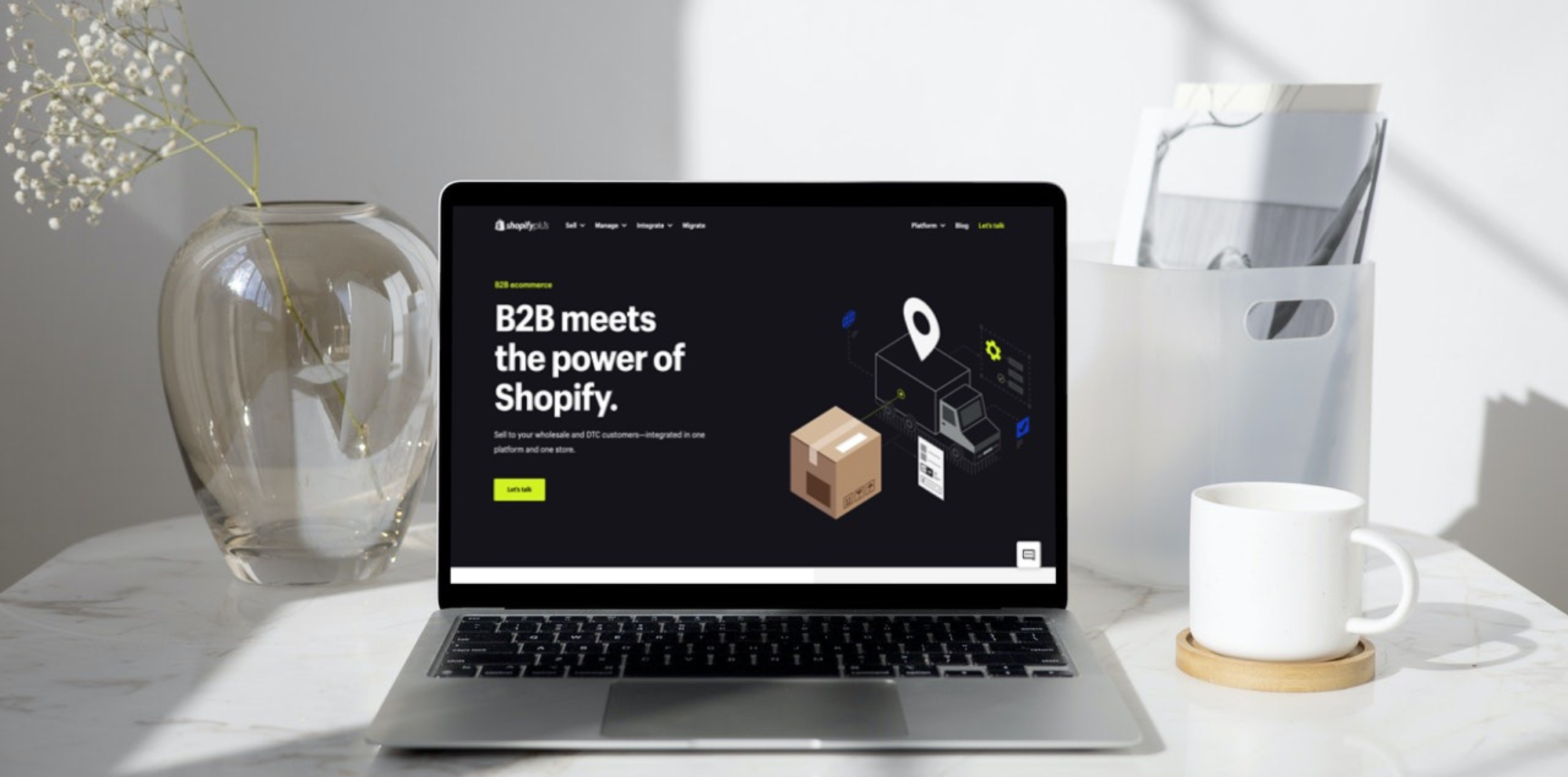
As Shopify expands beyond its DTC roots, more wholesale businesses are asking whether B2B on Shopify can support increasingly complex operations and provide a scalable foundation for long-term growth.
The answer is yes, but the level of capability depends on your Shopify plan. Since 2 April 2026, core B2B features on Shopify have also been available on Basic, Grow and Advanced, giving more merchants access to native tools such as company profiles, custom catalogues, volume pricing and payment terms. Shopify Plus still provides greater flexibility, control and scalability for businesses with more complex wholesale requirements.
That means the question is no longer simply whether Shopify can support B2B, but which setup provides the right level of functionality for your business.
Whether you sell DTC, B2B or both, this guide explains how Shopify B2B works, the features and limitations that matter most, how capabilities differ by plan, what the main costs are, and how Shopify compares with other B2B solutions so you can choose the right approach for your wholesale operation.
Key Shopify B2B features explained
B2B on Shopify is Shopify's native wholesale solution, designed to help merchants manage both B2B and DTC operations within a single platform. Since April 2026, core B2B functionality has been available across Basic, Grow, Advanced and Shopify Plus, although the depth of features and level of control vary by plan.
The platform includes a growing suite of built-in capabilities, such as company profiles, custom catalogues, volume pricing, payment terms and a dedicated B2B checkout, reducing the need to rely on third-party apps or manual workarounds for core wholesale processes. Shopify Plus adds more advanced capabilities for businesses with more complex requirements, including unlimited catalogues, direct catalogue assignment to companies and locations, deposits and partial payments.
For a complete overview of available functionality, refer to the Shopify B2B feature overview.
While the feature set continues to evolve, this section focuses on the 11 core capabilities that have the greatest impact on conversion, buyer retention and operational control. Each is explained through practical use cases, key benefits and limitations to help you assess where it fits within your wholesale strategy.
|
B2B feature |
Basic / Grow |
Advanced |
Shopify Plus |
|
Company profiles with multi-user permissions |
Companies, locations and buyer permissions |
Same as Basic / Grow |
Same as on Basic/ Grow |
|
Customer-specific catalogues |
Up to 3 active catalogues, assigned via B2B Markets |
Up to 3 active catalogues, assigned via B2B Markets |
Unlimited catalogues + direct assignment to individual companies or locations |
|
Wholesale pricing, volume pricing & quantity rules |
Custom prices, volume price breaks, minimums, maximums and increments |
Same as Basic/ Grow |
Same pricing tools + more granular company/location catalogue assignment |
|
Flexible payment terms & methods |
Net terms, due on fulfilment and vaulted cards |
Same + contextual checkout through Markets |
Same + deposits, partial payments and payment requests per fulfilment |
|
Dedicated B2B checkout |
B2B checkout, PO numbers, one-time addresses and draft-order workflows |
Plus contextual checkout via Markets |
Contextual checkout + broader Plus customisation capabilities |
|
Self-service buyer portal |
Assigned catalogues/pricing, order history, reordering and account management |
Same as Basic/ Grow |
Same as Basic/ Grow |
|
Quick bulk ordering |
Quick order lists and multi-variant ordering |
Same as Basic/ Grow |
Same core bulk-ordering capabilities |
|
Custom discounts & B2B promotions |
B2B discount codes, automatic discounts and custom discount conditions |
Same as Basic/ Grow |
Same as Basic/ Grow |
|
Markets for B2B |
Segment B2B customers and assign up to 3 active catalogues across Markets |
Same + contextual storefront and checkout experiences |
Unlimited market catalogues + direct company/location catalogue assignment |
|
Store personalisation |
Standard theme customisation and B2B storefront features |
Contextual storefront customisation by market |
Same + B2B/DTC theme customisation by customer type |
|
Automation with Shopify Flow |
B2B objects and Flow automations |
Same as Basic / Grow |
Same core B2B Flow functionality |
Company profiles with multi-user permissions
Plan availability: Available on Basic, Grow, Advanced and Shopify Plus.
What it does:
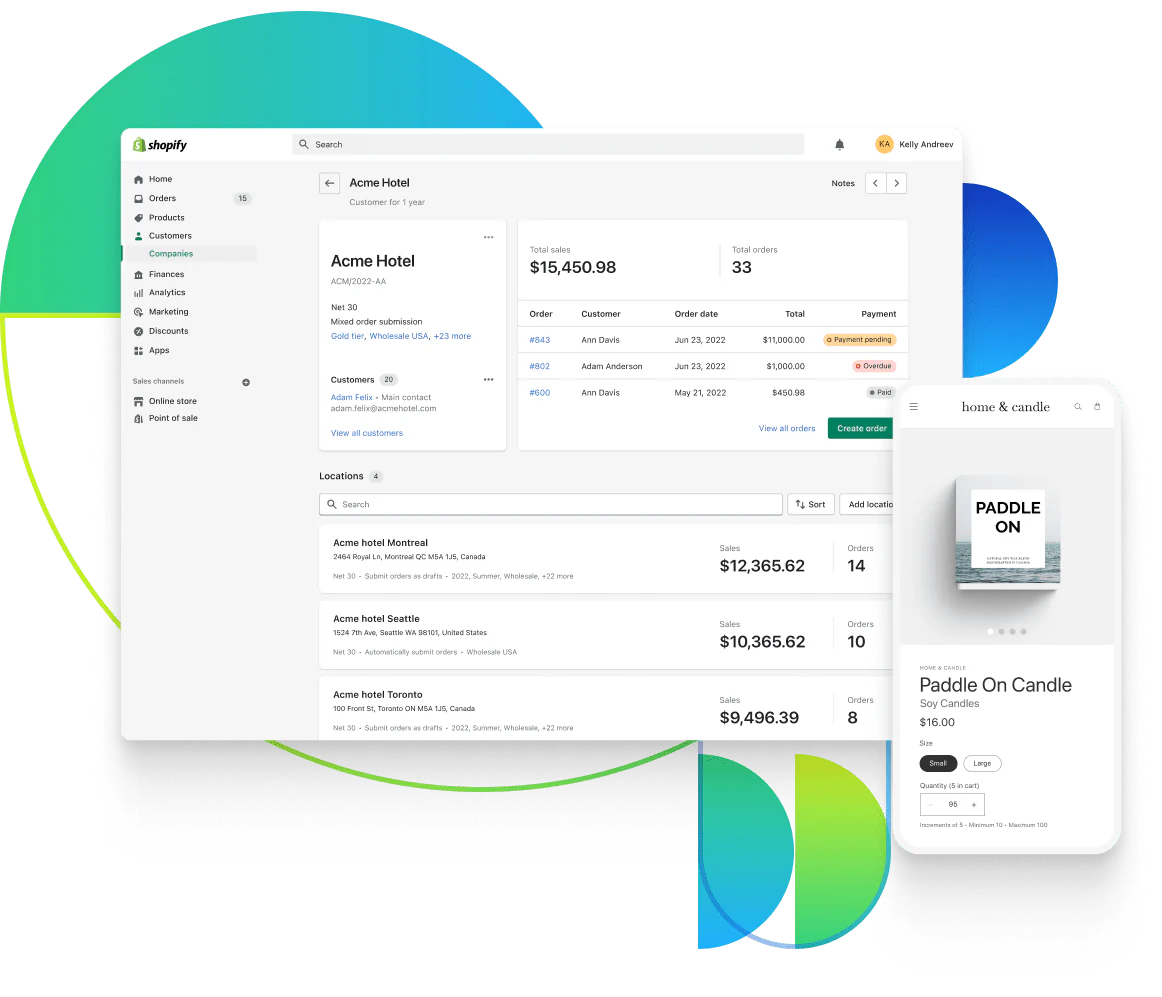
Company profiles let merchants manage B2B customers at the account level by grouping multiple buyers, locations and purchasing settings under one organisation.
Each company can include:
-
Multiple locations, each with its own shipping and billing addresses, tax settings, payment terms, checkout settings and catalogue access.
-
Multiple buyers, with permissions assigned at company-location level:
-
Ordering only: Can place orders for the assigned location and view their own order history.
-
Location admin: Can place orders, view orders placed by all buyers at that location, and update shipping and billing addresses.
-
When a buyer is assigned to more than one company location, they select the location they are purchasing for when they log in. Shopify then applies the relevant catalogue, pricing, payment terms and checkout settings for that location.
Use case:
A merchant supplies a retail chain with 10 stores. Each store is set up as a separate location under one company profile. Store managers can place orders for their assigned locations, while authorised location admins can view all orders placed for those locations and manage relevant account details.
Key benefits:
-
Improves buyer experience with individual logins and location-specific access.
-
Supports multi-location purchasing without relying on shared customer accounts.
-
Simplifies B2B account management by keeping buyers, locations and purchasing settings within the same company structure.
Limitations:
-
Only two buyer permission levels – Ordering only and Location admin – which can be restrictive for businesses with more complex purchasing hierarchies.
-
No native buyer-to-buyer approval workflow – multi-step purchasing approvals require additional processes or custom solutions.
-
Permissions are location-based rather than fully customisable, limiting more granular role structures within the same company location.
Customer-specific catalogues
Plan availability: Available on Basic, Grow, Advanced and Shopify Plus. Basic, Grow and Advanced support up to 3 active catalogues across all B2B Markets. Shopify Plus supports unlimited catalogues and direct catalogue assignment to individual companies or company locations.
What it does:
Shopify B2B catalogues let you control which products B2B customers can access and the prices they see, helping you tailor the buying experience across different customer groups, markets and company structures.
Level 1: Product visibility and pricing by B2B segment
Catalogues let you define which products are visible and purchasable for different B2B customer groups, while also applying the relevant pricing. In a blended B2B and DTC store, this makes it possible to offer wholesale-only products or pricing without showing them to retail customers.
On Basic, Grow and Advanced, catalogues are assigned through B2B Markets, allowing you to group customers with similar product and pricing requirements. These plans support up to three active catalogue assignments across all B2B Markets.
Level 2: Company-level control – Shopify Plus only
On Shopify Plus, catalogues can also be assigned directly to specific companies or company locations. This gives merchants more granular control where individual accounts, branches or locations require their own product assortments or negotiated pricing.
Each company location can have up to 25 catalogues assigned to it, including catalogues inherited through Markets and those assigned directly.
When buyers log in and select their company location, Shopify applies the relevant catalogue access and pricing for that location.
Use case:
A food wholesaler sells both to consumers and national restaurant groups.
On Basic, Grow or Advanced, restaurant customers with the same product and pricing requirements could be grouped into a B2B Market and assigned a catalogue containing bulk formats such as 5kg pasta and 10L sauces, while retail customers continue to see standard consumer pack sizes.
On Shopify Plus, the wholesaler could go further and assign different catalogues directly to the restaurant group's head office and regional distribution kitchen, giving each location its own product assortment and negotiated pricing.
Key benefits:
-
Improves buyer relevance and reduces friction by showing customers only the products and pricing relevant to their account or market.
-
Separates B2B and DTC assortments without requiring separate storefronts.
-
Supports more granular account-level pricing on Plus through direct catalogue assignment to individual companies or locations.
Limitations:
-
Basic, Grow and Advanced are limited to three active catalogue assignments across all B2B Markets, which can become restrictive for businesses with many buyer groups or pricing structures.
-
Direct company or company-location catalogue assignment is Plus-only, limiting customer-specific pricing on lower-tier plans.
-
Catalogue visibility is not controlled at the individual user level; access is determined by the buyer's company location and applicable Markets/catalogues.
-
Catalogue setup and assignment require active management, particularly as the number of customer segments, markets and pricing structures grows.
Wholesale price lists
Plan availability: Available on Basic, Grow, Advanced and Shopify Plus. The core pricing tools are the same across plans, while Shopify Plus provides more granular customer-level pricing through unlimited catalogues and direct catalogue assignment to individual companies or company locations.
What it does:
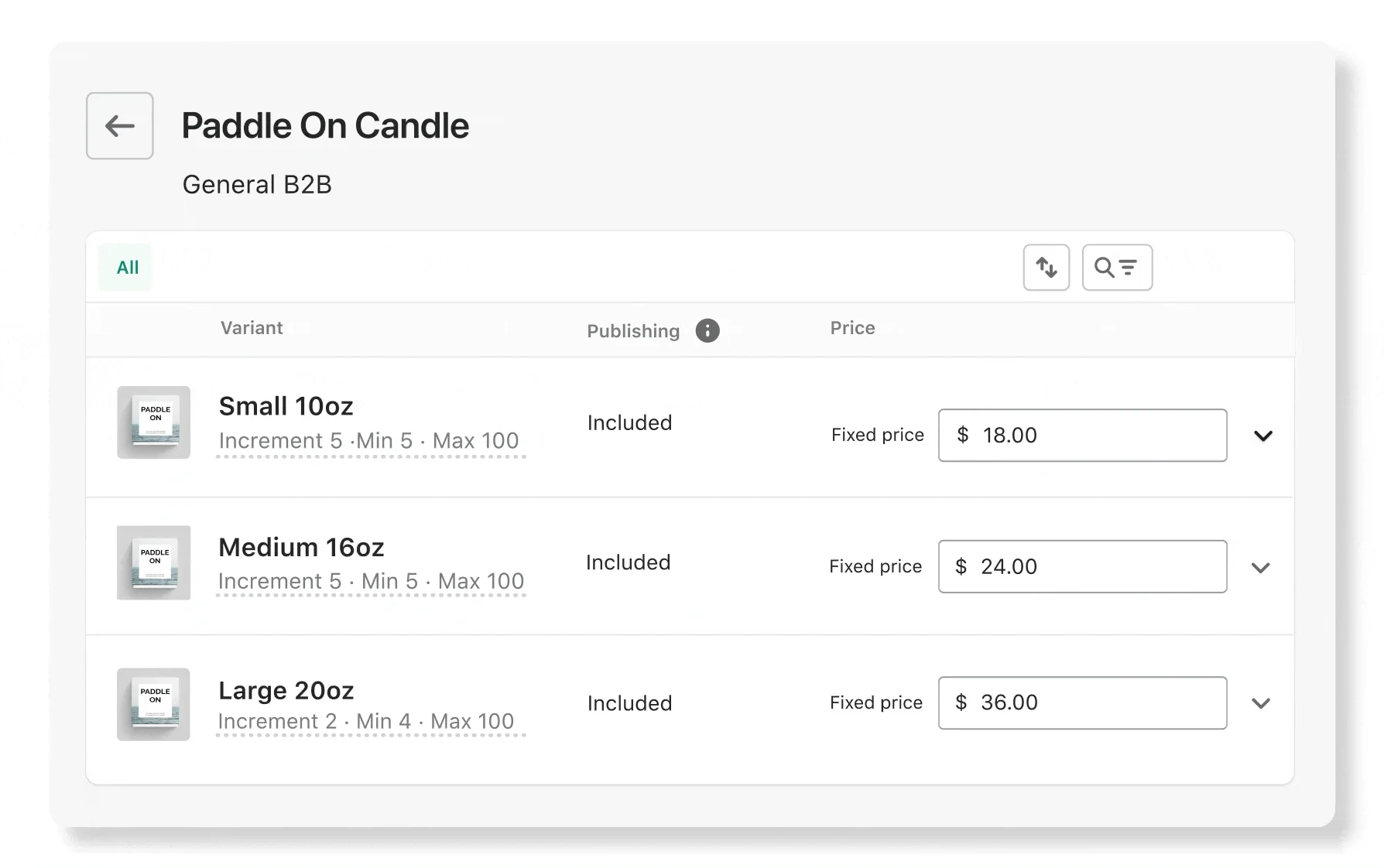
Shopify B2B catalogues let you control what business customers pay at product and variant level, while volume pricing and quantity rules define how prices change with order size and how products must be purchased.
You can use these tools to:
-
Set custom or fixed prices for specific products or variants.
-
Offer volume price breaks that automatically apply when customers purchase larger quantities.
-
Set quantity rules, including minimums, maximums and required increments such as full case packs.
On Basic, Grow and Advanced, these pricing rules are applied through catalogues assigned to B2B Markets. On Shopify Plus, catalogues can also be assigned directly to individual companies or company locations for more granular customer-specific pricing.
Use case:
A supplier offers base-level pricing to all wholesale accounts, but strategic partners receive volume discounts. Using a single price list, the merchant can apply pricing tiers such as:
-
1–9 units: £12 each
-
10–49 units: £10 each
-
50+ units: £9 each
Each tier is applied automatically based on the quantity ordered, with no manual adjustment required.
Key benefits:
-
Encourages larger orders with automatic volume price breaks.
-
Prevents incorrect order quantities by enforcing minimums, maximums and pack-size increments.
-
Reduces manual pricing work by applying agreed B2B prices and quantity rules automatically at checkout.
Limitations:
-
Volume pricing and quantity rules apply at variant level — buyers cannot combine different colours, sizes or other variants to meet a quantity threshold.
-
Volume pricing can include up to 10 price breaks per product, which may be limiting for particularly complex pricing structures.
-
Customer-specific pricing is less granular on Basic, Grow and Advanced, because catalogues are assigned through B2B Markets rather than directly to individual companies or locations.
Flexible payment terms & methods
Plan availability: Core B2B payment terms are available on Basic, Grow, Advanced and Shopify Plus. Shopify Plus additionally supports deposit requirements, partial payments and payment requests per fulfilment.
What it does:
Shopify B2B supports payment terms that reflect how wholesale customers typically buy, allowing businesses to defer full payment rather than requiring every order to be paid immediately at checkout.
Across all plans, merchants can:
-
Set payment terms such as Net 7, Net 15, Net 30, Net 45, Net 60, Net 90 or due on fulfilment.
-
Apply payment terms at company-location level or to individual draft orders.
-
Let customers view outstanding balances and payment due dates through their accounts.
-
Use vaulted credit cards for faster repeat payments.
On Shopify Plus, merchants can also:
-
Require a percentage-based deposit when an order is placed.
-
Accept and record multiple partial payments.
-
Request payment separately for individual fulfilments.
Customers can pay before the due date through their account, while overdue orders remain visible once the payment term has passed.
Use case:
A furniture wholesaler offers established retail customers Net 30 payment terms, allowing them to place larger orders without paying the full amount upfront.
On Shopify Plus, the wholesaler could also require a 20% deposit when the order is placed, with the remaining balance due under the agreed payment terms.
Key benefits:
-
Makes high-value B2B orders easier to place by supporting deferred payment rather than requiring full payment at checkout.
-
Matches established wholesale purchasing practices with configurable net terms and due-on-fulfilment options.
-
Provides additional payment flexibility on Plus through deposits and partial payments.
Limitations:
-
Payments on terms are not automatically collected when they become due — merchants may still need to capture or record payment manually.
-
Deposits and partial payments are Shopify Plus-only, which limits more advanced payment structures on Basic, Grow and Advanced.
-
Payment terms are configured rather than dynamically tiered, so more complex credit or buyer-specific approval logic may require additional workflows or integrations.
Dedicated B2B checkout
Plan availability: Core B2B checkout features are available on Basic, Grow, Advanced and Shopify Plus. Contextual checkout through Shopify Markets is available on Advanced and Plus.
What it does:
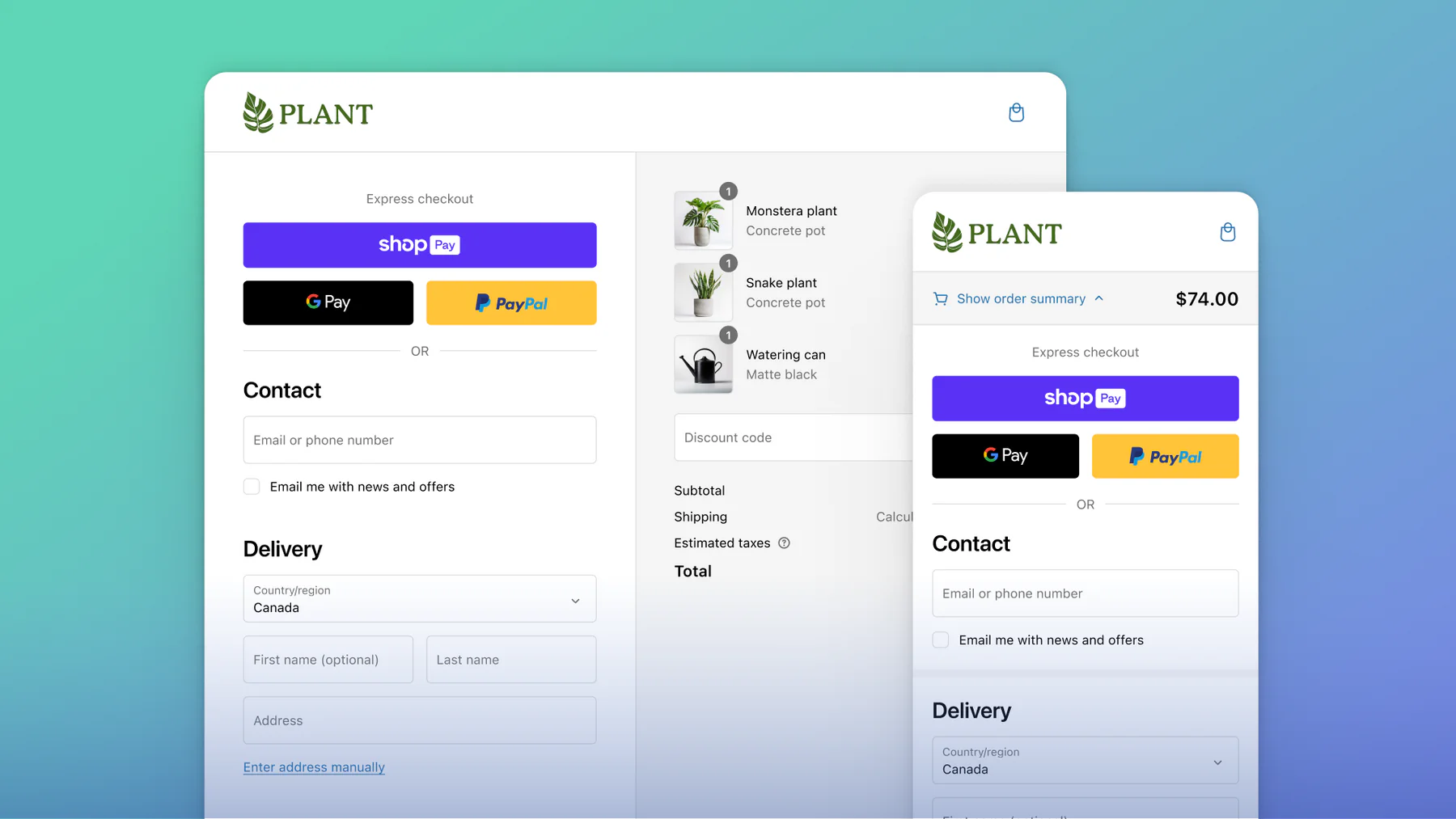
Shopify's B2B checkout is designed around account-based purchasing, giving merchants more control over how wholesale orders are submitted, reviewed and paid.
It supports workflows such as:
-
Draft order submission and review: Require orders from selected companies or company locations to be submitted as drafts, giving your team time to review or adjust them before confirmation.
-
Locked pricing and inventory reservation: Keep agreed prices fixed and reserve stock while a draft order is under review.
-
Procurement-ready checkout fields: Collect purchase order numbers and allow buyers to enter a one-time shipping address without permanently changing the company location.
-
One-page B2B checkout: Let buyers review company, shipping, order and payment details on a single checkout page.
-
Customised payment and delivery options: Use Shopify Functions and supported checkout customisation tools to control which payment or delivery methods are shown to B2B customers.
Checkout behaviour can be configured at company or company-location level. Merchants can choose whether orders are submitted automatically or saved as drafts for review, while Advanced and Plus merchants can also use contextual checkout through Markets.
Use case:
An electronics supplier handles large enterprise orders that require purchase orders and internal review. The company location is configured to submit orders as drafts, allowing the sales team to review pricing, reserve inventory and confirm payment terms before accepting the order.
Key benefits:
-
Reduces order errors by allowing selected B2B orders to be reviewed before confirmation.
-
Supports procurement-led buying with purchase order numbers, one-time shipping addresses and B2B-specific checkout settings.
-
Protects negotiated pricing and stock availability by locking prices and reserving inventory on draft orders.
-
Provides more control over checkout behaviour through company-level settings, Shopify Functions and, on Advanced and Plus, contextual checkout through Markets.
Limitations:
-
Advanced contextual checkout requires Advanced or Shopify Plus, so Basic and Grow have less flexibility for serving different checkout experiences by market.
-
Complex approval workflows are still limited natively — Shopify can submit orders as drafts for merchant review, but multi-step buyer-side approval chains may require additional development or external tools.
-
Local delivery and in-store pickup require a draft-order workflow if they need to be preselected by the merchant; buyers cannot freely select these options in the standard B2B checkout flow.
Self-service buyer portal
Plan availability: Available on Basic, Grow, Advanced and Shopify Plus.
What it does:
Shopify B2B customer accounts give authorised buyers a self-service portal where they can manage orders and account activity without relying on sales or support teams.
Once logged in, B2B buyers can:
-
Access the products and pricing available to their assigned company location.
-
Place new orders and duplicate past orders for faster reordering.
-
View order history and order status.
-
Pay outstanding balances.
-
Submit and track self-serve returns, where enabled.
-
View company and location information.
-
Update permitted profile, billing or shipping details based on their assigned role.
B2B customers must sign in through Shopify customer accounts before they can access B2B-specific products, pricing or ordering functionality.
Use case:
A packaging supplier serves hundreds of small manufacturers. Instead of relying on sales representatives to process routine repeat orders, buyers can log in, duplicate previous orders, check order status and manage outstanding payments themselves.
Key benefits:
-
Reduces support workload by giving buyers more control over routine order and account management.
-
Speeds up repeat purchasing by allowing buyers to reorder from previous orders.
-
Improves account visibility by giving customers direct access to order status, balances and company information.
Limitations:
-
The native portal has limited buyer-specific personalisation beyond the company, location and account context configured in Shopify.
-
More advanced procurement workflows require additional tools or development, particularly where businesses need bespoke dashboards, approval processes or connections to enterprise procurement systems.
-
Buyer access depends on company-location permissions, so what each user can view or edit is determined by their assigned role and location.
Quick bulk ordering
Plan availability: Available on Basic, Grow, Advanced and Shopify Plus.
What it does:
As part of the wider Shopify B2B feature set, quick order functionality helps business buyers place larger, variant-heavy orders more efficiently without adding each option to the cart one at a time.
Native B2B ordering supports:
-
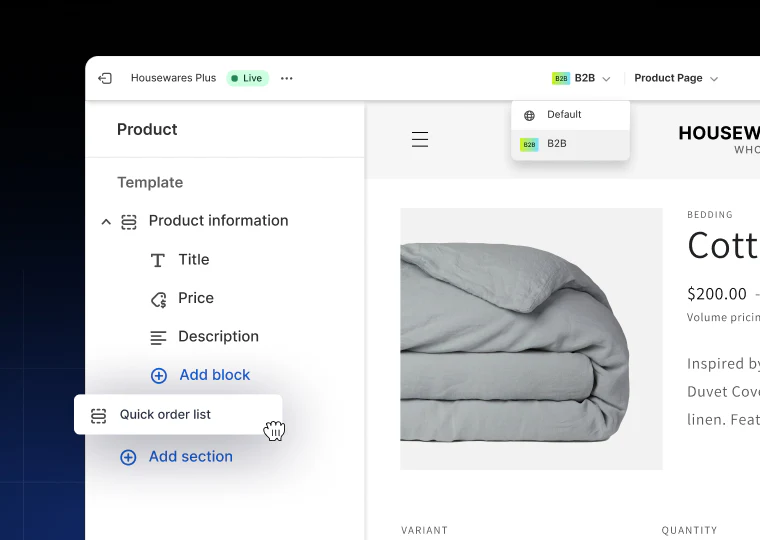
Quick order lists on product pages, allowing buyers to enter quantities for multiple variants of the same product and add them to the cart together.
-
Quantity rules and volume pricing, so buyers can see relevant minimums, pack increments and price breaks while ordering.
-
Faster repeat ordering through customer accounts and previous orders.
This is one of the Shopify B2B features available across Basic, Grow, Advanced and Plus. Shopify's free themes version 11.0 or later support the Quick order list section, while custom themes may require additional development to provide the same experience.
Use case:
A fashion wholesaler supplies multi-brand retailers. Instead of adding each shirt size separately, a buyer can enter quantities for several variants — for example, 6 small, 10 medium and 10 large — from the same product page and add them to the cart together.
Key benefits:
-
Reduces time and effort for buyers placing large or variant-heavy orders.
-
Improves order accuracy by showing multiple product variants in one ordering interface.
-
Supports larger orders alongside quantity rules and volume price breaks.
-
Speeds up repeat purchasing through quick ordering and account-based reordering.
Limitations:
-
Native quick order lists operate at product level, allowing buyers to order multiple variants of the same product rather than building complex multi-product orders from one grid.
-
Theme support varies — Shopify free themes version 11.0+ support Quick order lists, while custom or older themes may require development work.
-
More advanced bulk-order workflows, such as CSV uploads or ERP-style multi-SKU ordering interfaces, require custom development or third-party solutions.
Custom discounts & B2B promotions
Plan availability: Core B2B discount functionality is available on Basic, Grow, Advanced and Shopify Plus. Gift card purchasing and use by B2B customers requires Shopify Plus.
What it does:
Alongside catalogue pricing, Shopify B2B lets merchants create additional discounts and promotions for wholesale customers without changing their underlying contracted prices.
B2B discounts can include:
-
Discount codes, such as percentage, fixed-amount or free-shipping offers.
-
Automatic discounts that apply when eligible B2B customers meet specified conditions.
-
Market-specific discounts, allowing promotions to target particular B2B customer groups.
-
Promotions layered on top of catalogue pricing, where the discount configuration allows it.
In a blended store, discounts can apply to both B2B and DTC customers by default. To restrict a promotion to a specific wholesale audience, merchants can assign the discount to the relevant B2B Market.
On Shopify Plus, gift cards can also be added to B2B catalogues and made available for B2B customers to purchase or use at checkout.
Use case:
A homeware wholesaler runs a seasonal promotion for its highest-value trade customers. It creates an automatic discount for its "Gold-tier" B2B Market, allowing eligible buyers to receive the promotion without changing their underlying catalogue pricing.
On Shopify Plus, the merchant could also make gift cards available to selected B2B customers as part of its broader promotional strategy.
Key benefits:
-
Runs targeted promotions without changing contracted B2B pricing.
-
Segments offers by B2B Market, helping merchants target specific customer groups.
-
Supports seasonal and account-based campaigns alongside existing catalogue pricing.
-
Adds further promotional options on Plus through B2B-compatible gift cards.
Limitations:
-
Gift card support for B2B customers is Plus-only and must be enabled for the store.
-
Discount eligibility needs careful configuration in blended stores, because discounts can otherwise apply to both B2B and DTC customers.
-
More complex promotional logic may require Shopify Functions, apps or custom development.
Markets for B2B
Plan availability: B2B Markets are available across Basic, Grow, Advanced and Shopify Plus. Basic, Grow and Advanced support up to 3 active catalogue assignments across all B2B Markets. Advanced and Plus add contextual storefront and checkout experiences, while Plus supports unlimited B2B Market catalogues and direct catalogue assignment to companies or company locations.
What it does:
Markets for B2B, introduced in Shopify Summer ’25 Edition, expands Shopify Markets framework to support regional and account group–based segmentation for B2B.
Previously, Markets were defined only by geography (e.g. UK, EU). Now, you can also group sets of B2B customers — including specific companies or locations — into their Markets or submarkets.
This enables you to:
-
Create B2B Markets based on regions (e.g. UK, EU, US) or custom groups (e.g. “Top 20 Distributors”, “Wholesale – Japan”).
-
Assign catalogues to each Market to control product availability and visibility.
-
Localise the experience with currency, tax, theme, and language settings.
-
Automatically apply the correct experience based on the buyer’s shipping address or location.
Note:
A buyer’s experience is determined by all Markets they qualify for — based on their shipping destination and customer group.
If a buyer matches multiple Markets with different catalogues, Shopify combines the catalogues, showing all included products. Without careful catalogue governance, this can result in duplicate listings or unintended price conflicts.
Use case:
A packaging supplier sells to distributors across Europe, North America and Asia.
-
Its EU B2B Market uses euro pricing and a region-specific product catalogue.
-
Its Japan Market provides localised content and relevant product availability.
-
Its North America Market uses USD pricing and its own commercial settings.
On Advanced or Plus, the merchant can also tailor storefront and checkout content for each market, providing a more relevant B2B on Shopify experience without operating separate stores.
Key benefits:
-
Supports regional and customer-group segmentation from one Shopify store.
-
Tailors products, pricing and commercial settings to different B2B audiences.
-
Supports international B2B selling with market-specific currency and localisation.
-
Adds contextual storefront and checkout experiences on Advanced and Plus.
Limitations:
-
Basic, Grow and Advanced are limited to three active catalogue assignments across all B2B Markets, which can restrict businesses with many pricing or product segments.
-
Direct company or company-location catalogue assignment is Plus-only.
-
Overlapping Markets and catalogues require careful governance to avoid unintended product or pricing combinations.
Store personalisation
Plan availability: Store personalisation varies by plan. Contextual storefront customisation through Shopify Markets is available on Advanced and Shopify Plus. Theme editor customisation specifically by B2B versus DTC customer type is available only on Shopify Plus.
What it does:
Store personalisation lets merchants adapt the Shopify B2B storefront to different types of buyers rather than showing every customer the same content and merchandising experience.
Depending on your plan and storefront setup, you can:
-
Create contextual storefronts by Market on Advanced and Plus, changing content such as banners, messaging and merchandising for specific B2B audiences.
-
Customise the theme by customer type on Plus, allowing a blended store to present different content to logged-in B2B and DTC customers.
-
Use Liquid in themes and email templates to display relevant company information or B2B-specific messaging.
-
Build a custom headless storefront where more advanced B2B UX or integration requirements justify it.
This allows a blended Shopify store to share the same underlying commerce platform while presenting a more relevant experience to wholesale and retail customers.
Use case:
A fashion wholesaler runs B2B and DTC through the same Shopify store. Retail shoppers see lifestyle imagery and consumer-focused merchandising, while wholesale buyers see trade-focused messaging and content relevant to their market.
On Shopify Plus, the merchant can customise theme content specifically according to whether the logged-in customer is B2B or DTC.
Key benefits:
-
Creates a more relevant buying experience for different customer types and markets.
-
Keeps B2B and DTC on one commerce platform while allowing the storefront experience to differ.
-
Supports regional and segment-specific merchandising through contextual storefronts.
-
Provides greater brand and UX control for more complex B2B requirements.
Limitations:
-
Contextual storefront customisation requires Advanced or Plus.
-
Theme editor customisation specifically by B2B versus DTC customer type is Plus-only.
-
Storefront personalisation does not replace catalogue, pricing or checkout configuration; these need to be managed separately.
-
Highly bespoke experiences may still require Liquid development, apps or a headless build.
Automation with Shopify Flow
Plan availability: B2B automation with Shopify Flow is available on Basic, Grow, Advanced and Shopify Plus.
What it does:
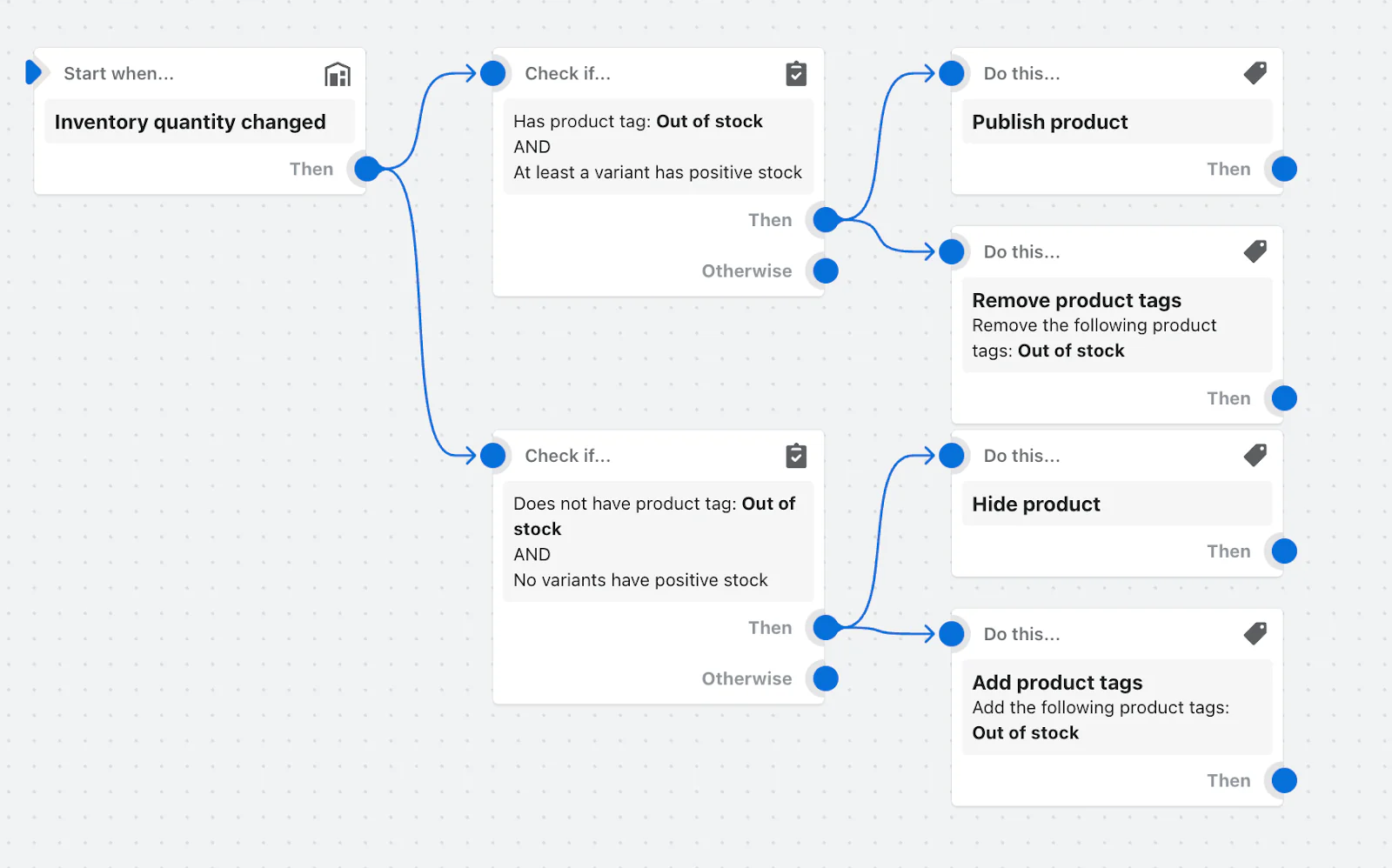
Shopify Flow lets merchants automate repetitive Shopify B2B processes using trigger, condition and action-based workflows, reducing the amount of manual work required as wholesale operations grow.
B2B workflows can be used to:
-
Automatically tag B2B orders.
-
Notify sales or operations teams when a B2B order is placed.
-
Send B2B order invoices to additional contacts.
-
Send access emails when new B2B buyers are approved.
-
Automate actions around company account requests.
-
Trigger internal workflows based on order, customer or company activity.
Shopify provides pre-built B2B Flow templates, or merchants can create their own workflows around supported triggers and actions.
Use case:
A medical supplies distributor uses Shopify Flow to reduce manual order administration.
When a B2B order is placed, Flow automatically tags the order and notifies the relevant internal team. Higher-value orders can trigger an additional notification so sales staff can review them promptly.
The merchant can also use Flow to automate onboarding tasks, such as notifying staff when a new company account request is submitted or sending access emails after a buyer is approved.
Key benefits:
-
Reduces repetitive administrative work across B2B ordering and customer management.
-
Helps teams respond faster to new orders, account requests and exceptions.
-
Supports more consistent B2B processes as order and customer volumes grow.
-
Provides ready-made B2B workflow templates while allowing merchants to build their own automations.
Limitations:
-
Flow is limited to supported triggers, conditions and actions, so highly specialised workflows may require custom development.
-
Complex cross-system automation involving ERP, CRM or other external platforms may require apps, APIs or middleware.
-
Workflow design still requires careful governance, particularly as automations become more complex or depend on multiple business rules.
Setting up B2B on Shopify: Key requirements and considerations
Choosing B2B store setup models
Before setting up B2B on Shopify, one of the first decisions is whether to run B2B and DTC from the same store or keep wholesale operations in a separate storefront. Shopify supports two main models: a blended store and a dedicated B2B store.
Blended store
A blended store serves both B2B and DTC customers through the same Shopify store and admin. Inventory, theme, products and most store settings are shared, while B2B-specific elements such as catalogues, pricing, payment terms, tax exemptions and customer access can be configured separately.
This model is generally suited to businesses that:
-
sell similar products to B2B and DTC customers
-
share inventory across both channels
-
use the same internal team to manage wholesale and retail
-
want to avoid maintaining separate stores and integrations
A blended setup is available when using B2B on Shopify Basic, Grow, Advanced or Plus, although the level of catalogue control, storefront personalisation and checkout customisation varies by plan.
Dedicated B2B store
A dedicated store is a separate Shopify store used only for B2B customers, with its own admin, storefront, branding, inventory and settings.
This model is better suited to businesses that:
-
want a distinct wholesale buying experience
-
need separate B2B and DTC inventory
-
want to gate the entire storefront to approved B2B customers
-
use different teams or operational processes for B2B and DTC
A dedicated store requires a separate Shopify store and its own configuration, apps and integrations. Shopify Plus merchants can also use an eligible expansion store within their Plus organisation for a dedicated wholesale storefront.
For businesses evaluating Shopify B2B without Plus, a blended store is usually the simpler route because it avoids the cost and operational overhead of maintaining an additional store.
Implementing Shopify B2B on Plus isn’t just about turning features on — it’s about aligning them with your sales model, catalogue, and team structure. Our Shopify Plus development service helps brands create scalable wholesale experiences that work in practice as well as in theory.
Other requirements and setup considerations
Before enabling B2B on Shopify, there are several account, customer and order requirements to consider:
-
Use a B2B-supported Shopify plan: B2B features is available on Shopify Basic, Grow, Advanced and Shopify Plus, with some advanced features restricted to Advanced or Plus.
-
Set up B2B customers as Companies: Business customers must be associated with a company and company location to access B2B-specific pricing, catalogues, payment terms and checkout settings.
-
Activate customer accounts: B2B customers must use Shopify's customer accounts. Legacy customer accounts are not supported for B2B customers or orders.
-
Activate B2B with Markets where required: Shopify uses Markets to group B2B company locations and apply catalogues, pricing and contextual experiences. Stores using B2B with Markets need to activate the relevant Markets functionality; on Basic, Grow and Advanced, the new Shopify Markets setup is required for B2B catalogue features.
-
Review features that are off by default: Some B2B functionality, including abandoned checkouts and gift cards at checkout, is disabled by default and may require Shopify Support to activate. Gift cards at B2B checkout are available only on Shopify Plus.
-
Check payment and checkout compatibility: Some features, including accelerated checkouts such as Shop Pay, Google Pay and Amazon Pay, are not compatible with standard B2B checkout flows. Payment methods can be tailored using supported apps or Shopify Functions.
-
Plan around order limits: B2B orders and draft orders support up to 500 line items. Orders that exceed this limit must be split into smaller transactions.
-
Review blended-store behaviour carefully: In a blended store, many settings apply to B2B and DTC customers by default. Catalogues, Markets, discounts, checkout tools and Shopify Functions can be used to control where the experience needs to differ.
Pricing for B2B on Shopify
Core B2B features are included at no additional cost on Basic, Grow, Advanced and Shopify Plus, making B2B on Shopify without Plus a viable option for businesses with more straightforward wholesale requirements.
Standard plans provide access to core capabilities such as company profiles, B2B catalogues, volume pricing, payment terms and vaulted credit cards. Shopify Plus, which starts from around $2,300 per month, adds more advanced functionality including unlimited catalogues, direct catalogue assignment to companies and locations, deposits and partial payments.
What does the B2B on Shopify cost include?
Your Shopify subscription covers the native B2B functionality available on your chosen plan, including:
-
Core wholesale features without a separate B2B licence fee.
-
Less reliance on third-party wholesale apps for standard B2B workflows.
-
Shared B2B and DTC infrastructure, including products, inventory, orders and customer management.
-
More advanced B2B capabilities on higher-tier plans, where additional catalogue, payment or customisation requirements apply.
The total Shopify B2B cost can still include apps, development, integrations and implementation work depending on the complexity of your wholesale operation.
For a full breakdown of Shopify Plus pricing and benefits, see our Shopify Plus article.
Comparing B2B on Shopify to other B2B solutions
Now that Shopify B2B is available on Basic, Grow, Advanced and Shopify Plus, businesses no longer need Plus simply to access native wholesale functionality. Most core capabilities, including companies, catalogues, net payment terms, self-service ordering and Shopify Flow automations, are available across plans, while Advanced and Plus add more flexibility for complex B2B requirements.
If you're evaluating Shopify for B2B, the key question is therefore whether the native features on your current plan are enough, whether they need to be extended with apps or custom development, or whether a more specialised B2B platform would be a better fit.
This section compares:
-
native B2B on Shopify across different plans
-
ways to extend Shopify B2B with apps, themes or custom development
-
enterprise B2B platforms designed for more complex operating models
The goal is to help you compare functionality, implementation effort, cost and business fit before deciding which approach best supports your wholesale operation.
Extending B2B on Shopify beyond the native feature set
For many businesses, the native Shopify B2B solution now covers the core requirements for company accounts, catalogues, wholesale pricing, payment terms, checkout and repeat ordering.
Apps, themes and custom development become more relevant when you need additional workflow, UX or integration capabilities beyond what your current Shopify plan provides.
Option 1: Use third-party B2B/wholesale apps
Third-party apps can simulate core B2B features within a standard Shopify storefront, including:
-
Customer-specific pricing and discounts.
-
Gated visibility (e.g. login to view pricing).
-
Basic volume pricing or wholesale order forms.
-
Hidden products or collections based on tags.
These tools typically rely on tags, metafields, and theme edits to manage visibility and pricing logic.
Popular apps:
-
BSS B2B Suite (pricing varies).
-
SparkLayer (£39–£240/month).
-
Wholesale Club (£19–£39/month).
Benefits:
-
Faster to implement than building custom functionality from scratch.
-
Extends specific B2B workflows without replacing the whole Shopify setup.
-
Useful where native features do not fully match operational requirements.
Limitations:
-
Adds subscription and implementation costs.
-
Can duplicate functionality already available natively in Shopify B2B.
-
Introduces another application and data layer to maintain.
-
App compatibility and workflow complexity can increase as the B2B operation grows.
Example implementation:
-
App subscription: ~£468–£1,428/year (Based on SparkLayer’s Starter and Growth plans. Actual cost depends on B2B order volume and integration needs).
-
Setup and logic configuration: ~20–40 hours at £24–£35/hour → £480–£1,400 (Estimated from ITJobsWatch – Shopify Developer UK).
-
Total estimated cost: £948–£2,828/year.
Bottom line:
Apps now make the most sense when they solve a specific gap in the native Shopify B2B features, rather than recreating core functionality already included in your plan.
Option 2: Use the Trade theme for B2B
The Trade theme is a free Shopify-developed theme built specifically for simple B2B stores. It doesn’t add functionality — but provides a layout and structure optimised for wholesale customers.
Key features include:
-
Compact list-style navigation for faster product browsing.
-
Built-in support for bulk ordering via variant quantity selectors.
-
Clean UX designed for reorder-driven workflows.
Benefits:
-
Built and supported by Shopify — no license cost.
-
Clean layout optimised for repeat B2B buyers.
-
Works with standard Shopify tools (tags, metafields, etc.).
-
Can be extended with apps for discounts, quote logic, or gated content.
Limitations:
-
No support for company profiles, payment terms, or B2B-specific checkout flows.
-
Still requires configuration of tag logic, which can become complex as the business grows.
-
Not suitable for businesses needing pricing by location, approval flows, or multiple buyers per account.
Example implementation:
-
Developer time for setup and light styling: ~15–30 hours at £24–£35/hour → £360–£1,050.
-
Additional dev time may be needed for custom logic or integration with tagging workflows.
Bottom line:
Trade is a good starting point for stores needing basic B2B gating and an order-optimised layout, without investing in custom builds. It’s best suited to smaller B2B catalogs, repeat buyers, or businesses testing wholesale before committing to Plus.
Option 3: Custom theme development using Shopify Liquid
Without access to Shopify Plus, merchants needing a tailored B2B experience often commission a fully bespoke theme built with Shopify Liquid. This approach gives greater control over how wholesale customers interact with products, pricing, and order flows — but requires significant developer involvement.
Common deliverables include:
-
A custom theme built from the ground up to support wholesale buyers.
-
Login-gated access and tag-based pricing logic embedded directly into theme templates.
-
Custom ordering UX — such as table-style layouts, simplified catalog views, or product matrix forms.
-
Integration with apps like BSS B2B or Locksmith to extend control over customer groups and visibility.
Benefits:
-
Highly tailored to your brand and buyer logic.
-
No need to rely on a prebuilt theme or third-party apps.
Limitations:
-
Checkout and account logic remain limited on standard plans.
-
All workflows must be manually implemented.
-
High reliance on developer skill and availability.
Example implementation:
-
Custom theme build: 80–140 hours → £1,920–£4,900.
-
App integrations or backend logic: 20–40 hours → £480–£1,400.
-
Maintenance: 4–8 hours/month → £200–£500/month.
-
Total: ~£2,500–£6,500 one-time, plus ongoing maintenance costs.
Bottom line:
This approach gives you more control than apps or prebuilt themes, but the outcome depends heavily on your developer or agency’s skill. It can work well as an interim solution before moving to Plus — especially for merchants with clearly defined B2B processes and a lean catalogue structure.
Option 4: Custom storefronts using Hydrogen or APIs
Hydrogen is Shopify’s React-based framework for building headless storefronts, giving merchants complete control over the B2B experience. This option suits merchants with complex workflows or system integrations — but comes with high development and maintenance cost.
What it enables:
-
Fully bespoke B2B frontend with branded UX.
-
Integration with ERPs, CRMs, or PIM systems.
-
Advanced ordering logic and customer-specific experiences.
-
Full control over how pricing, catalogues, and accounts are handled via APIs.
Benefits:
-
Maximum flexibility and customisation.
-
Supports highly complex or integrated B2B operations.
-
Works well for multi-system environments or composable architecture.
Limitations:
-
No native B2B features — everything must be built manually.
-
Requires deep dev experience (React, APIs, authentication).
-
Long implementation timelines.
-
High long-term maintenance cost.
Example implementation:
-
Custom Hydrogen build: 120–200 hours → £4,200–£10,000.
-
Backend logic (e.g. pricing engine, API middleware): 40–80 hours → £1,400–£4,000.
-
Optional CMS, search, or multi-region logic: varies.
-
Total: ~£6,000–£15,000+ one-time, plus ongoing maintenance costs.
Bottom line
Hydrogen and APIs give you maximum flexibility, but no native B2B features out of the box. This route is best for large-scale businesses needing total control over the buyer experience or those already operating in a headless or composable architecture.
Shopify B2B vs other platform solutions
This comparison focuses on B2B capabilities on Shopify Plus, Adobe Commerce (Magento), and OroCommerce—three widely adopted platforms that cater to distinct business models and technical needs.
-
Shopify Plus is a SaaS-based solution known for its speed to launch, operational simplicity, and growing suite of native B2B features.
-
Adobe Commerce is selected for its deep customisation capabilities and robust B2B toolset, ideal for complex and heavily integrated environments.
-
OroComerce is purpose-built for B2B commerce, offering strong support for account-based workflows, custom pricing, and CRM-driven sales models.
We compare these platforms across four critical criteria:
-
Native B2B feature coverage – to assess how much functionality is available out of the box vs. requiring add-ons or custom development.
-
Total cost of ownership – including licensing, infrastructure, and development effort, which directly affects ROI.
-
Time to market – important for businesses needing to move quickly without excessive technical overhead.
-
Business fit – to help identify which platform best aligns with your operating model, team structure, and growth stage.
|
Comparison factor |
Shopify Plus |
Adobe Commerce (Magento) |
OroCommerce |
|
Native B2B feature coverage |
Built-in B2B suite: company profiles, price lists, PO terms, buyer permissions, Partial checkout extensibility |
Advanced native B2B: quotes, requisition lists, shared catalogues, approval workflows |
B2B-first platform: quotes, custom pricing, buyer roles, approval workflows, built-in CRM |
|
Total Cost of Ownership |
License: From ~$2,300/month (Shopify Plus base fee) Other costs: Low setup and app fees; minimal maintenance Dev cost: Low—no custom hosting or infrastructure required |
License: Free (Magento Open Source), or Adobe Commerce / Adobe Commerce Cloud with paid licenses. Pricing is influenced by GMV, AOV, and solution complexity. While Adobe does not publicly disclose pricing, industry estimates suggest annual license fees typically start at $50,000 or more. Other costs: High—custom development, hosting, upgrades Dev cost: High ongoing dev hours and agency reliance |
License: Free (Community Edition). Enterprise Edition is paid, with pricing based on GMV, users, and hosting needs. Other costs: High—custom implementation, self-hosted infra Dev cost: High—internal team or partner required |
|
Time to Market |
Fast implementation for standard builds using Shopify’s native themes and app ecosystem. Custom projects require more time but generally involve less setup complexity than traditional platforms. |
Longer implementation due to custom development, infrastructure setup, and multi-system integration. Typically requires a dedicated agency or in-house team. |
Moderate to long implementation depending on workflow complexity and whether internal or partner resources are available. Often involves deep ERP/CRM integration. |
|
Business fit |
Mid-market brands scaling hybrid B2B/DTC models, Subscription or D2C-first businesses |
Complex B2B logic, manufacturers, distributors, or ERP-driven businesses |
B2B-first companies with sales teams, long deal cycles, and ERP/CRM integrations |
Conclusion: Is B2B on Shopify worth it?
B2B on Shopify has become a much more accessible option for businesses looking to manage wholesale and DTC through the same commerce platform. With core B2B features now available across Basic, Grow, Advanced and Shopify Plus, the main question is no longer whether Shopify can support B2B, but whether the capabilities on your chosen plan match the complexity of your wholesale operation.
B2B on Shopify is most effective when:
-
You want to manage B2B and DTC from the same platform.
-
Your wholesale workflows are structured and repeatable.
-
You want to replace fragmented manual or app-based processes with native functionality.
-
You value faster implementation and lower infrastructure overhead.
-
Your catalogue, pricing, payment and checkout requirements fit within the capabilities of your Shopify plan.
A more advanced Shopify setup or another B2B platform may be a better fit when:
-
Your workflows require complex buyer roles, approval chains or procurement processes.
-
You need highly granular company-level pricing or catalogue control.
-
You rely on deep ERP, PIM or procurement integrations.
-
Your B2B experience requires extensive checkout, storefront or headless customisation.
-
Your operational requirements go beyond what native Shopify B2B and targeted extensions can support efficiently.
For many businesses, the practical approach is to start with the native B2B on Shopify capabilities available on their current plan, then move to Advanced, Shopify Plus, apps or custom development only as complexity increases.
The right setup therefore depends less on business size alone and more on how sophisticated your pricing, customer structure, purchasing workflows and integrations need to be.
If you’re considering using B2B on Shopify Plus, On Tap’s Shopify Plus development services can help you validate the fit, design the right feature set, and deliver a tailored solution, whether you're launching B2B from scratch or consolidating fragmented workflows.
With 20+ years of experience in complex eCommerce builds, On Tap combines technical depth with strategic insight to help brands scale efficiently on Shopify. Contact us to explore what’s possible for your B2B roadmap.