 Best full-service eCommerce agency 2026


Shopify Plus is the enterprise-tier plan in the Shopify ecosystem, built for high-growth and large enterprises that need more than the platform’s standard capabilities. It offers exclusive features and benefits not available on the Basic, Grow, or Advanced plans, with the scale, flexibility, and reliability required for complex, high-volume operations.
This guide covers the full Shopify Plus features list for 2026, current pricing, key platform changes, and the capabilities that still differentiate Plus from lower plans. We also look at real Shopify Plus case studies and explain how the main features of Shopify Plus support high-growth and enterprise operations.
14 Shopify Plus features and advantages that make it stand out
What changed in Shopify Plus for 2026?
Before looking at individual capabilities, it is worth understanding the new Shopify Plus features and platform changes shaping the enterprise offering in 2026. Some capabilities that previously helped define Plus are becoming more widely available, while Shopify is shifting investment towards extensibility, automation and enterprise-scale operations.
-
Core B2B features expanded beyond Shopify Plus: Company profiles, payment terms, volume pricing, quantity rules and up to three B2B catalogues are now available on Basic, Grow and Advanced plans. Plus still retains advanced capabilities such as unlimited B2B catalogues, direct catalogue assignment, deposits, partial payments and payment requests by fulfilment.
-
Market-specific checkout and customer account customisation: Advanced and Plus merchants can customise checkout and customer accounts by market, including different branding, blocks and experiences for individual countries or B2B customer groups.
-
Rollouts for controlled storefront changes: Shopify introduced Rollouts, allowing merchants to schedule, gradually deploy, and A/B test entire themes or checkout configurations, including market-specific experiences.
-
More flexible fulfilment options: Plus merchants can now offer shipping and store pickup within the same order, with Shopify automatically splitting the order into the appropriate fulfilments.
-
Multi-entity commerce support: Shopify Plus has added capabilities for merchants operating multiple legal entities within a single store, including support for separate Shopify Payments accounts in eligible scenarios.
-
Expanded B2B functionality: Shopify added B2B store credit, pickup in store, automated vaulted payments, B2B discounts enabled by default and Shopify Functions-powered rules for payment terms, deposits and order review.
-
Greater investment in agentic commerce: Shopify Catalog and the Universal Commerce Protocol are making product data more accessible to AI-powered shopping experiences, while Spring ’26 introduced variant-level publishing and more market-specific channel controls.
For high-growth and enterprise retailers, Shopify Plus features extend beyond the core functionality of standard plans. It combines advanced features, dedicated support, and enterprise-grade infrastructure, giving brands the scale, flexibility, and reliability to manage complex operations with confidence.
The 14 features and advantages below highlight where Plus delivers the most impact for brands operating across multiple markets, channels, and customer segments.
|
No. |
Feature/advantage |
Strategic value for high-growth and enterprise brands |
|
1 |
Scale complex wholesale operations with greater control over catalogues, payment structures, and company-specific purchasing workflows. |
|
|
2 |
Operate up to 9 additional branded stores under one contract to deeply localise for high-value regions or strategies. |
|
|
3 |
Serve multiple regions from a single storefront with advanced localisation, multiple legal entities, and region-specific rules. |
|
|
4 |
Adapt checkout UI, branding, and logic by market or segment to improve conversion rates and buyer trust. |
|
|
5 |
Deploy bespoke discount, shipping, payment, and order-routing logic natively in Shopify for faster, more reliable execution. |
|
|
6 |
Automate processes across multiple stores to reduce manual work, improve accuracy, and scale operations efficiently. |
|
|
7 |
Schedule and execute complex, multi-region campaigns automatically with coordinated changes to products, pricing, and design. |
|
|
8 |
Use AI-powered intent data to improve ad targeting, lower acquisition costs, and increase return on ad spend. |
|
|
9 |
Expand physical retail with advanced in-store capabilities fully integrated with online sales, inventory, and customer data. |
|
|
10 |
Manage staff, permissions, and analytics centrally across all stores for stronger governance and operational control. |
|
|
11 |
Support enterprise-scale integrations with faster data syncs, exclusive endpoints, and priority webhook delivery. |
|
|
12 |
Dedicated support with Launch Engineer and Merchant Success Manager |
Accelerate time-to-market and ongoing optimisation with assigned Shopify specialists. |
|
13 |
Launch multiple custom front ends for regions, brands, or campaigns without duplicating backend systems. |
|
|
14 |
Maintain speed and stability during peak demand with SLA-backed uptime, auto-scaling, and a global CDN. |
1. Built-in B2B feature set
What it is and how it works
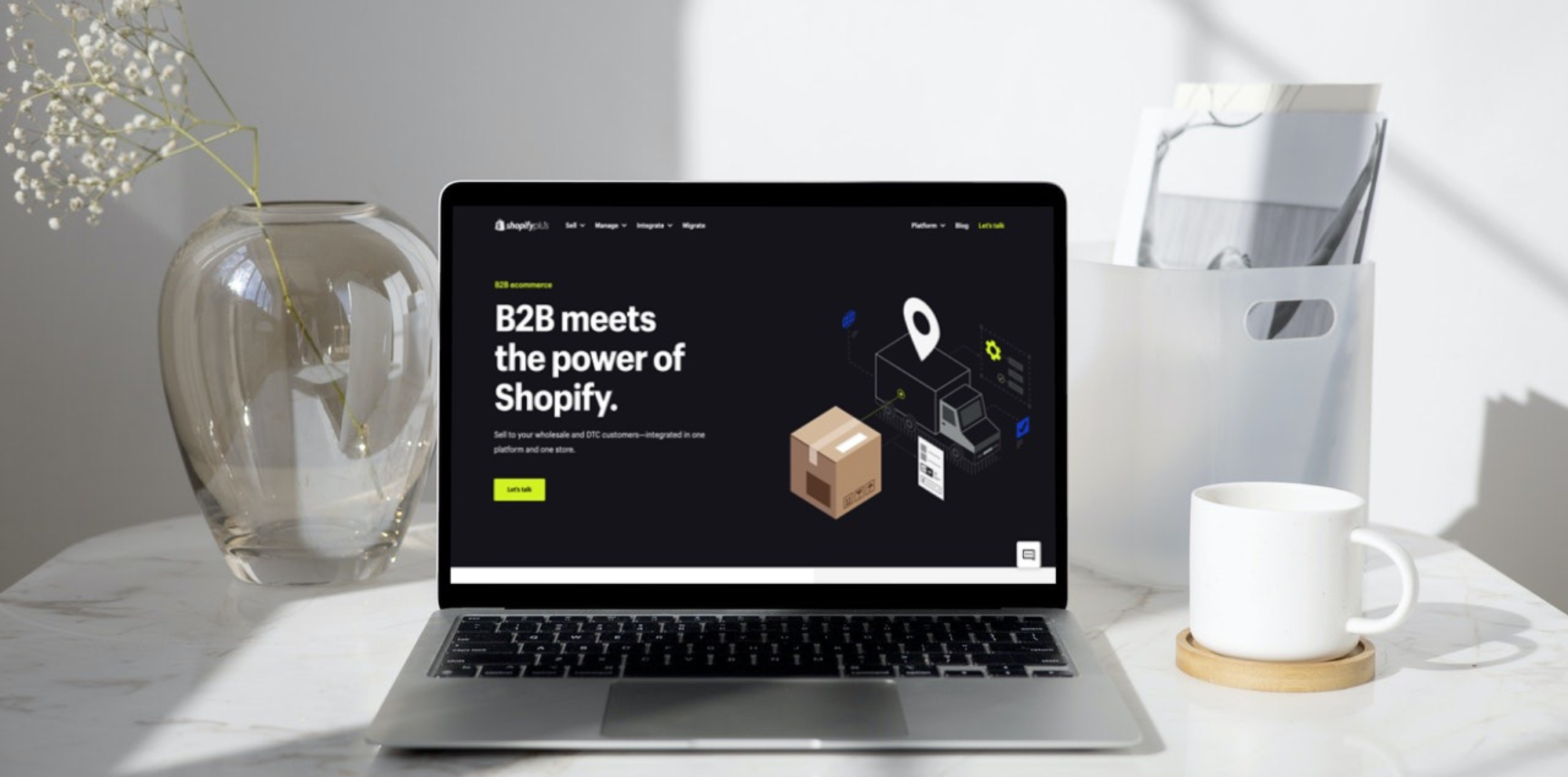
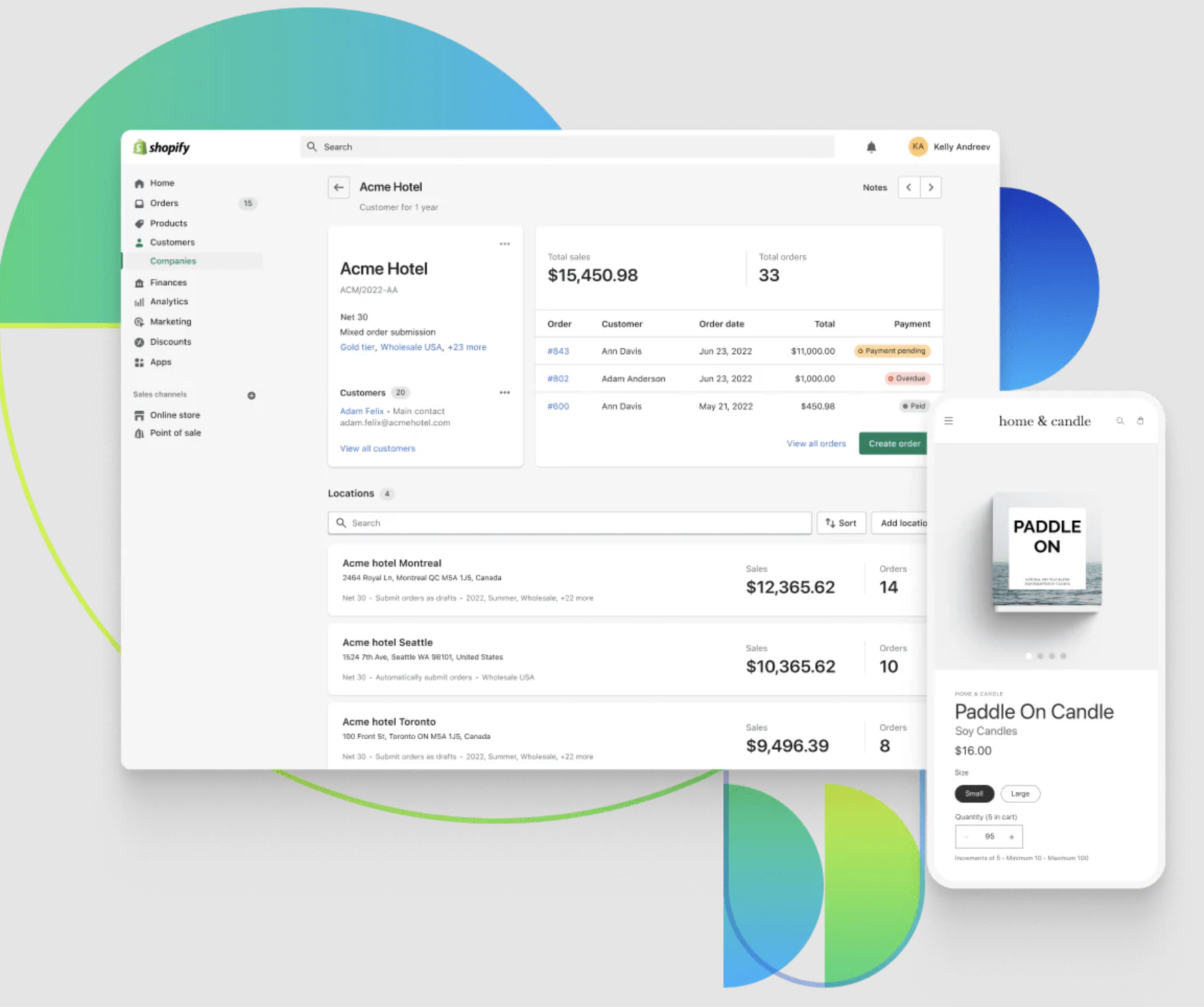
Shopify Plus extends Shopify B2B with capabilities designed for more complex wholesale operations. It supports unlimited B2B market catalogues, direct catalogue assignment to specific companies and company locations, and customer-level pricing structures.
It also adds advanced payment controls, including deposit requirements, partial payments, and payment requests per fulfilment. Together, these features give larger B2B businesses greater control over pricing, purchasing workflows, and payment terms across different customer accounts and markets.
Key capabilities include:
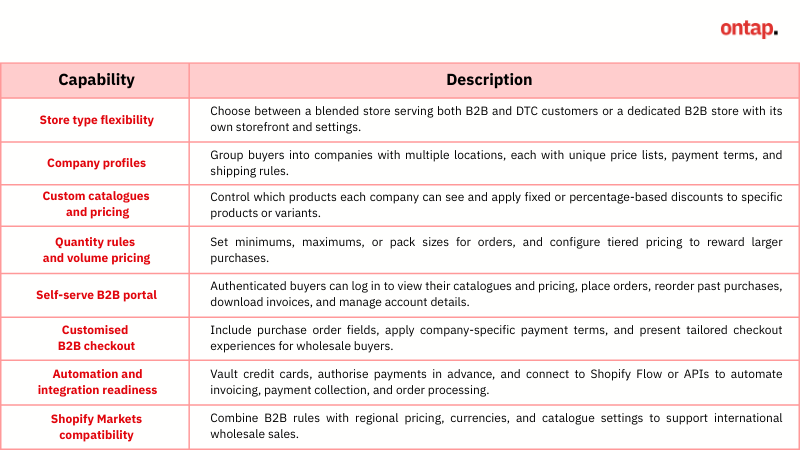
Value for high-growth and enterprise brands:
-
Scale complex B2B pricing – Use unlimited B2B market catalogues and assign catalogues directly to individual companies or locations for more granular customer-level pricing.
-
Support more flexible payment workflows – Use deposits, partial payments, and payment requests per fulfilment to accommodate larger or more complex wholesale orders.
-
Manage large B2B customer bases – Centralise companies, locations, pricing, payment terms, and purchasing permissions within Shopify as wholesale operations grow.
-
Support international B2B operations – Combine B2B capabilities with Shopify Markets to tailor pricing, products, checkout, and storefront experiences for different customer groups and regions.
Limitations:
-
Advanced procurement workflows may require additional tools – Shopify Plus supports draft-order review and approval, but more complex requirements such as multi-stage approvals, advanced quoting, or specialised procurement workflows may require third-party apps or custom development.
-
Some checkout and fulfilment options remain restricted – Shop Pay and other accelerated checkout methods aren't supported for B2B, although Apple Pay can be used as a standard B2B payment method. Subscriptions and pickup points are also unsupported, while local delivery is limited to B2B draft orders. In-store pickup can be enabled for B2B by contacting Shopify Support.
Real-world case study
Filtrous migrated to Shopify Plus to leverage the built-in B2B suite. They launched their wholesale storefront in just 63 days and received their first B2B order within that time. By setting up company-specific catalogues, custom discounts, and payment terms, and automating invoicing with Shopify Flow and vaulted credit cards, they cut manual work by 12 hours per week across sales and support teams. The result was a 27% increase in organic conversion rate and a faster, more scalable wholesale operation.
How to get it without Plus: Cost, complexity, and compromises
B2B features are not available in Basic, Grow, or Advanced. Comparable B2B functionality can be pieced together, but each approach adds cost and overhead:
-
Apps – Use B2B/Wholesale Solution ($25–$50/month) and Wholesale Pricing Discount ($39–$59/month) to add company profiles, custom catalogues, quantity rules, buyer portals, and checkout customisation. They work for smaller setups but require ongoing maintenance and increase the risk of mismatched pricing or slower order processing.
-
Theme modifications – Wholesale-oriented themes or custom Liquid templates can hide/show products and create order forms at low cost, but become difficult to maintain as catalogues grow and updates risk breaking code.
-
Custom storefronts – A separate B2B interface using Shopify APIs gives full control but typically costs tens of thousands upfront plus developer retainers, with slower time-to-market and higher technical risk.
For a deeper breakdown of Shopify B2B features, limitations, and how to implement them effectively, read our full guide: Shopify B2B: In-depth evaluation of features, limitations, and business fit.
2. Expansion Stores for multi-store operations
What it is and how it works
Expansion Stores is a Shopify Plus feature that lets you create up to 9 additional independent stores under one Plus contract. All Expansion Stores must represent the same brand, but can be adapted for different regions or market strategies. Each store can have its domain, theme, apps, payment gateways, tax settings, and shipping logic.
All Expansion Stores are managed through the Shopify Organization Admin, allowing centralised control over staff accounts, billing, and permissions while maintaining operational independence for each store.
Value for high-growth and enterprise brands
-
Unlocks new growth opportunities – Up to 9 fully localised stores let you target and serve high-value regions with tailored experiences that drive higher conversion rates and customer lifetime value.
-
Deep localisation – Adapt currencies, tax rules, content, product availability, and payment methods for each market, improving compliance and customer relevance.
-
Centralised governance – Manage user access, permissions, and billing across all stores from one dashboard, improving operational oversight.
Limitations
-
Same-brand requirement – Limits use to the same brand and product line, meaning enterprises with multi-brand portfolios will need separate Plus contracts, which can increase licensing costs and administrative overhead.
-
No native cross-store sync – Without built-in syncing for products, customers, or orders, scaling operations across multiple stores requires integration tools or middleware. This adds cost, complexity, and operational risk.
-
Independent setup and maintenance – Each store needs its own theme, apps, and content updates, creating extra workload for teams managing frequent launches or campaigns.
Real-world case study
Who Gives A Crap used Shopify Plus Expansion Stores to launch dedicated sites in the US, UK, and Europe, tailoring messaging, pricing, and checkout flows for each market. They also created wholesale expansion stores with Shopify’s B2B suite to serve business buyers. This approach drove 2× year-over-year revenue growth, a 15% lift in conversion, and a 20% increase in customer lifetime value, while centralising management across all stores in one Shopify admin.
How to get it without Plus: Cost, complexity, and compromises
Shopify’s standard plans don’t include the ability to run multiple independent stores under one contract. To approximate it, businesses must create separate Shopify accounts for each market or business unit.
-
Cost: Basic ($39/month), Grow ($105/month), or Advanced ($399/month) per store, plus integration costs for inventory, product, and order syncing.
-
Compromises: No native centralised management. Operations become fragmented, integrations are more complex, and deploying changes across stores is slower compared to Expansion Stores.
3. Shopify Markets for multi-region localisation within a single store
What it is and how it works
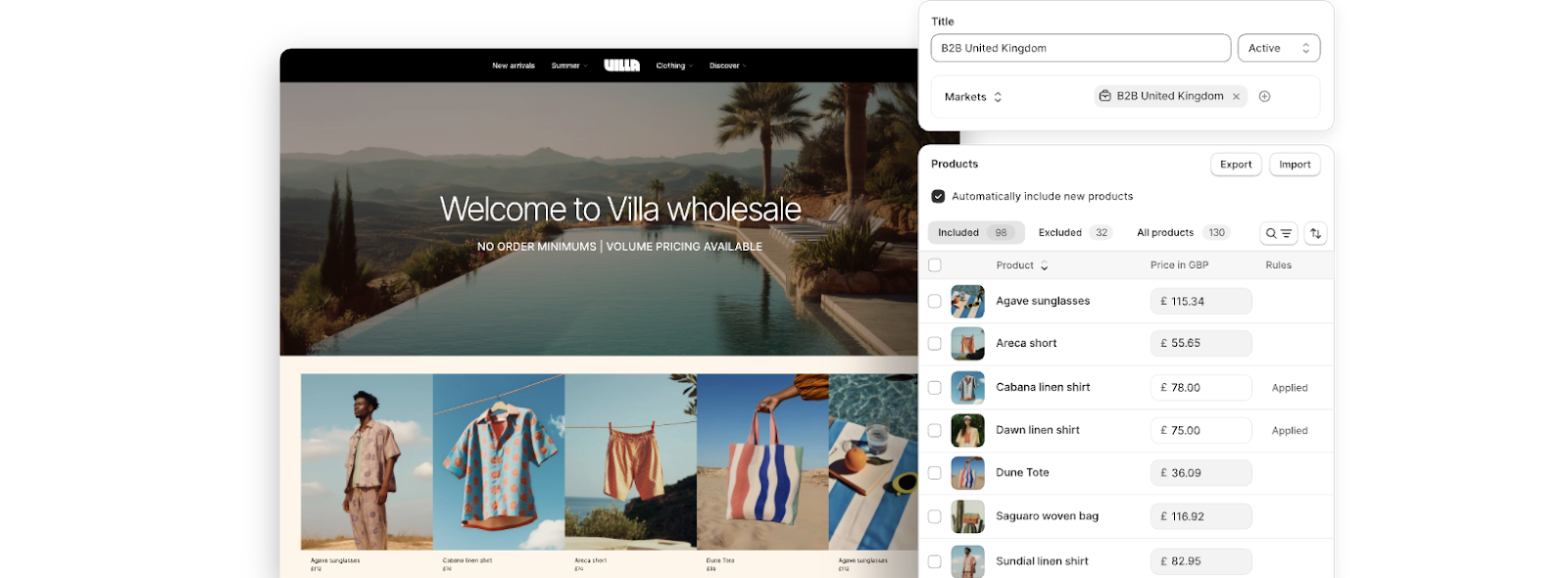
Shopify Markets is a feature that lets you create and manage distinct markets, each with its own selling rules. A market can be a region, a country, or a customer segment, so you can tailor the buying experience for different audiences within a single store.
Key capabilities include:
-
Configure up to 50 active markets on Shopify Plus (3 on other plans)
-
Assign multiple legal entities for region-specific tax and invoicing
-
Localised pricing in multiple currencies, using automatic or custom rates
-
Market-specific product assortments and translations
-
Custom payment methods, shipping rules, and duties/taxes at checkout
-
Regional domains or subfolders for SEO and compliance
Value for high-growth and enterprise brands
-
Serve multiple regions from one store – Manage up to 50 active markets without building separate stores, streamlining operations and reducing maintenance overhead.
-
Maintain a unified brand experience across regions – Keep the same store design and core content while adapting language, currency, payment methods, and tax rules for each market.
-
Improve speed to market – Configure a new market in days rather than building and maintaining a separate store, reducing time to revenue.
Limitations
-
Limited merchandising control – Content and campaigns cannot be fully customised per market beyond translations and small adjustments, which can reduce local marketing effectiveness.
-
No independent performance isolation – Because all markets run from one storefront, any technical issues, downtime, or changes affect every region simultaneously.
Real-world case study
Bydee, a Sydney-based swimwear and resort wear brand, used Shopify Markets to localise currencies, languages, and delivery options for international shoppers, while complementing it with a US expansion store for deeper customisation. This hybrid strategy helped Bydee achieve 189% global sales growth in two years, including a 500% increase in the US, alongside a 26% uplift in average order value.
How to get it without Plus: Cost, complexity, and compromises
Shopify Markets is included on all Shopify plans. On Basic, Grow, and Advanced, you can create up to 3 active markets for free. Expanding beyond this limit requires paying $59/month per additional market (up to a maximum of 50). These plans also do not support multiple legal entities and provide a narrower set of localisation options compared to Plus.
To achieve more advanced localisation, you may still need apps such as Weglot or Langify for content translation ($20–$35/month), Auto Currency Switcher for currency conversion ($11–$19/month), and Zonos or Avalara for duties and tax at checkout ($25–$65/month).
At scale, this can mean running several apps alongside additional market fees, leading to higher monthly costs, more vendor relationships to manage, and potential inconsistencies in pricing or tax logic across regions.
Expanding across regions introduces challenges around pricing, tax, fulfilment, and governance. With our Shopify Plus development service, we help you implement internationalisation strategies that reduce operational friction while supporting growth in every market.
4. Advanced checkout customisability to boost conversions
What it is and how it works
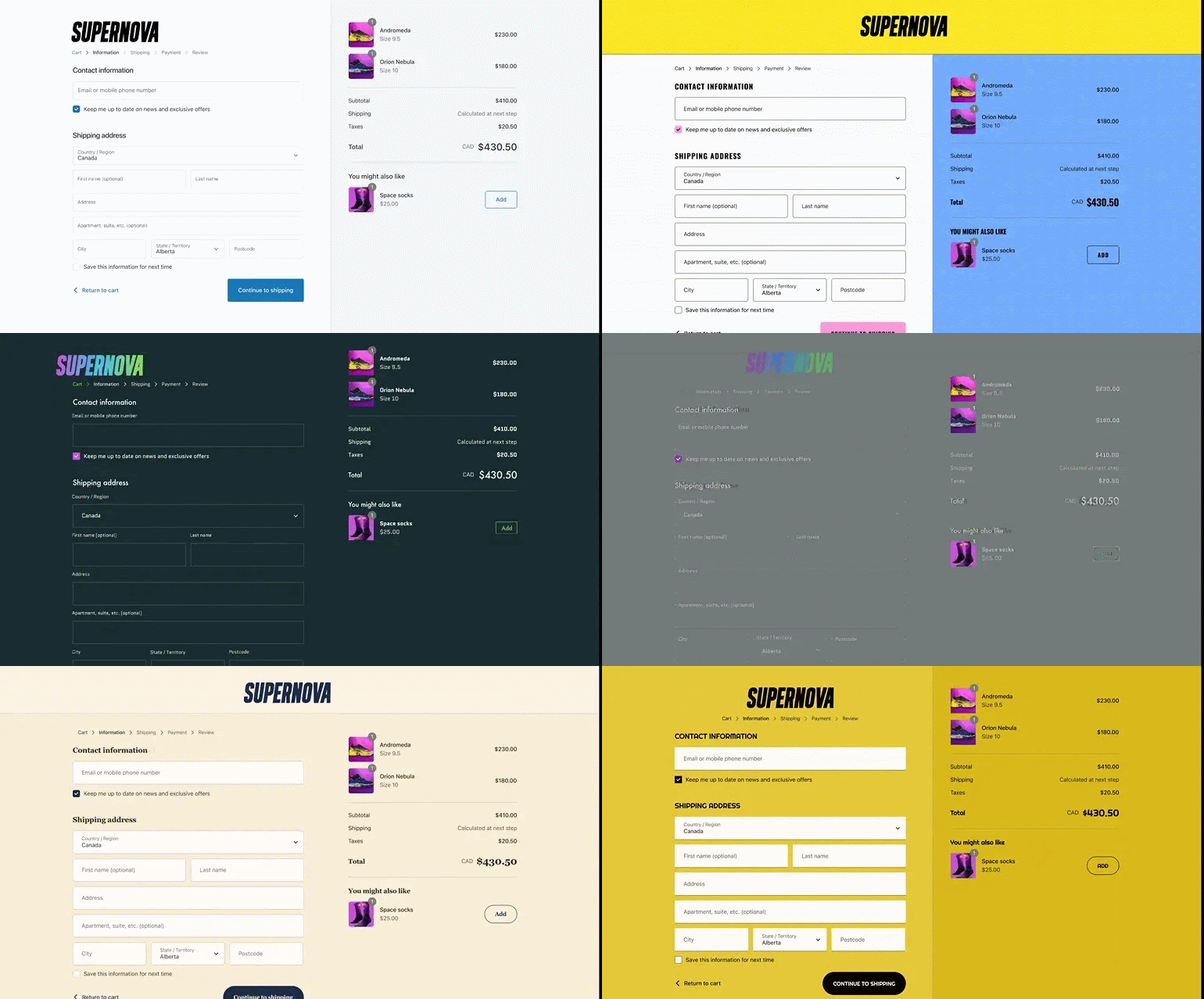
Advanced checkout customisability on Shopify Plus allows you to adapt the checkout experience for different customer types, markets, and operational requirements, all while keeping performance, security, and upgrade compatibility.
Key capabilities:
-
Custom design – Add elements such as banners, extra fields, or promotional blocks through Checkout Extensibility, and apply market-specific branding or messaging for different regions or buyer segments.
-
Custom logic – Use Shopify Functions to control discount rules, shipping rates, and payment routing directly within checkout.
-
Other enhancements – Enforce validation rules such as VAT ID checks or delivery restrictions, and insert targeted messages or upsells to build trust and increase order value.
Value for high-growth and enterprise brands
-
Increase conversion rates with the most relevant payment options, delivery choices, and trust signals for each purchase context, reducing hesitation and abandoned checkouts.
-
Maintain brand consistency at every touchpoint by carrying your visual identity and tone seamlessly through to the final purchase stage.
-
Support varied sales models by enabling distinct checkout designs, content, and rules for multiple customer types or markets within a single store.
Limitations
-
Customisation is limited to Shopify’s predefined extension points, and implementing advanced designs or logic within those boundaries typically requires development investment.
Real-world case study
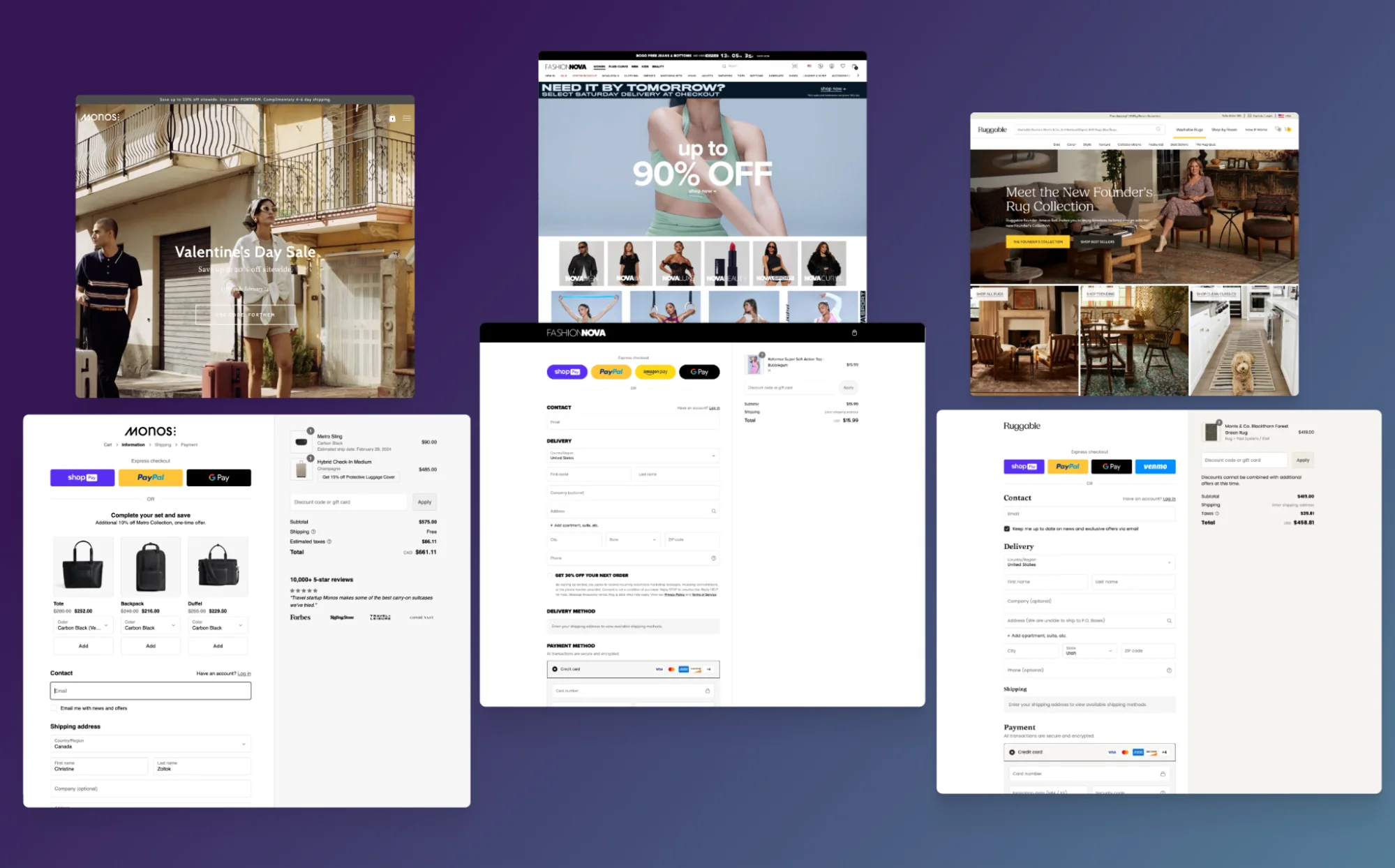
Monos, a Canadian travel brand with four online stores, used Shopify Plus’s Checkout Extensibility to make no-code design changes, add upsells and custom add-ons like shipping insurance, and integrate seamlessly with Shop Pay. The upgrade saved the team over 10 hours of development time each month, delivered a consistently faster checkout, and supported a higher-converting experience with Shop Pay, converting up to 50% better than guest checkout.
How to get it without Plus: Cost, complexity, and compromises
On Basic, Grow, or Advanced plans, checkout customisation is restricted to basic branding changes such as logo, colours, and fonts. While some third-party apps can add enhancements like upsell modules (e.g., ReConvert, In Cart Upsell & Cross-Sell) or extra form fields (e.g., HulkApps Custom Order Fields), these changes are confined to the limited placements and functions allowed in the standard checkout. Because Shopify does not expose deeper checkout controls on these plans, neither apps nor custom development can replicate the capabilities available through Checkout Extensibility on Plus.
5. Shopify Functions for custom business logic
What it is and how it works
Shopify Functions let you replace or extend Shopify’s default logic for handling key commerce workflows. Unlike traditional third-party apps that run on external servers, Functions run natively within Shopify’s infrastructure, so they execute instantly even at high traffic.
They can be applied to a range of scenarios: creating advanced discount rules such as tiered pricing, bundles, or “buy X get Y” offers; adjusting shipping rates based on order size, region, or customer group; controlling which payment methods display for certain products or markets; enforcing cart and checkout rules like order minimums or restrictions; and routing orders to specific warehouses or fulfilment partners.
Value for high-growth and enterprise brands
-
Unlock operational agility by adapting core platform logic to fit unique business models without maintaining external scripts or servers.
-
Reduce app dependency by handling promotions, shipping rules, and payment routing natively within Shopify.
-
Optimise margins by setting precise rules for discounts and shipping rates that protect profitability across regions and channels.
Limitations
-
Requires developer expertise to design, build, and maintain custom Functions.
-
Some business scenarios may still need complementary apps or integrations if Shopify has not yet exposed the relevant function points.
Real-world case study
Pilgrim, a fast-growing Indian beauty brand, utilised Shopify Functions on Plus to power custom checkout logic, including charging cash-on-delivery fees, displaying valid coupons, and verifying serviceable pin codes before accepting orders. Running these rules natively on Shopify’s infrastructure allowed them to handle over 1,500 transactions per minute without downtime, achieving a 22.4% conversion rate during flash sales and doubling year-on-year revenue.
How to get it without Plus: Cost, complexity, and compromises
On Basic, Grow, or Advanced plans, merchants are limited to public apps built with Shopify Functions. These apps provide predefined logic, such as discount rules or shipping calculators, but cannot be customised or extended to meet unique requirements as they can on Plus.
There are two approaches to replicate Shopify Functions capabilities without Plus:
-
Public Shopify apps: Apps such as Discount Ninja (advanced promotions), Wholesale Pricing Discount (B2B catalogues), and Advanced Shipping Rules (custom shipping conditions) provide pre-built logic. Typical costs range from $10–$50 per app per month, and a full setup may require 2–4 apps ($30–$100/month).
Compromises: -
They may not fully match the flexibility or performance of Shopify Functions.
-
Logic runs outside Shopify’s backend, potentially causing slower execution or inconsistency during peak traffic.
-
You’ll be managing multiple apps, which increases complexity and the risk of configuration errors.
-
Custom app development: If you need an equivalent of business logic without Plus, you'd need to build a custom app to mimic Functions.
Compromises: -
Development costs range from several thousand to tens of thousands of dollars, depending on the complexity.
-
Ongoing maintenance overhead for updates, testing, hosting, and security can add thousands per year.
6. Shopify Flow to automate workflows at scale
What it is and how it works
Shopify Flow is an automation tool that enables you to create workflows that run automatically based on store events, conditions, or schedules. Workflows can respond to triggers such as new orders, inventory changes, or customer actions, and apply rules to decide when actions should run. Once triggered, Flow can execute tasks like tagging orders, updating stock levels, sending customer alerts, or notifying internal teams.
Flow is included on all paid Shopify plans, but Shopify Plus unlocks advanced automation and multistore capability. On Shopify Plus, Flow can integrate with custom apps and partner tools to handle more complex use cases such as pushing wholesale orders to an ERP, creating support tickets, or syncing VIP customer data with marketing platforms. Workflows can also be applied across multiple stores through the Organization Admin.
Value for high-growth and enterprise brands
-
Increase efficiency by automating repetitive processes across multiple stores from one dashboard.
-
Improve accuracy by reducing human error in key workflows such as order handling and inventory management.
-
Respond more quickly to events with instant triggers for time-sensitive actions such as fraud checks or priority handling for VIP orders.
-
Enhance customer experience through timely, consistent communication and personalised engagement.
Limitations
-
More complex workflows may require a developer or automation specialist to design and implement them effectively.
Real-world example
Doe Beauty, formerly known as Doe Lashes, uses Shopify Plus along with Shopify Flow and other automation tools to handle approximately 80% of its operational tasks automatically. This allows the six-person team to dedicate more time to creative strategy and growth initiatives. As a result, Doe Beauty has achieved a 5% increase in average order value and reduced manual work by around four hours per week through automated processes.
How to get it without Plus: Cost, complexity, and compromises
On lower plans, Flow is limited to Shopify’s built-in triggers and actions, and can only automate processes within a single store.
Merchants who need cross-store automation or external integrations must use third-party tools such as Mechanic ($9–$99/month) or Arigato Automation ($15–$50/month). These apps can extend automation but add extra cost, setup time, and a higher risk of inconsistencies compared to the native multistore capabilities available on Plus.
7. Shopify Launchpad for scheduled campaign execution
What it is and how it works
Shopify Launchpad is an automated campaign scheduler available exclusively to Shopify Plus merchants. It enables the scheduled execution of key actions such as adjusting product pricing, publishing products to sales channels, increasing inventory, applying creative and theme changes, scheduling checkout scripts, enabling password protection before events, and tracking performance with real‑time analytics.
Value for high-growth and enterprise brands
Launchpad ensures campaigns run precisely and reliably, which is vital for high‑stakes events such as flash sales or coordinated global launches. It allows teams to shift focus from manual execution to strategic marketing, customer engagement and demand fulfilment
Limitations
Launchpad only executes according to predetermined schedules and does not adapt dynamically to performance. For workflows requiring logic such as “if stock runs low, then…”, merchants need to integrate Launchpad with tools such as Shopify Flow.
Real-world case study
Cozykids used Launchpad alongside Shopify Flow to automate a themed campaign for the Moon Landing anniversary, including overnight changes to theme, styling, and branding. The campaign delivered a 40% increase in site traffic, an 82% rise in revenue during the event, and significantly reduced manual workload and human error by automating updates across the store.
How to get similar features without Plus: Costs, complexity and compromises
-
Option 1 – Public third-party apps: Use apps such as Product Scheduler, Theme Switcher, or Discount Timer to replicate automation. Costs range from $10 to $50/month per app, with 2–3 apps often required, totalling $20 to $100/month.
-
Option 2 – Manual execution: Plan changes in advance and have staff manually push updates at the right moment. This avoids app costs but increases labour overhead and the risk of timing errors, especially for multi-region events.
8. Shopify Audiences for high-intent ad targeting
What it is and how it works
Shopify Audiences is an AI-powered advertising tool available exclusively to Shopify Plus merchants using Shopify Payments (Shopify’s built-in payment processing system) in the U.S. and Canada. It leverages anonymised, aggregated purchase data from participating Shopify stores to build high-quality prospect lists matched to your products. These audiences are seamlessly exported to ad platforms like Meta, Google, TikTok, Pinterest, Snapchat, and Criteo for more effective targeting or exclusion. You can automatically generate lookalike audiences and tailored retargeting lists to drive higher conversions.
Value for high-growth and enterprise brands
-
Improve ad efficiency by targeting shoppers with high purchase intent, reducing wasted spend on low-quality impressions.
-
Lower customer acquisition costs by focusing the budget on people more likely to buy. Shopify reports that Audiences v2.4 can lower cost per acquisition by up to 50%.
-
Boost retargeting results with curated lists that outperform standard pixel-based retargeting. For example, “Retargeting Boost” lists have been shown to deliver up to 2× conversion efficiency compared to conventional retargeting methods.
Limitations
-
Geographic limitations: Only Plus merchants in the U.S. and Canada using Shopify Payments can access Audiences, limiting its utility for global or multi‑region businesses.
-
Requires participation in data sharing: Brands must opt into Shopify Network Intelligence, meaning anonymised purchase data is shared—this may require internal privacy and compliance review.
-
Relies on ad platform setup: Audience performance depends on accurate implementation in destination platforms, demanding thorough technical execution and oversight.
Real-world case study
BUBS Naturals leveraged Shopify Audiences to reach more qualified buyers with less competition, exporting high-intent lists to ad platforms for targeting and lookalikes. This approach achieved up to 3× return on ad spend (ROAS), doubled site conversion rates, increased direct-to-consumer revenue by 10%, and maintained an 84% repeat customer rate.
How to get similar features without Shopify Plus: Costs and compromises
Brands not on Plus can still build lookalike and retargeting audiences using first-party data (email lists, pixel tracking, CRM) or third-party tools like Facebook’s Business Manager or Audience tools from platforms like Klaviyo.
-
Cost: Expect standalone audience suites or agency tools to charge $500–$2,000/month, plus ad spend.
-
Compromises: These methods lack Shopify’s rich purchase-intent insights, offer smaller audience pools, and require manual list management, resulting in less precision and higher labour demands.
9. Shopify POS Pro for unified online and in-store selling

What it is and how it works
Shopify POS Pro is Shopify’s most advanced point-of-sale system, available to Shopify Plus merchants with up to 20 POS Pro locations included in the plan.
It unifies online and in-store sales by syncing products, inventory, orders, and customer data in real time. Key capabilities include omnichannel inventory tracking, in-store pickup and ship-from-store, advanced staff permissions, flexible exchange and receipt options, and integrated customer profiles that show purchase history across online and retail.
It runs on iOS or Android devices using Shopify’s POS app and works with a range of compatible hardware, such as barcode scanners, receipt printers, and Shopify’s payment terminals.
Value for high-growth and enterprise brands
-
Cost-efficient retail expansion – POS Pro for up to 20 locations is included in Plus, removing one of the biggest recurring software costs when scaling a retail network.
-
Unified sales and operations – POS Pro is fully integrated with Shopify’s online store, so sales, inventory, and customer data remain consistent across channels and locations.
Limitations
-
Hardware readiness for Shopify POS Pro – POS Pro requires compatible devices and peripherals. Merchants with legacy or unsupported hardware may face extra costs and slower rollout.
Real-world case study
Slam Jam, connected its flagship store and online operations with Shopify POS Pro to enable ship-from-store, in-store pickup, and profile-driven service. This integration increased daily orders by 15%, reduced operational costs by 50%, and improved the speed and personalisation of in-store experiences.
How to get it without Plus: Cost, complexity, and trade-offs
On Basic, Shopify, or Advanced plans, POS Pro is available only as a paid add-on at $89/month per location. Merchants also need to handle hardware purchases and integrations independently. As store count grows, managing separate POS licenses and aligning them with online operations adds recurring costs and operational overhead.
10. Shopify Organization Admin for centralised multi-store management
What it is and how it works
Shopify Organization Admin is a Plus-only feature that centralises multi-store management in one dashboard. It lets merchants create unlimited staff accounts, set granular role-based permissions, apply templates across stores, switch between stores without separate logins and view cross-store analytics to reduce the complexity of managing large teams and multiple storefronts.
Value for high-growth and enterprise brands
-
Support large teams efficiently by giving the right people the right level of access without worrying about account limits.
-
Streamline multi-store operations by managing permissions, switching between stores, and reviewing key metrics from a single login.
-
Improve security and compliance with granular, role-based access controls applied consistently across stores.
Limitations
-
Does not currently allow centralised product or content management; these remain store-specific unless integrated with third-party tools.
How to get it without Plus: Cost, complexity, and compromises
Basic, Grow, and Advanced plans do not include Organization Admin. Each store must be managed separately with its staff account limits (Grow: 5 staff accounts, Advanced: 15 staff accounts) and no centralised permissions or cross-store view.
Merchants managing multiple stores can use third-party tools such as Matrixify or Multi Store Sync Power ($20–$100+/month) to sync certain settings, but these cannot replicate the native, organisation-wide access control and store-switching convenience of Plus.
11. Advanced API access & rate limits for enterprise-scale integrations
What it is and how it works
Shopify Plus gives merchants access to higher API rate limits and exclusive endpoints, compared to other standard plans. This is vital for high-volume data syncs and integrations with ERPs, CRMs, or fulfilment systems.
Plus-only endpoints include Multipass (single sign-on), Gift Card API, and User API, enabling advanced scenarios like automated user management and digital voucher workflows. Plus also benefits from prioritised webhook delivery and even staging environments for integration testing.
Value for high-growth and enterprise brands
-
Support enterprise-scale integrations by syncing large volumes of data quickly and reliably.
-
Enable advanced functionality such as single sign-on for customer accounts, custom staff management tools, or automated gift card distribution.
-
Maintain operational continuity during peak sales periods with reduced risk of API throttling.
Limitations
-
Requires in-house or partner development expertise to build and maintain custom integrations.
-
High-volume API usage may still need monitoring to avoid exceeding even Plus-level limits during extreme peaks.
How to get it without Plus: Cost, complexity, and compromises
On non-Plus plans, merchants can still integrate with external systems via Shopify’s public APIs, but may face slower sync speeds, rate limiting during high-volume operations, and no access to Plus-only endpoints. Some third-party integration platforms, such as Zapier, Make (Integromat), or Celigo, can help optimise API usage but cannot unlock the higher limits or restricted APIs available to Plus.
12. Dedicated support with Launch Engineer and Merchant Success Manager
What it is and how it works
Shopify Plus provides dedicated account management and priority support to help high-growth brands plan, launch, and scale effectively. This includes access to a Launch Engineer during onboarding, who works with your team to coordinate technical setup, integrations, and go-live timelines. After launch, ongoing strategic guidance is provided by a Merchant Success Manager (MSM), who helps identify growth opportunities, connects you with vetted partners, and ensures you’re leveraging Shopify Plus features to their fullest.
Value for high-growth and enterprise brands
-
Reduce time to market by having a single point of contact manage onboarding milestones, technical dependencies, and integrations.
-
Minimise operational risk during launch by having experienced specialists oversee store setup, data migration, and checkout configuration.
-
Continuously improve ROI on Plus by working with an MSM to identify new feature adoption opportunities, streamline workflows, and access exclusive beta programs.
Limitations
-
Dependency on assigned personnel – The effectiveness of support depends on the experience and responsiveness of the assigned Launch Engineer and MSM, which can vary.
-
Not a full project management service – While support is strategic, merchants still need internal or agency resources to execute development, design, and marketing work.
How to get similar support without Shopify Plus: Costs, complexity and compromises
Without Plus, merchants typically rely on agencies, consultants, or app vendors for launch and optimisation support. The challenge is that without a Launch Engineer or Merchant Success Manager to escalate issues directly inside Shopify, resolution can be slower and requires more internal coordination.
It is worth noting that while Plus provides dedicated Shopify-side support, it does not cover the full scope of project execution. Agencies or internal teams are still required for development, design, marketing, and long-term optimisation. In practice, Shopify’s support is most effective when complemented by agency or in-house expertise, rather than acting as a replacement.
13. Support for up to 25 headless storefronts
What it is and how it works
Shopify Plus supports up to 25 headless storefronts, enabling you to build fully custom front ends while relying on Shopify’s back end for commerce functions like product management, checkout, order processing, etc. These storefronts can be developed using modern frameworks such as React, Vue, or Next.js, and powered by the Shopify Storefront API for product, cart, and checkout functionality.
For a native development and hosting approach, Shopify offers Hydrogen, a React-based framework optimised for commerce, together with Oxygen, its global edge hosting platform. This integrated solution delivers high performance, global scalability, and a streamlined development-to-deployment pipeline.
Value for high-growth and enterprise brands
The ability to run up to 25 headless storefronts from one Shopify Plus backend lets brands launch unique regional, brand-specific, or campaign-driven experiences without duplicating core systems. This supports faster innovation, improved performance, and more tailored customer journeys across markets.
Limitations
-
Building and maintaining headless storefronts requires significant developer expertise, including front-end framework knowledge and API integration skills.
-
Each custom front-end needs its own content management, performance monitoring, and testing workflows, which can increase ongoing operational overhead.
Real-world case study
Taschen rebuilt its international webshop on Shopify Plus using a headless architecture. The project went live in just five months, launching in five languages. Since launch, TASCHEN has achieved 20% year-on-year revenue growth, a 12% increase in orders, and a 6% rise in average order value. Shopify Plus now serves as the control centre of its online business, unifying channels and supporting future B2B expansion.
How to get it without Plus: Cost, complexity, and compromises
On Basic, Grow, or Advanced plans, merchants can still build a headless storefront using the Storefront API and host it on Hydrogen with Oxygen or on third-party platforms like Vercel or Netlify. However, a single Shopify backend can only power one headless storefront.
To launch multiple regional or brand-specific headless sites, merchants would need to maintain separate Shopify accounts (from $39 to $399 per month each) and pay hosting costs for each build. This increases operational complexity, as catalogues, orders, and integrations must be managed across multiple systems, and raises the risk of inconsistent experiences without a unified backend.
14. 99.99% uptime SLA and enterprise-grade security
What it is and how it works
Shopify Plus runs on fully managed, cloud-based infrastructure built for enterprise traffic and high transaction volumes. It supports over 10,000 checkouts per minute per store, offers 99.99% SLA-backed uptime, and automatically scales resources during traffic spikes. A 300+ node CDN ensures fast global page loads, while PCI DSS Level 1 compliance and DDoS protection provide enterprise-grade security. Hosting is fully managed, with no server setup or maintenance required.
Value for high-growth and enterprise brands
-
Reliably handle peak demand during major campaigns without downtime, preserving revenue and customer trust.
-
Deliver consistent speed worldwide so customers enjoy a fast, responsive site no matter where they are located.
Limitations
Merchants cannot directly configure hosting or server settings, which means all performance and security optimisation must be done within Shopify’s provided tools and APIs. While this simplifies management for most brands, it reduces flexibility for enterprises with highly customised infrastructure strategies or niche performance requirements.
Real-world case study
Gymshark relies on Shopify Plus infrastructure to handle massive global peaks without downtime. During Black Friday, the brand processed thousands of orders per minute while maintaining a seamless shopping experience for millions of visitors worldwide
How to get it without Plus: Cost, complexity, and compromises
Merchants on Basic, Grow, or Advanced have no contractual uptime guarantee and must rely on Shopify’s standard service commitments. To replicate Plus-level assurance, you would need to set up your hosting redundancy or failover arrangements, adding both cost and operational complexity.
Full Shopify Plus overview: Complete feature set and how it compares with other plans
You’ve already seen how Shopify Plus adds advanced features and advantages on top of Shopify’s core functionality. This section brings those advantages together with the standard features available on all plans, so you can see the full picture in one place.
While the main focus is to review the Shopify Plus plan features, we’ve also included a plan comparison table so you can see which capabilities are exclusive to Plus and which are shared with other plans. This helps you assess whether those built-in benefits justify the Plus investment for your business, or if a lower plan supplemented with third-party solutions would be sufficient.
Shopify Plus vs other Shopify plans: Detailed comparison
|
Features and capabilities |
Basic |
Grow |
Advanced |
Plus |
|
Staff accounts |
1 |
5 |
15 |
Unlimited |
|
Inventory locations |
10 |
10 |
10 |
200 |
|
Shopify Markets (active markets) |
3 |
3 |
3 (expandable to up to 50 at $59/month per additional market) |
50 |
|
Native B2B suite |
Core B2B features; up to 3 active B2B market catalogues |
Core B2B features; up to 3 active B2B market catalogues |
Core B2B features; up to 3 catalogues + contextual storefront and checkout experiences |
Unlimited B2B catalogues, direct company catalogue assignment, deposits, partial payments, and payment requests per fulfilment |
|
Expansion Stores |
✘ |
✘ |
✘ |
Up to 9 additional storefronts |
|
Checkout customisation |
Basic branding & Thank You page |
Basic branding & Thank You page |
Basic branding & Thank You page |
Full Checkout Extensibility, Shopify Functions, Branding API |
|
Shopify Functions |
Public apps only |
Public apps only |
Public apps only |
Public & private apps, Plus-only extension points |
|
Shopify Flow automation |
Single-store automation |
Single-store automation |
Single-store automation |
Cross-store automation via Organization Admin |
|
Launchpad campaign scheduling |
✘ |
✘ |
✘ |
✔ |
|
Shopify Audiences |
✘ |
✘ |
✘ |
✔ |
|
POS Pro |
Add-on |
Add-on |
Add-on |
20 locations included |
|
Organization Admin |
✘ |
✘ |
✘ |
Centralised staff, apps & permissions |
|
API access & rate limits |
Standard limits |
Standard limits |
Standard limits |
Elevated limits, Plus-only endpoints |
|
Headless storefronts |
1 |
1 |
1 |
25 |
|
Security & uptime |
Standard |
Standard |
Standard |
99.99% SLA, SSO, bot protection |
How does Shopify Plus pricing compare with other plans?
Price is another important part of the comparison. At current US pricing when billed annually, Basic starts at $29/month, Grow at $79/month, and Advanced at $299/month, while Shopify Plus starts at $2,300/month on a three-year term. Pricing varies by region and contract terms, but the gap shows why businesses should compare both Shopify Plus plan features and total platform cost when evaluating the options.
For a more detailed breakdown of fees, transaction costs, and value at each tier, see our full Shopify pricing comparison guide.
What's next for Shopify Plus? Future updates and roadmap insights
Choosing an eCommerce platform is as much about its future trajectory as its current feature set. Shopify Plus evolves continuously through Shopify Editions and core platform updates, adding enterprise-grade capabilities that strengthen scale, governance, and localisation while reducing reliance on custom development.
Shopify’s 2026 roadmap is increasingly focused on AI-driven commerce, broader B2B capabilities, stronger localisation, and more scalable developer tools for high-growth and enterprise merchants.
-
AI and agentic commerce – Shopify Catalog, UCP, and Storefront MCP are expanding how products can be discovered and purchased through AI-powered experiences.
-
More advanced B2B controls – With core B2B now available across plans, Plus differentiates through unlimited catalogues, direct company catalogue assignment, and advanced payment options.
-
Stronger Markets capabilities – Shopify continues to expand market-level control over pricing, products, channels, shipping, and regional selling rules.
-
More flexible analytics – ShopifyQL and new analytics APIs give teams more ways to query, embed, and extend Shopify data.
-
Scalable APIs and extensibility – Faster bulk operations, expanded GraphQL capabilities, and continued investment in Shopify Functions support larger integrations and high-volume workflows.
Conclusion: Is Shopify Plus worth the investment?
This article has examined Shopify Plus alongside Shopify’s standard plans and its upcoming roadmap, highlighting where Plus adds enterprise-grade capabilities beyond the shared core features.
Shopify Plus proves most valuable once your business reaches a scale or complexity that standard plans and third-party apps can no longer support. If you are expanding across regions, running both B2B and DTC, or need advanced automation and governance, Plus can deliver more long-term value than lower tiers. For smaller operations with simpler needs, Advanced or lower plans may remain the more cost-efficient choice.
If you are considering the move to Shopify Plus, On Tap can help you make the most of your investment. As a trusted agency with 19+ years of experience, we deliver end-to-end Shopify Plus development services, tailored to high-growth, high-volume brands. Contact us to discuss how we can help you achieve your Shopify Plus goals.