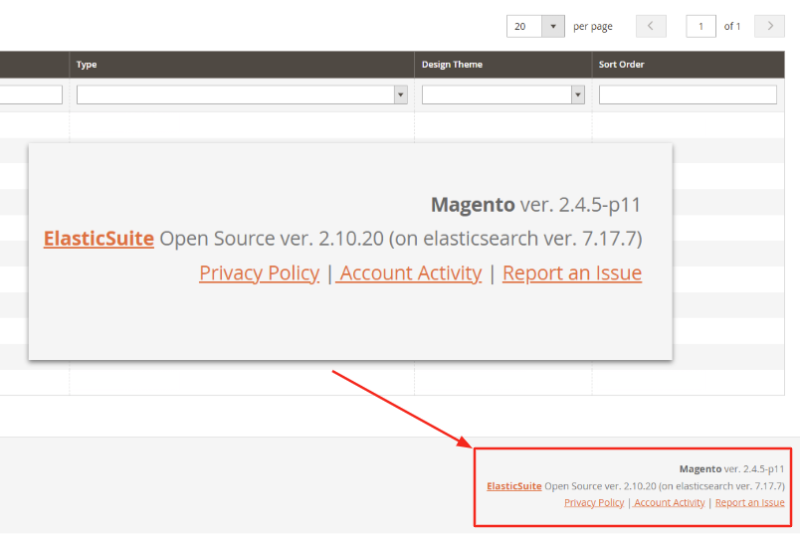
Adobe Commerce B2B (formerly Magento B2B) is the native suite of business-to-business capabilities built into Adobe Commerce (previously known as Magento Enterprise Edition). These capabilities are exclusive to Adobe Commerce and are not available in Magento Open Source.
Adobe Commerce B2B provides advanced functionality to manage complex organisational purchasing structures and negotiated sales processes. It includes multi-buyer company accounts with role-based permissions and approval workflows, custom catalogues and price lists, request-for-quote (RFQ) management, and purchase-order-based checkout.
In this guide, we’ll break down its features, costs, and overall suitability to help you determine whether Adobe Commerce B2B is the right fit for your business.
Core features of Adobe Commerce B2B
Adobe Commerce B2B offers a robust set of features designed to streamline B2B sales processes, enhance the enterprise-grade customer experience, and boost operational efficiency. Here are the core features to know.
A summary table of Adobe Commerce B2B features and business benefits
|
Core features |
Feature description |
Benefits |
|
1. Multi-user company accounts |
Manages company accounts with multiple users, supporting parent–child hierarchies, role-based permissions, approval workflows, and automated onboarding. |
Accurately reflects business structures, ensures purchase control, speeds up onboarding, and builds long-term enterprise relationships. |
|
2. Shared catalogues & custom pricing |
Creates dedicated catalogues for specific customers or groups with custom pricing (fixed price, percentage discount, tiered pricing). |
Delivers personalised buying experiences, drives bulk orders, boosts revenue, and improves profitability. |
|
3. Negotiable quotes & reusable templates |
Supports Request for Quote (RFQ) with online price negotiation, status tracking, and reusable quote templates for repeat orders. |
Shortens sales cycles, increases transparency, saves time on recurring deals, and strengthens buyer trust. |
|
4. Flexible B2B payments (POs, credit) |
Allows checkout via Purchase Orders, extends company credit limits, and tracks balances in real time. |
Improves cash flow, reduces credit risk, provides flexibility, and ensures procurement compliance. |
|
5. Requisition lists & quick order |
Enables buyers to save frequently purchased items in requisition lists and place quick orders via SKU entry or CSV upload. |
Speeds up reordering, reduces sales team workload, increases order frequency, and boosts retention. |
1. Multi-user company accounts management
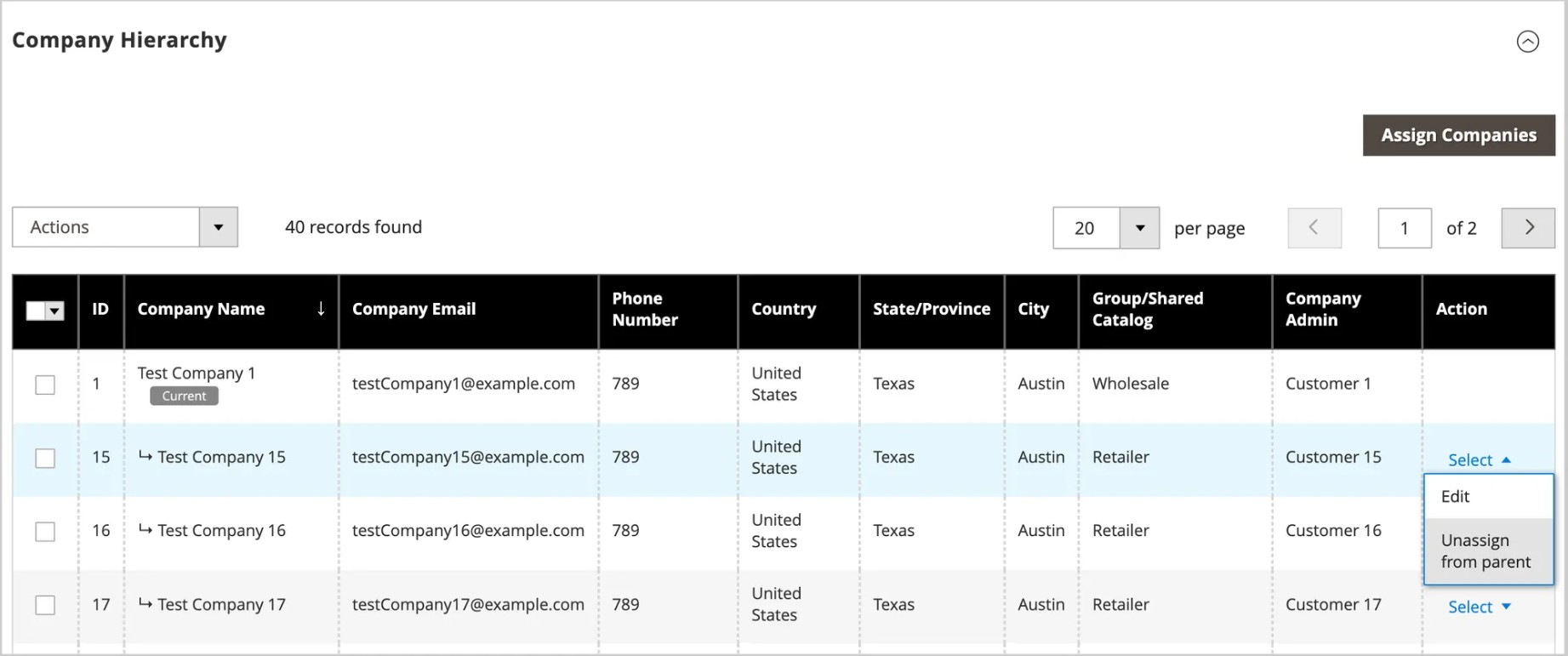
Adobe Commerce B2B provides the ability to create and manage multi-user company accounts in a centralised admin grid.
How the feature works:
-
Company account creation:
-
-
Storefront registration: Customers can create their own company account directly from the storefront by submitting company details, legal address, and administrator information. The request must then be reviewed and approved by the store admin before the account becomes active.
-
Admin creation: Store administrators can set up a company account directly from the Admin panel. This method allows them to preconfigure settings such as status, credit limit, customer group, and available payment or shipping methods, with the option to activate the account immediately or keep it pending approval.
-
-
Organisational hierarchy that mirrors real business structure & relationships: In the Admin, companies can be organised in a parent–child hierarchy, while standalone accounts remain as single companies. Once set up, the parent company administrator gains oversight of all assigned subsidiaries. This structure supports complex organisations such as franchises, subsidiaries, and multi-location businesses by combining local autonomy with central governance.
-
Role-based access control and streamlined approval workflows: Within each company account, the buyer’s company administrator defines roles such as buyer, approver, or procurement manager and assigns specific permissions to each. They can also configure approval workflows, for example, requiring senior approval on high-value purchase orders before they are submitted.
-
Automated onboarding communications: Once a company account is approved, Adobe Commerce automatically sends a welcome email with secure password setup for the designated company admin. This process is important when dealing with enterprise buyers who expect a seamless and secure start to their digital procurement journey.
Business impact: The multi-user company account capability enables merchants to efficiently manage complex B2B relationships while reducing operational overhead.
-
Streamlined corporate account management: Merchants can manage all B2B company accounts and hierarchies from a single, centralised grid—ensuring consistent account setup, permissions, and purchasing policies across complex organisational structures. This scalable model allows merchants to handle more B2B clients without increasing workload.
-
Faster onboarding and sales conversion: Automated approval and onboarding workflows shorten the time from account registration to first purchase, helping sales teams accelerate deal closure and improve pipeline efficiency.
-
Reduced order errors and support costs: By enabling clearly defined roles and permissions within buyer companies, merchants experience fewer order disputes, miscommunications, and unauthorised purchases—leading to lower customer support overhead.
-
Improved customer retention: Giving B2B clients autonomy to manage their internal users, roles, and order approvals enhances convenience and trust. This self-service flexibility builds stronger, longer-term relationships with business customers.
2. Shared catalogues with custom pricing and structure
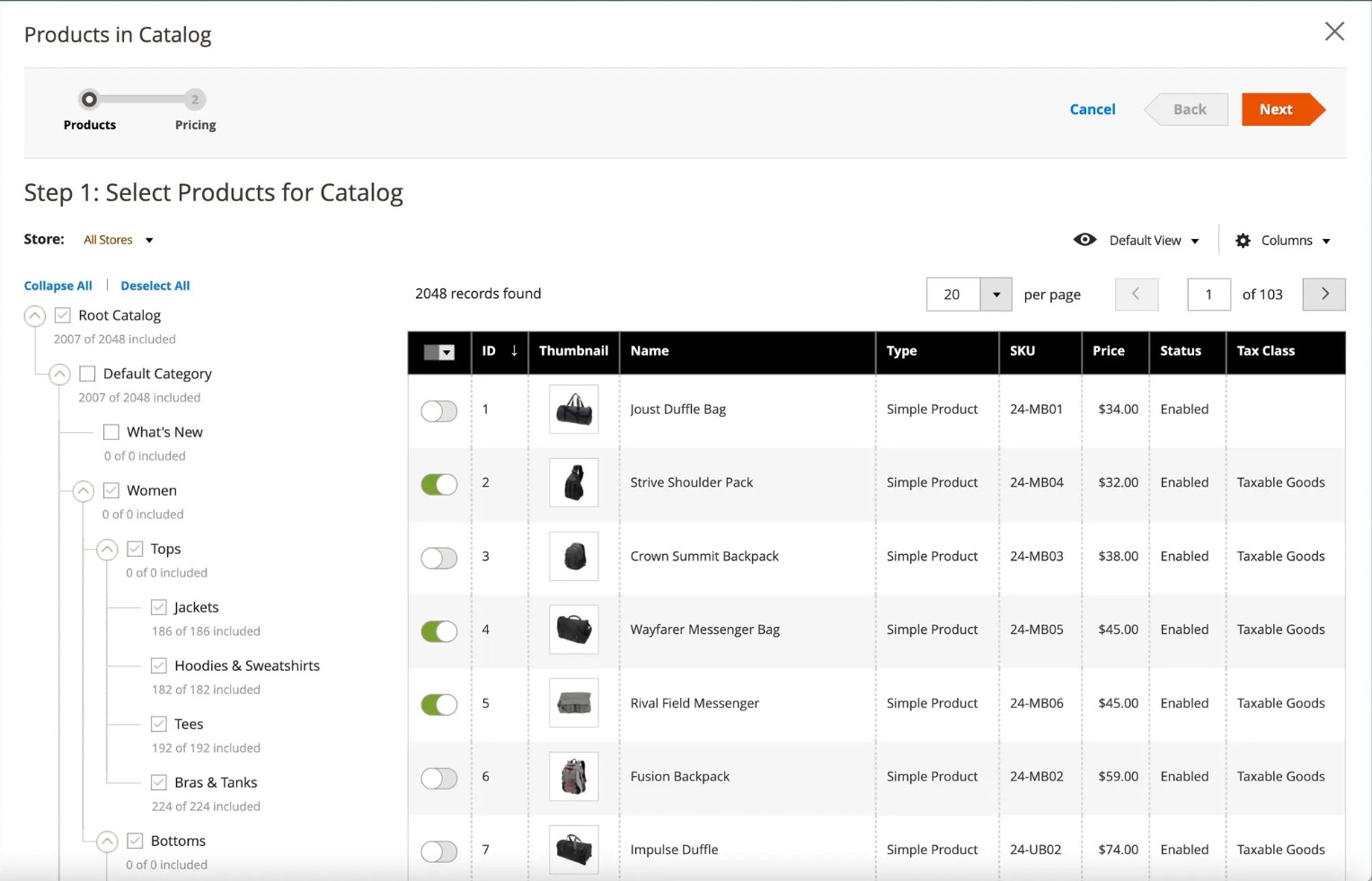
With shared catalogues in Adobe Commerce, merchants can define custom catalogue views and set pricing adjustments across multiple product records.
How the feature works:
-
Dedicated product ranges and catalogue structure: Shared catalogues in Adobe Commerce B2B allow merchants to assign specific products to a catalogue and structure them in a way that reflects client needs or business agreements. Each catalogue can have its own set of products, categories, and access permissions, ensuring that only the intended buyers or buyer groups see the relevant assortment.
-
Custom pricing options in shared catalogues: Within each shared catalogue, merchants can define custom product prices that differ from the store’s default pricing. Adobe Commerce supports several pricing methods:
-
Fixed price: Assign a specific price to a product, regardless of the base catalogue price.
-
Percentage discount: Apply a percentage-based reduction from the product’s base price.
-
Tier pricing: Set quantity-based price breaks (for example, 5% off for 10–20 items, 10% off for 21–50 items).
These pricing configurations are managed directly within the shared catalogue settings in the Admin, allowing merchants to assign unique price structures to selected customer groups or company accounts.
-
Lifecycle management: Shared catalogues can be created, duplicated, modified, or deactivated directly from the Admin. Merchants can update product selections, adjust pricing, or change catalogue status at any time. When a catalogue is no longer needed, it can be retired without affecting other active catalogues. This management process allows existing catalogue configurations to be reused or adjusted as business requirements change.
Business impact: The shared catalogue capability enables merchants to manage B2B product assortments and pricing with precision while maintaining centralised control over catalogue data and operations.
-
Efficient catalogue personalisation: Merchants can assign specific products, categories, and pricing to targeted customer segments or buyer groups. This ensures that each group sees only the relevant assortment with accurate pricing, enhancing the relevance and personalisation of the shopping experience. Centralised management also helps prevent inconsistencies across multiple catalogues and reduces errors in product visibility or pricing.
-
Adaptive catalogue management: Catalogues can be flexibly managed and edited, allowing merchants to respond quickly to changes in contracts or seasonal offerings without creating new catalogues from scratch. This saves time, reduces administrative workload while still ensuring catalogues remain accurate and up to date.
3. Negotiable quotes and reusable templates
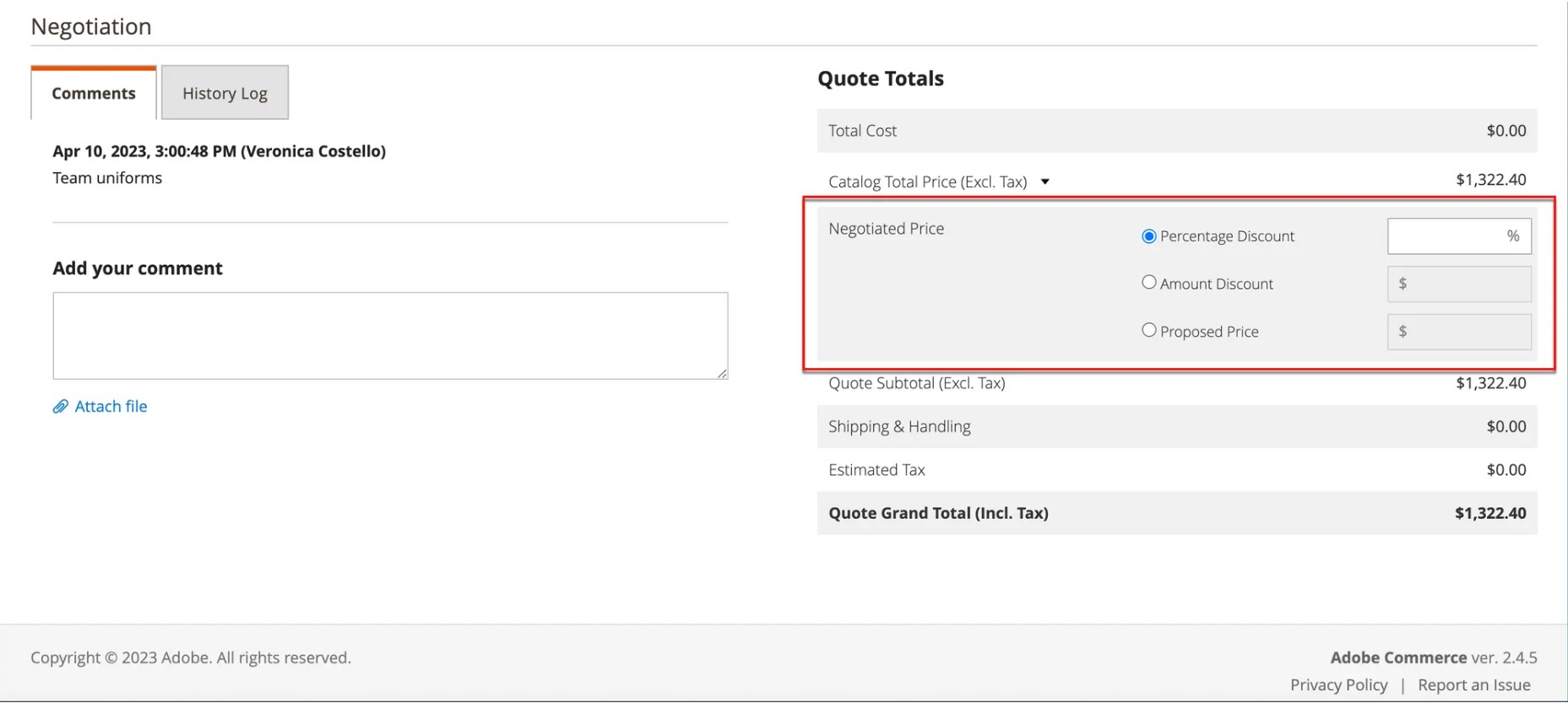
In B2B commerce, purchase decisions often require negotiation—buyers expect to request quotes, compare terms, and finalise contracts before placing large orders. Adobe Commerce B2B supports this process with built-in negotiable quotes and reusable quote templates, giving merchants the tools to manage complex pricing negotiations directly within the storefront.
How the feature works:
-
Managing negotiable quotes through the approval flow:
-
Quote drafting and submission by merchants: After receiving a request for quote (RFQ) with product details, quantities, and special requirements, the merchant reviews and drafts the proposal. They can adjust pricing, apply discounts, suggest product alternatives, or revise shipping terms. Once updated, the quote is sent back to the buyer, often with an expiration date and locked-in terms to ensure accountability and transparency.
-
Review and respond management: Merchants can notify buyers when a quote is updated and track their actions in the account dashboard. From there, buyers can:
-
Accept the quote and convert it directly into an order.
-
Request further changes by adding comments.
-
Reject the quote entirely if the terms are not acceptable.
-
Automatic quote-to-order conversion: Once approved, the quote is converted directly into a purchase order. All negotiated pricing and terms carry over automatically, ensuring accuracy between negotiation and fulfilment.
-
Status tracking and accountability: Every comment and quote activity within the RFQ process is logged in the Comments and History Log, creating a complete digital trail. Quote statuses such as Draft, Opened, Submitted, Client Reviewed, Updated, Ordered, Closed, Declined, and Expired show both parties exactly where the quote stands. This visibility reduces the need for offline follow-ups and keeps the negotiation cycle transparent and efficient.
-
Reusable quote templates for recurring orders: For B2B buyers who frequently place similar orders regularly, Adobe Commerce allows merchants to create quote templates that store agreed product configurations and pricing. Instead of restarting the RFQ (Request for Quote) process every time, buyers can quickly generate new quotes from these templates with just a few clicks. Both buyers and merchants can manage recurring orders more efficiently through a generated quote link, which includes a notification indicating that the quote is approved and ready for checkout.
Business impact: The negotiable quotes and reusable templates feature helps merchants streamline complex B2B pricing and ordering processes.
-
Faster negotiation and deal closure: By conducting negotiations online and continuously, merchants can speed up the sales process, enabling sales teams to close deals more quickly and reduce the time from RFQ to final order. At the same time, maintaining transparent and accountable interactions throughout the process further strengthens buyer trust and confidence in the transaction.
-
Reduced operational overhead for recurring orders: Reusable quote templates streamline the management of recurring B2B orders, ensuring that large and complex transactions—often the core of B2B revenue—are processed efficiently and transparently without manual effort.
4. Flexible B2B payment options
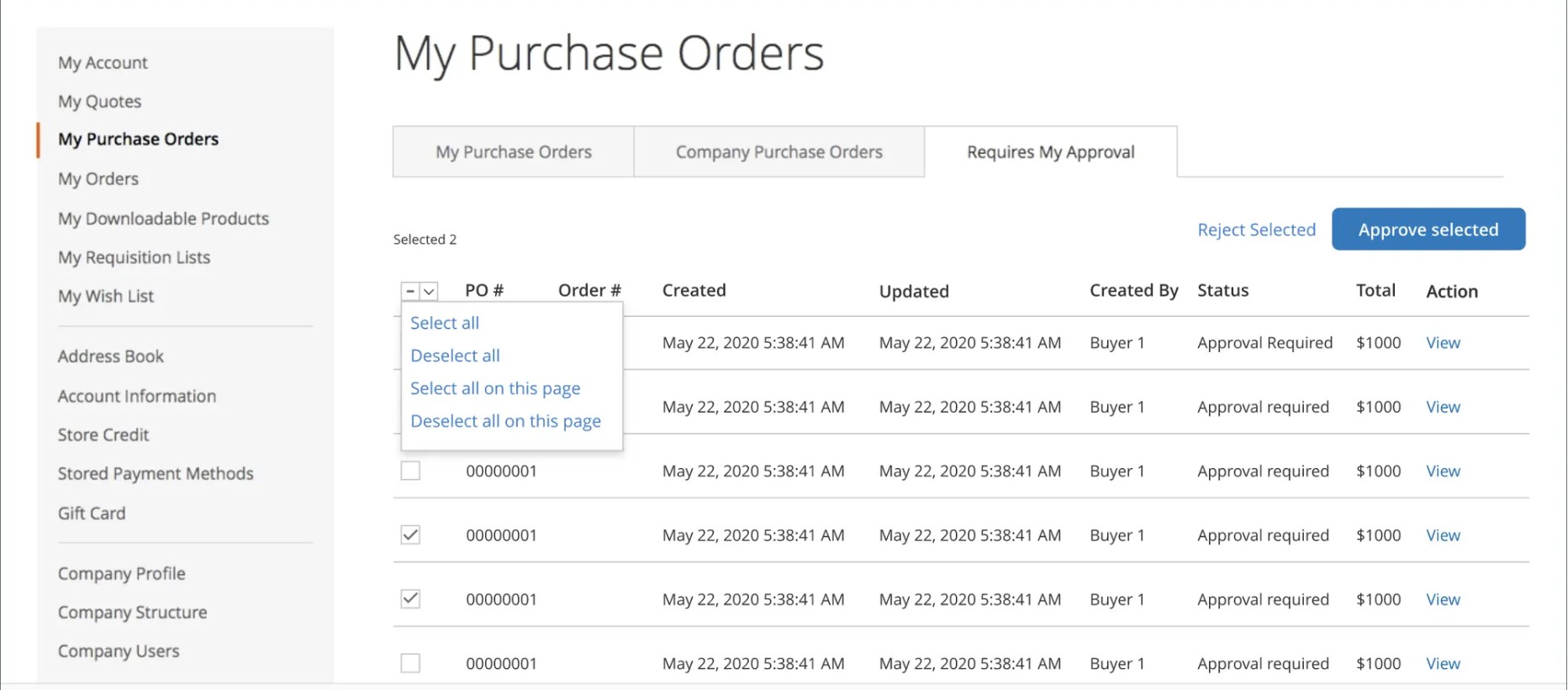
Adobe Commerce B2B supports enterprise-grade purchasing workflows, enabling buyers to place orders without paying up front, through purchase orders and company credit limits.
How the feature works:
-
Purchase orders: A Purchase Order (PO) is a formal document issued by the buyer to authorise a transaction, specifying products, quantities, and agreed prices. In Adobe Commerce B2B, buyers can select PO as a payment method during checkout and enter their internal PO number for reference. At the same time, merchants can configure approval workflows tied to company accounts to ensure that POs follow predefined authorisation rules. All PO activity, including submissions and approvals, is logged in the system to provide a complete audit trail for tracking purposes.
-
Company credit management: In Adobe Commerce B2B, merchants can extend credit directly to company accounts by setting credit limits and monitoring account balances in real time. Buyers can place orders using their available credit until the limit is reached, and the system enforces these boundaries automatically. All transactions against the credit line are tracked, allowing merchants to maintain visibility over outstanding balances and credit usage.
Business impact: These B2B payment options not only align with real-world B2B procurement but also help merchants maintain stronger financial control while giving buyers the flexibility they expect in enterprise purchasing. The result is faster order capture, fewer billing errors, and a seamless experience that strengthens long-term customer relationships.
5. Requisition lists and quick orders
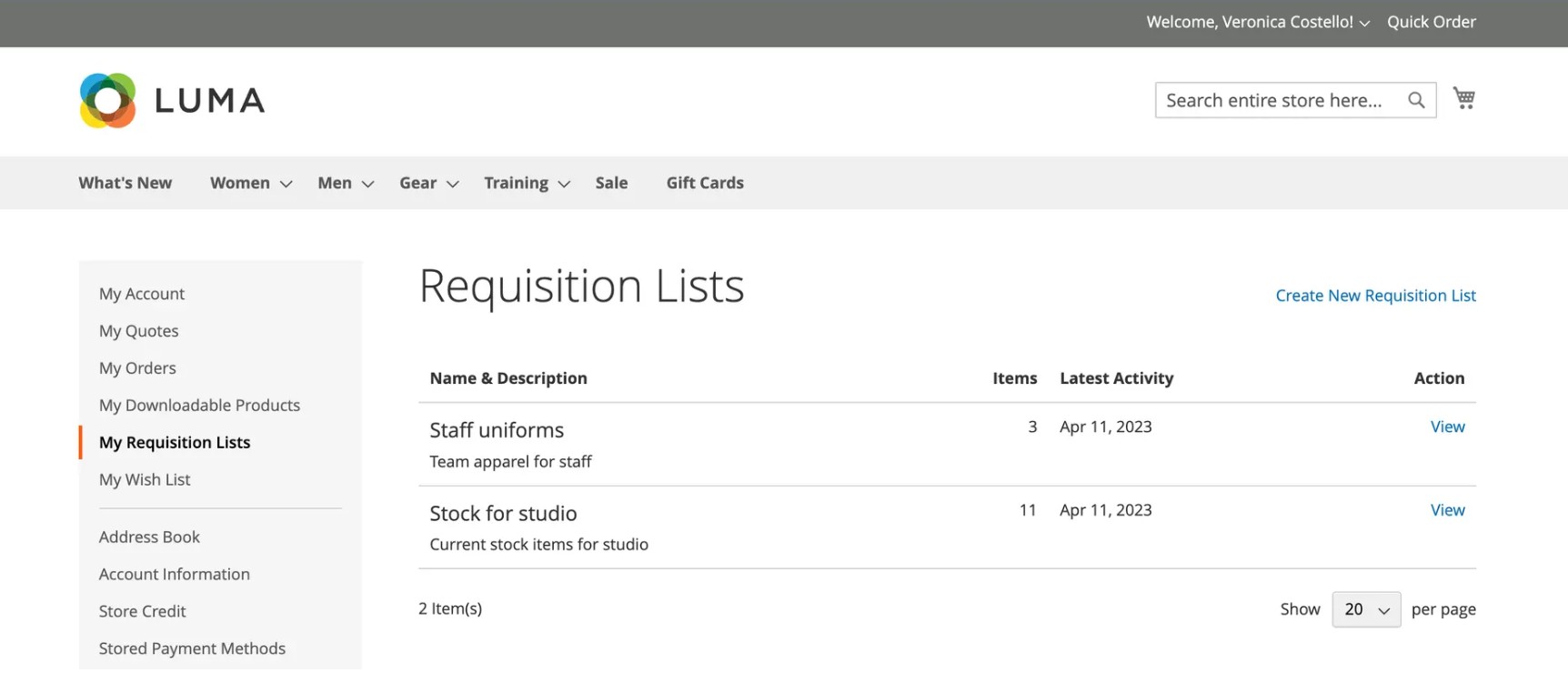
Adobe Commerce B2B provides requisition lists and quick orders to accelerate repeat purchasing and empower buyers to manage their own procurement, reducing the administrative load on sales teams.
How the feature works:
-
Requisition lists for frequently purchased items: In Adobe Commerce B2B, merchants can enable requisition lists to support buyers who frequently order the same products. Commonly purchased items—including multiple configurations such as quantities, options, or seasonal items—can be added to a list and saved for future use. These lists can then be reused to quickly generate new orders without manually rebuilding the cart from scratch, streamlining the reordering process.
-
Facilitate quick ordering via SKU or CSV upload: Merchants can enable buyers to place orders quickly by entering product SKUs directly or uploading a CSV file containing multiple SKUs and quantities. Buyers can submit large or standardised orders without navigating through the storefront catalogue, and the system automatically validates the SKUs and quantities before adding the products to the cart for checkout.
Business impact: These features help merchants simplify reordering while enhancing buyer experience and operational efficiency.
-
Simplified reordering for customer retention: Faster and easier reordering reduces repetitive tasks for buyers, allowing them to quickly repurchase frequently ordered items. This improves the overall shopping experience, speeds up checkout, and enhances buyer satisfaction, which in turn drives long-term customer retention and loyalty—key factors for sustainable B2B revenue growth.
-
Reduced merchant workload and improved operational efficiency: As buyers handle more tasks themselves, merchants experience fewer manual interventions and encounter fewer order errors. This reduces administrative effort, streamlines order processing, and enables the business to efficiently manage higher transaction volumes without increasing operational resources.
Short summary: Adobe Commerce B2B brings structure and scalability to the entire B2B buying journey, from onboarding new company accounts to negotiating terms, capturing orders, enabling fast reordering, and building long-term loyalty through self-service. Instead of relying on manual processes or fragmented tools, merchants can manage the complexity of enterprise selling directly within a unified platform. The result is a streamlined experience for both sides: buyers gain the flexibility and control they expect, while merchants improve efficiency, reduce operational costs, and unlock sustainable growth in highly competitive markets.
Unlock the full potential of Adobe Commerce B2B with On Tap. Our team delivers seamless workflows, system integrations, and optimised performance to enhance purchasing experiences and drive revenue growth. Discover now: On Tap’s Adobe Commerce Development Services.
Understanding the total cost of ownership for Adobe Commerce B2B
When evaluating Adobe Commerce B2B, it’s essential to consider the total cost of ownership (TCO), encompassing not only the licence fee but also platform, infrastructure, customisation, and maintenance expenses. The breakdown below shows how these costs are typically structured.
-
Mandatory costs: These are the costs that most merchants will incur to run Adobe Commerce B2B effectively:
-
Licensing: Adobe Commerce (paid edition) uses a revenue-based licensing model. The cost is typically tied to the merchant’s annual gross merchandise value (GMV) or revenue. Native B2B functionality is included in this licence, so no separate purchase is required for core B2B features.
-
Hosting & infrastructure:
-
Adobe Commerce Cloud (managed): Hosting, CDN, and core infrastructure are included as part of the subscription. However, merchants may still incur additional costs for performance optimisation, custom search, or third-party services.
-
On-premises deployment: Merchants are responsible for hosting and infrastructure setup, which can include servers (cloud or dedicated), CDN, caching, and performance tuning. This often means higher upfront or ongoing costs compared to the managed Cloud edition.
-
Optional costs (Based on business needs): These costs depend on the scale and complexity of the business, and are not mandatory for every merchant:
-
Development costs: Customisation, B2B workflow configuration (quotes, approvals, credit management), and UI/UX design can add significant development costs.
-
Integration costs: Connecting Adobe Commerce B2B with ERP, CRM, CPQ, or warehouse/logistics systems usually requires middleware or custom API development.
-
Maintenance & support: Ongoing costs include patches, upgrades, security updates, and optional support contracts.
Factors influencing total pricing include the scale of operations, the number of SKUs, the complexity of B2B workflows, internationalisation requirements such as multi-site or multi-currency setups, and the level of customisation.
Alternative options for B2B businesses
Two ways to enable B2B with Magento Open Source
While Magento Open Source lacks the advanced B2B toolkit available in Adobe Commerce, merchants can still build a strong B2B experience by extending the platform’s core capabilities. There are two main approaches: using third-party modules or developing custom B2B features tailored to specific business workflows.
-
Magento Open Source + modules: With this approach, merchants enhance MOS by adding third-party modules to implement B2B features like company account management, tiered pricing, quotes, bulk ordering, and approval workflows.
-
Strengths: Lower upfront licensing fees, faster deployment, and the flexibility to choose only the modules needed for specific B2B features.
-
Weaknesses: Feature fragmentation across multiple vendors, integration complexity, higher ongoing maintenance, and no guaranteed long-term support or consistent updates from all module providers.
-
Who it suits: SMEs with limited budgets, in-house technical teams able to manage modules, and merchants needing selective B2B features rather than a full suite.
-
Developing custom B2B features: This approach involves building B2B features entirely from scratch, tailored to the business’s workflows, approval processes, and specific requirements. Implementation can be done with in-house resources or by hiring an external agency.
-
Strengths: Fully customised to meet unique business needs, seamlessly integrated with existing systems such as ERP, CRM, or PIM, and highly flexible for future enhancements and specialised workflows.
-
Weaknesses: Longer development and deployment timelines, higher initial and ongoing costs due to development and maintenance, and dependence on the technical expertise of the in-house team or agency.
-
Who it suits: Businesses with complex B2B processes, sufficient budget and technical resources, and merchants requiring a fully tailored B2B experience that cannot be achieved through modules alone.
Table comparison of approaches to implementing B2B features with Magento
|
Approach |
Pricing includes |
Pros |
Cons |
Best use cases |
|
1. Adobe Commerce with built-in B2B features |
Adobe Commerce licence + implementation |
Native B2B module (official support), enterprise-grade scalability, seamless updates. |
High upfront licensing cost, requires technical expertise to manage. |
Large enterprises with complex B2B operations, multi-site/global businesses. |
|
2. Magento Open Source + B2B modules |
B2B modules + setup |
Lower entry cost, flexibility in choosing B2B modules, faster to deploy. |
Fragmented features, risk of compatibility issues, and limited long-term support. |
SMBs or mid-sized companies testing B2B commerce without high investment. |
|
3. Magento Open Source + custom development |
Developer cost |
Fully tailored workflows, exact fit to unique B2B needs, high flexibility. |
Longer implementation time, higher development costs, and heavy reliance on the agency. |
Enterprises with highly specific workflows not covered by native features or modules. |
Looking to scale your B2B operations on Magento Open Source? On Tap’s Magento B2B solution delivers powerful features and seamless integrations to help your business grow efficiently.
Other B2B eCommerce solutions
When evaluating B2B eCommerce platforms, it’s important to compare Adobe Commerce B2B with other leading solutions such as Carbon B2B, Shopify Plus, and BigCommerce B2B edition. These platforms are commonly considered because they all provide functionality tailored for B2B selling, making them relevant alternatives for businesses operating in the B2B space.
-
Carbon B2B: Carbon B2B is a rapid-deployment solution built on Magento/Adobe Commerce and Hyvä, enabling businesses to launch high-performance, SEO-optimised storefronts in weeks—at up to 50% lower cost than other B2B platforms. It extends native Adobe Commerce B2B features with sales rep management, approval workflows, product attachments, and price hiding, delivering personalised buying experiences, streamlining approval processes, and supporting complex or hybrid B2B/B2C operations with greater flexibility and cost efficiency.
-
Shopify Plus: The enterprise version of Shopify, offering built-in B2B tools such as company account management, wholesale pricing, flexible payment options, and custom checkout processes, simplifying B2B deployment and management.
-
BigCommerce B2B edition: A SaaS platform targeting mid-to-large businesses, providing basic B2B tools like customer groups and tiered pricing, though many advanced features require third-party apps or custom integrations.
Key comparison criteria include:
-
Native B2B feature coverage – Measures how much B2B functionality (multi-user accounts, quotes, approvals, tiered pricing) is available out of the box versus requiring add-ons or custom development.
-
Total cost of ownership (TCO) – Includes licensing, infrastructure, and development effort, directly affecting ROI.
-
Time to market – Important for businesses that need to launch quickly without excessive technical overhead.
-
Business fit – Helps identify which platform best aligns with a company’s operating model, team structure, and growth stage.
|
Criteria |
Adobe Commerce B2B |
Carbon B2B |
Shopify Plus |
BigCommerce B2B edition |
|
Native B2B feature coverage |
Advanced native B2B features: quotes, requisition lists, shared catalogues, and approval workflows. |
Includes all Adobe Commerce B2B features plus advanced capabilities (Sales Rep Management, Product Attachments, Hide Prices, workflow approvals). |
Built-in B2B suite: company profiles, price lists, PO terms, buyer permissions; partial checkout extensibility. |
Basic B2B tools: customer groups, tiered pricing; advanced features require apps or custom integration. |
|
Total Cost of Ownership (TCO) |
High: Licence depends on GMV, AOV, plus development, hosting, upgrades, and ongoing dev hours. |
Moderate: annual licence, lower than Adobe Commerce; faster deployment reduces development costs. |
Moderate: ~$2,300/month base fee; low setup and app fees; minimal dev/hosting costs. |
Moderate: Variable licensing; additional costs for apps and integrations. |
|
Time to market |
Longer: Full-feature setup, custom development, and multi-system integration; usually requires agency or in-house team. |
Very fast: Can launch in weeks with pre-integrated modules and a concierge setup. |
Fast: Standard builds deploy in weeks using native themes and apps; custom projects take longer but have a simpler setup. |
Fast: SaaS platform with standard templates and apps; customisations add time. |
|
Business fit |
Best for complex B2B logic: manufacturers, distributors, ERP-driven businesses requiring full B2B capabilities. |
Ideal for merchants wanting Magento flexibility with lower cost and faster time to market, supporting both B2B and hybrid B2B/B2C. |
Best for mid-market brands scaling hybrid B2B/DTC models or subscription/DTC-first businesses. |
Good for mid-sized businesses needing basic B2B capabilities and easier deployment. |
If you’re evaluating which B2B solution is the best fit for your business, reach out to On Tap for expert B2B guidance today. With over 19 years of experience across Magento, Adobe Commerce, and other eCommerce platforms, On Tap provides strategic consulting to help you choose the platform that best aligns with your growth objectives. In addition, we offer services in digital growth planning, website optimisation, and B2B transformation, helping businesses digitise, automate, and scale effectively.
Conclusion
Adobe Commerce B2B brings a comprehensive suite of features that empower businesses to streamline complex B2B operations, provide tailored experiences for enterprise customers, and drive efficiency across sales and procurement processes. While the investment requires careful consideration of costs and ROI, for many businesses, it delivers significant long-term value by supporting scalable growth and stronger customer relationships.
If you’re looking to leverage Adobe Commerce B2B or explore the best digital commerce solutions for your business, On Tap, as a proud member of B2BEA, can help you implement, optimise, and maximise your platform’s potential. Contact us now to learn how we can support your B2B growth and digital transformation.