According to OroCommerce Insight, 64% of B2B buyers nowadays prefer digital channels over traditional ones, highlighting a significant shift in customer behaviour. This trend highlights the necessity for B2B companies to adopt digital transformation and enhance their e-commerce capabilities.
Therefore, this article provides a comprehensive 10-step guide to building a B2B eCommerce website designed to deliver a high-performing digital storefront, support complex buying journeys, and improve long-term sales outcomes. Each step is tailored to meet the unique needs of B2B buyers, helping you create a buying experience that reduces friction, supports internal approval processes, and enables repeat purchasing.
This guide covers every critical stage, from defining your business objectives and selecting the right platform to hosting, feature customisation, system integration, and finally, testing and monitoring your website. You’ll also find real-world examples for inspiration. By the end, you'll be fully equipped with the knowledge needed to develop your digital store that delivers strong customer experience and sustainable revenue growth.
How different B2B eCommerce models shape website development requirements
Each B2B eCommerce model creates a different set of constraints and priorities for your website. Decisions around architecture, platform capability, storefront structure, and integration depth should always be informed by how your business sells today and how it plans to scale in the future.
Understanding your model upfront ensures that the development process starts with the right assumptions. It reduces the risk of overengineering, avoids feature gaps that limit growth, and provides a clearer foundation for the strategic steps that follow.
-
B2B eCommerce: In this model, you're exclusively selling to businesses through your eCommerce website. These customers typically follow structured purchasing processes that involve multiple decision-makers, bulk orders, and formal payment methods. As such, your eCommerce site should be equipped with B2B-specific features such as multi-user account structures, custom pricing rules, purchase order workflows, and integrations with backend systems like ERP or CRM. All of this should be delivered within a website UX that prioritises speed, clarity, and control. This ensures your customers can complete complex transactions efficiently, reduces friction in the procurement process, and builds long-term trust in your digital store.
-
DTC alongside B2B: In this model, your business sells directly to individual consumers, bypassing intermediaries such as distributors, wholesalers, and retailers. Individual customers expect a fast and intuitive shopping experience, so your website should prioritise straightforward navigation and a smooth checkout process. If you also serve B2B buyers, you’ll need to incorporate advanced features like tiered pricing, bulk ordering, and account management. To maintain clarity and efficiency, your website should clearly distinguish between the two by offering a dedicated B2B portal or login area.
-
B2B2C: In a B2B2C model, your business sells to partners (such as distributors, franchisees, or retailers), who then sell to the final consumer. In this case, your website should focus on supporting partner-specific workflows, such as order tracking, stock visibility, and performance analytics. This ensures a smooth and efficient distribution process.
Once your B2B eCommerce model is defined, the next key decision is how that model should be reflected in your storefront structure. This is not a purely technical choice. Different models place different demands on pricing logic, customer journeys, operational workflows, and system integration, which directly affects usability, scalability, and long-term maintainability. In practice, most B2B eCommerce projects come down to choosing between two primary storefront approaches, each with distinct trade-offs:
-
Blended storefront: A blended storefront is a single online store that serves both businesses and end consumers through the same website and backend system. This model offers centralised management through a single admin dashboard and shared resources, including inventory, themes, and integrations. It helps maintain brand consistency across all customer segments and is more cost-effective, as there’s no need to build or maintain a separate store. However, this approach has limitations, such as the difficulty in efficiently segmenting inventory by customer type. Additionally, operations may become more complex if different teams are managing B2B and DTC channels. A blended storefront is ideal if you sell the same or similar products to both audiences and want to keep operations streamlined and costs low.
-
Dedicated storefront: A dedicated storefront is an entirely separate eCommerce site built specifically for B2B customers. This setup allows you to create a highly tailored B2B buyer experience with customised branding, features, and workflows suited to business buyers. It also enables complete control over inventory allocation and is a better fit for organisations with distinct B2B and DTC teams or processes. However, it comes with higher overhead: managing two separate stores means additional admin work or duplicate app costs. A dedicated storefront is most appropriate when your B2B business requires a distinct experience and operational structure, separate from your DTC operations.
10 key steps in B2B eCommerce website development
In this section, we’ll walk you through the 10 key steps of B2B eCommerce website development. Whether you're starting from scratch or improving your current one, following a step-by-step process ensures your site is built for performance, scalability, and long-term success.
Step 1: Define your business objectives
The first step in the process is defining the outcomes your B2B eCommerce website is expected to deliver. These may include increasing online revenue, enabling greater self-service for existing customers, improving customer retention and repeat ordering, or reducing operational friction across sales and support teams.
With those outcomes in mind, the next step is to translate them into clear business objectives. These objectives will directly shape your customer experience and overall operational strategy. When defining them, consider the following factors:
-
Growth plans: What are your goals for scaling the business? Are you preparing for rapid growth or planning steady, long-term expansion?
-
Customer base expansion: Are you aiming to reach new types of customers or enter new market segments?
-
Go-to-market timeline: How quickly do you need to launch or pivot your B2B offering? A shortened timeline may influence your technical setup and platform choice.
-
Geographic & language needs: Will you be serving customers in multiple locations or offering support in various languages?
-
Operational complexity: How complex are your internal workflows? Do you need separate systems for teams, regions, or pricing structures?
Clearly defining these objectives upfront will help ensure your store platform and technology stack are aligned with your long-term business vision.
Step 2: Choose a suitable eCommerce platform for your B2B website
Choosing the right eCommerce platform depends heavily on your business’s needs and capabilities. This decision requires a clear understanding of which platform type best suits your operational model, along with the specific features your website must support. Once these factors are identified, you’ll be in a much better position to select the most suitable platform for your B2B digital store. To help guide your decision, we’ll begin by exploring the main types of eCommerce platforms and ideal use cases.
Deployment models
The deployment model determines where and how your platform is hosted, who manages updates and maintenance, and how much control you have over customisation. Broadly, there are two primary options:
-
SaaS eCommerce platform: A SaaS (Software-as-a-Service) eCommerce platform is a cloud-based solution where the provider manages all aspects of hosting, security, updates, and compliance. Businesses pay a subscription fee to access the platform via a web interface. Many SaaS platforms come with built-in B2B features or app marketplaces, enabling quick setup with minimal development effort. This platform is ideal for businesses that prioritise ease of use, fast time-to-market, and minimal technical maintenance.
-
Open-source eCommerce platform: An open-source eCommerce solution provides full access to the platform’s source code, allowing enterprise-level B2B businesses to customise and control the digital commerce experience fully. Unlike SaaS platforms that limit backend access, open-source solutions give you the freedom to build a B2B platform tailored to your exact needs. This platform is ideal for businesses with complex B2B requirements that need a highly tailored, self-managed eCommerce solution and have the development resources to maintain and scale it reliably.
-
PaaS eCommerce platform: A PaaS (Platform-as-a-Service) eCommerce platform sits between SaaS and fully self-hosted open-source solutions. The platform provider manages the underlying cloud infrastructure, scalability, security updates, and compliance, while businesses retain the flexibility to customise application logic, integrations, and frontend experiences. This model is well-suited to B2B organisations that require more control and extensibility than SaaS typically allows, but want to avoid the operational overhead of managing infrastructure themselves. PaaS platforms are often chosen for complex B2B use cases involving deep system integrations, international expansion, or long-term scalability.
Architecture models
Another crucial aspect to consider is its architecture model, which determines how its frontend, backend, and services are organised and interact with each other. The architecture directly affects your site’s performance, scalability, development speed, and ability to adapt to future needs. Some of the architectural approaches in modern B2B eCommerce platforms include:
-
Headless architecture: A headless eCommerce architecture separates the front-end (the “head”) from the back-end systems, allowing businesses to customise the user experience fully. While the backend continues to manage commerce logic, such as inventory, checkout, and payment, the frontend is completely decoupled and can be built using any framework or design approach. This is the best fit for B2B businesses that need more control over their UX and operate across multiple digital channels.
-
Composable architecture: Composable commerce is a modular approach to building eCommerce platforms, allowing businesses to select and integrate best-fit technologies to create a tailored, flexible solution. Unlike traditional monolithic systems, it uses APIs to connect and manage individual components of an eCommerce site, allowing brands to scale and adapt quickly. This architecture suits large or fast-scaling B2B enterprises with complex customer journeys, multiple systems, and a need to innovate rapidly while avoiding vendor lock-in.
-
Microservice architecture: Microservice architecture is the most flexible eCommerce architecture model, where the system is broken into independent, modular services. Each microservice handles a specific function and operates autonomously. This separation gives developers precise control, enabling them to scale or update individual components without affecting the rest of the system. This approach is ideal for large B2B businesses with complex eCommerce operations or those requiring frequent updates and the ability to adopt new technologies quickly.
-
Monolithic architecture: Monolithic architecture is a traditional software development model in which the entire application is built as a single, unified unit. While it may include various functional modules, they are all tightly connected. This architecture is a good fit for a B2B business with simple application needs and limited technical resources.
When choosing the right platform, beyond flexibility and scalability, features are also the key consideration for any B2B business planning an eCommerce website. A well-designed B2B site should offer core functionalities that ensure a smooth, B2C-inspired experience, such as intuitive navigation, advanced search, and mobile-optimised UX. Just as important are B2B-specific capabilities, such as bulk ordering, tiered pricing, request for quotation (RFQ), role-based account management, and customer segmentation. Some businesses may also require advanced features, such as AI-powered tools, to stay competitive in a rapidly evolving market. Since not all platforms offer these features natively, it’s essential to identify your requirements early and determine whether key functions are built in or require third-party integrations.
Explore our latest blog for a detailed breakdown of the most critical B2B eCommerce features that your business needs for a digital store in our latest blog: B2B eCommerce website features: Essential elements for B2B online success.
Having reviewed all the key platform types and essential features, here are a few well-known B2B eCommerce platforms you can consider as a reference when selecting the right ones for your business:
-
Shopify Plus: The enterprise-grade version of Shopify, a fully hosted SaaS solution that combines all the core features of Shopify with built-in B2B capabilities. These include company profiles with multi-user permissions, customer-specific catalogues, and quick bulk ordering. It enables businesses to manage both B2B and DTC operations on a single platform, scaling efficiently with the support of Shopify’s robust infrastructure and a vast ecosystem of over 8,000 apps.
-
Adobe Commerce B2B: Adobe Commerce, formerly known as Magento Commerce, offers flexible B2B solutions, including a fully managed Adobe Commerce Cloud Service (SaaS) for scalability, a customisable cloud platform Adobe Commerce on Cloud (PaaS) for complex needs, and Commerce Optimiser to enhance performance and personalisation. Adobe Commerce delivers enterprise-ready B2B features, including company account hierarchies, role-based access, shared catalogues, and custom pricing. It supports global operations with multi-site, multi-language, and multi-currency capabilities, along with approval workflows and flexible payment options. As a SaaS platform, it offers scalability, automatic updates, and ERP/CRM integration. Adobe Commerce Optimiser further enhances performance with AI-driven recommendations, advanced search, and scalable merchandising for extensive catalogues.
-
BigCommerce: A fully hosted SaaS platform that offers a wide range of B2B features right out of the box, such as configure-price-quote (CPQ) tools, multi-level company accounts, and robust headless commerce capabilities. Built on MACH principles (Microservices, API-first, Cloud-native, Headless), BigCommerce is designed to enable seamless integration, scalability, and personalised customer experiences through APIs.
For more insights on B2B eCommerce platforms and how to choose the one that best fits your business needs, please refer to our blog: 10 best B2B eCommerce platforms for growth and scaling your business
Step 3: Decide how to build your website: In-house, hire an agency or hybrid approach
After deciding which platform your business will run on, the next step is determining how to build it. There are three main approaches:
-
Build in-house: If you have an internal development and design team, building the site in-house gives you complete control over the process. This option is ideal for businesses with technical expertise, a clear product roadmap, and the resources to manage ongoing maintenance and updates.
-
Hire an agency: Working with an experienced agency can save time and bring valuable professional expertise. This is especially beneficial for businesses that lack technical skills, want to launch quickly, but also need a scalable, long-term website solution. Agencies can support these businesses by providing strategic consultation and end-to-end assistance throughout the entire process, allowing teams to focus on daily operations while ensuring long-term success.
-
Hybrid approach: In many cases, the project scope can be split between your in-house team and the agency. This allows for flexibility, enabling internal resources to stay involved while leveraging external support where needed most, such as complex integrations, UX design, or performance optimisation.
Carefully consider the complexity, long-term maintenance, and scalability of your project when choosing between these options. Be sure to consult closely with the agency to find the right balance and optimise costs.
With 19 years of experience in the eCommerce industry and a team of 400+ experts, On Tap is proud to deliver an end-to-end, long-term approach tailored to your business goals. For more details, explore our B2B solutions.

Step 4: Start with hosting
Whether or not B2B businesses need to manage hosting depends on the type of eCommerce platform they choose. Specifically:
-
Platform-managed hosting (SaaS): If you use a SaaS-based B2B eCommerce platform such as Shopify Plus or BigCommerce, hosting is fully managed for you. The platform provider handles server maintenance, security, performance optimisation, and software updates, allowing your team to focus on business operations rather than infrastructure.
-
Self-managed hosting (on-premise or cloud): If you opt for a self-hosted or open-source B2B eCommerce solution like Magento/ Adobe Commerce or Shopware, you’ll be responsible for setting up and maintaining your hosting environment. This involves renting server space (on-premise or via cloud providers), installing the eCommerce software, and managing performance, security, and updates. While this offers greater control and customisation, it requires significant technical expertise.
The right choice depends on your technical capabilities, customisation needs, and budget. For B2B companies with a strong internal development team, self-hosting provides the flexibility to scale and tailor the platform to complex business logic. However, for companies lacking technical resources, it is highly recommended to work with experienced eCommerce solution providers. Regardless of which option you choose, it’s essential to keep your current business scope and future growth path in mind. Ideally, you should opt for a hosting solution that offers real-time auto-scaling to maintain long-term performance, reliability, and stability as your business evolves.
Experience dynamic hosting that seamlessly scales in real time to meet your needs, delivering zero downtime with our On Tap hosting now!
Step 5: Choose a B2B theme
Once all necessary features and integrations are in place, the next critical step is to consider how the storefront is presented, ensuring a seamless and intuitive user experience for your B2B customers. In a B2B context, this means supporting how buyers search, evaluate, and place orders - not just how the storefront looks.
Here are some of the criteria for choosing a B2B eCommerce theme:
-
B2B-specific features: Select a theme that enables the seamless integration and presentation of B2B-specific features, such as customer-specific pricing, bulk ordering, and quote requests. These features are critical for serving business buyers with personalised and contract-based terms.
-
Customisation and flexibility: The theme should support customisation, like colours, fonts, layouts, and page components, without requiring extensive coding.
-
Scalability for growth: B2B stores often require support for extensive product catalogues, high SKUs, and growing customer bases; therefore, the theme should handle extensive variants, inventory tracking, and quick filtering across thousands of products. It should also integrate seamlessly with backend systems, such as ERPs or CRMs, and allow for easy addition of any other apps you plan to use.
-
Responsive design and mobile compatibility: B2B buyers often place orders from various devices. Therefore, ensuring the theme provides a seamless experience across desktop, tablet, and mobile is essential.
-
SEO, performance, and technical standards: A B2B theme should be built with clean, performant code that supports fast load times and strong Core Web Vitals, follows SEO best practices, and remains compatible with analytics, tracking, and marketing automation tools.
-
Security standards and compliance: The theme must support SSL/HTTPS, secure checkouts, and avoid introducing vulnerabilities. It should work within your platform’s security standards (e.g., PCI DSS, ISO compliance).
-
Vendor support and documentation: Choose a theme from a reputable provider that offers clear documentation, regular updates, and responsive technical support to ensure long-term reliability.
Once you’ve learned all the criteria that best fit your business needs, you can browse the theme marketplaces on eCommerce platforms such as Shopify and BigCommerce. These platforms offer a wide variety of ready-made themes that help accelerate the development of storefronts. Be sure to read the full description, check reviews from users who have used the theme, and thoroughly test the demo to ensure it aligns with all the criteria above.
However, if the available templates don’t fully align with your brand identity or customer journey requirements, you have two options:
-
Customise an existing theme to represent your brand’s look better while enhancing the overall buying experience.
-
Develop a fully custom theme tailored to your B2B workflows, branding, and technical needs.
In both cases, it’s recommended to work with experienced design and development partners who understand your platform’s architecture and best practices for B2B.
Step 6: Set up and configure features on the platform
Once your B2B eCommerce platform and theme are selected, the next critical step is to set up and configure the features that will power your digital storefront. The setup of a B2B eCommerce platform should be approached in phases, starting with essential backend and frontend features, such as catalogue setup, customer account creation, and basic payment and shipping configurations.
Once the basics are in place, businesses can implement advanced configurations, such as customer-specific pricing, personalised catalogues, role-based access controls, and B2B buying workflows aligned with organisational purchasing structures. This stage is key to ensuring operational readiness and preparing your website for a successful launch.
Step 7: Customise features based on your needs
Although most B2B eCommerce platforms come with a wide range of built-in B2B features, many businesses have unique operational needs that require custom functionality. For example, a company might need to implement a custom product configurator for complex made-to-order items or create multi-tier approval workflows for large organisations – features that may not be available out of the box on the chosen platform. These types of requirements typically arise from how the business operates rather than from design preference. Customisation at this stage should therefore be driven by clear operational needs, ensuring that any bespoke functionality delivers tangible value without introducing unnecessary complexity or long-term maintenance risk.
If the business has an experienced in-house development team familiar with the platform, it can handle these enhancements internally. Otherwise, it's recommended to partner with certified developers who understand the platform’s architecture and best practices. This ensures that custom features are implemented securely and efficiently, without compromising the site’s performance, scalability, or long-term compatibility.
Step 8: System integration
In addition to customising platform features, system integration is mission-critical for B2B eCommerce. B2B transactions often involve negotiated pricing, contract-based terms, multi-user company accounts, recurring orders, credit limits, and tight supply chain coordination. To handle this effectively, your eCommerce platform must work in seamless sync with your broader enterprise technology stack. Some key integrations can include:
-
CRM (e.g., Salesforce, HubSpot) to manage long sales cycles, track corporate accounts with multiple stakeholders, and coordinate efforts across sales reps, account managers, and support teams.
-
ERP systems (e.g., SAP S/4HANA, Oracle NetSuite) to handle complex B2B processes such as purchase orders, invoicing on net terms, custom credit management, and procurement integration.
-
PIM platforms (e.g., Akeneo, Pimcore) are used to manage detailed, technical, or regulated product information, which is critical when selling to distributors, contractors, or procurement officers who require accurate data for informed buying decisions.
-
WMS solutions (e.g., Manhattan Associates, ShipBob) are essential for coordinating bulk inventory movements, managing multiple warehouses, supporting just-in-time delivery, and handling third-party logistics, all of which are crucial for B2B supply chain efficiency.
-
Accounting software (e.g., QuickBooks, Xero, Sage): Automate reconciliation, tax calculations, invoicing, and financial reporting by syncing sales, refunds, and customer credit usage directly from the eCommerce system.
Take a B2B distributor of industrial components for example: to operate efficiently, they might connect SAP ERP to manage complex pricing agreements and delivery timelines, sync Akeneo PIM to deliver localised, multilingual catalogues, and integrate a WMS for up-to-the-minute inventory tracking across regional warehouses.
To ensure smooth and accurate integration, an API-first approach is a highly effective method for achieving this goal. With this, all systems can be seamlessly connected, even when complex logic is required to route data between platforms.
Discover how our On Tap integration service and API-first integration platform empower your business with robust, future-ready integration.
Step 9: Test your site thoroughly before launch
Before launching the site live to customers, it must undergo rigorous testing.
Functionality and usability testing:
-
Conduct functional testing to verify that all features (e.g., placing orders, quote generation, user roles, promotions, pricing) function correctly.
-
Test integrations in a staging environment.
-
Perform usability testing with real or representative users to identify UI/UX issues (e.g. confusing navigation, slow workflows, unclear product info).
-
Gather user feedback early to resolve issues before launch.
Security and performance testing:
-
Run security tests: vulnerability scans, penetration tests, and ensure data privacy (e.g. customer isolation, encryption).
-
Run performance test: Core Web Vitals + load and stress testing to simulate high traffic and large orders.
Final pre-launch:
-
Consider a soft launch or beta release for real-world testing and validation.
-
Launch only after all tests pass and final approval is secured.
Step 10: Analyse performance and optimise regularly
After launching your B2B eCommerce site, your business must continuously monitor site performance and customer behaviour by tracking key KPIs. For example, high product views but low quote requests may indicate gaps in your conversion funnel. Key KPIs to track include:
-
Time-to-checkout or quote submission
-
Login-to-order ratio
-
Drop-off rates (e.g., B2B registration, cart abandonment, quote form exits)
Beyond metrics, it’s equally important to actively gather feedback to identify any additional pain points or blockers that users may face when interacting with your site. It is suggested that you use multiple channels to gather insights:
-
Post-interaction surveys
-
Customer support tickets
-
Direct input from account managers or business consultants
Additionally, businesses should stay current with market trends to remain competitive. Regularly explore and experiment with new features that align with your business model and customer needs. This proactive approach enables you to stay ahead of the curve and continually enhance your digital experience.
Real-world examples of B2B eCommerce websites
For further inspiration in developing your B2B eCommerce website, let’s explore some of the B2B eCommerce websites currently in the market below.
Tile Cloud
Overview & Challenge: TileCloud is a brand transforming the Australian tile market and redefining home renovations as enjoyable, design-driven experiences. Within just a few years of its launch, the business experienced rapid growth, reaching over $1.2 million in monthly revenue. To maintain this momentum, TileCloud set out to optimise its online presence, serving both DTC and B2B audiences, while expanding its wholesale operations. This growth strategy required a robust eCommerce solution capable of seamlessly supporting both DTC and B2B channels.
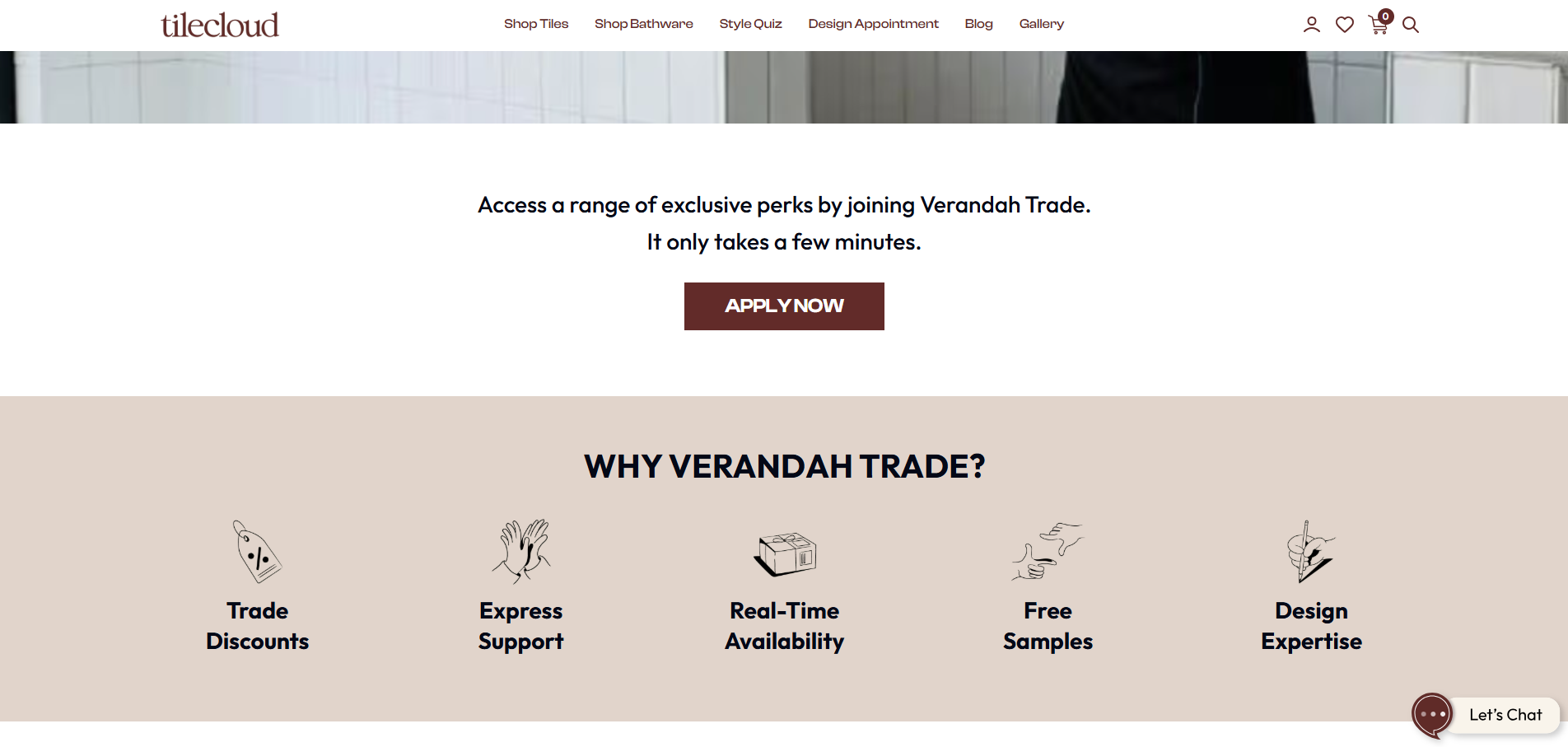
Solution: The company chose to launch a dedicated B2B expansion store using Shopify Plus, leveraging the following key features and benefits:
-
Out-of-the-box B2B tools: Personalised pricing for different wholesale customers, depending on their partnership with TileCloud.
-
Shopify Function: Customise the checkout process and apply multiple discounts
-
Advanced reporting: Preconfigured data views for deeper insights into key metrics like average order value, enabling data-driven optimisations across sales and customer experience.
Results: With Shopiy Plus, Tile Cloud received fast results:
-
+24% in B2B customer signups (YoY).
-
+34% in average order value (YoY).
-
+28% in customer conversion rate (YoY).
-
Improved decision-making and campaign effectiveness with deeper data insights.
-
Elevated experience for both consumer and wholesale customers.
Food Service Direct
Overview & Challenge: FoodServiceDirect.com is a leading U.S.-based food service distributor offering a wide range of products to both B2B and B2C customers through its digital platform. As the business expanded, it recognised the need to modernise its eCommerce infrastructure. The key objectives were to tailor the digital sales experience to the unique needs of B2B buyers, efficiently manage a vast and diverse product catalogue, and expand into new service areas, including building a dedicated platform for franchise operations.
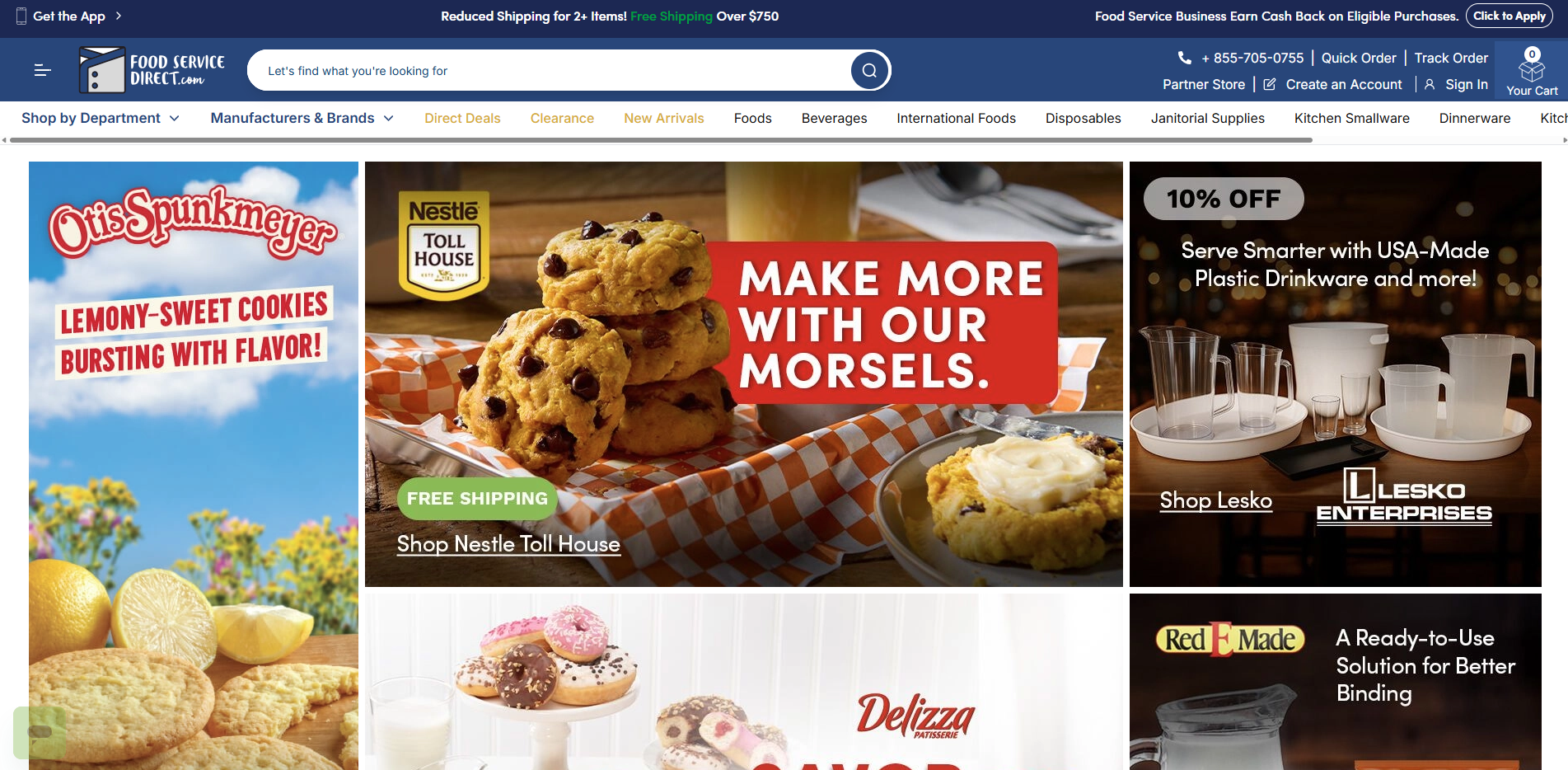
Solution: The business selected Adobe Commerce as the platform to develop two distinct web stores:
-
One general shopfront for both B2B and B2C.
-
One B2B-centric platform tailored for franchise partners.
The key features and benefits they utilised include:
-
Customer experience optimisation: Customised product details pages, create brand pages, etc, using Adobe’s open architecture and headless commerce
-
Used built-in Adobe tools (e.g., New Relic, Fastly, Blackfire.io) to enhance security, monitor system activity, and optimise performance.
-
Integrated third-party: A search functionality API by Unbxd, product data enrichment solutions from 1Worldsync, customer service software from ZenDesk and FSD’s own in-house product management software.
Results: Adobe Commerce has helped FoodServiceDirect.com receive impressive results:
-
+40% new customer acquisition
-
+110% repeat purchases
-
+40% B2B sales
Conclusion
This article outlines 10 essential steps for developing a successful B2B eCommerce website, along with real-world case studies that offer valuable insights for your digital transformation journey. To ensure smooth operations, each step must be approached with care, precision, and a clear understanding of how all components work together to achieve the desired outcome.
That said, the path to success isn’t always straightforward. From choosing the right B2B platform to implementing custom features and integrations, the process can be overwhelming without the proper guidance. That’s why partnering with an experienced B2B eCommerce agency is highly recommended. As a proud member of the B2B eCommerce Association, On Tap has a proven track record of delivering successful B2B initiatives, spanning consulting, implementation, and ongoing expert advisory. Contact us today to start shaping your B2B digital success.