
As B2B eCommerce continues to accelerate, driven by rising buyer expectations, global competition, and the growing demand for personalisation, many businesses are finding that their existing platforms struggle to keep pace with market complexity. In fact, according to research by Forrester Consulting on behalf of Zoovu, 81% of B2B decision-makers report that an insufficient eCommerce platform amplified poor data issues, lacking the tools to manage complexity, scale, or capture customer insights. If your organisation is encountering similar challenges, a strategic replatforming initiative may be the key to regaining agility, addressing data inefficiencies, and unlocking long-term growth.
In this article, we’ll explore everything you need to know about B2B eCommerce replatforming: from its definition and key benefits, to common risks, how to recognise when your business needs replatforming, and 12 essential steps for executing a successful transition. After reading this, you’ll be equipped with the clarity, insight, and practical guidance needed to make informed decisions and confidently lead your organisation through a high-impact replatforming journey.
What is B2B eCommerce replatforming?
B2B eCommerce replatforming is the process of moving a B2B online store from one eCommerce platform to another. This migration typically involves transferring complex product catalogues with advanced attributes, tiered and contract-based pricing models, customer accounts with negotiated terms, order histories, and mission-critical integrations with ERP, CRM, and supply chain systems.
As each B2B platform often has unique business logic, data structures, workflows, and functionalities, these must be re-engineered to align with the new platform. These differences increase the complexity of the transition, impact overall costs, and introduce risks that require careful planning, testing, and stakeholder alignment to ensure a seamless migration.
Key benefits and potential risks of B2B eCommerce replatforming
While replatforming is a crucial step toward building a more robust and future-ready digital foundation, it requires careful consideration and planning to ensure success. Below, we break down the key benefits and potential risks to help B2B businesses evaluate this move more effectively. Let’s dive in!
Benefits of B2B eCommerce replatforming
Replatforming is a strategic move for B2B customers as well as for your company’s evolving needs. With a more suitable platform, the key benefits it can bring include:
-
Advanced B2B features: A modern eCommerce platform often comes with built-in B2B functionalities, such as customer-specific pricing, account-based purchasing, quoting, and multi-level approval workflows. Some platforms also offer robust app ecosystems and marketplaces, making it easier to add or customise advanced B2B modules.
-
Improved performance and scalability: A scalable eCommerce platform can handle larger product catalogues, higher traffic volumes, and complex pricing models without compromising speed. Its enhanced infrastructure also supports future business growth and market expansion.
-
Better UX and customer journeys: A new advanced platform can significantly improve site speed, offer intuitive navigation, and ensure complete mobile optimisation, enhancing the overall purchasing experience for B2B buyers. It may also provide advanced self-service capabilities, such as personalised dashboards and streamlined reordering, making the buying process faster, easier, and more efficient.
-
Operational efficiency: An upgraded eCommerce can improve backend workflows, automation (e.g., order processing and inventory updates), enhance data management, save time and reduce errors.
Risks of B2B eCommerce replatforming
While replatforming can effectively resolve a range of business challenges, the process itself often introduces several complexities. The following risks require careful consideration:
-
High cost: Replatforming often requires a significant upfront investment, including licensing, development, data migration, integration, testing, launching, performance monitoring, and staff training. In fact, according to Digital Commerce 360, most merchants expect to invest between $25,001 and $500,000 during the process of switching to a new eCommerce platform. This makes replatforming a decision that must be justified by long-term value and business impact.
-
Risk of business disruption: Downtime, unexpected errors, or launch delays during a replatforming project can pose serious risks to customer satisfaction and business continuity. In the B2B space, where the digital store often serves as a vital tool for procurement and supply chain visibility, even short-term disruptions may lead to lost revenue and strained client relationships.
-
Internal change management: Different teams (sales, IT, operations, customer service) may have conflicting priorities or resistance to change. Without strong alignment and communication, these differences can hinder progress. Additionally, training and user adoption are frequently underestimated, particularly when businesses lack the resources or in-house expertise to deliver structured, role-specific training programs that ensure successful onboarding across teams.
-
Long-term consequences of choosing the wrong platform: Switching to a new platform is a significant investment, and choosing the wrong one can have costly long-term effects. A platform that isn’t thoroughly evaluated or lacks scalability can lock your business into a rigid ecosystem, limit innovation, and gradually erode your competitive advantage.
To avoid such pitfalls, consulting with a highly experienced agency is a widely recommended approach. On Tap is a leading eCommerce agency with 19 years of industry experience and a team of over 400 specialists. Get started with our consultancy service today.

How can you determine if B2B replatforming is truly worth it?
Replatforming is a significant investment of time, resources, and budget; just a few minor platform issues shouldn’t trigger it. The decision must be tied to a long-term vision for your B2B website, outlining how it will support your future growth, evolving customer expectations, and emerging technology trends. Consider the following key criteria to determine whether replatforming is truly necessary or if a workaround could be sufficient.
Misalignment with business goals and long-term vision
As your wholesale business evolves, your eCommerce platform must keep pace with increasingly complex demands, whether that means supporting B2B and DTC simultaneously, expanding into new regions, or enabling omnichannel experiences. However, not every performance bottleneck or missing feature justifies a full replatform. The key is understanding whether your current platform’s foundation can support your long-term goals or whether you're hitting structural limits that require a new solution.
-
When to work around: If your platform's foundation aligns with your long-term goals, but certain features are underdeveloped, a workaround may be more practical than replatforming. You can often solve gaps through third-party apps, backend automation, or workflow optimisation.
-
When to replatform: Replatforming is necessary when your current system cannot fundamentally support your strategic direction. This includes limitations in enabling hybrid B2B/DTC sales, scaling across regions, integrating with modern tech stacks, or delivering omnichannel experiences.
Poor platform performance and limited scalability
Performance issues are among the most frustrating obstacles in managing a wholesale eCommerce website. Slow load times, frequent errors, or system crashes not only hurt customer experience but also impact conversions and operational efficiency. As your product catalogue grows or as order volume increases, the cracks in your platform's scalability can become more pronounced.
-
When to work around: If performance issues are limited in scope, for example, due to poor hosting and unoptimised images, these are typically fixable without needing a full platform migration.
-
When to replatform: If your site consistently suffers from slow loading, downtime during traffic spikes, or struggles to handle a growing catalogue and complex B2B transactions, even with decent hosting, the core platform may be the bottleneck. Another red flag is if performance degrades with every version update, suggesting that the platform's infrastructure is outdated or no longer suited to your business scale. In these cases, replatforming is often the smarter long-term solution.
Outdated or rigid technology stack
An inflexible or outdated tech stack can quickly become a bottleneck, slowing down innovation, limiting integration capabilities, and increasing maintenance costs. As your business grows and strives to keep up with the latest technology trends, this issue needs to be addressed thoroughly and decisively.
-
When to work around: If technology gaps are limited and can be addressed with lightweight APIs, connectors, or middleware, a full replatform may not be required. This is often feasible when your core system is still stable and extensible.
-
When to replatform: If your legacy platform lacks the compatibility or flexibility to integrate with modern systems or emerging technologies, replatforming is likely the smarter long-term investment. A contemporary, modular tech stack allows faster adoption of new tools, supports scalability, and helps future-proof your business.
Ineffective or frustrating user experience (UX)
A seamless and intuitive user experience is essential in any eCommerce website. If the digital store frustrates users or creates friction in the buying journey, it can directly impact conversion and customer retention.
-
When to work around: If the UX challenges are surface-level (e.g., poor design, navigation issues), these can often be fixed through front-end redesigns or UX optimisation without switching platforms.
-
When to replatform: If the platform itself limits your ability to deliver a smooth B2B experience, such as lacking support for mobile, complex ordering workflows, or self-service account tools, replatforming may be necessary to meet modern buyer expectations and reduce friction at scale.
Lack of essential B2B-specific capabilities
Not all eCommerce platforms are designed with B2B functionality in mind. Your business may eventually encounter missing features that are critical to B2B operations, impacting both the customer experience and internal workflows.
-
When to work around: If the missing features are non-critical and can function independently (e.g., reward points programs, gift cards, pop-up apps), installing third-party apps or lightweight plugins can be a practical short-term fix.
-
When to replatform: If the missing feature impacts core workflows across the entire website, such as pricing by customer group, multi-location inventory, or hybrid DTC and B2B functionality, it becomes a significant limitation. If these features also need to integrate tightly with other systems, it’s often better to move to a platform where these capabilities are built in natively. Native support ensures better compatibility, streamlined operations, and a more scalable foundation as your business grows.
Inability to adapt to evolving customer behaviour
As buyer expectations shift toward more personalised, digital-first experiences, businesses must ensure their eCommerce platforms can adapt quickly. Failure to evolve alongside customer behaviour can lead to lost sales, decreased loyalty, and competitive disadvantage.
-
When to work around: If evolving customer expectations, such as better search functionality, improved mobile responsiveness, or small-scale personalisation, can be addressed with front-end optimisations, plug-ins, or third-party extensions, a full replatforming may not be necessary.
-
When to replatform: If your buyers increasingly demand modern digital experiences (e.g., self-service portals, personalised dashboards) and your current platform cannot keep pace with these expectations, replatforming becomes a strategic necessity.

12 key steps for replatforming your B2B eCommerce site: The complete checklist
Now that you understand when it’s time for your business to replatform, let’s explore how to build a replatforming plan that is strategic, efficient, and worthy of the investment. Let’s walk through each one in detail.
1. Define your goals in a B2B eCommerce replatform project
Before making any technical decisions, the first and most crucial step is to define clearly what your business hopes to achieve through replatforming. These goals will form the foundation for evaluating platforms, setting priorities, and guiding implementation efforts.
Start by conducting a comprehensive audit of your current eCommerce platform. This should cover performance metrics, user experience, integration capabilities, and ongoing operational costs. The goal is to pinpoint what’s working, what’s holding you back, and where the most urgent improvements are needed.
Need help with this step? Consider using diagnostic tools like AuditIQ to get a clearer picture of your current platform’s performance and identify key limitations.
Following this, businesses can define the goals they aim to achieve through the replatforming effort, both in the short term and long term. These may include objectives such as enhancing scalability to support future growth, enabling advanced personalisation for different buyer roles or supporting hybrid B2B and DTC models more efficiently.
2. Choose the right B2B eCommerce platform approach
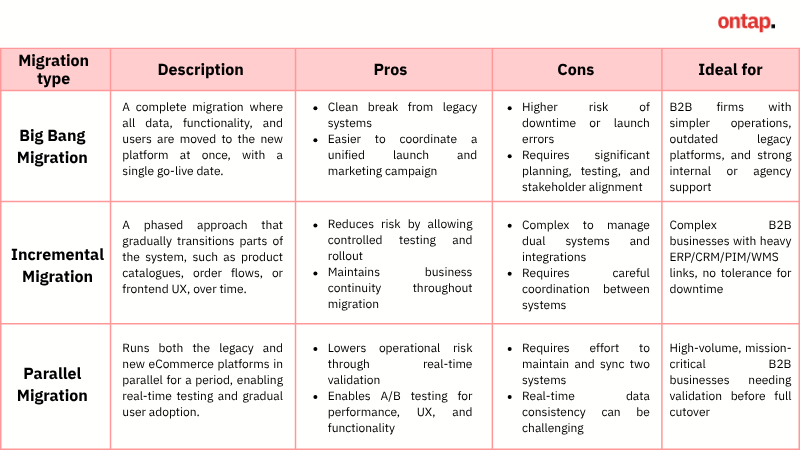
Based on your business objectives, operations complexity, and internal capabilities, you can choose the best replatforming approach. Here are the three most common replatforming approaches:
Big Bang Migration
A complete migration where all data, functionality, and users are moved to the new platform at once, with a single go-live date.
Pros:
-
Clean break from legacy systems
-
Easier to coordinate a unified launch and marketing campaign
Cons:
-
High risk of downtime or errors if not executed perfectly
-
Requires significant planning, testing, and stakeholder alignment
Ideal for: B2B Businesses with relatively simple operations, a legacy platform is outdated or unsustainable, and they have a strong internal team or agency support for a structured rollout
Incremental migration
A phased approach that gradually transitions parts of the system, such as product catalogues, order flows, or frontend UX, over time.
Pros:
-
Reduces risk by allowing controlled testing and rollout
-
Business continuity is maintained throughout the migration
Cons:
-
Can be complex to manage dual systems and integrations
-
Requires careful coordination between systems
Ideal for: Complex B2B businesses with extensive integrations (ERP, CRM, PIM, WMS) often cannot afford significant downtime and prioritise minimising disruption to both customers and internal teams.
Parallel migration
Parallel migration involves running your new eCommerce platform in parallel with the existing one for a set period. During this period, both systems operate in parallel, enabling real-time comparison, testing, and gradual user adoption before the legacy system is fully retired.
Pros:
-
Lowers operational risks as you can validate the new system while the old one is still live
-
Allows A/B testing between platforms for performance, UX, and functionality.
Cons:
-
Requires more effort and coordination to maintain two systems in parallel.
-
Keeping both systems updated with accurate, real-time data can be a challenging task.
Ideal for: B2B enterprises with mission-critical operations, high order volumes, or complex B2B workflows that can’t afford downtime. It’s beneficial for businesses needing to validate performance or user experience before a complete cutover.
3. Assemble the right team
The following key step is to involve stakeholders from all primary business functions to ensure a 360-degree view of requirements, risks, and opportunities. This involves:
-
IT/Engineering: Leads platform architecture, system integrations (e.g., ERP, CRM, PIM), data security, and compliance. Ensures the platform is scalable, API-friendly, and aligned with internal infrastructure.
-
Sales & account management: Offers insight into complex sales cycles, customer journey, buyer hierarchies, and account-specific pricing or contract terms. Ensures the platform supports quote-based selling (RFQs), purchase orders (POs), and customer-specific catalogues.
-
Customer service: Identifies pain points and service challenges throughout the customer journey that can be addressed through self-service portals, live chat, or ticketing systems.
-
Marketing & customer experience teams: Defines strategies for content, personalisation, and lead nurturing tailored to multiple personas (e.g., buyers, approvers, procurement officers). Aligns the platform with branding, SEO, and marketing automation tools to ensure seamless integration.
-
Procurement/operations: Brings operational expertise on fulfilment workflows, logistics, vendor coordination, and approval chains.
-
Finance & legal: Ensures tax logic, invoicing, compliance, and credit terms are supported. Helps review terms of service, data policies, and any regulatory requirements.
4. Decide how to execute your replatforming: In-house, agency, or hybrid approach
However, not every business has the internal resources to manage the full scope of such a long and complex process, especially in the case of B2B eCommerce, where complexity is even greater. This makes it essential to evaluate whether to handle the project in-house, partner with an agency, or pursue a hybrid model. Each approach comes with its own set of advantages and challenges, and the right choice will depend on your internal capabilities, timeline, budget, and long-term digital strategy.
-
In-house execution: Best suited for enterprises with a strong internal IT and digital team. This option provides you with complete control over the project, ensuring tighter alignment with existing systems and processes. However, it requires significant internal resources, deep technical knowledge, and experience in managing complex B2B requirements, such as pricing logic, role-based access, and backend integrations.
-
Work with a specialised agency: Ideal for businesses seeking end-to-end expertise and faster execution. A specialised B2B agency brings proven strategies, implementation experience, and access to a broader skill set, as well as long-term support/consultation. It’s typically more costly, but it reduces risk and accelerates time-to-market when internal bandwidth or expertise is limited.
-
Hybrid approach: A collaborative model where internal teams work alongside an agency, sharing responsibilities based on strengths. For example, your team might handle user interface development while the agency manages the ERP integration. This approach combines external expertise with internal knowledge, making it flexible and cost-efficient.
5. Select the right platform
Once the approach has been defined, the next and most critical step is selecting the right platform. This requires businesses to conduct a thorough evaluation and comparison to ensure they choose a solution that offers a clear improvement in both functional capabilities and long-term scalability. A well-informed platform choice lays the foundation for a future-proof B2B eCommerce strategy.
Evaluate your ideal deployment model and architecture
Before committing to a new platform, it’s essential to determine which technical architecture and deployment model best suits your B2B business. Your decision should be guided by factors such as:
-
Level of customisation required
-
Speed to market vs. flexibility trade-off
-
Internal development capabilities and IT resources
-
Integration needs with ERP, CRM, or PIM systems
-
Total cost of ownership (TCO) over time
-
Future scalability and innovation plans
Depending on your level of digital maturity, customisation needs, and internal resources, you may prefer a monolithic, headless, composable, or microservices architecture. Each offers different levels of flexibility, complexity, and control.
-
Monolithic architecture: A traditional, all-in-one platform where the frontend (user interface) and backend (logic, data, and operations) are tightly coupled. Monolithic systems are often easier to launch initially, but can become rigid over time, making customisation and scaling difficult as business requirements evolve.
-
Headless architecture: In a headless model, the frontend and backend are decoupled from each other. This allows businesses to deliver content across multiple channels (web, mobile, kiosks, etc.) while managing backend operations separately. Headless is ideal for companies that want design freedom, faster frontend performance, and omnichannel consistency.
-
Composable architecture: This approach takes a headless approach a step further. Instead of one large platform, composable commerce assembles best-of-breed solutions (e.g., CMS, PIM, search, checkout) through APIs. It offers maximum flexibility and adaptability, ideal for enterprises with complex, evolving requirements and the in-house capability to manage a modular stack.
-
Microservice architecture: This approach divides the application into independent services (e.g., order management, pricing, inventory) that can be deployed and scaled separately. It provides fine-grained control and is highly scalable, though it requires significant development resources and mature DevOps practices.
For instance, if your current monolithic eCommerce platform is hindering your progress, consider the following challenges: it may be slow to update the website interface, complex to launch on new channels like mobile apps, or difficult to integrate with other tools (such as ERP or CRM). In that case, it may be time to migrate to a headless or composable architecture.
By adopting this architecture, you can separate the frontend from the backend, enabling your team to quickly update the design or launch new touchpoints without impacting the core system. You can also connect best-of-breed tools, such as a PIM (Product Information Management), CRM, or AI search, more easily using APIs, giving your buyers a smoother, smarter shopping experience.
Similarly, you’ll need to decide between SaaS, PaaS, and open-source models, balancing factors such as time-to-market, ownership, scalability, and customisation. The right choice will ensure your platform can adapt as your business grows and evolves.
-
SaaS (Software-as-a-Service) eCommerce platforms are cloud-hosted solutions that offer faster deployment, lower maintenance, and built-in scalability. They are ideal for businesses that want to enter the market quickly without managing infrastructure or incurring heavy technical upkeep. However, the vendor’s ecosystem can limit customisation, and deep backend control may not be fully available.
-
Open-source platforms provide full control over code, architecture, and integrations. They are highly customisable and ideal for complex B2B use cases, such as custom workflows, deep ERP integration, or multi-brand catalogues. However, they require more internal resources or a capable development partner to manage hosting, security, and ongoing maintenance.
-
PaaS (Platform-as-a-Service) strikes a balance between SaaS convenience and open-source flexibility. It provides a managed infrastructure layer while still allowing for advanced customisation and code-level development. PaaS platforms are well-suited for B2B companies that need deeper functionality or integration flexibility without fully taking on the burden of self-hosting.
Beyond migrating from one platform to another, there are also cases where businesses move between different versions of the same platform. Here are some common types of migrations your company can consider:
-
Sidegrade/Downgrade (e.g., Adobe Commerce to Magento Open Source): A cost-optimised shift where businesses move from a premium licensed platform to a more lightweight or open-source version. This is common when some enterprise-level features are no longer required, but the company still wants a Magento-based ecosystem.
-
Replatform (e.g., Magento 1 to Magento 2): A replatform typically brings improved performance, security, and features. However, not all old modules or customisations are compatible, so businesses might migrate data and selectively rebuild or replace features.
Learn more: Gain more insight about upgrading from Magento 1 to Magento 2, refer to our blog: 12 steps to migrate from Magento 1 to Magento 2: Key insights before you begin.
Ensure the platform has essential features for B2B complexity
When evaluating new platforms, it's critical to ensure that their features can accommodate the core complexities of B2B eCommerce, including quote-based selling, customer-specific pricing, bulk ordering capabilities, and multi-user account management with permission controls. These functionalities are fundamental to enabling smooth transactions, improving operational efficiency, and delivering a tailored buying experience to your wholesale customers.
Beyond checking for these features, take a closer look at how they are implemented. Are they native to the platform, or do they rely on third-party apps, custom development, or manual workarounds? Relying heavily on plugins or custom code can lead to integration issues, higher maintenance costs, and limited scalability in the long run.
For a deeper dive into the key features required for successful B2B eCommerce, explore our detailed blog post: B2B eCommerce website features: Essential elements for B2B online success
Look beyond features: scalability and integration
Scalability ensures that your platform evolves with your business, whether you’re adding distributor portals, launching in new markets, or handling increased order volumes. A scalable platform adapts to your pace, not the other way around.
Integration is equally crucial. With tools like ERP, CRM, and PIM in play, your platform must connect smoothly to avoid silos and manual workarounds. Modern APIs and prebuilt connectors make all the difference here.
A platform that scores high on both fronts empowers innovation, reduces friction, and positions you for sustainable growth. That’s why you need to make sure your next platform:
-
Offers robust integration capabilities and clean APIs: Seamless integration with existing and future systems is critical. Look for a platform that supports standard protocols and has a proven track record of integrating with popular enterprise tools. This ensures your operations remain connected, efficient and adaptable.
-
Be scalable for future growth and evolving business models: As your business grows, your platform should be able to grow with it. A scalable platform empowers you to expand confidently in multiple directions, like:
-
Supports expansion into new business models (e.g., D2C, B2B2C) without requiring significant rework.
-
Enables smooth geographic and market expansion with multi-language, multi-currency, and localisation support.
-
Adapts to growing internal complexity with flexible user roles, permissions, and custom workflows
Validate with demos and Proof of Concept (PoC)
Finally, always test the platform against real business scenarios, not just standard use cases. Request tailored demos or a PoC to:
-
See how the platform handles complex workflows relevant to your B2B model
-
Identify gaps early, especially if key functions require extra apps or custom builds
Overall, the platform you choose must align with your operational workflows, buyer expectations, and future scalability, while requiring the fewest compromises. A thoughtful, strategic evaluation today will help you avoid costly limitations and ensure the platform can evolve with your business needs over time.
Today’s market offers a wide range of B2B eCommerce platforms, each with its own strengths and specialisations. Explore our blog to discover key platforms and find the one that best fits your business needs: 10 best B2B eCommerce platforms for growth and scaling your business
6. Design for UI/ UX
The next area of focus should be the design experience on the user interface, which involves multiple personas, such as procurement, finance, sales, and technical buyers, each with their own goals and workflows. A successful B2B UI/UX strategy must go beyond aesthetics to deliver functional, role-based access and personalised interfaces that support the entire sales lifecycle. With that in mind, here are the key tactics for designing an effective UI/UX:
-
Optimise UX for complex B2B workflows: Simplify key interactions, such as advanced product search (by specs, SKU, category, availability), bulk or repeat ordering, CSV uploads, RFQs, purchase orders, multi-tier approvals, and saved carts for team purchases.
-
Implement role-based personalisation: Modern B2B buyers expect the same level of personalisation they experience in B2C, but tailored to their professional needs. Some key examples include:
-
Account-specific catalogues based on contracts or buyer segments
-
Personalised pricing, discounts, and promotions per customer group/ segment
-
Customised content (e.g., training resources, case studies, or product updates) is shown based on industry or buyer role
-
Smart suggested products based on purchase history or industry preferences
Want to see more personalisation tactics drive faster decisions and stronger B2B buyer relationships? Explore our blog for more information: B2B eCommerce personalization: Definition, benefits, 6 key strategies and 9 must-have features
7. Migrate features and extensions
As part of your replatforming process, it's essential to evaluate which features and extensions should be carried over or rebuilt in the new system. With the audit already completed, you should have a clear list of features to include, such as advanced search, RFQ workflows, custom pricing rules, or analytics tools. If the new platform doesn't natively support these features, assess whether they are:
-
Available via compatible third-party extensions
-
Require custom development
In addition to the options above, if certain features can’t be migrated directly, consider exploring alternative extensions that offer similar functionality or plan to rebuild them to align with your upgraded environment. The goal is to maintain a seamless experience for both internal teams and customers while making the most of the new platform’s capabilities.
8. Plan data and content migration
Migrating data and content is one of the most critical and resource-intensive parts of any B2B eCommerce replatforming project. Unlike B2C, B2B platforms deal with more complex datasets, such as tiered pricing, account hierarchies, contract terms, and order histories. If not adequately planned, poor data migration can lead to business disruption, loss of customer trust, and significant rework after launch.
Cleanse and structure your data
Your business should start by auditing your existing data to ensure accuracy, consistency, and relevance. Key areas include:
-
Product data: Standardise product names, descriptions, attributes, SKUs, and taxonomy to ensure searchability and accurate filtering on the new site.
-
Customer accounts: Ensure company profiles, contacts, and roles are structured adequately for multi-user access and role-based permissions.
-
Order history: Identity which order and invoice records need to be migrated to ensure continuity in customer experience and reporting.
Map complex B2B elements for migration
B2B systems often include custom business logic that must be carefully mapped and migrated:
-
Catalogue structures: Preserve category hierarchies and customer-specific catalogues or assortments.
-
Pricing rules: Migrate account-level pricing, volume discounts, and contract-based pricing with precision to avoid pricing errors post-launch.
-
Contract terms & workflows: Ensure any logic related to terms, approvals, or credit limits is captured and validated during migration.
Close coordination between business, IT, and platform specialists is critical to maintaining data integrity throughout the process.
Preserve SEO and digital equity
During migration, it's also essential to maintain your site's SEO performance and digital footprint:
-
Redirect old URLs to new paths using 301 redirects
-
Carry over metadata (titles, descriptions, alt tags) and structured data
-
Audit page performance and indexing before and after migration to avoid ranking loss
Ultimately, investing the time to structure, clean, and validate your B2B data not only ensures a smoother transition but also sets the foundation for more innovative personalisation, reporting, and operations going forward.

9. Integrate key systems
Equally important is integration; B2B platforms must support complex backend operations, personalised experiences, and real-time data syncing across multiple enterprise systems. If integrations are poorly planned or fragmented, it can result in order errors, pricing discrepancies, fulfilment delays, and a broken customer experience.
If your systems (ERP, CRM, PIM, etc.) were already integrated on the old platform, focus on re-integrating them properly. This is also an opportunity to add any necessary systems to enhance operational efficiency. Here are the key systems needed for a B2B eCommerce site:
-
ERP (Enterprise Resource Planning): Manages inventory, pricing, customer accounts, and financials. It’s central to order accuracy and fulfilment, especially for complex B2B purchasing cycles.
-
CRM (Customer Relationship Management): Ensures that sales, marketing, and support teams have visibility into account-level data, deal stages, communication history, and customer segmentation, facilitating more effective engagement.
-
PIM (Product Information Management): Supports the management of extensive and detailed product catalogues. Ensures that technical specifications, regulatory information, and digital assets are consistent across all touchpoints.
-
WMS (Warehouse Management System): Coordinates stock levels, warehouse operations, and shipping logistics to ensure seamless inventory management. Real-time integration ensures accurate availability, lead times, and delivery expectations.
-
Accounting systems: Synchronises invoicing, credit terms, taxes, and payment reconciliation, especially critical in B2B where transactions often occur on net terms or by purchase order.
It is recommended to use modern APIs or middleware platforms to ensure clean, scalable, and future-proof integration, not brittle point-to-point connections.
Maximise your operational efficiency with On Tap’s integration service with an API-first integration flow.
10. Run rigorous testing
In B2B eCommerce, testing is a critical phase that ensures your platform performs under real-world business complexity. Given the number of users, touchpoints, and systems involved, comprehensive testing can make or break a successful launch.
Conduct multiple types of testing
A wide range of elements will need to be thoroughly tested to ensure the new platform performs as expected. This includes:
-
Functional testing: Ensure that all core features (product search, login, cart, checkout, order tracking, etc.) work as expected across user roles and permissions.
-
Integration testing: Validate that data syncs properly across CRM, ERP, PIM, WMS, and accounting platforms. This includes contract-based pricing, inventory availability, PO submissions, and customer-specific catalogues.
-
Performance & load testing: Simulate high-volume ordering, bulk uploads, and concurrent users to verify the platform’s ability to handle B2B traffic spikes, especially for product launches or seasonal surges.
-
Security testing: Test user permissions, account isolation, and enterprise-grade data protection to prevent unauthorised access to sensitive information.
-
SEO testing: Ensure that URL structures, redirects, metadata, and sitemap updates are intact after replatforming to protect search engine visibility.
Involves cross-functional users in UAT
User Acceptance Testing (UAT) should involve real internal stakeholders from Sales, Procurement, Customer Service, and IT, not just testers or developers. Each department will spot different gaps:
-
Sales may flag pricing logic or quote tools
-
Procurement may test approval chains and the budget caps
-
Support may test order lookup and returns
-
IT will test data integrity and sync failures.
This collaborative testing approach helps uncover edge cases and usability blockers before launch.
11. Prepare for launch
A successful B2B eCommerce launch goes far beyond flipping the switch; a well-structured launch plan is essential to ensure adoption, minimise disruptions, and drive long-term value.
-
Train internal teams: B2B processes are complex, so teams need more than a quick walkthrough. Provide role-specific onboarding, live training sessions, and a central knowledge hub with SOPs, videos, and FAQs to equip teams to support customers confidently from day one.
-
Communicate proactively with customers: For long-term B2B clients, platform changes can feel risky. Share clear timelines, benefits, and documentation (e.g., login guides or feature highlights), offer training or 1:1 onboarding for key accounts, and use email or in-portal messaging to build trust and ease the transition.
-
Implement a soft launch strategy: Start with a limited group of strategic clients or internal users to test ordering flows, integrations, and feedback loops. Use this phase to resolve issues and refine messaging before a full rollout, reducing risks and protecting customer relationships.
12. Monitor and iterate post-launch
Post-launch monitoring and iteration are critical to long-term success, especially in a B2B environment where the cost of friction, whether technical or operational, can damage key account relationships and revenue streams.
-
Track critical performance metrics: Use a solid analytics framework to monitor both technical and commercial KPIs in real time, page load speed, uptime, quote-to-order rates, checkout abandonment, repeat orders, and user behaviour (heatmaps, click paths). Track backend syncs with ERP/CRM systems and sets alerts to catch anomalies before they affect customers.
-
Collect feedback from users: Gather insights from customer surveys, feedback widgets, and account manager check-ins. Leverage input from sales and support teams, and follow up with UAT testers to identify usability gaps and compare live performance against expectations.
-
Continuously optimise and scale: Post-launch, evolve your platform with enhancements such as advanced personalisation, subscription models, or automation tools. Improve search and content relevance, expand integrations (e.g., shipping APIs, punchout catalogues), and adapt workflows to new buyer behaviours.
Conclusion
This article has covered everything your business needs to know about B2B eCommerce replatforming, from definitions and key benefits to potential risks and indicators for when it’s time to replatform. It also includes a step-by-step guide to building a comprehensive replatforming plan that optimises cost and streamlines operations.
To ensure the success of this complex process, it's highly recommended to collaborate with an experienced agency that specialises in eCommerce. With nearly two decades of experience across B2B platforms like Shopify, Adobe Commerce, BigCommerce, and more, On Tap is proud to be a trusted partner in delivering high-impact eCommerce projects. As a member of the B2B eCommerce Association, we understand replatforming is a long-term journey, and we’re here to support you from consultation through to implementation and beyond. Check out our
B2B solutions and migration service and get in touch with our team today to kick off your digital transformation with confidence.