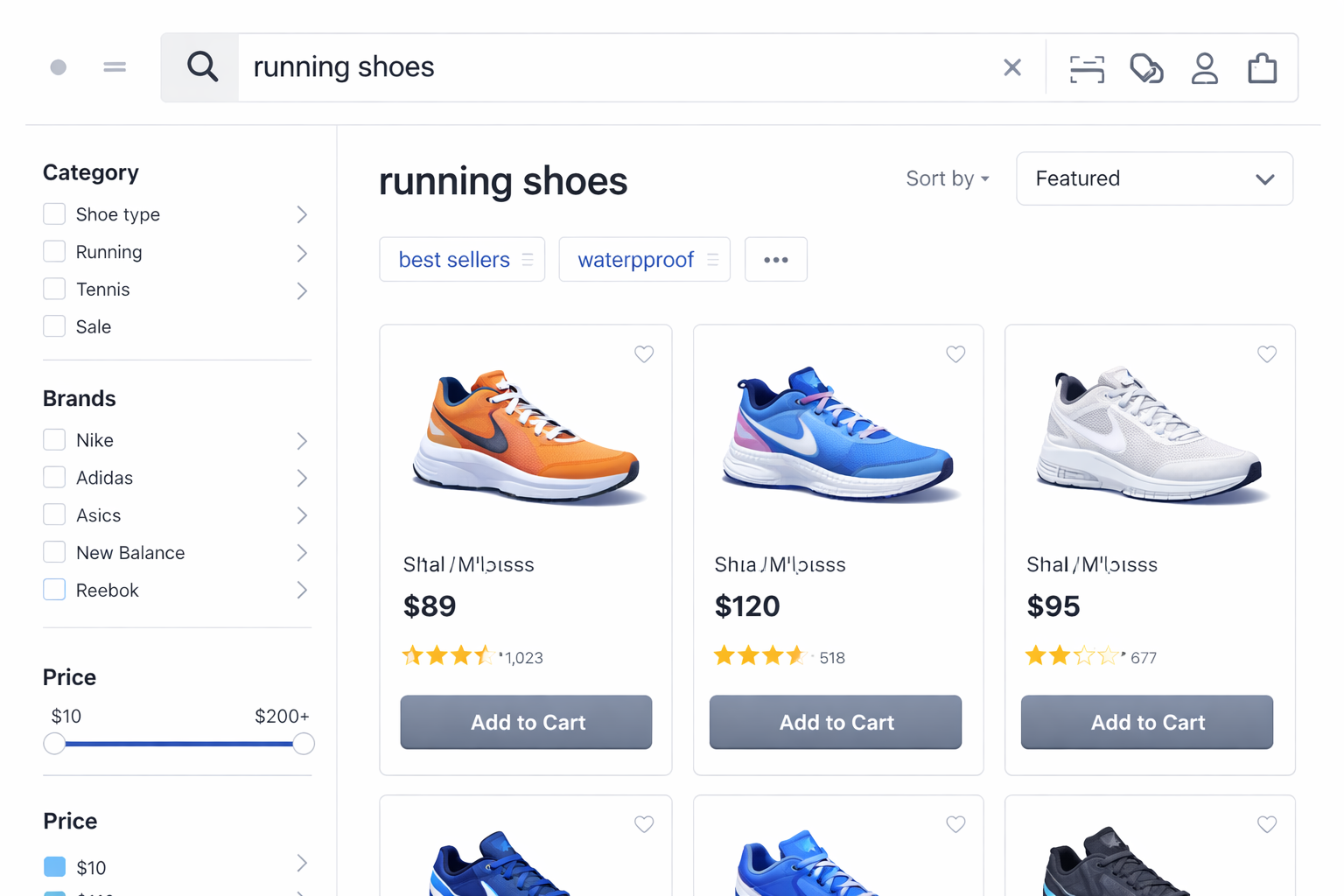
On most eCommerce websites, a meaningful share of visitors use the search bar at some point in their journey. These users are typically more intent-driven. Instead of browsing categories, they are actively stating what they want, whether that is a specific product, a type of item, or a solution to a need. How effectively your site responds to that intent has a direct impact on revenue.
Research shows that when shoppers feel they have had a successful search experience, 92% purchase the item they searched for, and 78% add at least one additional product. In contrast, poor search experiences frequently lead to abandonment, with studies suggesting that 80% of shoppers leave a site due to frustrating search results.
This guide walks you through how to optimise your eCommerce site search to improve customer experience and drive measurable business impact. You will learn how eCommerce site search works, the most important best practices to strengthen it, and the leading external tools that can enhance performance beyond native platform features.
What is eCommerce site search, and why is it important?
What is eCommerce site search, and how does it work?
eCommerce site search is the function that allows customers to type what they are looking for and receive relevant results from across your website.
From the outside, search appears simple: a query is entered, and results appear instantly.
In reality, the system typically performs several structured steps to determine which results should appear and how they should be ordered:
-
It interprets the query: The system processes what the customer types and attempts to recognise variations such as misspellings, alternative terms, or combined attributes like “black waterproof jacket”.
-
It scans the searchable data across your site: The query is compared against the product data fields configured as searchable, such as product names, key attributes, categories, tags, and other structured fields. If important information is missing or inconsistent, relevant items may not surface.
-
It determines what qualifies as a match: Not every item will be shown. The system applies internal matching rules to decide which products or pages are sufficiently relevant to appear.
-
It orders the results: The qualifying results are arranged based on relevance logic. This may prioritise exact keyword matches, higher-weighted fields like product titles, in-stock items, popular products, or items you have chosen to promote.
The final results customers see are shaped by how each of these steps operates. Differences in query interpretation, matching logic, ranking rules, merchandising priorities, or underlying data can all influence which products appear and how they are ordered. Understanding these stages helps explain why search results sometimes feel irrelevant, incomplete, or unexpectedly ranked.
Why is it important?
Search captures explicit customer intent. When someone types a query, they are signalling a defined need or objective. Because search operates at this high-intent moment, its performance influences both immediate revenue and longer-term business performance.
-
It improves product discovery and the overall shopping experience: A well-functioning search experience helps customers quickly locate relevant products without navigating through multiple categories or filters. When search results accurately reflect the intent behind a query, shoppers can move from intent to discovery with minimal friction. This reduces frustration, shortens the path to relevant products, and keeps customers engaged within the site.
-
It increases conversion and revenue from high-intent visitors: Once shoppers discover relevant products through search, they can move directly to evaluating and selecting items, which increases the likelihood of completing a purchase. Many retailers report measurable performance improvements after improving search technology. For example, 50% retailers surveyed say they saw increases in revenue as a direct result of search technology, and this rises to 93% among companies with more advanced search setups.
Effective search can also surface complementary or related products within the same query context, encouraging shoppers to explore additional items and increasing basket value. -
It reveals customer behaviour insights that inform product and merchandising strategy: Your search logs capture real-time demand signals that external analytics often miss, providing direct insight into how customers search for and evaluate products. Metrics such as search-to-conversion rates and zero-result queries help you:
-
Understand which search terms lead to purchases, revealing the product types, attributes, or use cases customers prioritise
-
Identify where customers struggle to find relevant products, particularly when high-frequency searches return no results
By analysing these patterns, merchants can better understand customer behaviour and use those insights to guide merchandising and product strategy, such as refining assortment planning, prioritising inventory, and identifying opportunities for new product development.
When site search is poorly configured, it not only reduces conversion but also blinds you to real demand patterns and suppresses revenue potential. When optimised deliberately, it becomes both a revenue driver and a source of strategic insight for decisions across merchandising, content, product planning, and customer experience.
|
If your internal search data is not being actively analysed or optimised, you may be missing out on both revenue and demand insights. On Tap offers a free consultation to evaluate your search performance, data structure, and relevance logic, and outline where measurable gains can be made. |

10 best practices to optimise eCommerce site search
Because search determines what customers see at their highest-intent moment, small structural changes can have a disproportionate impact. The best practices below focus on removing friction from product discovery, increasing search-driven revenue, and giving you greater control over how intent translates into visible results.
Make search highly visible and accessible
Why it matters
If shoppers cannot immediately find the search function, high-intent users may default to navigation or leave altogether. Research shows that 47% of users expect a search bar to be present on every eCommerce page, meaning its absence can create instant friction and frustration. Ensuring easy and consistent access reduces barriers at the earliest stage of product discovery and strengthens the overall customer experience for intent-driven shoppers.
How to take action
-
Position the search bar in the primary navigation zone, above the fold: The top of the page receives the most initial attention. Placing the search bar in this zone ensures it is noticed early in the session, increasing the likelihood that visitors use search as a direct discovery method rather than relying solely on navigation.
-
Maintain a consistent search bar location across all templates: The search field should remain in the same position on the homepage, category pages, product detail pages, and content pages. Structural consistency reduces hesitation and supports seamless transitions between browsing and searching.
-
Ensure the input field accommodates full query visibility: Customers often enter multi-word searches. The search bar should be wide enough to display complete search strings without truncation. Clear visibility improves input accuracy and supports more precise result matching.
-
Design the search bar with strong visual clarity: Use sufficient contrast, spacing, and clear input styling so the search field is immediately recognisable as an interactive element. When the function is identifiable at a glance, it reduces interpretation time and increases the likelihood that visitors initiate a search.
-
Ensure the search bar is immediately accessible on mobile: With the majority of eCommerce traffic and transactions now occurring on mobile devices, search accessibility on smaller screens directly affects revenue performance. Because screen space is limited, search is often reduced to an icon. That icon should remain persistently visible in the header and expand into a full-width input field with a single tap. When filter drawers or sorting controls are active, the search trigger should remain reachable so query refinement does not require navigating away from the current view.
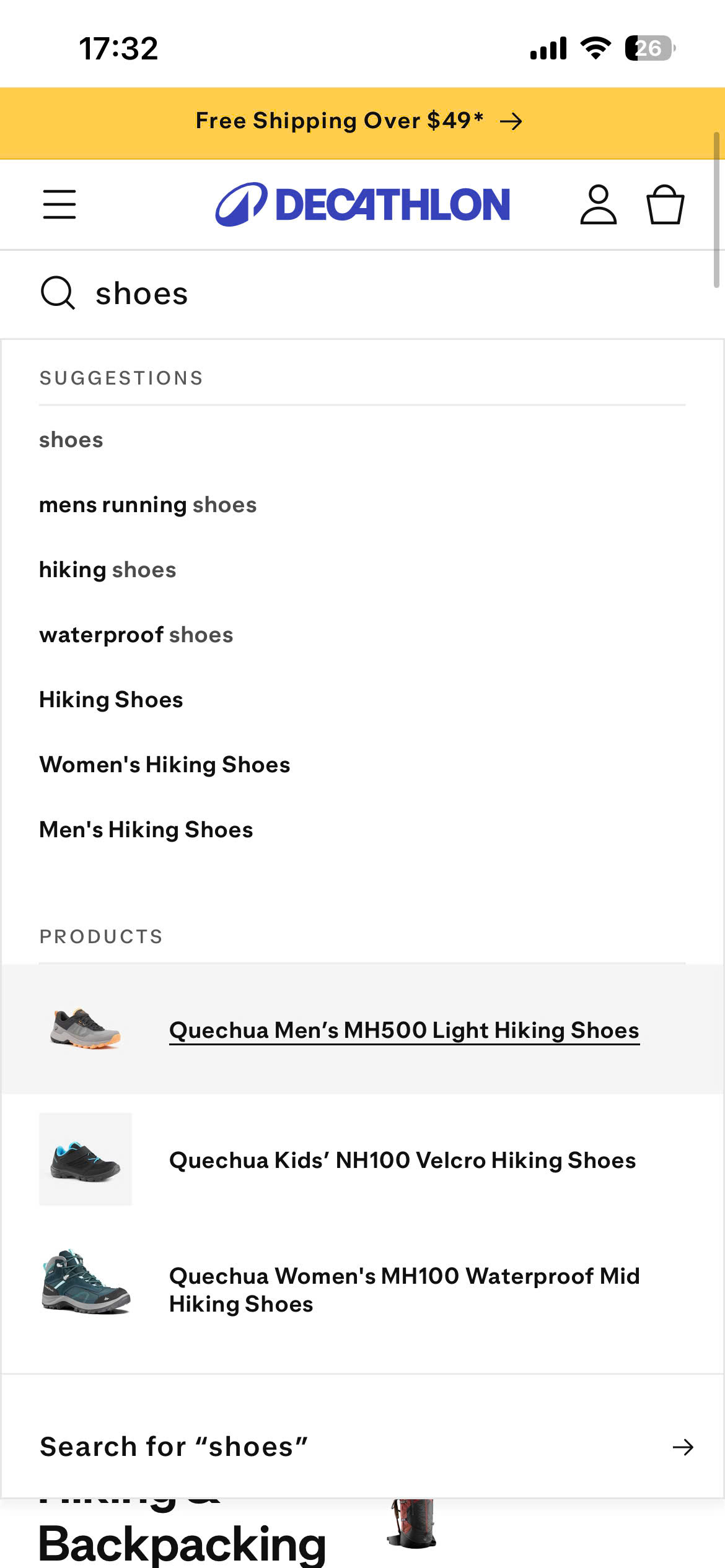

Real-world example: Decathlon
On Decathlon’s mobile site, the search field remains prominently visible within the header, allowing shoppers to start a search immediately after landing on the page. When activated, the input expands into a full-width field, making it easy to enter multi-word queries on smaller screens.
The same search interface is also consistently positioned within the primary navigation across the site and given sufficient horizontal space to display queries clearly. Combined with clear placeholder text, this makes the search function easy to recognise and access at any stage of the browsing journey.
By keeping search visually prominent and consistently accessible across devices, Decathlon reduces friction at the earliest stage of product discovery and encourages shoppers to use search as a primary navigation tool.
Enable typo tolerance and synonym recognition
Why it matters
A significant portion of search queries include spelling errors, variations in terminology, or alternative phrasing, and many eCommerce search systems fail to handle these differences effectively. According to benchmarks, around 70% of eCommerce search implementations do not return relevant results for synonymous product terms, meaning shoppers looking for the same item with different wording will get inconsistent outcomes. This gap between customer language and catalogue language often results in “no results” pages, which frustrates shoppers and directly harms conversion and engagement. A search experience that tolerates minor mistakes and recognises synonyms keeps more customers connected to relevant products, reducing dead-end interactions and protecting revenue.
How to take action
-
Enable typo tolerance (fuzzy matching): Configure your search engine to interpret common spelling variations and small mistakes. This ensures that queries with minor errors still return relevant products, reducing the chance that shoppers abandon their journey due to a misspelling.
-
Implement synonym recognition in your search index: Map different terms with the same meaning (e.g., “hoodie” and “sweatshirt”) so that both lead to the same results. This alignment between customer vocabulary and catalogue terminology increases result relevance without requiring cataloguing changes.
-
Include common alternate phrases and regional variations: Recognise commonly used alternative terms (for instance: “TV” vs “televisions”?) or regional language differences (for example, “sneakers” vs “trainers”). Treating these variations as equivalent broadens result coverage for the same product intent.
-
Use “did you mean” suggestions for unfamiliar spelling: When the system detects a likely misspelling, suggest corrected search terms. These prompts help maintain shopper momentum and reduce zero-result experiences.
Case study: SLEEFS
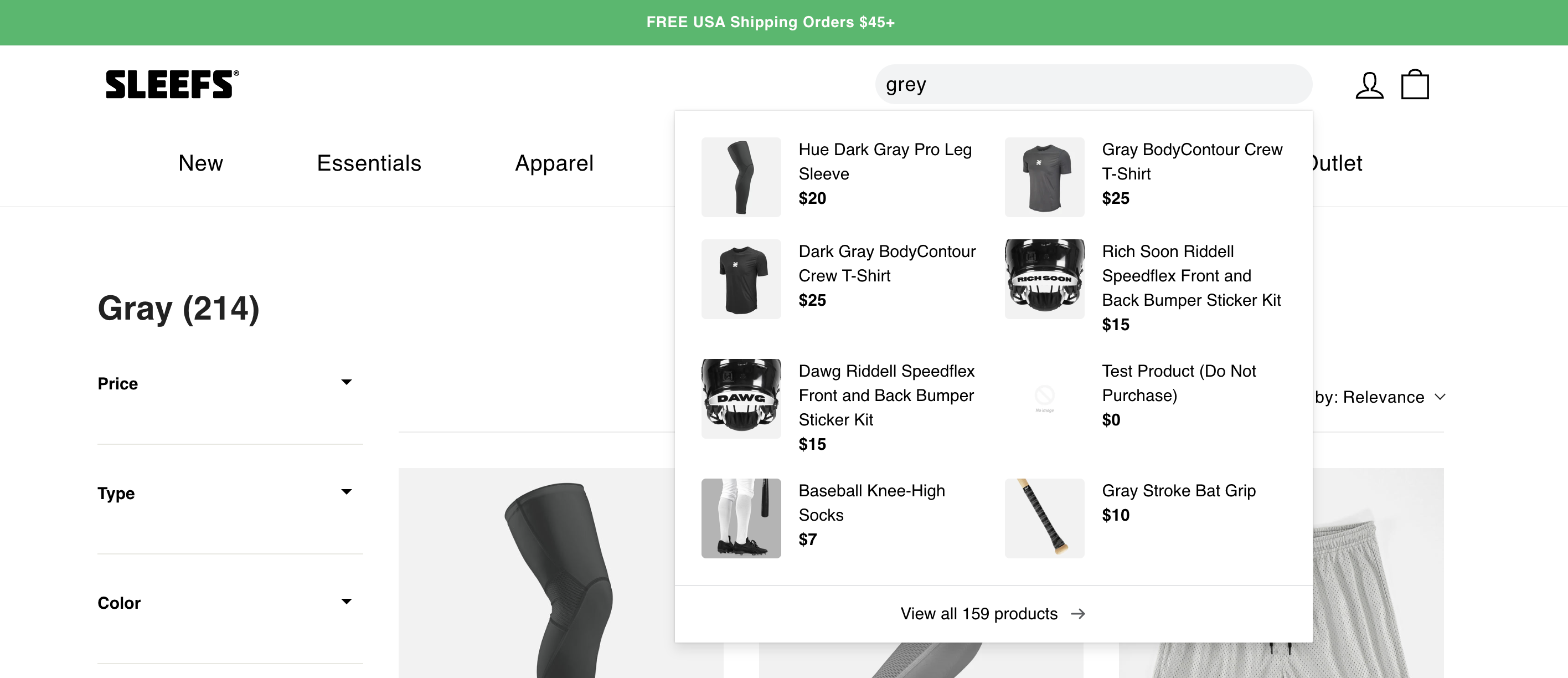
When searching for “grey,” SLEEFS returns products labelled both “Gray” and “Dark Gray,” indicating synonym normalisation between spelling variations. The system does not treat “grey” and “gray” as separate terms but consolidates them into a unified result set. This ensures regional spelling differences do not fragment product visibility.
Implement autocomplete and predictive search
Autocomplete reduces the effort required to complete a search and actively shapes query formation. When suggestions are relevant and visually structured, they lower input friction, reduce the likelihood of zero-result searches, and increase click-through directly from the dropdown.
How to take action
-
Trigger autocomplete after minimal input and update suggestions in real time: Display suggestions after 2 - 3 characters and refresh them dynamically as the query evolves. This reduces typing effort and increases interaction before full submission.
-
Expand partial queries into complete, intent-aligned phrases: Transform incomplete inputs into structured search suggestions that reflect common product terms or categories. This helps shape query formation and reduces ambiguous or underspecified searches.
-
Enable AI-based intent prediction for incomplete or ambiguous queries: Where supported, use machine learning to interpret early-stage input and surface the most probable matches. Predictive logic improves suggestion accuracy before the query is fully formed.
-
Display product-rich suggestions within the dropdown: Include product thumbnails, pricing, and key attributes instead of limiting suggestions to plain text. Visual context allows immediate relevance validation and supports faster click-through directly from the dropdown.
Case study: Burt’s Bees Baby
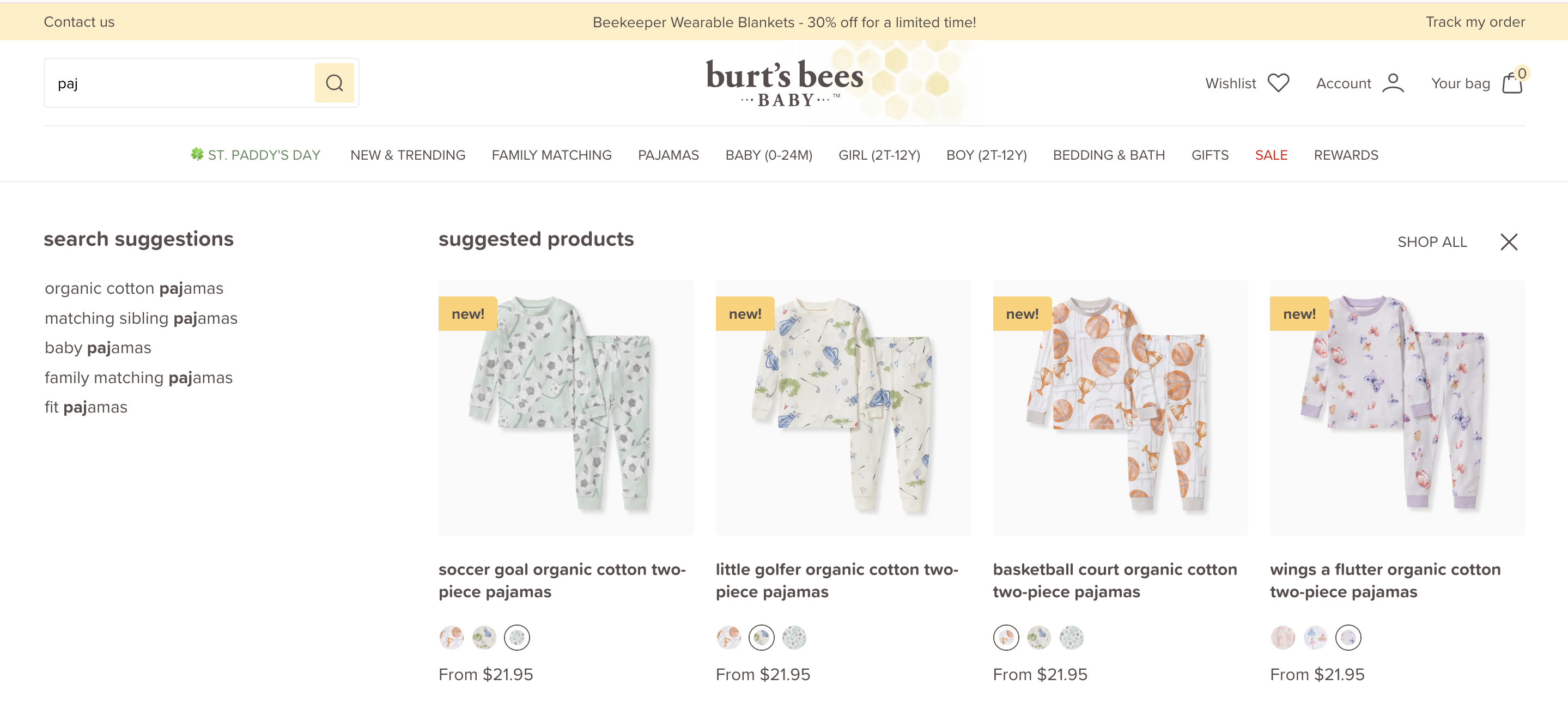
When typing a partial query such as “paj”, Burt’s Bees Baby immediately surfaces structured suggestions including “organic cotton pajamas”, “matching sibling pajamas”, and “family matching pajamas”. These suggestions expand the query into category-level pathways before a full term is entered. Instead of waiting for exact completion, the system anticipates intent and guides visitors toward relevant product clusters, reducing friction and encouraging faster navigation into the catalogue.
Enhance search performance and speed
Why it matters
Google’s latency experiments found that even delays of 100 - 400 milliseconds reduced user engagement by 0.2% - 0.6%. In eCommerce search, where users are expecting near-instant results, response time directly influences interaction depth and product exploration.
Slow search does not just frustrate. It reduces the number of queries performed, limits refinement behaviour, and weakens conversion from high-intent sessions.
How to take action
-
Measure search response time separately from overall page speed: Track the time between query submission and results rendering. General page speed metrics do not isolate search latency. Use browser DevTools, Real User Monitoring tools, or your search provider’s analytics to identify delays in API calls or result rendering.
-
Optimise indexing and catalogue updates: Ensure product data is indexed correctly and updated in near real time. Delayed indexing can cause newly added or updated products to be missing from results, creating a perception of search inaccuracy.
-
Test search performance under peak load conditions: Promotional campaigns, seasonal spikes, or high-traffic periods often expose performance bottlenecks. Stress-test search infrastructure to ensure consistent sub-second response during peak sessions.
-
Minimise frontend rendering delays: Even if the backend response is fast, heavy JavaScript, unoptimised result templates, or complex filter logic can slow visual rendering. Audit frontend execution time to ensure results appear immediately after the response is received.
-
Prioritise mobile search load speed: With the majority of eCommerce traffic now coming from mobile devices, search performance on mobile has a direct impact on product discovery and revenue. However, mobile environments introduce additional performance constraints. Network latency can increase significantly on 4G or congested connections, and mobile devices typically have lower processing power than desktop environments. Because mobile screens are smaller and interactions are more fragile, even small delays can interrupt search behaviour and increase bounce rates.
As a result, you should monitor mobile search response time separately and optimise API calls, payload size, and frontend rendering to maintain near-instant results. Tools such as Google PageSpeed Insights or Lighthouse can help evaluate mobile performance and identify latency issues affecting search interactions.
Even after optimising search response time and frontend rendering, performance can still degrade over time as catalogue size grows, new scripts are added, or traffic spikes occur. Continuous visibility is essential to catch these issues early. AuditIQ is designed to track Core Web Vitals, page speed and real user experience in real time, so latency problems that affect search response or mobile usability are flagged before they impact high-intent shoppers. Beyond these checks, AuditIQ is an eCommerce monitoring platform that also covers security, configuration changes, SEO & GEO health and frontend stability from a single dashboard.
Improve zero-results handling
Why it matters
A zero-results page is a high-risk moment in the customer journey. It signals that the site cannot fulfil the expressed intent, creating a dead end.
Even when a product does not exist in the catalogue, the experience should not end the session. How you handle this moment determines whether discovery continues or stops.
How to take action
-
Provide intelligent query correction and suggestions: When no results are found, suggest corrected spellings or closely related terms automatically. Instead of displaying a blank state, guide the visitor toward the nearest relevant alternative.
-
Surface relevant categories or closely related product groups: If an exact match is unavailable, present the closest matching category or subcategory. This keeps visitors within a relevant product area rather than redirecting them to generic bestsellers.
Case study: Victoria Beckham

When a search returns no direct matches, Victoria Beckham does not present a blank state. Instead, the page transitions into a curated recommendations module, likely informed by browsing history or past behavioural signals. This keeps shoppers within the brand’s product environment rather than forcing them to restart their journey.
In addition, a visible on-page chatbot prompt (“Can I help you find what you're looking for?”) provides an assisted discovery pathway. This introduces a fallback option at the exact moment the intent is at risk of breaking.
Together, personalised recommendations and assisted support reduce the likelihood that a zero-result moment turns into session abandonment. The experience shifts from “no results” to “alternative pathways,” preserving engagement even when an exact match is unavailable.
Use faceted filters within search results
Faceted filters are structured, attribute-based refinement tools that allow shoppers to progressively narrow search results using multiple decision-driving criteria without restarting their query.
According to consumer research, 57% of US online adults regularly use filters on retail and brand websites to narrow search results, with key attributes like availability and product type being especially important. When implemented thoughtfully, faceted filters turn high-volume result sets into manageable consideration groups, supporting faster comparison and more efficient product selection.
How to take action
-
Prioritise filters based on buying logic, not catalogue structure: Choose filters that reflect how customers make decisions, such as size, price, colour, compatibility, or material. Even without advanced data, you can identify which attributes typically determine purchase in your category. Avoid exposing every available attribute; focus on the ones that meaningfully narrow choices.
-
Preserve search context during refinement: Configure faceted navigation so results update instantly without resetting the original search query. Keep the search term visible, display applied filters clearly, and allow shoppers to remove or adjust them without restarting.
-
Make filters query-aware: Adapt available facets based on the shopper’s search term rather than using a static filter set. Contextual filtering reduces noise and helps users narrow results more efficiently.
-
Maintain clean and consistent filter values: Ensure attribute names are standardised and not duplicated or inconsistently formatted. Remove redundant or low-impact filters that add noise. Clear, structured filter values make refinement faster and more reliable.
Case study: Nike
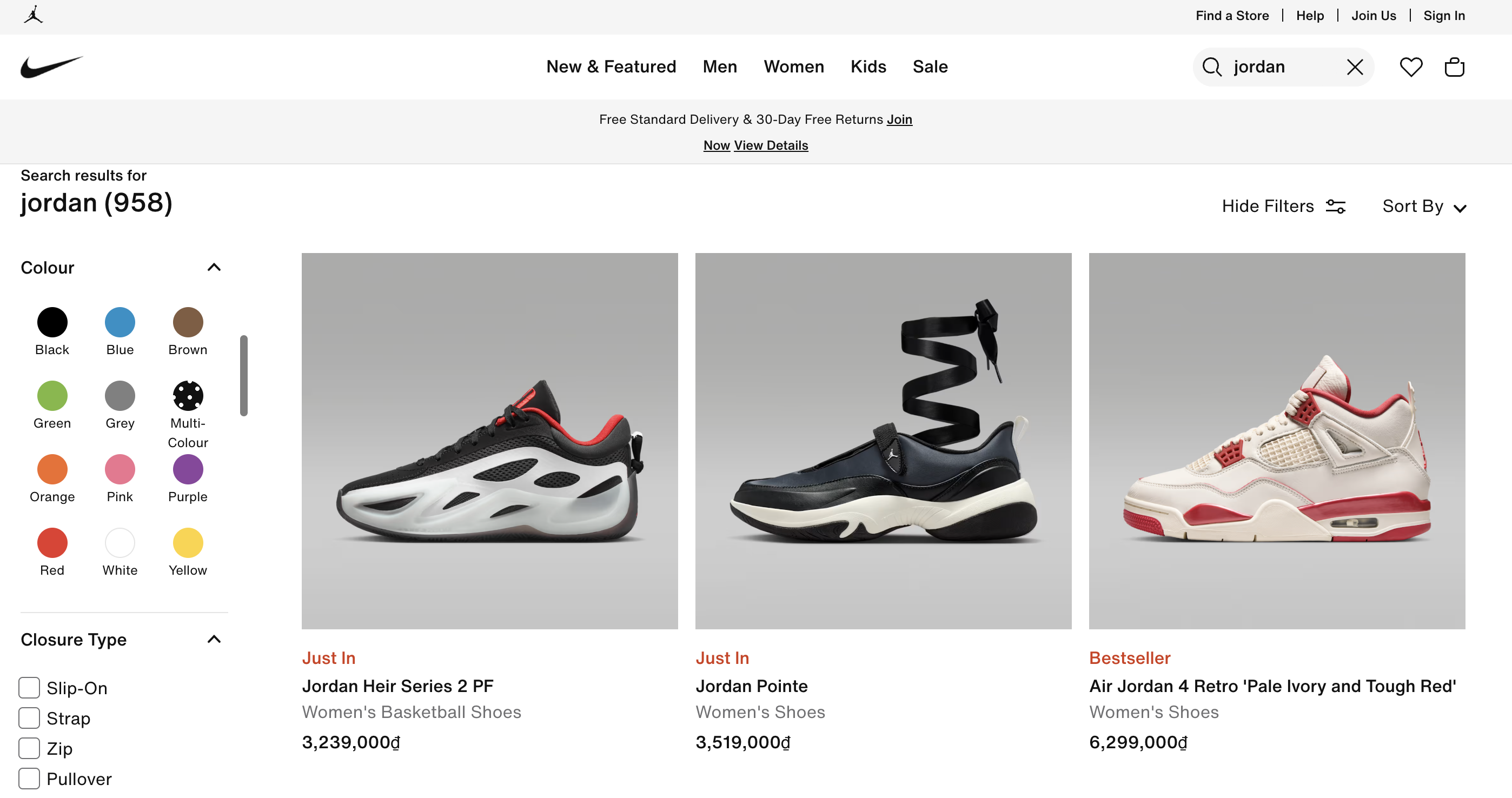
Nike’s search results page for the query “jordan” illustrates structured faceted navigation within a large product set of nearly 1,000 results. Instead of relying solely on sorting, the page exposes attribute-based filters such as colour and closure type alongside the results grid. Each facet is expandable, supports multiple selections, and updates the grid dynamically without resetting the original search term.
Crucially, the filters display only attribute values that exist within the current “jordan” result set rather than every possible catalogue option. This keeps refinement relevant to the dataset and reduces the risk of empty-result combinations. A shopper can progressively combine attributes, such as narrowing by colour or closure type, to reduce the result set while remaining within the original search context.
Align product data with search behaviour
Why it matters
Search works by matching customer queries to the information stored in your product catalogue. If the data does not clearly describe what a product is, who it is for, or what features it includes, the search engine has little to match against.
Usability benchmarking across eCommerce sites shows that 29% to 34% perform poorly on common product-type and feature-based searches. These are queries where customers search using category terms or specific attributes such as material, colour, or function.
When those attributes are not consistently stored in searchable fields, relevant products fail to surface. In these cases, the issue is not the ranking logic. It is the structure and completeness of the underlying product data.
How to take action
-
Align product naming with real customer language: Export your top internal search queries from the past 30 to 60 days and compare them directly with how products are currently named on your site. If customers search for “waterproof hiking jacket” but your product title only says “Outdoor Shell Model 4200,” the search may fail to match correctly. Update product titles so they reflect the terms customers actually use, especially high-intent elements such as material, size range, compatibility, or primary function.
-
Incorporate high-frequency search terms into indexed fields, not just descriptions: Use internal search reports to identify recurring modifiers such as “cheap”, “organic”, “plus size”, or “industrial grade”. Where relevant, integrate these terms into indexed product fields such as titles, attribute values, tags, or structured metadata rather than relying solely on long-form descriptions that may not be weighted in search ranking.
-
Use failed searches as a signal to improve product data: Regularly review search terms that return no results or generate very low engagement. In many cases, the product exists but does not contain the exact wording customers use. Instead of assuming the algorithm is weak, check whether product names or key details need updating. Treat your internal search reports as direct feedback on how well your catalogue reflects customer language. Fixing data gaps often improves search performance more effectively than adjusting ranking rules.
Personalise search results based on user behaviour
Why it matters
Not all shoppers searching for the same term have the same intent. A new visitor searching “jackets” may be exploring broadly, while a returning customer who previously browsed women’s outerwear likely expects different results.
Personalisation reduces the gap between generic search output and individual preference. According to McKinsey, personalisation can drive 10–15% revenue uplift when implemented effectively, particularly in digital commerce environments.
How to take action
-
Use browsing and purchase history to influence ranking: Where supported, adjust search results based on past category views, product interactions, or purchase history. For example, if a visitor frequently browses women’s products, prioritise that segment within gender-neutral searches.
-
Segment new vs returning visitors differently: Returning customers can benefit from behaviour-informed ranking, while new visitors may require broader default relevance logic. Applying the same ranking logic to both groups can reduce effectiveness.
-
Avoid over-personalisation for broad queries: For generic searches, maintain diversity within top results rather than narrowing too aggressively to one behavioural pattern. Personalisation should refine, not restrict, discovery.
Case study: Chewy
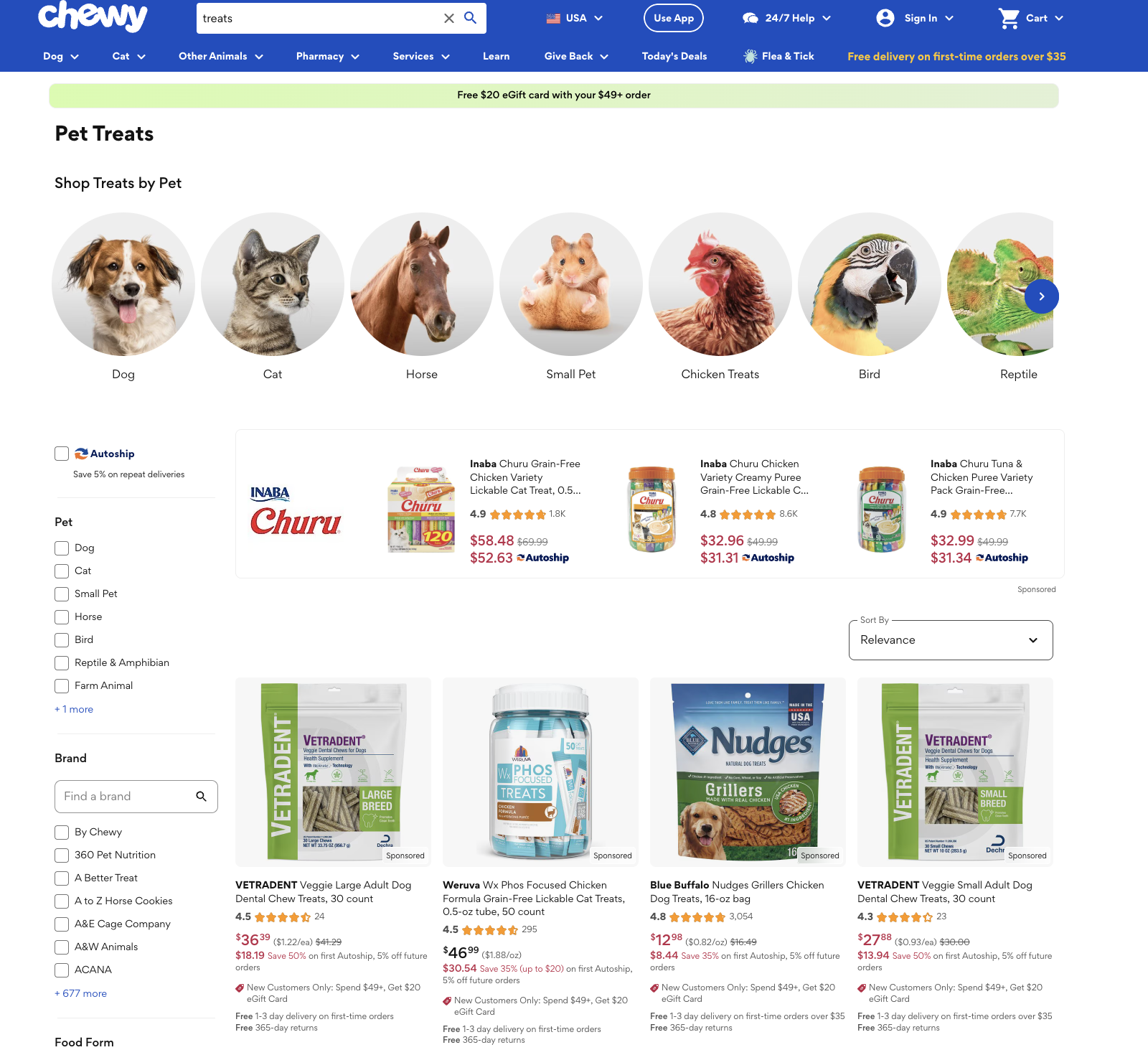
On Chewy, search results are influenced by browsing behaviour. For example, if a shopper has previously browsed dog products or added dog products to their cart, a generic query such as “treats” prioritises dog-related products over other pet categories. The same query may surface different results for a shopper browsing cat products.
Here, the search term remains identical, but result ordering adapts based on behavioural context. This ensures that the first visible products align more closely with likely purchase intent, reducing the need for additional filtering or refinement.
Use content within search results
Why it matters
Many search queries express evaluation or research intent, not immediate purchase intent. When shoppers encounter relevant guidance alongside product listings, they are more likely to engage and convert. 61% of surveyed shoppers say they are likely to engage with content such as articles, FAQs, and curated collections when it is shown in search results, and 59% say they are likely to purchase after consuming that kind of content. This indicates that integrated content helps bridge the gap between exploration and purchase.
If search only returns products, shoppers with research-oriented queries may look elsewhere for guidance, increasing abandonment. Relevant content within search results keeps decision-making within your site, reduces friction, and supports higher-confidence buying decisions.
How to take action
-
Surface relevant content for informational or solution-driven queries: Some search queries clearly indicate research intent, including phrases such as “how to,” “best for,” “difference between,” or problem-based descriptions. In these cases, search configurations that allow blog articles, buying guides, FAQs, or comparison pages to appear alongside products can better support these exploratory queries and reduce the need for users to seek external information.
-
Blend helpful content with product search results: Some search queries contain mixed intent, meaning different users may be looking for different types of results. For example, a query such as “gift ideas for runners” may indicate that some shoppers want to browse products directly, while others are looking for guidance or curated recommendations. In these cases, surfacing both product listings and relevant content such as buying guides or themed collections within the search results allows shoppers to choose the path that best matches their intent and explore options more efficiently.
-
Use content to reduce comparison friction: In categories where customers evaluate multiple specifications or features, short explanatory content blocks, fit guides or structured summaries within search results can clarify differences between products. This reduces the need for repeated navigation between listings and product detail pages and supports more efficient refinement, particularly in technical or specification-heavy categories.
Case study: REI
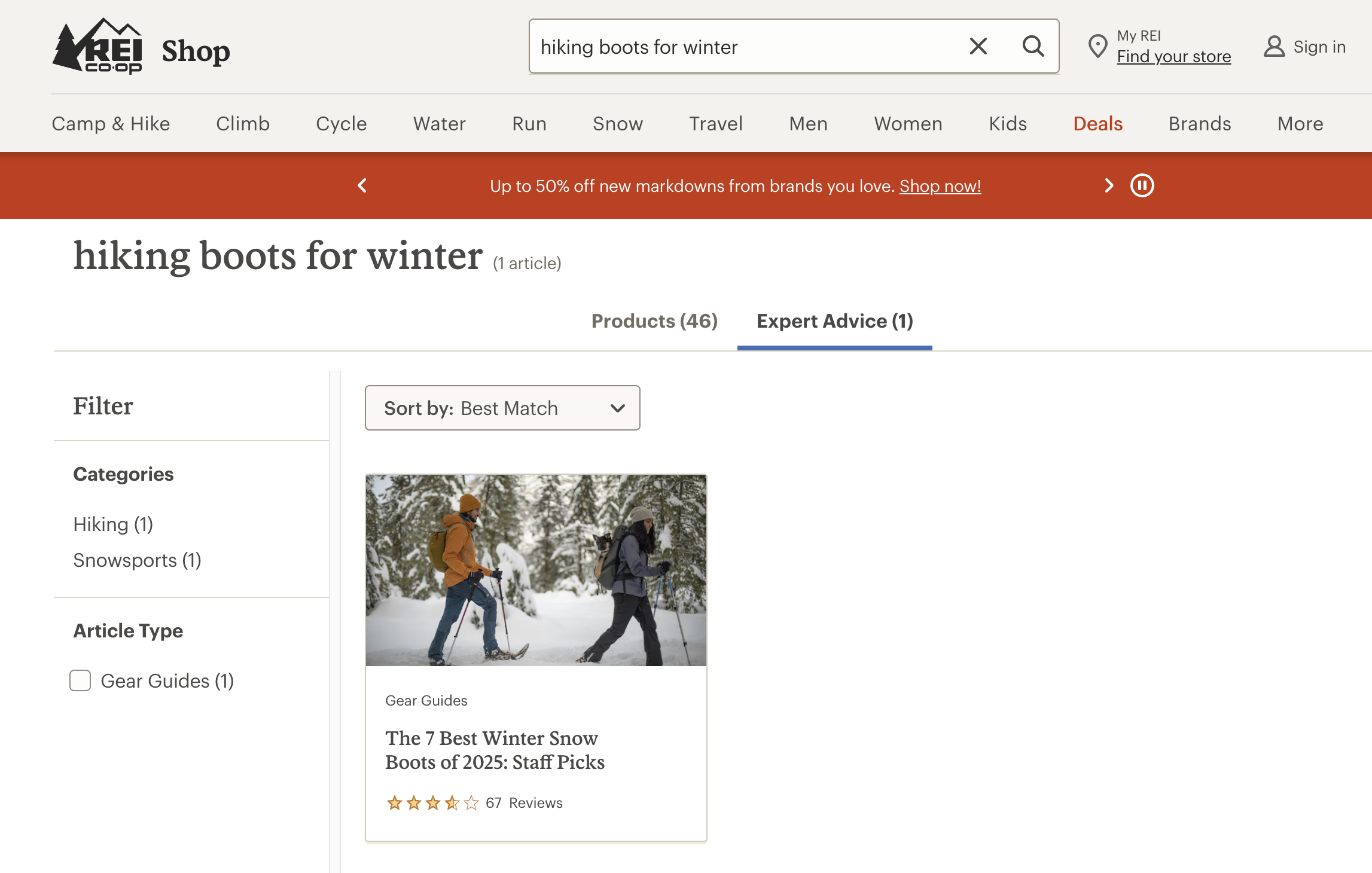
When customers search for queries such as “hiking boots for winter,” REI surfaces both relevant products and educational buying guides within the results environment. The guide helps shoppers understand insulation, waterproof ratings, and fit considerations before selecting a product.
By integrating guidance directly into search results, REI reduces the need for external research and supports higher-confidence purchase decisions within the same session.
Optimise search result ranking to support commercial priorities
Why it matters
Search optimisation is not only about returning accurate results. It also involves strategically shaping ranking logic within relevant results to support commercial objectives. Visibility within search results directly affects engagement and revenue. If commercially important products appear too low in results, they are unlikely to receive meaningful engagement. However, if boosting overrides intent alignment, it can reduce trust and suppress click-through. The objective is controlled commercial influence within relevant boundaries.
How to take action
-
Use ranking rules to prioritise commercially important products: Configure search ranking rules to slightly boost products that support operational goals such as clearing excess inventory or promoting higher-margin items. When several products match a query equally well, position priority items higher within the relevant result set.
-
Adjust ranking during campaigns and seasonal promotions: Update search boosting rules during product launches, seasonal campaigns, or promotional periods so featured collections appear more prominently for relevant queries. Review and reset these rules once the campaign ends to maintain relevance.
When these best practices are implemented cohesively, search performance should improve in observable ways. Fewer zero-result queries, clearer progression from results to product pages, and stronger revenue per search session indicate that search is aligned with both customer intent and commercial objectives.
|
Need help turning these site search best practices into real results? With over 20 years of eCommerce experience, On Tap helps brands optimise product discovery and conversion across multiple eCommerce platforms. Our work with TEMPLESPA was recognised at the 2025 eCommerce Awards, and On Tap also received two Silver awards. Explore our digital marketing services. |
External site search solutions to enhance eCommerce search performance
Most eCommerce platforms include built-in search functionality. For smaller catalogues, this may be sufficient. However, as product ranges grow and merchandising becomes more complex, native search often lacks the flexibility, performance, and behavioural intelligence required to optimise conversion at scale.
At that stage, merchants often integrate a dedicated search solution that operates alongside the eCommerce system. These tools are typically delivered as SaaS and connected via API, allowing them to handle indexing, ranking logic, and predictive capabilities independently of the core commerce engine.
External search solutions are not replacements for your eCommerce system. They are specialised layers designed to enhance product discovery through:
-
More sophisticated ranking and merchandising controls
-
Behavioural and AI-driven ranking
-
Faster query processing at scale
-
Stronger merchandising and reporting controls
However, selecting the right solution is not always straightforward. Search performance depends not only on the technology itself, but also on how well it fits your store’s platform architecture, product catalogue, and merchandising strategy. A solution that works well for one merchant may require significant configuration or technical effort for another.
|
On Tap helps merchants evaluate these factors and identify the search solution that best aligns with their platform architecture, catalogue structure, and commercial objectives through our eCommerce consultancy services. Our team then handles implementation, search configuration, and ongoing optimisation, ensuring the chosen solution delivers measurable improvements in product discovery and conversion performance. |
Below are several specialised search platforms commonly used by eCommerce brands to enhance site search performance.
|
Solution |
Overview |
Key features |
|
Algolia |
A widely adopted hosted search platform known for extremely fast response times and strong API flexibility. Often used by high-growth brands and headless commerce architectures. |
|
|
Searchspring |
A retail-focused search and merchandising platform designed to give marketing and merchandising teams direct control over search results. |
|
|
Bloomreach Discovery |
An enterprise product discovery platform combining AI-driven search, merchandising, and personalisation. |
|
|
Constructor |
A product discovery platform focused on improving search relevance using behavioural data from shopper interactions. |
|
|
Doofinder |
A plug-and-play search solution designed to improve search usability with relatively quick implementation. |
|
Conclusion
Search is the mechanism that translates customer intent into visible options. At the moment a query is entered, your search system determines what can be discovered, what is prioritised, and what remains unseen.
Throughout this guide, we have outlined practical best practices to strengthen that design. Individually, these improvements may appear incremental. Collectively, they reshape how efficiently intent becomes discovery and how consistently discovery becomes revenue.
For over 20 years, On Tap has helped eCommerce brands strengthen conversion performance across Magento, Shopify, and enterprise platforms. As an award-winning eCommerce agency, we combine structured diagnostic analysis with practical implementation to ensure search and product discovery translate into measurable commercial impact.
If you would like to strengthen your search strategy and wider conversion performance, explore our digital marketing services. Or contact our team to discuss your current search performance and growth objectives.