Shopify Plus provides a strong foundation for managing inventory at scale, but it's not a one-size-fits-all solution for every business. The platform excels at keeping stock synchronised across various locations and sales channels, but it has limitations when it comes to more complex operations like advanced forecasting, detailed reporting, and multi-store synchronisation.
This post will break down Shopify Plus’ core inventory management flow, highlight its strengths and limitations for large-scale businesses, and show how merchants can bridge gaps using specialised inventory tools to optimise stock control, reduce errors, and scale efficiently.
Inventory operations in Shopify Plus: End-to-end tracking, control, and forecasting
1. Inventory tracking based on SKU, location, and stock status
Shopify Plus tracks inventory across three key aspects: SKU-level accuracy, fulfilment location, and stock status. Together, these provide merchants with precise, real-time visibility and control over their inventory.
-
Variant-level accuracy: Inventory is managed at the variant (SKU) level, meaning each size, colour, or style has its own stock count. This level of granularity is critical: without visibility at the variant level, every downstream decision—from order fulfilment to replenishment—risks being inaccurate.
-
Location-level visibility: Building on SKU-level accuracy, Shopify Plus tracks inventory across each fulfilment location, any place where products are stocked, sold, or shipped. Shopify Plus supports up to 200 locations, including physical sites such as warehouses, retail stores, and POS outlets, as well as integrated fulfilment app locations like Shopify Fulfillment Network, Printful, or ShipBob if integrated. Location-based tracking ensures that merchants know exactly what is available in each facility, rather than relying on a single, blended company-wide figure.
-
Stock status control: Within each location, inventory is organised into five statuses to reflect whether units can be sold, are reserved, or are incoming:
-
On hand – The total number of units at a location, including Committed, Unavailable, and Available inventory.
-
Available – Units on hand and ready to sell immediately.
-
Committed – Units reserved for open orders.
-
Unavailable – Units not sellable, such as those tied up in draft orders, under review, or held by apps.
-
Incoming – Units expected from transfers, purchase orders, or fulfilment apps but not yet received.
2. Internal visibility and control in inventory operations
Shopify Plus equips internal teams with advanced tools to manage and track the full lifecycle of products, from spotting low stock to ordering from suppliers, balancing stock across locations, organising bins, and coordinating as a team. This creates proactive oversight, reduces the likelihood of shortages, and ensures day-to-day operations scale smoothly. Here’s how it works:
-
Admin thresholds and flags: Staff first set minimum stock thresholds in the admin. When a product’s quantity dips below this level, the system automatically flags it in the inventory view. This gives teams an early warning signal to review and take action before shortages occur.
-
Automated alerts with Shopify Flow: Beyond static thresholds, Shopify Flow lets merchants monitor store events and automatically trigger workflows across apps and teams. For example, as soon as stock status changes, Flow can send an instant Slack message to the warehouse, email a purchasing manager, or tag products as “low stock.” This ensures no one misses a critical inventory update.
-
Create and manage purchase orders with suppliers: When low stock is detected, staff can generate purchase orders (PO) directly inside Shopify Plus. Each PO includes product quantities, pricing, payment terms, shipping carrier, and expected delivery dates. POs progress through multiple statuses (draft, ordered, partial, received, closed), giving teams full visibility into the order lifecycle. Once a PO is created or received, inventory is automatically updated: items move into the “incoming” status until they arrive, then transition into available stock. This makes supplier replenishment seamless and keeps stock levels accurate across all locations.
-
Inventory transfers between locations: If stock needs to be balanced across warehouses or retail stores, staff can create a transfer. The system holds the units at the source location until they’re shipped and then assigns them to the destination once received. Staff can draft, edit, cancel, or duplicate transfers as needed, making it simple to keep products flowing to the locations where they’re most in demand.
-
Bin locations management: Within each location, staff can assign products to bin locations for more precise organisation. These can be managed in bulk by importing or exporting CSV files. By mapping items to specific bins or shelves, staff can pick, pack, and restock faster — an essential capability for large warehouses with complex product ranges.
All of these tools are accessible to unlimited staff accounts on Plus. Warehouse operators, purchasing teams, and finance staff can each work from the same real-time data, reducing bottlenecks and ensuring accountability isn’t limited to a small admin group.
3. Inventory visibility in the customer journey
Shopify Plus gives merchants flexible control over how inventory information is presented, helping to drive conversions, reduce shopper frustration, and personalise the buying experience. Using Checkout Extensibility (a tool that lets you customise the checkout experience) and Shopify Functions (custom code that extends Shopify Plus’s core logic), stores can configure rules that surface availability in a way that builds trust and prevents overselling. Common setups include:
-
Displaying urgency messages like “Only 3 left” on product pages to encourage conversion.
-
Automatically hiding or greying out out-of-stock variants to avoid customer frustration.
-
Enforcing quantity limits per order when stock is scarce (e.g., max 2 per customer).
-
Reserving stock segments for certain groups, such as VIP customers or wholesale buyers, directly at checkout.
These ensure that customers always see accurate, real-time availability while merchants maintain control over how inventory is allocated.
4. Order routing and fulfilment execution
Order routing rules to determine fulfilment locations
Order routing rules activate when products are stocked in multiple active locations. They ensure efficient stock allocation and real-time updates across all connected sales channels. When a customer places an order, Shopify Plus checks inventory across locations and assigns fulfilment to the most suitable option based on rules such as:
-
Minimising split shipments: The system first checks if a single location can fulfil the entire order. If not, it selects the smallest number of locations needed to ship all items, helping reduce shipping costs and complexity.
-
Market-based prioritisation: Locations that belong to the same market as the shipping address are ranked higher. For example, a customer ordering from France will be fulfilled from a European warehouse if stock is available, instead of pulling from North America.
-
Geographic proximity: If multiple locations qualify, Shopify Plus routes the order to the one closest to the customer’s address to shorten delivery times and improve shipping efficiency.
-
Customisable preferences: Merchants can further influence the rules by ranking locations (e.g., prioritising warehouses over retail stores) or by using location metafields (e.g., routing based on capacity, vendor, or other custom attributes).
Note: If no single location can fulfil the entire order, Shopify Plus may split the order across multiple locations based on these rules.
How Shopify Plus executes fulfilment
-
Fulfilment methods (where orders can be fulfilled from): Shopify Plus gives merchants the flexibility to decide who handles fulfilment:
-
Self-fulfilment (merchant-managed): Staff pick, pack, and ship directly from warehouses or retail stores. Processing and shipment updates are managed in the Shopify Admin.
-
Third-party fulfilment services: Shopify Plus integrates with partners like Shopify Fulfilment Network, Amazon Multi-Channel Fulfilment, or external 3PLs via apps. Order data is automatically sent to the partner, who handles fulfilment end-to-end.
-
Custom fulfilment services: If no app exists, merchants can set up custom services. Shopify sends order details (e.g., via email) to designated suppliers or logistics partners for processing.
At setup, merchants can use one method or mix multiple ones depending on product type, location, or region.
-
Fulfilment workflow (how orders are processed in practice): Once methods are defined, Shopify Plus controls the flow of fulfilment for each order:
-
Order assignment: Each line item is routed to the appropriate fulfilment method (self, service app, or custom) based on product configuration. Orders can be split if items use different fulfilment sources.
-
Execution mode: Merchants decide whether to process orders manually or automatically:
-
Manual: Staff trigger fulfilment when ready — reviewing the order, marking items as fulfilled, and entering tracking numbers. This provides checkpoints for quality control or bundling.
-
Automatic: Shopify Plus instantly forwards fulfilment requests to the assigned service (e.g., SFN, Amazon). The partner processes the order without staff intervention, ideal for high-volume operations.
-
Status updates & inventory sync: As fulfilment progresses, Shopify Plus updates order statuses and deducts inventory in real time from the selected location. Updated stock counts are synchronised across all sales channels (online store, POS, marketplaces) and reflected in the Admin, ensuring customers only see available products. For cancellations, refunds, or returns, inventory can be automatically restocked if settings or integrations allow (auto-restock on cancel, restock on return, or 3PL apps pushing data back). Otherwise, staff must manually adjust stock to keep numbers accurate across connected systems, including ERP, WMS, and 3PL integrations via API.
5. Reporting and forecasting
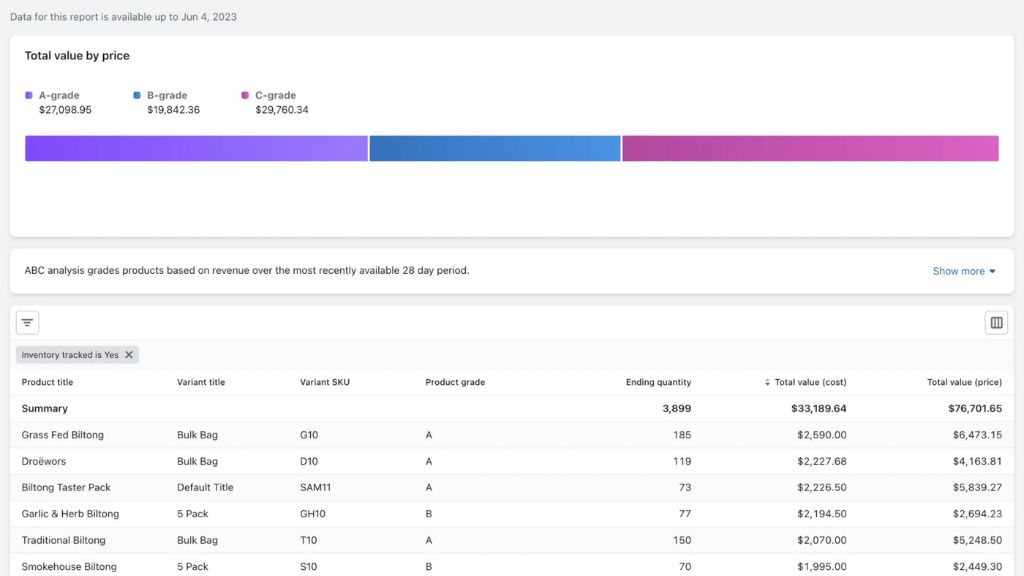
Shopify Plus captures every inventory movement and provides a suite of reports designed to keep merchants in control of stock health and replenishment cycles.
-
Month-end inventory snapshot: Track available quantities of each SKU at the close of each month to benchmark stock trends.
-
Month-end inventory value: See the total cost value of inventory on hand to monitor capital tied up in stock.
-
Inventory sold daily by product: Measure sales velocity and use daily averages to anticipate replenishment needs.
-
Products by percentage sold/sell-through rate: Identify top-performing and slow-moving products to guide purchasing priorities.
-
ABC product analysis: Grades your products based on revenue contribution to decide which to prioritise for restocking.
-
Inventory remaining (days of Inventory): Estimate the number of selling days remaining before stockouts occur.
-
Inventory adjustment changes: Record total quantity change in inventory during a selected time period to ensure transparency. This includes manual adjustments, app adjustments, transfers, and order fulfillments.
-
Inventory adjustments by count: Record the number of adjustments made during a selected time period, allowing merchants to track the frequency and type of adjustment events across staff or apps.
In addition to these defaults, Plus merchants can generate new explorations for custom inventory reports or connect data with external systems like API to ERP, WMS, or BI systems for deeper forecasting and planning.
Together, these reports allow merchants to:
-
Tracking: Monitor real-time stock levels, capital value, and every movement or adjustment.
-
Forecasting: Predict sales velocity, identify potential stockouts, and understand demand trends at the SKU level.
-
Planning: Inform smarter purchasing decisions, optimise SKU assortments, manage working capital, and strengthen supply chain efficiency.
By transforming raw stock data into actionable insights, Shopify Plus enables merchants to maintain accurate inventory today while confidently preparing for future demand.
However, the way inventory is managed can differ depending on business models and selling strategies. In the following sections, we will explore three common scenarios: omnichannel retail, cross-border selling, and B2B/wholesale, to demonstrate where Shopify Plus offers specific features or manages inventory differently.
How Shopify Plus inventory management adapts to different selling strategies
1. Omnichannel retail (Online, POS, and marketplaces)
Unified inventory across online and physical retail: Shopify Plus provides a single source of truth for stock across all channels. When products are sold in-store through Shopify POS, inventory is deducted instantly from that outlet’s pool and reflected online. This real-time synchronisation ensures accurate availability, making click-and-collect (BOPIS) and ship-from-store reliable. Customers only buy what is truly in stock, and staff can fulfil online orders directly from local inventory.
Store-level inventory control with POS Pro: Included with Plus, POS Pro enhances stock management at the retail outlet level. Staff can:
-
Receive supplier deliveries or internal transfers directly from the POS interface.
-
Keep counts accurate with barcode scanning.
-
Use the sales suggestion page to identify stale inventory and free up cash flow.
Planning and demand forecasting with Stocky: Stocky, included with POS Pro subscriptions, helps merchants forecast demand and manage purchase orders. It ensures retailers reorder the right products at the right time to maintain optimal stock levels and reduce overstock or stockouts.
Marketplace connections via Shopify Marketplace Connect: Shopify Plus cannot sync directly with external marketplaces like Amazon or eBay. Merchants must use the Shopify Marketplace Connect app to synchronise inventory, product listings, and orders, ensuring consistent stock across all channels and reducing the risk of overselling.
2. Cross-border selling
For Plus merchants selling internationally, store architecture defines how inventory is managed: either within a single store with one central admin, or across multiple regional stores where each operates with its own independent inventory and admin.
-
Single store for multiple markets/regions: With this model, all inventory management tasks — including stock tracking, allocation, and fulfilment — are performed from a single admin dashboard, giving merchants a unified view across all markets.
-
Unified inventory management: All inventory is tracked on this single platform, without splitting stock by market. When an order comes from any country, the system automatically deducts from the total inventory, ensuring accurate stock levels across all regions.
-
Automatic regional fulfilment from assigned locations: Shopify Plus lets you group locations within a shipping profile and assign each group to specific regions. Orders from customers in a given region are then automatically fulfilled from the locations linked to that region’s shipping profile, helping to optimise delivery times and reduce shipping costs.
-
Show only fulfillable inventory: You can display only the products available at locations capable of shipping to the customer’s location, so customers can only purchase items that can actually be fulfilled. This improves control over regional sales, enhances the customer experience, and reduces inventory and shipping risks.
-
Multiple stores for multiple markets/regions: In this model, you create separate Plus stores for each region (e.g. North America, Europe, APAC). The biggest difference is that each expansion store operates as a standalone store with its own inventory system and admin dashboard. Stock levels in one store do not affect any other store. Merchants can still monitor all stores from a central admin if desired, but each store functions independently.
-
Market-specific inventory allocation: This model allows you to allocate inventory separately for each market or region (NA, EU, APAC). You have full control over product availability in each region, preventing inventory conflicts between markets.
-
Third-party tools required for syncing: Since stores do not share inventory by default, you will need third-party apps from the Shopify App Store or a custom solution via API to sync inventory across stores if needed. This adds complexity and potential costs.
3. B2B and wholesale
Shopify Plus also accommodates B2B workflows, with inventory management differing based on whether B2B is blended into a DTC store or separated into a dedicated wholesale store.
-
Blended store (DTC + B2B): A single Plus store can serve both retail and wholesale customers. All orders, regardless of customer type, draw from the same inventory pool. Merchants can configure rules such as minimums and payment terms for B2B customers, but inventory allocation is not separated within the store.
-
Dedicated B2B store: Merchants can also set up a dedicated wholesale store. In this model, inventory is ring-fenced from DTC, with a separate ledger maintained for wholesale orders. This setup allows B2B stock to be tracked independently while orders are still fulfilled from the assigned locations with real-time updates.
Many merchants struggle to align Shopify Plus’ inventory management capabilities with the realities of their business operations. At On Tap, our team helps you bridge this gap by:
-
Assessing whether Shopify Plus’ native features are sufficient and identifying where complementary solutions may be needed from a technical perspective.
-
Designing optimised inventory management approaches that both leverage the strengths of Shopify Plus and its ecosystem, and improve operational efficiency while controlling costs.
With our Shopify Consulting services, you gain actionable guidance to make smarter platform decisions and ensure your inventory strategy truly supports your business goals.
The benefits of Shopify Plus inventory management
1. Scalability across multiple locations and regions
With support for up to 200 locations, Shopify Plus scales to accommodate complex fulfilment networks, whether that means warehouses, retail stores, or 3PL hubs.
For merchants selling internationally, store architecture determines how inventory is structured and managed across regions:
-
One store for multi-regions: Manage all stock centrally in a single store while still tailoring the shopping experience for each region. Inventory remains unified and tracked in one place.
-
Multiple stores for multi-markets: Set up individual stores per region, with inventory managed independently in each store. This gives merchants flexibility if local operations or regulations require distinct stock control.
This flexibility allows merchants to adapt their inventory model as they expand into new geographies or increase operational complexity.
2. Unified inventory within the Shopify ecosystem
Shopify Plus provides merchants with a centralised inventory system that keeps stock accurate and consistent across all sales and fulfilment channels. This unified approach delivers several key benefits:
-
Accurate, real-time stock across channels: Shopify Plus acts as a single source of truth by synchronising inventory across online stores, marketplaces, warehouses, and retail outlets. Stock is updated instantly whenever items are sold or received, reducing overselling and ensuring both staff and customers see the correct availability.
-
Enhanced in-store operations with POS Pro: POS Pro allows staff to manage inventory directly in stores, scan barcodes, receive supplier deliveries, and access advanced forecasts. Changes made at the POS are immediately reflected online, keeping inventory consistent across channels and supporting omnichannel services like BOPIS and ship-from-store.
-
Optimised order fulfilment and planning: With location-level stock tracking and status management, merchants can prioritise inventory allocation, forecast demand accurately, and plan transfers or purchase orders more effectively.
3. Enhanced operational efficiency with automation and smart routing
Shopify Plus leverages automation to reduce manual effort in inventory and fulfilment workflows, improving both accuracy and speed. The benefits include:
-
Intelligent order routing: Shopify Plus’s built-in routing rules automatically select the optimal fulfilment location based on stock availability, merchant-defined priorities, or proximity to the customer. This reduces split shipments, lowers costs, and ensures faster delivery.
-
Automated fulfilment powered by Shopify Plus’s Partner Network: The Shopify Plus ecosystem connects with a wide network of fulfilment and shipping partners—such as Shopify Fulfilment Network, Amazon Multi-Channel Fulfilment, and other 3PLs. By sending requests directly to these partners, merchants can automate the entire process from stock updates to picking, packing, and shipping. This helps reduce manual efforts, save time, and eliminate bottlenecks.
By combining automated routing with integrated fulfilment, merchants minimise errors, shorten fulfilment times, and free up staff to focus on higher-value tasks instead of manual inventory updates or shipment coordination.
4. Seamless shopping with accurate and flexible product displays
Shopify Plus helps merchants deliver a smoother, more reliable shopping journey by ensuring customers always see accurate stock and by providing flexible display controls for product availability. These capabilities reduce frustration, increase trust, and keep customers coming back.
-
Real-time stock visibility for shoppers: Thanks to Shopify Plus’s centralised inventory system, product availability is synchronised across online stores, marketplaces, and POS. Customers avoid the frustration of buying items that turn out to be unavailable.
-
Fair access during high-demand sales: With Checkout Extensibility and Shopify Functions, merchants can limit purchases per customer, hide out-of-stock products, and tailor availability by channel. Shoppers enjoy a fairer experience, especially during exclusive drops.
-
Reliable delivery for every order: Shopify Plus enforces configured shipping zones so customers can only purchase from fulfilment locations that can actually serve their region. This reduces failed orders and gives buyers confidence that their purchase will arrive on time.
5. Flexible strategies for different customer segments
Shopify Plus inventory management adapts to both B2C and B2B scenarios. Merchants can manage inventory centrally in one store or operate multiple regional/segment-specific stores depending on business needs. For example, B2B clients may require dedicated stock pools with special pricing, while retail customers are served from the main catalogue. This flexibility ensures merchants can align their inventory operations with diverse sales strategies.
Where does inventory management on Shopify Plus fall short?
Shopify Plus provides a lot of inventory management features for large-scale merchants, but it isn’t a replacement for a warehouse management system (WMS) or enterprise resource planning (ERP) solution. As catalogues, order volumes, and regional complexity grow, the following limitations become clear:
1. Omnichannel and multichannel constraints
Shopify Plus provides real-time inventory sync across its native ecosystem (Shopify online store, Shopify POS, and connected fulfilment apps). However, when businesses expand to external channels such as Amazon, eBay, or a third-party POS, visibility breaks down.
-
No native marketplace sync: Shopify Plus does not automatically deduct inventory when an item sells on non-Shopify sales channels (Amazon, eBay, Walmart, or social platforms like TikTok Shop). Without third-party integrations, merchants must manually reconcile stock, which becomes unmanageable at scale.
-
Third-party POS gaps: Shopify POS syncs seamlessly, but sales on external POS systems (used in retail chains, pop-ups, or wholesale counters) don’t flow back into Shopify Plus. This leaves store managers blind to total stock levels. For example, a retailer running Shopify Plus for eCommerce but Square POS for offline sales must rely on middleware or manual imports to align counts.
-
Hidden trade-offs of third-party integration: While integrations and middleware (e.g., ChannelAdvisor, Linnworks, Sellbrite) can bridge the gap, they add complexity, cost, and sometimes lag in updates. This makes “real-time” less reliable than Shopify Plus’s native sync.
Impact: Without centralised synchronisation for omnichannel and multichannel, merchants face mismatched counts, overselling, or underutilised stock. This creates customer experience issues (backorders, cancellations) and operational inefficiencies (time spent reconciling data).
2. Limited order allocation logic
Shopify Plus provides order routing rules with predefined options like minimising split shipments, prioritising stock within the customer’s market, or choosing the nearest fulfilment location. These cover standard scenarios but fall short for merchants needing more advanced or customised distribution strategies.
-
No granular or SKU-specific logic: Shopify Plus does not allow merchants to enforce advanced conditions, such as always fulfilling a certain product line from a designated warehouse, or routing high-value SKUs through a specific distribution centre for security reasons.
-
No optimisation based on cost or capability: Native rules don’t factor in real-time variables like shipping costs, warehouse workloads, or carrier service levels, which many enterprises rely on to optimise fulfilment.
-
No manual reassignment: Once Shopify Plus automatically assigns a location, there is no built-in option for admins to override routing on a per-order basis in the backend. Adjustments typically require cancelling and recreating orders or using third-party tools.
Impact: Enterprises operating multiple warehouses or running complex fulfilment workflows may face higher shipping costs, inefficiencies in stock usage, and reduced control over fulfilment priorities without an advanced Order Management System (OMS).
3. Multi-store inventory synchronisation silos
Shopify Plus supports expansion stores, which allow merchants to run separate stores for different regions, currencies, or brands. While this supports global growth, it also fragments inventory data.
-
No central inventory pool: Each store maintains its own inventory counts, with no shared stock visibility across stores.
-
No cross-store synchronisation: A purchase in one region does not automatically adjust inventory in another, leading to mismatched availability.
-
No unified reporting: Merchants cannot access a consolidated dashboard to view global stock levels or performance. Each store generates separate reports.
Impact: For enterprises managing multiple regions or brands, this siloed approach makes it complicated to optimise fulfilment globally. Because inventory is managed separately in each store, stock may pile up in one market while another runs out, driving higher shipping costs, longer delivery times, and inconsistent customer experiences. The lack of unified reporting further complicates demand forecasting, resource allocation, and strategic decision-making.
4. Gaps in forecasting and replenishment
Shopify Plus includes standard sales and inventory reports, but these are retrospective and lack predictive functionality. Merchants can only view what has already been sold, not what will likely be needed next.
-
Manual, history-based forecasting only: Shopify Plus does not provide a dedicated forecasting dashboard, and its inventory forecasts rely solely on historical sales and inventory reports combined with manual calculations. Additionally, without AI or machine learning, these forecasts cannot adjust for seasonality, promotions, or market trends.
-
No automated replenishment: Shopify Plus does not support automatic replenishment based on inventory levels or demand forecasts. There are no built-in mechanisms to define min/max thresholds for products or automatically generate reorder triggers when stock falls below a certain level. As a result, merchants must constantly monitor inventory levels manually and initiate purchase orders themselves.
-
Manual planning dependency: Merchants must rely heavily on manual calculations and external tools to plan restocking. Reorder points, safety stock levels, and replenishment schedules are typically calculated outside the platform, often in spreadsheets or separate inventory management systems.
Impact: Merchants risk running out of fast-moving products (missed sales opportunities) or tying up capital in over-ordering. Dedicated forecasting tools (e.g. Inventory Planner) or ERP modules are needed for proactive replenishment.
5. Lack of support for advanced procurement workflows
Shopify Plus lets you create purchase orders, save them as drafts, and mark them as Ordered once approved. However, the workflow stops there — merchants must export POs as PDFs to share with suppliers.
-
No supplier management or communication: Shopify Plus doesn’t support supplier onboarding, direct PO submission, delivery schedule confirmations, or acknowledgement tracking. All vendor communication remains manual and outside of the platform.
-
No approval workflows for large teams: Enterprises cannot set up multi-level approvals for purchasing decisions, budget limits, or order authorisations, which adds friction to procurement governance.
-
No end-to-end procurement support: Critical activities such as automated PO approvals, invoicing, payment processing, and procurement analytics aren’t built into Shopify Plus. Merchants need external systems or apps to manage these processes.
Impact: Procurement remains a manual, disconnected process. This creates delays, increases the risk of errors, and prevents procurement from being fully aligned with real-time inventory data.
6. Bundle and kit management gaps
Shopify Plus manages inventory at the individual product or variant level, but it does not support bundles, kits, or assemblies natively. This creates challenges for brands that sell sets, multipacks, or rely on light manufacturing workflows.
-
No built-in bundles with multiple SKUs: When merchants create a bundle (e.g., a gift set), it exists as a standalone SKU. Shopify Plus does not automatically deduct stock from the underlying components when a bundle is sold.
-
No Bill of Materials (BOM): There’s no way to define recipes or assembly structures that connect multiple SKUs into a finished product.
-
No kitting support: Workflows such as “pick-and-pack” kits, made-to-order sets, or light assembly aren’t supported out of the box.
Impact: Because component inventory isn’t adjusted automatically, brands risk stock discrepancies, which can lead to customer experience issues like overselling and backorders, as well as operational inefficiencies from manual reconciliation.
Many of these limitations can be overcome by connecting Shopify Plus with complementary systems such as ERP, CRM, WMS, or PIM. To ensure they work seamlessly together, On Tap offers two powerful solutions:
-
Systems Integration service is designed to connect your eCommerce platform with critical enterprise systems such as CRM, ERP, PIM, or WMS. By streamlining workflows, improving data accuracy, and synchronising processes across platforms, this solution keeps your operations running smoothly and optimised for growth.
-
For merchants who prefer a fully managed option, Integration Flow provides automated, real-time data synchronisation between eCommerce platforms and a wide range of external systems such as ERP, WMS, CRM, PIM, marketplace & sales channels, and marketing. Built on an API-first approach, it eliminates the need for one-off connectors and ensures your entire technology stack operates in harmony. With setup, configuration, and ongoing support fully managed by On Tap, you can stay focused on your customers while your business remains agile and ready to scale.
Extending Shopify Plus inventory with complementary systems
Shopify Plus provides a solid foundation for inventory management, but it doesn’t cover every workflow or business requirement. To fill these gaps, merchants often add complementary systems and apps that enhance Shopify Plus’s native capabilities.
1. Warehouse management system (WMS)
Shopify Plus provides solid inventory tools, but is not a full warehouse management system. A WMS adds operational-level control, letting merchants track exactly where items are stored, how they move, and who handled them. For large catalogues, high order volumes, or multiple distribution centres, a WMS improves accuracy, efficiency, and scalability beyond Shopify Plus’s native capabilities.
Key capabilities:
-
Bin- and zone-level tracking: Map items to specific aisles, shelves, or bins for precise location management.
-
Barcode and RFID scanning: Scan products to update inventory in real time during receiving, picking, and packing.
-
Automated order fulfilment: Optimise picking routes and automatically update stock as orders are processed.
-
Replenishment automation: Monitor thresholds and generate alerts or purchase orders automatically.
-
Cycle counting and audits: Perform rolling inventory counts without pausing operations.
2. ERP integrations for end-to-end control

While Shopify Plus provides solid inventory visibility across sales channels, it does not natively connect purchasing, finance, and supply chain planning. That’s where ERP (Enterprise Resource Planning) integrations come in. By linking Shopify Plus with ERP systems such as NetSuite, Microsoft Dynamics, or Acumatica through Shopify’s ERP program, merchants can unify their inventory data with broader business operations.
Key capabilities:
-
Inventory and financial alignment: Every Shopify Plus stock movement updates the ERP’s financial records for accurate cost-of-goods and margin tracking.
-
Advanced demand planning: ERP systems forecast demand using seasonality, lead times, and safety stock beyond Plus’s built-in analytics.
-
Automated purchasing workflows: Purchase orders can be triggered automatically when stock falls below thresholds, including supplier approvals.
-
Centralised reporting across regions: For global brands running multiple stores, ERP ensures that all data, like inventory, financial, and operational data, is consolidated into one system for seamless reporting across regions.
3. Product information management (PIM) system
A PIM system enhances inventory management in Shopify Plus by serving as the single source of truth for product data across all channels and expansion stores. While Shopify Plus centralises inventory counts, PIM ensures SKUs, attributes, and localised details stay consistent, preventing mismatches that cause stock errors. This alignment keeps inventory accurate across DTC, B2B, and global markets while supporting seamless scaling.
Key capabilities:
-
Centralised product catalogue across all channels: PIM maintains a single master record for every SKU and automatically syncs it to Shopify Plus, ensuring that all stores, locations, POS outlets, and connected marketplaces use the same authoritative product data.
-
SKU governance and validation: Prevent duplicate SKUs, mislabeling, or errors that could distort stock counts.
-
Channel-specific customisation: Adapt descriptions, images, and languages for regional or B2B catalogues while keeping core SKU data unified.
-
Bulk updates at scale: Sync thousands of SKUs from the PIM to Plus store to reduce manual admin work.
-
Efficient handling of complex products: Manage sets, bundles, multipacks, or assemblies by defining component relationships, maintaining accurate variant combinations, and automatically updating stock levels for each item within a bundle.
-
Consistent global attributes: Ensure dimensions, pricing units, variant details, and other product attributes remain consistent across all storefronts and channels.
4. Demand forecasting & planning tools
Shopify Plus provides basic analytics, but advanced demand forecasting tools such as Stocky, ShipHero, and Inventory Planner go further by using predictive models to anticipate stock needs, optimise replenishment, and prevent both overstocking and stockouts. These tools integrate directly with Shopify Plus to ensure inventory levels align with customer demand and market shifts.
Key capabilities:
-
AI & machine learning optimisation: Leverage advanced algorithms to identify patterns, improve forecast accuracy, and continuously adapt predictions based on new data.
-
Predictive demand modelling: Use historical sales, seasonality, and lead times to forecast future inventory needs.
-
Automated replenishment: Trigger purchase orders or supplier alerts when forecasted demand risks depleting stock.
-
Safety stock management: Set dynamic buffers to avoid shortages during peak demand or supply delays.
-
Multi-channel forecasting: Consolidate data from Shopify Plus, marketplaces, and POS to plan stock across all sales channels.
-
Scenario planning: Model “what-if” situations (e.g., promotions, new product launches) to predict their impact on stock.
5. Third-party logistics (3PL) and fulfilment services
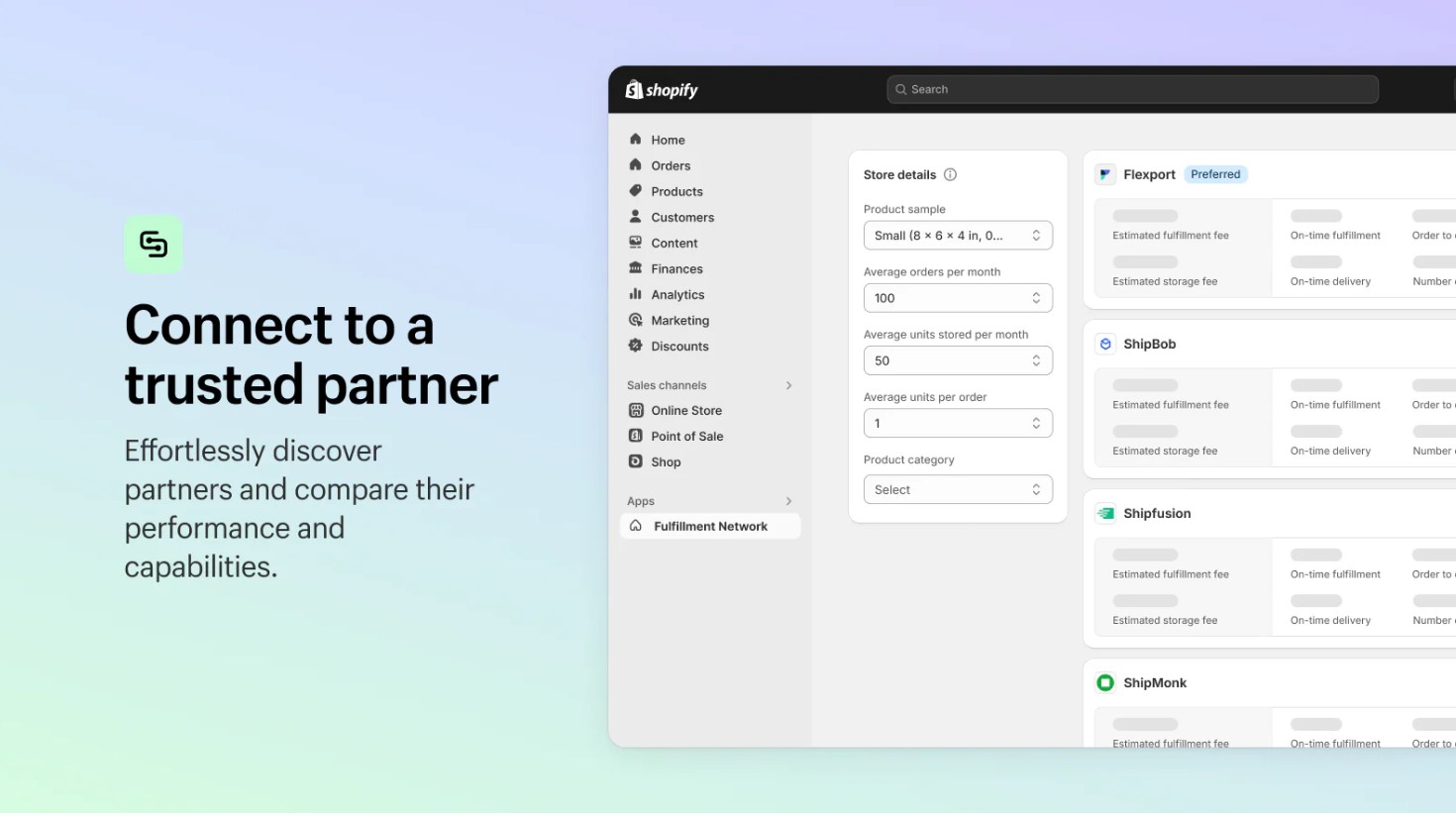
As Shopify Plus merchants scale, managing warehouses and shipping in-house becomes complex. Partnering with third-party logistics providers (3PLs) or Shopify’s Fulfillment Network (SFN) lets merchants automate order fulfilment, keep inventory accurate, and reach multiple regions without running their own warehouses.
Key capabilities:
-
Location integration: Add 3PL or SFN warehouses as locations with auto-updated stock.
-
Flexible and wide-ranging order routing: Automatically routes orders based on customer location, inventory levels, shipping costs, product type, and SLA requirements, while allowing complex routing logic for large-volume or specialised orders.
-
Stock deduction: Reserve and deduct inventory as soon as fulfilment is confirmed.
-
Scalable distribution: Expand into multiple regions with partner warehouses.
-
Faster delivery: Offer services like two-day shipping without owning warehouses.
-
Synchronised inventory tracking: Ensures that inventory records in Shopify Plus stay synchronised with real-time data from 3PL operations.
6. Dedicated inventory management systems/order management systems
Shopify Plus provides strong native tools to manage stock within a single store across POS and multiple fulfilment locations. However, it lacks depth for complex supply chain needs, with advanced procurement, forecasting, and order orchestration either basic or missing.
To close these gaps, merchants integrate dedicated Inventory Management Systems (IMS) or Order Management Systems (OMS). These platforms sit between Shopify Plus and external warehouses or channels, providing unified visibility, automation, and advanced control. Popular solutions like Brightpearl (Sage), Cin7, Skubana, DEAR, or Ordoro connect via API, enabling merchants to scale globally with greater accuracy and efficiency.
Key capabilities:
-
Centralised inventory view: Consolidate stock data across Shopify expansion stores, marketplaces (Amazon, eBay), warehouses, and POS into a single real-time dashboard, reducing discrepancies and overselling.
-
Advanced order routing: Apply logic beyond Shopify Plus’s native rules, including rules by SKU, warehouse capacity, shipping cost, or SLA, with support for split fulfilment and drop-shipping.
-
Forecasting & replenishment automation: Generate accurate demand forecasts, calculate reorder points and safety stock, and automatically issue purchase orders to suppliers.
-
Advanced procurement workflows: Manage suppliers end-to-end, send POs directly, enable multi-level approvals, and automate the full cycle from PO → receiving → invoicing → payment, all tightly aligned with real-time inventory data.
-
Batch, lot & serial tracking: Ensure full traceability with expiry dates, lot numbers, and serials to support recalls, regulatory compliance, and warranty management.
7. Multi-store and marketplace sync
Shopify Plus does not natively sync inventory across multiple stores or marketplaces. Merchants selling internationally (with expansion stores) or on channels like Amazon often use synchronisation apps or middleware to keep inventory aligned. Tools such as Syncio, Matrixify, ChannelAdvisor, Sellbrite, or Linnworks connect multiple Shopify Plus stores and marketplaces so that a sale in one channel instantly adjusts stock everywhere else.
Key capabilities:
-
Cross-store sync: Deduct stock across all Shopify Plus stores when a SKU sells in any store.
-
Marketplace integration: Ensure inventory updates flow between Shopify Plus and Amazon, eBay, Walmart, or other external channels.
-
Centralised pool management: Treat all stores and channels as one stock pool to reduce overselling risks.
-
Flexible scaling: High-volume merchants can use middleware OMS platforms to manage inventory across dozens of channels seamlessly.
Conclusion
Shopify Plus provides a powerful foundation for managing inventory. It functions as a unified inventory control system, ensuring your stock data is synchronised across all locations and sales channels in real time. This robust capability is supported by advanced features, including the ability to manage up to 200 locations, automate order routing and more, allowing you to implement flexible inventory strategies for diverse business models like B2B and omnichannel retail.
However, for large-scale merchants with complex needs, Shopify Plus is not a complete solution. It lacks the in-depth functionality of dedicated systems for forecasting, multi-store synchronisation, and detailed reporting. For these businesses, the key to success lies in extending Shopify Plus with specialised, complementary systems.
As a trusted Shopify Plus agency, On Tap helps merchants overcome the platform’s limitations by building tailored solutions that bridge gaps in native functionality. With deep expertise in supporting high-growth brands, we don’t just optimise inventory management, but also enable seamless integration with complex enterprise systems such as ERP, WMS, PIM, and 3PL. Our team works closely with you to adapt Shopify Plus to your unique business model and ensure your operations scale efficiently and sustainably.
Learn more about how we can help you with your inventory management needs and other complex projects by exploring our Shopify Plus development services.
Or, get in touch with our team to start a conversation about your business.