 Best full-service eCommerce agency 2026


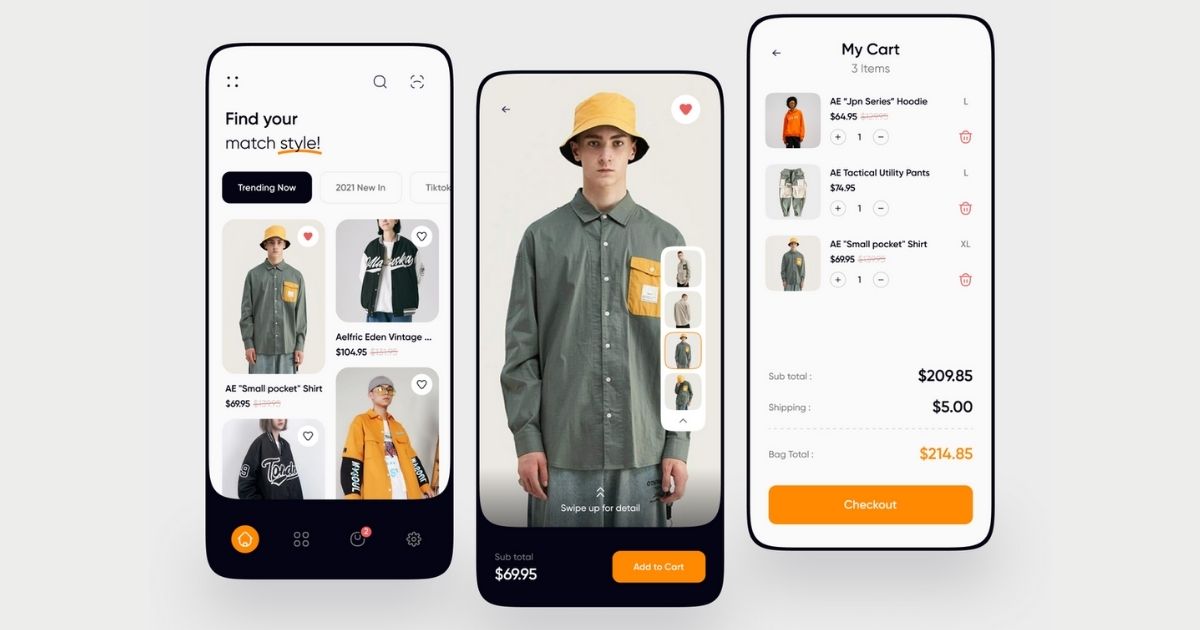
As online stores grow, product catalogues often expand to hundreds or even thousands of SKUs. Without a clear system to organise and prioritise products, shoppers can quickly feel overwhelmed when browsing. When customers struggle to find the right product quickly, many simply leave and look for a store that makes the decision easier.
This is where eCommerce merchandising becomes essential. By strategically organising, prioritising, and presenting products across your store, merchandising helps shoppers discover relevant products faster while guiding attention to the items that drive the most revenue.
In this guide, you’ll learn what eCommerce merchandising is, why it matters for growing online stores, and practical strategies to implement it effectively.
Definition of eCommerce merchandising
eCommerce merchandising is the process of strategically organising, presenting, and prioritising products across an online store to improve product discovery, help shoppers find the right products to meet their needs, and guide them toward the items the store owner wants to promote.
When done effectively, it transforms the shopping journey from passive browsing into an engaging and purposeful experience. Shoppers find what they need faster with less friction, leading to higher engagement, increased conversion rates, larger average order values, and stronger overall sales performance for the business.
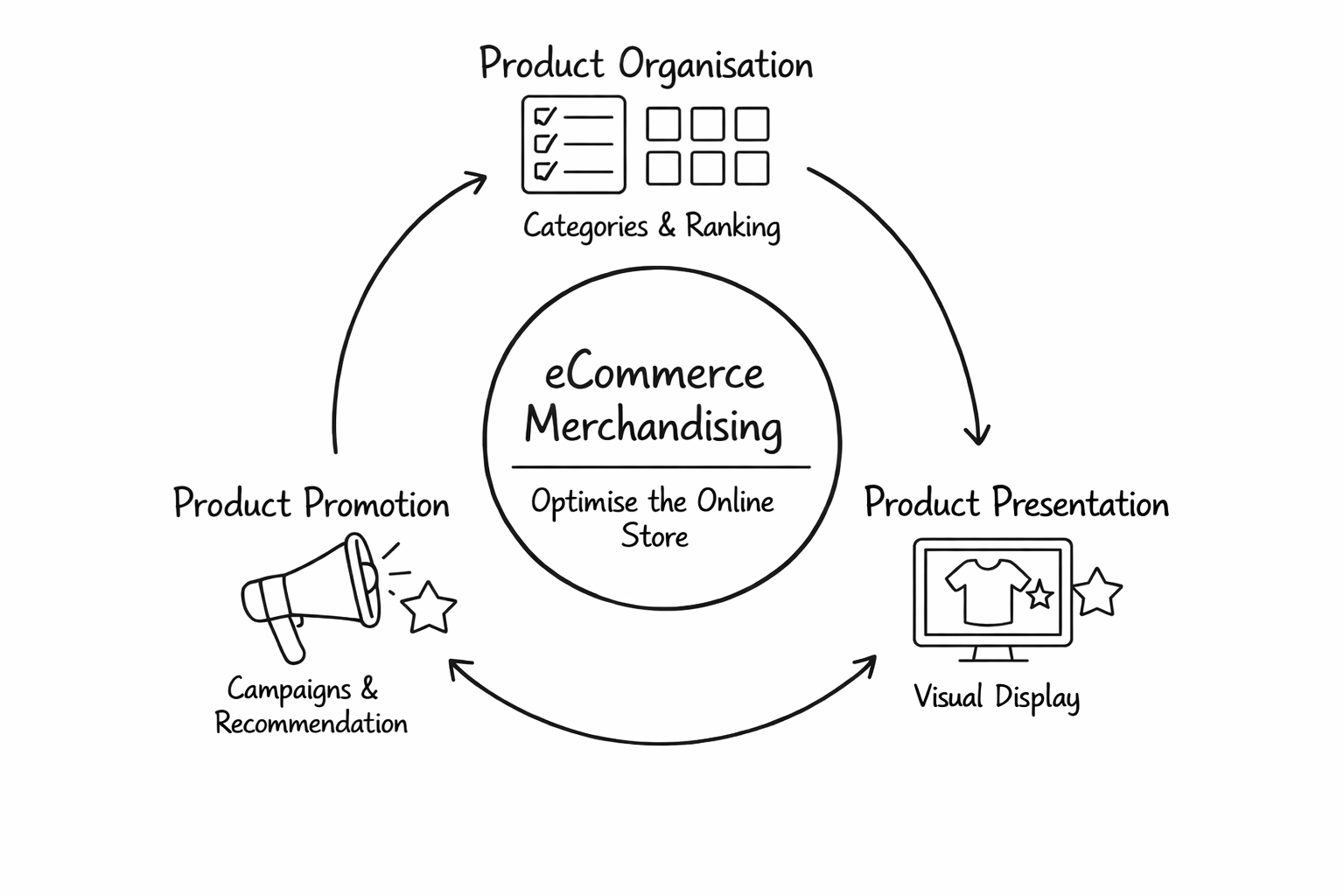
In practice, merchandising mainly revolves around three core activities:
-
Product organisation: Group, categorise, and prioritise products across the catalogue through collections, sorting logic, and product ranking.
-
Product presentation: Display products visually to attract attention and support decision-making using product imagery, highlights, and other visual merchandising elements.
-
Product promotion: Surface priority products at the right time and context through campaigns, curated collections, recommendations, or personalised experiences.
Therefore, effective eCommerce merchandising relies on data-driven decisions to optimise product organisation, presentation, and promotion, shaping how easily shoppers discover products and move toward purchase.
Why merchandising eCommerce matters
According to HubSpot, brands implementing dynamic sorting to improve product discovery have achieved up to 44% higher conversion rates. That means effective eCommerce merchandising is far more than making your storefront look good. It directly influences how easily customers discover products, how smoothly they move through the shopping journey, and ultimately how much they spend:
-
It improves product discovery: Effective merchandising ensures relevant products are immediately visible, preventing frustration and choice overload. This is especially important for stores with large catalogues, where clear organisation makes thousands of SKUs easier to navigate.
-
It streamlines the customer journey: A well-merchandised store guides shoppers from initial interest to purchase by surfacing relevant products and recommendations, helping them evaluate options faster and reach checkout with less friction.
-
It boosts conversion rates and revenue growth: Strategic merchandising highlights high-margin items and encourages larger basket sizes, increasing both average order value and overall revenue.
To succeed, brands must move beyond a design-centric mindset and treat merchandising as a high-impact lever for business growth.

Key steps to merchandise your online store effectively
Effective eCommerce merchandising doesn’t come from random changes. Without structure, merchants risk testing ideas and wonder if they drive results. A clear strategy lays the foundation for consistent performance before applying specific optimisations. This is especially important because digital merchandising operates very differently from physical retail displays, relying on data-driven product organisation rather than store layouts.
1. Define your goals
Before changing product placement, collections, or homepage layouts, you need a clear goal for your merchandising strategy. A clear objective ensures every adjustment supports measurable growth rather than scattered experimentation.
To avoid losing focus, start with only 1-2 primary goals. Below are common objectives with specific examples of targets to aim for:
-
Increase conversion rate: Target a 10% to 20% uplift in completed purchases.
-
Increase average order value (AOV): Target a 15% to 25% increase in total basket size through strategic bundling and cross-selling.
-
Promote strategic or high-margin products: Aim to increase the sales share or visibility of high-profit items by 30%.
-
Improve product discovery: Target doubling the number of product pages viewed per session to ensure more of your inventory is explored.
To track progress effectively, each goal should be linked to clear performance metrics. For example, goals like improving product discovery or increasing AOV can be tracked through indicators such as conversion rate, pages per session, add-to-cart rate, or average basket value.
2. Build a solid product data foundation
A successful merchandising strategy relies on a clean and well-structured data foundation. Organising your data accurately from the start ensures that products can be filtered, grouped, and analysed effectively. Structure your data through these 3 key layers:
-
Products: Define each product clearly with essential information such as name, brand, category, price, and product descriptions. Each product should represent a single core item in your catalogue.
-
Attributes: Define the key characteristics used to describe and filter products across the catalogue, such as colour, material, style, or technical specifications. Attributes help customers compare products and narrow down results using filters.
-
Variants: Define the selectable options of a single product, such as size or colour, and standardise their formats across the catalogue (e.g., S, M, L instead of Small, M, Large). Each variant should correspond to a unique SKU used for inventory and order tracking. Clear variant structures help customers choose the exact version of a product quickly and accurately.
3. Organise products strategically
Once product data is structured, the next step is to build a clear catalogue structure that defines how products relate to each other. A well-organised structure makes it easier for both customers and systems to understand the product range. This typically involves:
-
Define category and collection structure: Organise products into clear categories and curated collections that reflect how shoppers browse.
-
Prioritise products within collections: Decide which products appear first based on criteria such as popularity, margin, seasonality, or campaign priorities.
-
Create curated product groupings: Build collections around themes such as bestsellers, new arrivals, trending items, or seasonal selections.
|
If you are planning to improve how products are organised and prioritised across your store, On Tap offers a free consultation to review your merchandising strategy, product data structure, and category organisation to identify practical opportunities for improvement. |
4. Set up measurement
Once your catalogue is organised, set up tracking to measure the KPIs defined earlier. Tracking these metrics helps reveal which products, collections, or promotions drive engagement, helping merchants prioritise actions and make data-driven decisions before applying merchandising tactics.
5. Apply best practices
With measurement in place, apply merchandising tactics that align with your business goals. This may include visual merchandising, improved navigation and search, or curated and personalised product experiences. The objective is to prioritise tactics that directly support your targets, whether improving product discovery, increasing conversions, or promoting specific products.
6. Evaluate & iterate
After launch, review performance data regularly. Analyse metrics to identify what works and what needs improvement. Use these insights to refine product groupings, priorities, and recommendations so merchandising continues to improve customer experience and conversion over time.
Best practices for implementing eCommerce merchandising
The steps above outline the core framework for eCommerce merchandising. In this part, we explore practical best practices to apply when executing merchandising strategies. When implementing these practices, prioritise the tactics that best support the goals defined earlier, rather than applying every tactic at once.
Use tools to scale product organisation and prioritisation
Manual merchandising has clear limitations: it becomes time-consuming with large SKU volumes, reacts slowly to trends or stock changes, and can overlook high-potential products.
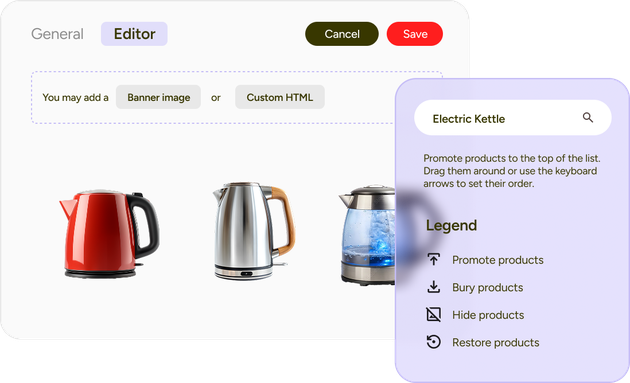
Merchandising tools help merchants scale product organisation and prioritisation by automating product ranking, managing large catalogues more efficiently, and dynamically adjusting product visibility based on business rules or customer behaviour.
-
Implement rule-based merchandising engines to apply business logic at scale: These engines automate how products are displayed across your site based on pre-set parameters, such as boosting products with a margin higher than 40% or demoting low-stock items.
-
Activate dynamic ranking systems: These systems monitor behavioural signals like clicks, add-to-cart activity, and purchase completion to reorganise layouts instantly (e.g., automatically moving a viral product to the top of search results), allowing your store to capitalise on shifting as they happen.
-
Utilise automated collection sorting: Prioritise products that match common shopper preferences and are widely suitable, such as items designed to suit multiple undertones or body shapes. This reduces mismatch frustration and helps shoppers reach suitable products faster.
Recommended tools to get started:
-
Bloomreach: AI merchandising rules, boost/bury products, and real-time ranking
-
Fast Simon: rule-based merchandising automation
-
Algolia: custom ranking combining search relevance with business priority
Approach multi-channel merchandising
Multi-channel merchandising keeps product organisation, prioritisation, and promotions consistent across customer touchpoints. Instead of managing channels separately, merchants coordinate merchandising across the website, email, paid ads, marketplaces, and social commerce, using the website as the central catalogue hub that feeds product data and prioritisation to other channels.
Adopting a multi-channel approach ensures merchandising decisions remain consistent across platforms, increasing visibility and impact.

-
Build merchandising logic centrally on the website: Set core business rules and product hierarchies on your primary storefront before distributing them to other channels. This ensures priority products remain consistently highlighted across different platforms.
-
Export enriched product feeds: High-quality feeds translate your site’s internal metadata (e.g., stock levels, pricing, or margins) into formats used by advertising platforms like Google Shopping or Meta Catalogues. This ensures the products promoted in paid ads align with the same high-performing items prioritised.
-
Maintain consistent visual merchandising and collection hierarchy: Apply the same collection structure, product badges, and highlighting rules wherever products appear. For example, a product marked “Best Seller” on the homepage should carry the same badge, imagery, and priority placement in ads, product catalogues, and emails to reinforce consistent product visibility.
|
Approach multi-channel merchandising with On Tap’s eCommerce consulting service to unify your product strategy across every touchpoint. We help merchants optimise catalogue structure, prioritisation, and promotions so shoppers experience consistent, relevant product discovery that drives engagement and boosts revenue. |
Structure collection pages to guide shoppers through large catalogues
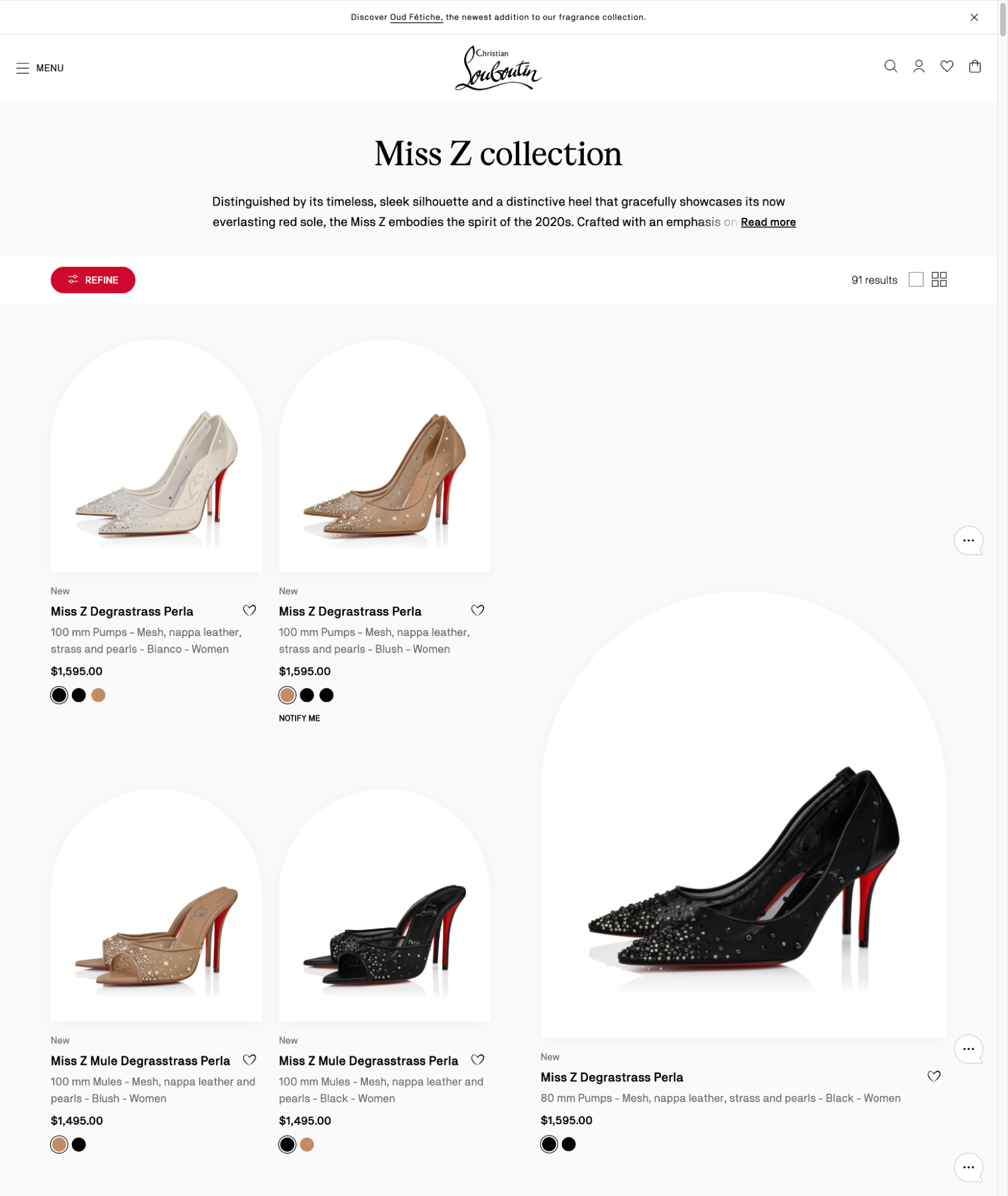
Collection pages, often called category or product listing pages (PLPs), are where shoppers browse products within the same catalogue. These pages typically include a product grid, filtering and sorting controls, and sometimes merchandising elements such as banners or curated collections. As a catalogue grows, the focus must shift from simply displaying items to actively managing the grid to ensure the most relevant and profitable products remain at the forefront.
-
Support product comparison: Display the same key details across all product cards, such as price, variants, ratings, or promotions, so shoppers can quickly scan and compare options without opening each product page. Consistent placement of elements makes the grid easier to evaluate and reduces browsing friction.
-
Dynamically re-rank products based on seasonal or campaign relevance: Adjust product positions in collections based on current campaigns or seasonal demand. Temporarily boosting relevant items, such as rainproof jackets during a stormy week, ensures that timely products receive maximum visibility.
-
Group products into solution-based sub-collections: Organise products around shopper intent or use cases rather than only technical categories. For example, a skincare collection can surface segments like “Oil Control” or “Hydration,” helping visitors quickly navigate to products that match their needs.
Curate homepage to highlight priority products and campaigns
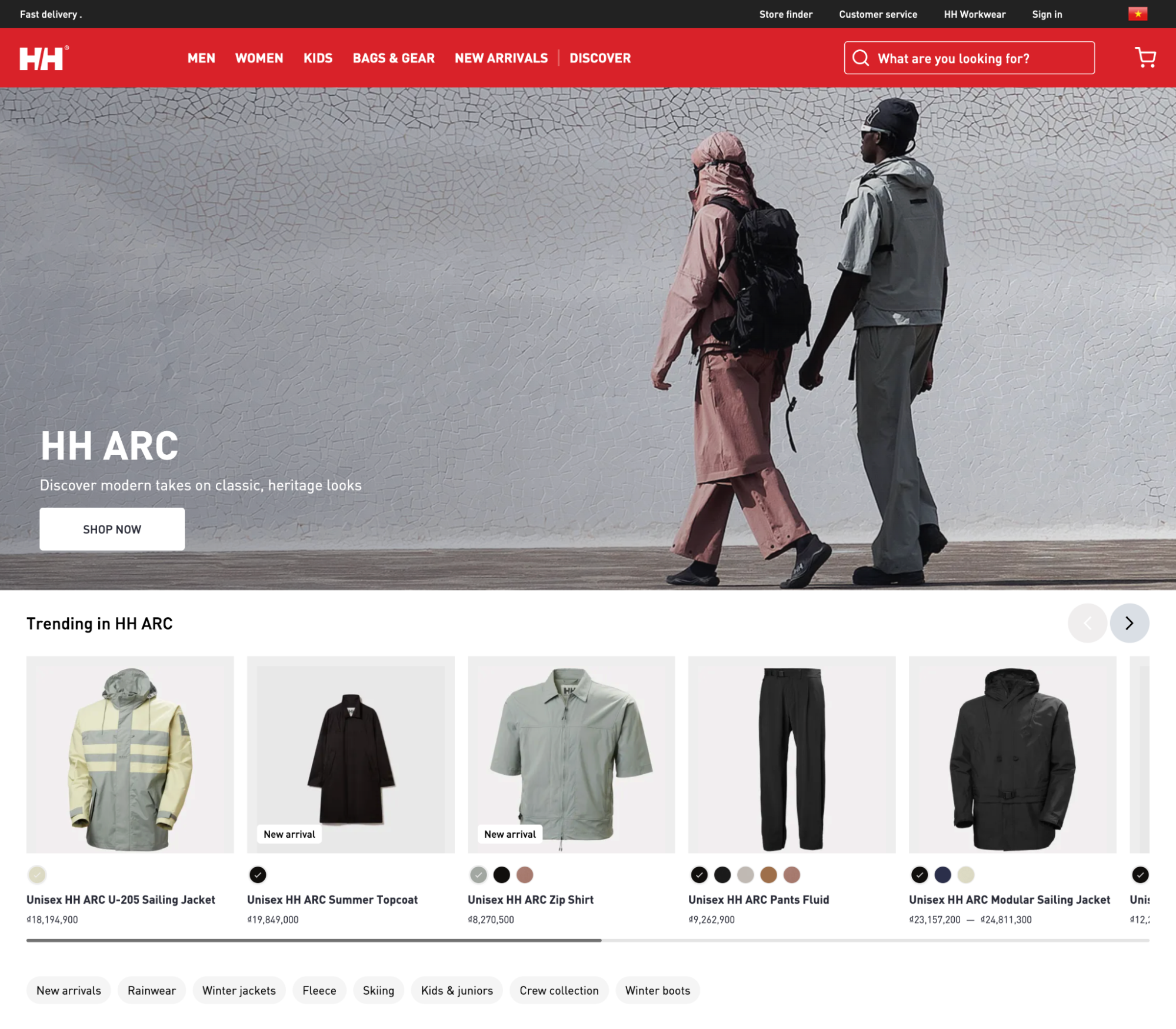
The homepage is often the first page shoppers see when entering an online store, making it a key space for eCommerce merchandising. Most eCommerce homepages typically include elements such as a hero banner, featured collections, product highlights, campaign sections, and links to major categories. Best practices focus on optimising these elements to introduce key products and ongoing campaigns while actively guiding shoppers toward your most profitable or time-sensitive inventory.
-
Allocate clear zones for campaigns and catalogue discovery: Place one primary campaign or promotion in the hero banner to capture attention. Below this, introduce just some curated product collections that represent high-performing groups while still allowing customers who are not promotion-driven to explore other catalogues.
-
Balance high-volume best-sellers with high-margin items: Use homepage product highlights to mix products that drive traffic with those that drive profitability. Placing high-margin or new arrivals in nearby popular items ensures your most lucrative inventory gets the premium visibility needed to maximise revenue.
-
Refresh featured collections using performance signals: Regularly update homepage collections based on sales velocity, engagement, seasonality, or inventory levels. For example, if a product group starts trending or inventory needs to move faster, move that collection higher on the homepage to increase exposure.
Optimise navigation to help shoppers find products faster
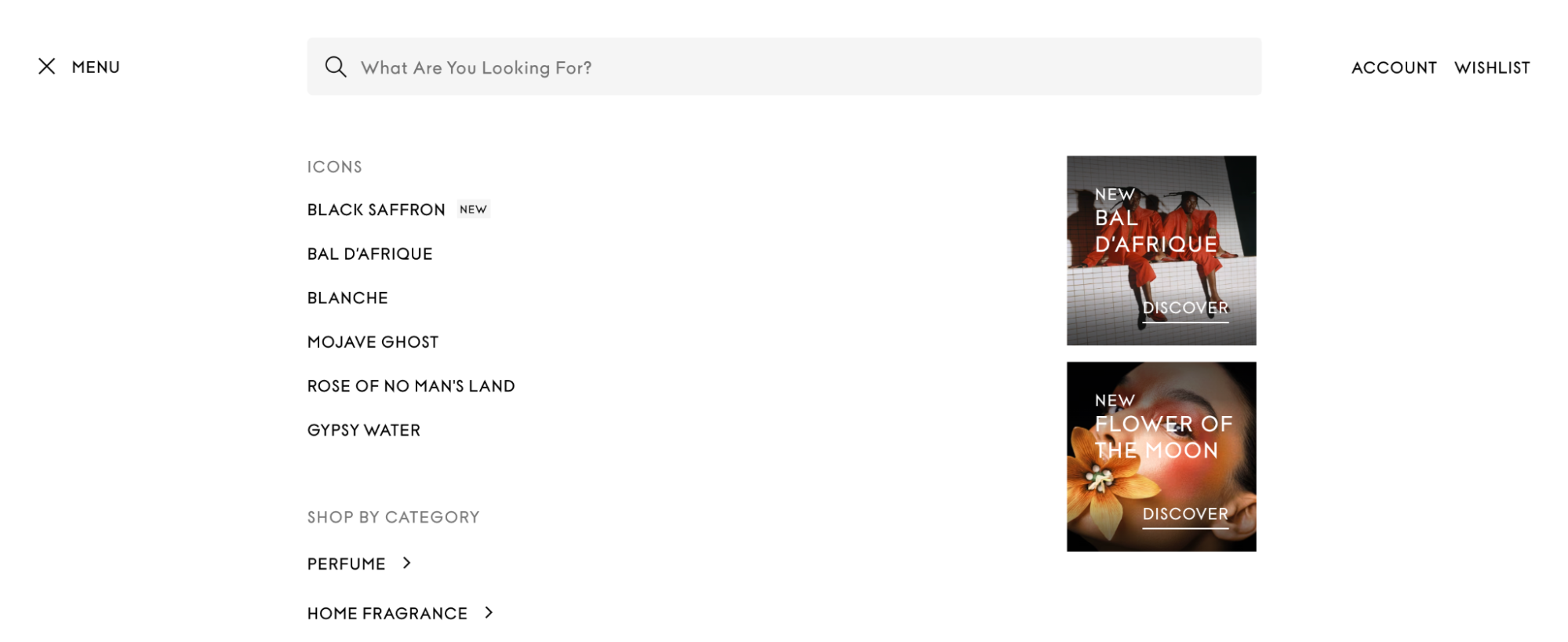
Navigation is the primary pathway customers use to explore an online store. When designed effectively, it reduces friction in the discovery process and guides shoppers toward the most relevant product categories quickly. As a product catalogue grows, the challenge shifts from simply listing items to managing complexity so that shoppers can find exactly what they need without cognitive overload.
-
Use intent-based navigation labels to match shopper goals: Include navigation paths based on use cases or concerns so that shoppers don’t have to guess where to go. For example, a beauty store might offer “Shop by skin concern” with options such as Acne or Hydration.
-
Expose related categories to help shoppers refine their path: Provide quick access to adjacent categories within the same product family so shoppers can switch paths without restarting their search. For example, when browsing Moisturisers, allowing easy access to Gel Moisturisers or SPF Moisturisers helps customers refine their choice faster.
-
Maintain clickable breadcrumbs to prevent dead-end journeys: Breadcrumb navigation, such as Home > Men’s Apparel > Outerwear > Waterproof Jackets, helps shoppers move back to broader categories if a product is not suitable. This keeps users exploring the catalogue instead of leaving the site.
For those looking to explore navigation strategies in more depth, read our guide: eCommerce navigation: Best practices to improve UX, SEO and business growth.
Use filters and facets to help shoppers narrow down large product lists
Well-optimised filters and facets help shoppers refine large product lists by narrowing results based on attributes (e.g. price, size, colour, brand, or product features). They usually appear on collection pages as a sidebar or dropdown panel and work alongside sorting options to help users quickly reduce a broad catalogue into a manageable set of relevant products. When catalogues grow to hundreds or thousands of SKUs, filters become essential for product discovery.
-
Implement intent-based and thematic facets: Beyond standard attributes like size or colour, utilise filters that reflect how customers actually use your products (e.g., a "Furniture" collection offering facets for "Room Size" or "Style"). This level of product organisation helps shoppers self-segment based on their specific needs.
-
Merchandise "No results" pages to maintain the discovery path: When a specific combination of filters yields no matches, use this space for product promotion by displaying "Best sellers," "Related items," or a "Clear all filters" button. This ensures that the customer is presented with alternative high-priority options to stay engaged.
-
Enable dynamic facet display to ensure relevance: Showing every possible filter creates unnecessary clutter. Configure your system to display only the facets relevant to the specific collection being viewed (e.g., showing "Material" for jewellery but "SPF Level" for sunscreens). This ensures that the most commercially important attributes for a particular product type are always surfaced at the right time.
Example: How Christian Louboutin’s filters and facets guide shoppers
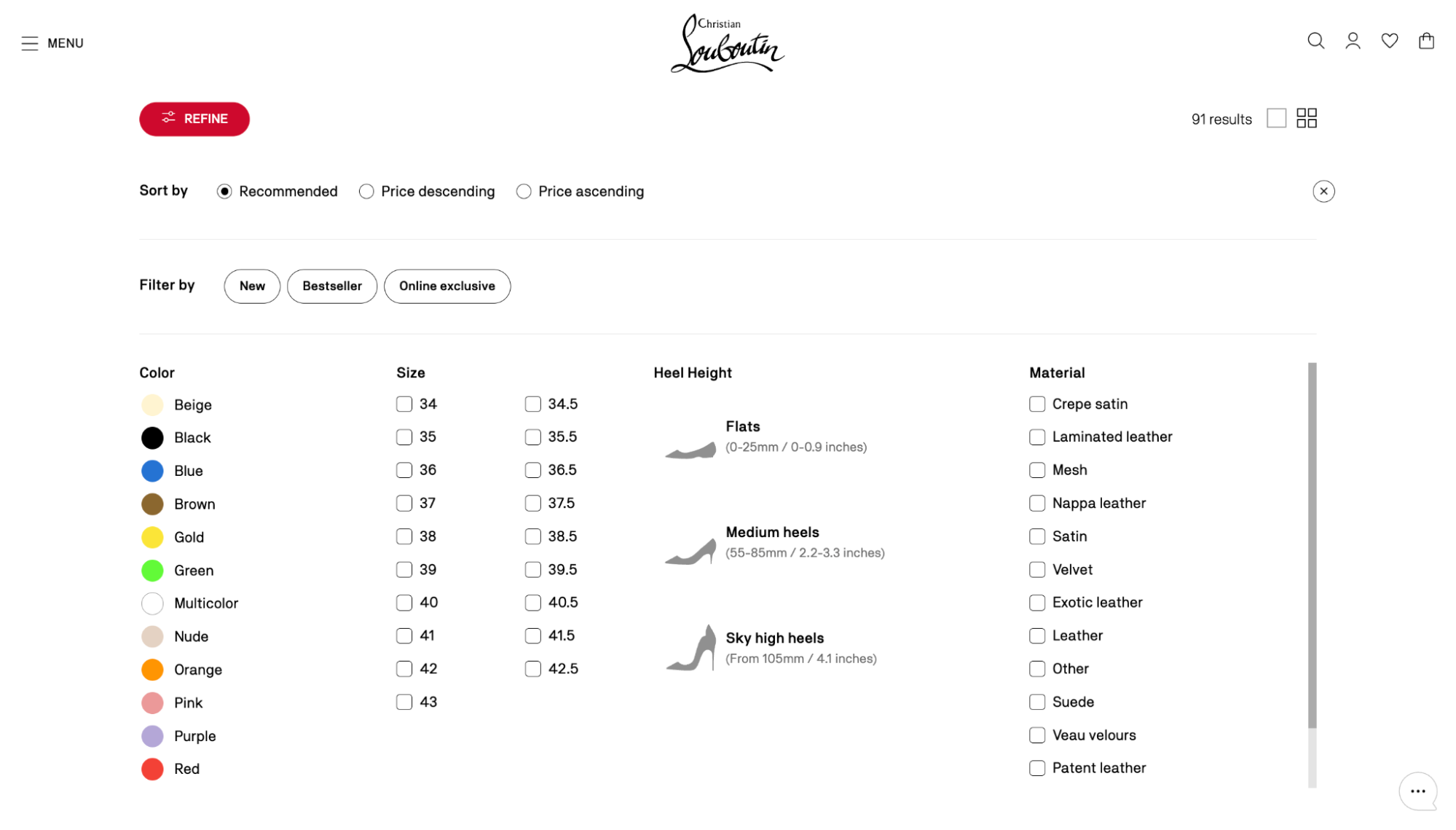
Christian Louboutin uses a structured filtering system to help shoppers navigate its large catalogue. Core filters like colour, size, heel height, and material match key customer preferences, while visual cues such as swatches and icons make selection fast and easy.
Functional facets such as “New,” “Bestseller,” and “Online Exclusive” highlight trending items, helping users discover high-priority products quickly. By combining standard attributes with commercial signals, Christian Louboutin lets shoppers self-segment while showcasing key products, creating a seamless, engaging, and conversion-focused browsing experience.
Optimise on-site search with searchandising rules
Searchandising (a combination of “search” and “merchandising”) refers to optimising an on-site search experience so that search results reflect both customer intent and business priorities.
eCommerce site search includes multiple components, including the search interface (search bar, autocomplete, and results pages), the ranking logic that determines product order, and merchandising elements such as promotional placements within results.
When optimised well, search becomes one of the highest-converting discovery channels because it captures visitors who already have strong purchase intent.
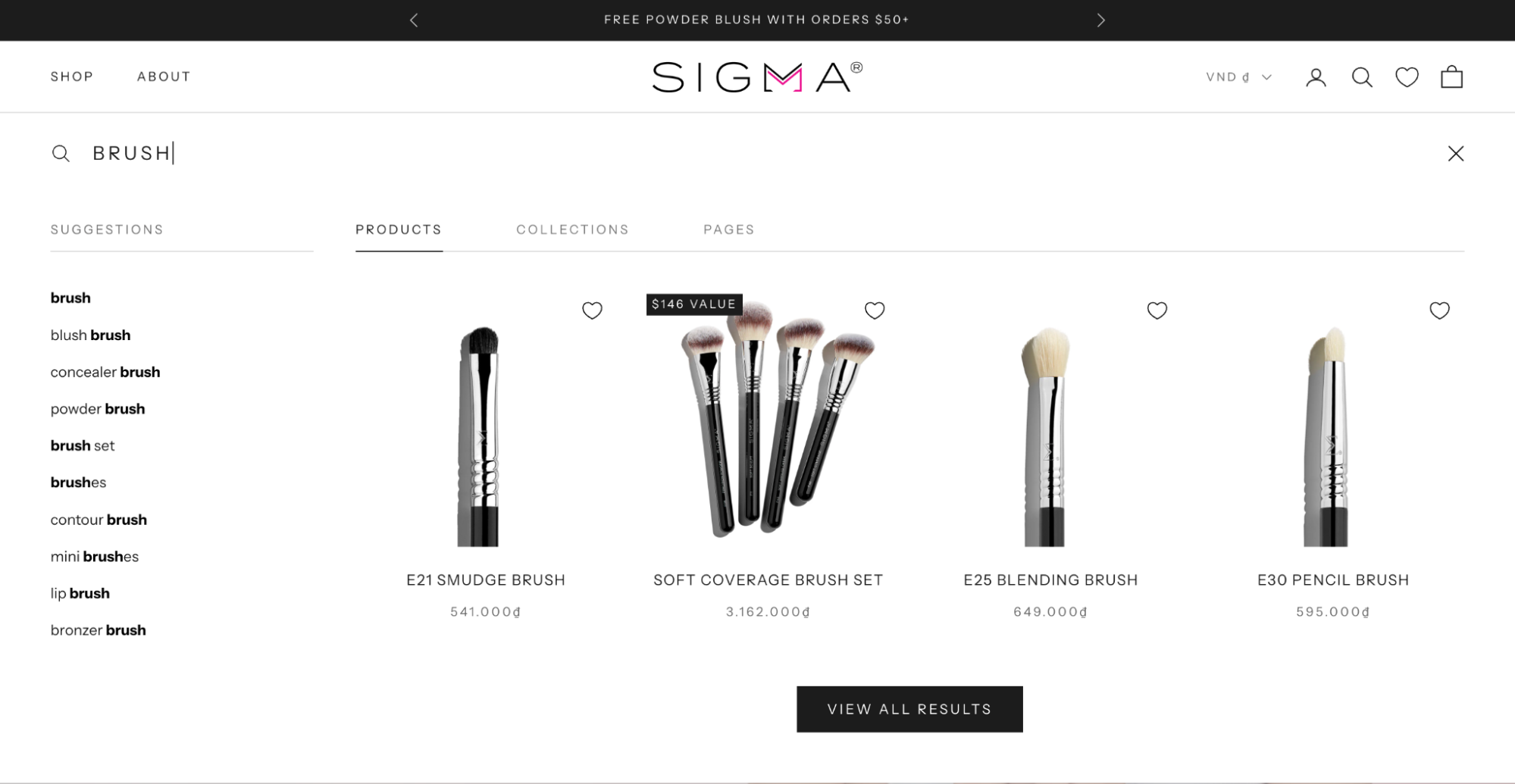
-
Map high-intent search queries to curated results pages: Many shoppers search using broad terms like “summer dress” or “gift under $50”. Instead of relying only on keyword matching, connect these queries to curated collections or landing pages featuring the most relevant products, aligning results with real shopping intent.
-
Boost strategically important products within search results: Adjust searchandising rules so products with strong conversion rates, healthy margins, or active promotions appear higher in results. This increases the chance that high-intent shoppers encounter items that deliver stronger commercial impact.
-
Use autocomplete suggestions to guide product discovery: Configure autocomplete to surface relevant categories, collections, or popular products as shoppers type. Showing curated paths instead of only keyword matches helps shoppers reach the right product groups faster.
To dive deeper into this topic, read our guide on eCommerce site search: Best practices to improve UX and drive more sales.
Optimise mobile-first layouts for merchandising
Mobile-first merchandising ensures that product discovery, prioritisation, and presentation work effectively on smaller screens, where up to 55-57% UK shoppers browse and make eCommerce purchases. Every design decision directly affects product display and presentation across devices. On mobile, this impact is especially pronounced: limited screen space and quick interactions mean careful prioritisation of which products appear first, how collections are navigated, and how smoothly shoppers can move toward purchase.
-
Prioritise commercially important collections and products above the fold: On mobile devices, vertical space is limited, so the first screen should immediately present a clear path to purchase. Placing a high-priority category, such as a “Trending Now” product row at the top, ensures shoppers see actionable options as soon as the page loads.
-
Optimise product card layouts for rapid vertical scanning: Mobile browsing involves fast scrolling, so product cards must be clear and informative at a glance. A two-column grid displaying key factors such as price, ratings, and colour options helps shoppers evaluate multiple items quickly without opening each product page.
Example: How TEMPLESPA improved mobile merchandising performance
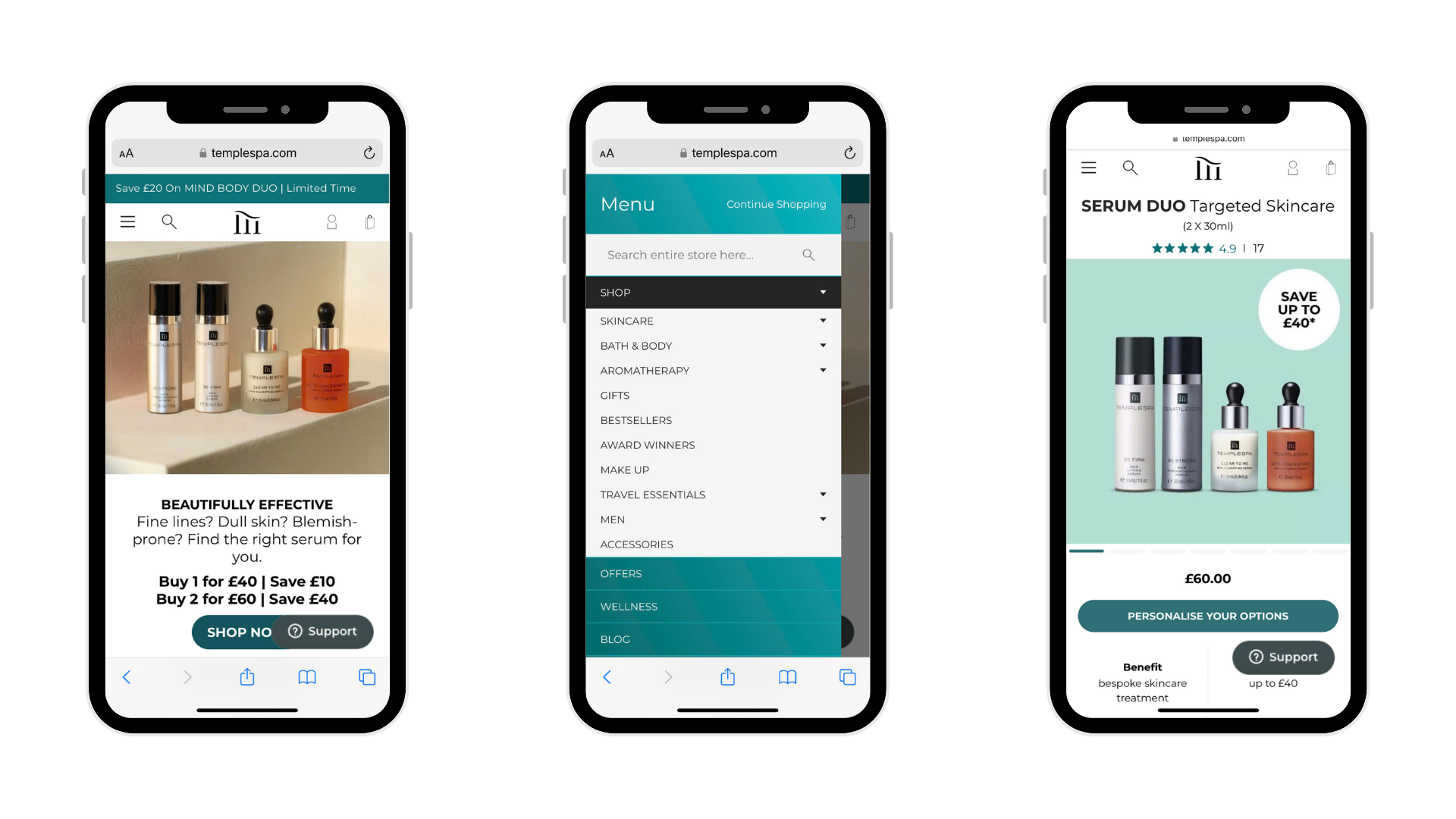
TEMPLESPA, a luxury British skincare brand with a large product catalogue, faced challenges in delivering an effective mobile shopping experience. Despite having well-structured collections and curated recommendations, inconsistent mobile responsiveness created friction during browsing, making it harder for shoppers to discover and engage with key products.
On Tap rebuilt the front-end experience with a mobile-first approach, focusing on usability, intuitive navigation, and seamless product presentation. This enabled smoother exploration of collections and more effective showcasing of curated recommendations and high-priority items.
Within three months, TEMPLESPA achieved an 18% increase in mobile conversion rate. The improvements demonstrated that strong mobile merchandising, optimised product discovery and presentation on smaller screens, directly drive higher engagement and sales.
Personalise product discovery with AI-driven merchandising
AI-powered personalised merchandising uses customer data such as browsing behaviour, purchase history, and real-time signals to dynamically organise and prioritise products across collections, categories, and recommendations. Instead of relying on fixed sorting rules, AI continuously adjusts product rankings to surface the most relevant items for each shopper, helping customers find what they want faster and increasing conversion potential.
Learn more about AI-driven eCommerce personalisation.
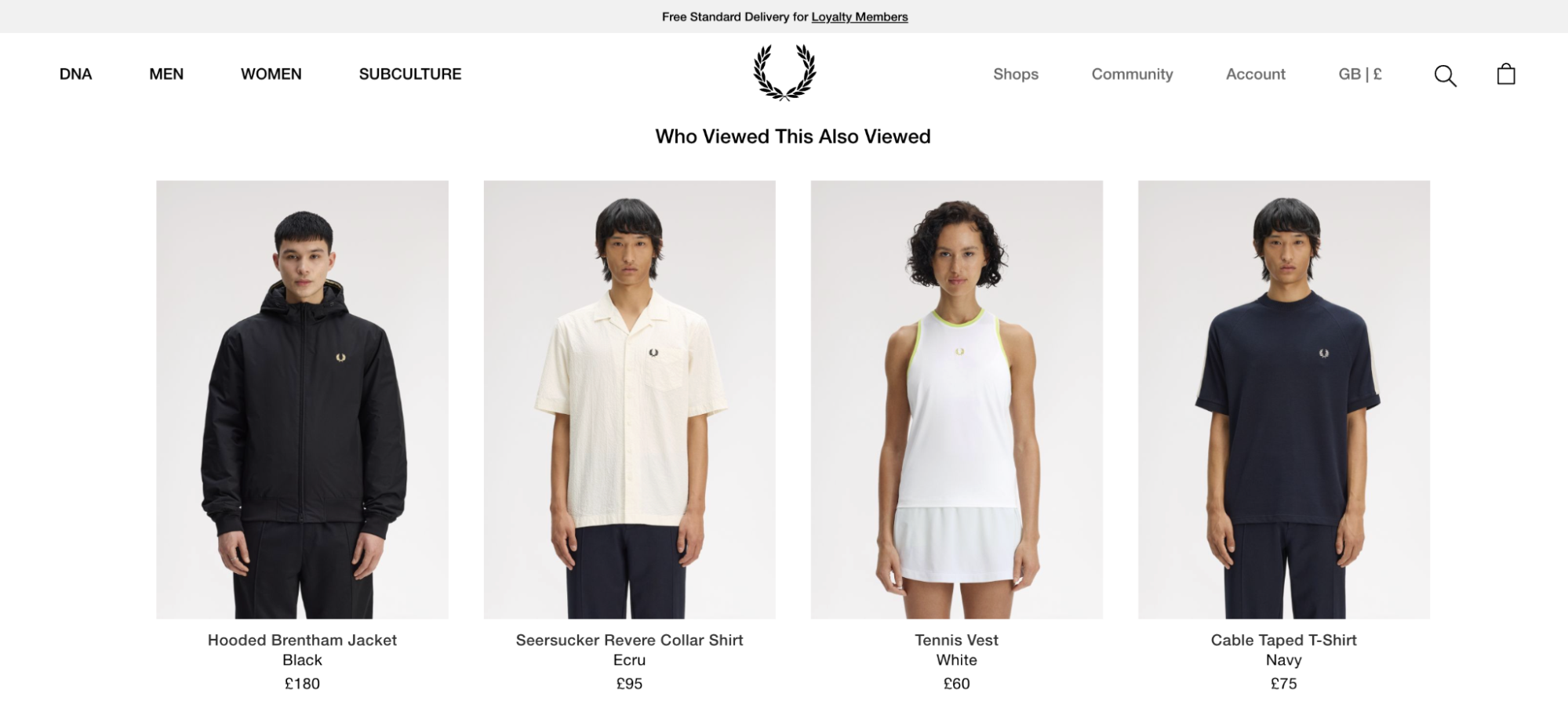
-
Dynamically prioritise products within collections: AI can automatically reorder products based on signals such as popularity, conversion probability, or individual shopper interest. High-relevance items surface first, ensuring the most engaging products receive the greatest visibility.
-
Automate cross-sell and upsell merchandising: Studies show personalised recommendations can reduce cart abandonment by up to 4.35%. AI identifies product relationships and shopper intent to present complementary or higher-value items, such as “Frequently bought together,” “Complete the look,” or smart bundle suggestions.
-
Personalise the "Empty state" and search results: Use previous browsing data to turn empty search results or carts into discovery opportunities. For example, showing “Still interested in these?” with products viewed in a previous session encourages shoppers to quickly resume their journey.
How to measure the success of eCommerce merchandising
As mentioned earlier, defining clear goals is the first step in determining which metrics to track. Once your merchandising strategies or best practices are implemented, monitor a focused set of metrics that reveal how well product discovery, shopper engagement, and revenue performance are improving. Tracking these metrics not only shows whether your KPIs are being met but also highlights areas for further optimisation and informs next steps.
|
KPI |
Definition & How to Calculate |
How to Track |
Contribution to Merchandising Goals |
|
Conversion Rate |
Percentage of visitors who complete a purchase after interacting with merchandised elements. Formula: (Number of purchases ÷ total visitors) × 100 |
Google Analytics 4 or platform dashboards (e.g., Shopify), segmented by category, filter usage, or merchandising pages. |
Shows improved product discovery leading to more sales. |
|
Average Order Value (AOV) |
Average spend per order. Formula: Total revenue ÷ Number of orders |
Order reports with segmentation for sessions using filters, facets, or recommendations. |
Measures the success of cross-selling, bundling, and personalised presentation to drive higher-value purchases. |
|
Revenue Per Visitor (RPV) |
Overall revenue generated per visitor. Formula: Total revenue ÷ Total unique visitors (or Conversion Rate × AOV) |
Analytics tools over defined periods, with merchandising segments. |
Holistic indicator capturing both discovery success and purchase value. |
|
Click-Through Rate (CTR) on Merchandised Elements |
How often shoppers click on promoted collections, “Frequently bought together”, trending rows, or recommendations. Formula: (Clicks on merchandised items ÷ Impressions) × 100 |
Event tracking in Google Analytics or platform tools. |
Proves product organisation and presentation are relevant and compelling. |
|
Add-to-Cart Rate |
Percentage of product views that result in an item being added to the cart. Formula: (Add-to-cart events ÷ Product page views) × 100 |
Enhanced e-commerce event tracking. |
Indicates how well product cards, visuals, and messaging drive immediate action after discovery. |
|
Cart Abandonment Rate (for merchandised journeys) |
Abandonment from pages with heavy merchandising (e.g., category pages with filters or recommendation carousels). Formula: 1 – (Completed purchases ÷ Carts created) × 100, segmented by path |
Analytics segmented by traffic source, product category, or merchandising campaigns. |
Lower rates signal smoother product discovery and more persuasive promotion. |
Best practices for measuring merchandising success:
-
Set clear baselines and targets before launching new merchandising tactics.
-
Segment data (new vs. returning visitors, mobile vs. desktop, high-value vs. price-sensitive customers) to identify which approaches work best for each group.
-
Use tools like Google Analytics 4, your eCommerce platform’s reports, or heatmapping tools to attribute performance to specific collections, placements, or AI-driven recommendations.
-
Review results regularly (weekly or monthly) and A/B test different layouts, product prioritisation, and promotional formats to optimise performance.
When done right, strong merchandising can deliver significant lifts; for example, intelligent product recommendations alone can contribute nearly a third of total site revenue for many stores.
Conclusion
For eCommerce stores with large catalogues, effective merchandising is critical for product discovery and purchase decisions. As catalogues grow to hundreds or thousands of SKUs, collections become harder to navigate and high-value products get buried. A strong merchandising strategy surfaces the right products, supports campaign priorities, and creates smoother paths from discovery to purchase, improving engagement and revenue.
With more than 20 years of eCommerce experience, On Tap has helped leading brands optimise merchandising strategies that drive measurable results. Our work with TEMPLESPA was recognised at the 2025 eCommerce Awards, where On Tap received two Silver awards.
If you want to uncover where merchandising opportunities exist in your store, our specialists can help audit your current setup and identify practical improvements. Speak with our specialists before making your next optimisation move.