
An open source platform is a type of eCommerce solution that offers full codebase access so website owners can customise, extend and manage their storefronts in depth. Yet even within the open source ecosystem, these platforms differ significantly in their architectures, technology stacks and extension mechanisms. These foundational differences determine how reliably the platform can handle complex workflows, support deep integrations, scale with growing data and traffic, and remain maintainable over years of development.
This article provides an expert comparison of five open source eCommerce platforms:
-
Magento Open Source
-
Carbon
-
WooCommerce
-
OpenCart
-
nopCommerce
It evaluates each platform against the criteria that matter most when selecting a technical foundation: architectural structure, extensibility depth, integration approach, performance profile, developer experience, maintenance workload and ecosystem maturity. The objective is to help you assess which platform supports your long-term business requirements, operational needs and aligns with your engineering capabilities.
1. Magento Open Source
Magento Open Source is one of the most widely adopted open source eCommerce platforms, initially launched in 2008. Magento later introduced an Enterprise Edition for larger merchants, which evolved into Adobe Commerce after Adobe’s 2018 acquisition. As of November 2025, Magento powers nearly 100,000 live websites. It is particularly common among mid-sized and large businesses that require complex operational workflows, multi-store setups or advanced catalogue structures.
Architecture & Technology Foundations
Core Architectural Paradigm
Magento is built as a domain-driven, modular commerce framework. Each business area, such as catalogue, pricing, checkout, orders and inventory, is implemented as an independent module with its own services, configuration and logic. This structure gives the platform a clear internal separation between functional domains and allows developers to adjust behaviour at the service level without modifying unrelated parts of the system.
Technology stack
Magento runs on a mature PHP-based stack designed to support complex operations at scale.
-
Backend: PHP on Magento Framework
-
Frontend: PHTML + XML layouts, KnockoutJS for checkout
-
Database: MySQL/MariaDB
-
Caching: Redis, Varnish, FPC
-
Search: Elasticsearch/OpenSearch
-
Others: Cron jobs, optional RabbitMQ
Modularity & Extension Model
Extension mechanisms include:
-
Plugins (method interception) for altering behaviour without overriding classes
-
Observers to attach logic to events
-
Dependency Injection (DI) for replacing or decorating services
-
Layout XML configuration for controlling storefront structure
-
Module enable/disable per feature set
These mechanisms allow controlled customisation while keeping core code intact and upgrade-safe.
Integration Architecture
Key characteristics:
-
REST and GraphQL APIs covering catalogue, checkout, customer and order operations
-
Service contracts providing stable, version-safe integration points
-
Event system enabling external logic to hook into business actions
-
Optional RabbitMQ for asynchronous or high-volume processes
-
Interoperability with ERP, PIM, OMS, CRM and other operational platforms
This architecture supports long-term system interoperability and scalable data flows.
Depth of customisation
This section evaluates how extensively Magento allows developers to modify key functional areas, such as the storefront, business workflows, the admin interface, and underlying data structures. The same criteria are applied to all other platforms to provide a clear, comparable view of customisation depth.
Legend (used across all platforms):
-
✔ Supported natively by the platform’s architecture: The platform provides built-in mechanisms (hooks, services, layout systems, template engines, APIs) that allow safe and direct customisation in this area.
-
▲ Supported via plugins or custom extensions: The platform does not provide built-in mechanisms for this area, but customisation is still achievable through plugins, extensions or custom code.
-
✗ Not practically supported: The platform’s architecture does not meaningfully support customisation in this area without heavy rewrites or non-recommended workarounds.
Note: This legend is explained once here and applies to all Customisation Capabilities tables in this guide.
|
Storefront (Frontend) |
✔ Themes, Layouts & Template Overrides ✔ PDP Customisation ✔ PLP Customisation ✔ Navigation & Content Blocks ✔ Cart Display & Behaviour ✔ Checkout UI Customisation ✔ Custom Frontend JS Frameworks ✔ Headless Storefront Support |
|
Backend Logic & Workflows |
✔ Pricing & Discount Rules ✔ Promotions & Cart Rules ✔ Checkout Logic & Validation ✔ Order Workflow Customisation ✔ Inventory & Stock Logic ✔ Tax & Shipping Logic ✔ Customer Account Logic ✔ Multi-Store/Multi-Channel Capability |
|
Admin Interface |
✔ Custom Admin Pages / Menus ✔ Custom Admin Grids, Filters & Columns ✔ Roles & Permissions Control ✔ Dashboard Widgets ✔ Configurable Settings Panels |
|
Data Model & Entities |
✔ Custom Attributes / Metadata ✔ Custom Entities / Data Types ✔ Schema Extension Capabilities ✔ Entity Relationship Modelling ✔ Catalogue Data Processing & Search Optimisation |
Magento offers the deepest level of customisation among open source platforms. Nearly every storefront element, business workflow, admin screen and data model can be tailored to complex enterprise requirements.
Performance and Scalability
Magento includes several built-in mechanisms to maintain performance across large catalogues and complex storefronts.
-
Full-page caching (via Varnish or the built-in cache) reduces rendering overhead.
-
Redis accelerates both application caching and session handling.
-
Dedicated indexers pre-compute catalogue and pricing information so the storefront can respond quickly, even when product data is large or frequently updated.
-
Elasticsearch or OpenSearch supports fast search, filtering and layered navigation across high SKU counts, and the architecture can scale horizontally using multiple web nodes and distributed services.
The default Luma theme is known for heavy JavaScript and complex rendering patterns, which is why stores that rely on it frequently experience slow page loads. This has led many merchants to adopt the Hyvä theme, a modern, lightweight frontend that dramatically reduces asset size and improves Magento’s real-world performance.
Hosting quality is another major determinant of Magento’s real-world speed. Insufficient CPU, memory or cache tuning can slow down even a well-built store, while properly optimised infrastructure can unlock Magento’s full performance potential. This reliance on strong hosting is also common across other open-source platforms, where flexibility and self-management make infrastructure quality a critical factor in overall performance.
Developer Experience & Learning Curve
Working effectively with Magento requires understanding concepts such as dependency injection, service contracts, module registration, EAV structures, indexers, and XML-based layout rendering. Therefore, effective implementation demands practical experience and disciplined engineering to prevent technical debt and maintain consistent performance.
While this foundational knowledge takes time to build, the payoff is consistency: once developers understand Magento’s patterns, the platform becomes predictable and highly efficient for large or complex projects.
Maintenance, Upgrades & Long-Term Upkeep
Adobe releases frequent patch updates and minor versions throughout the year. More specifically, from 2026, this will follow a structured cadence with monthly security fixes, an annual cumulative security patch in May, a full patch update also in May, and biannual beta patches in March and November. Stores using third-party modules or heavy customisations must keep those modules compatible with each release, which increases the amount of regression testing required during every upgrade cycle. Magento also relies on external services such as Elasticsearch/OpenSearch, MariaDB, Redis and RabbitMQ, all of which need periodic upgrades and configuration reviews to remain stable and secure.
Upgrades are recurring work for any Magento store, and they introduce both operational overhead and ongoing cost. The more customised a store becomes, the more expensive and resource-intensive upgrades and compatibility testing become over time.
| As one of the longest-established Magento agencies, we have seen firsthand how upgrades become one of the biggest long-term pain points for Magento merchants. This is exactly why we created Evergreen - our solution designed to eliminate the upgrade burden and cost once and for all. In the initial project, we optimise your store to establish a clean, stable foundation that supports upgrade-safe development, even for stores with significant customisation. After that, we provide free lifetime minor upgrades and security patches, delivered in cadence with Adobe’s official release schedule. |
This approach removes one of the most significant long-term friction points of running Magento, allowing organisations to benefit from its advanced open source architecture without incurring the ongoing maintenance and upgrade workload that typically comes with it.
Ecosystem
-
One of the largest ecosystems in open source commerce, with 3,800+ extensions available on the official Magento Marketplace.
-
Extensive coverage across enterprise integration categories, including ERP (SAP, Dynamics), PIM (Akeneo), OMS, CRM tools, advanced search engines, B2B workflows, multi-vendor marketplace modules and region-specific tax or regulatory extensions.
-
Well-established partner and developer network, backed by thousands of agencies and independent contributors. Over a decade of community involvement ensures ongoing improvements, knowledge-sharing and long-term availability of expertise.
Pros, cons and ideal use cases
|
Pros |
Cons |
|
|
Ideal Use Cases For This Platform
With these pros and cons addressed, Magento Open Source is suited for:
-
Medium to large merchants with complex workflows or integrations.
-
Organisations with access to experienced PHP/Magento developers.
2. Carbon
Carbon is a next-generation open-source eCommerce platform developed and managed by On Tap. It takes the power of Magento and Adobe Commerce and strips away much of the associated complexity. By rebuilding the framework within a fully managed, performance-optimised ecosystem, Carbon gives you enterprise-grade extensibility, consistently high speed and stability, and dramatically lower operational overhead. The result is a platform that enables you to launch new sites in a matter of weeks while significantly reducing long-term operating costs compared with traditional open-source solutions.

Architecture & Technology Foundations
Core Architectural Paradigm
Carbon is a modular commerce platform that leverages Magento’s backend capabilities while replacing the default frontend and operational layers with a simplified, modern architecture. The platform provides a clean, high-performance storefront built on Hyvä. Unlike a custom Magento build, Carbon ships with a predefined technical structure and pre-integrated modules for search, B2B, merchandising, analytics and UX optimisation, reducing architectural decisions and lowering implementation risk.
Technology Stack
Carbon’s technology stack blends Magento extensibility with managed platform services delivered by On Tap:
-
Backend: Magento 2 foundation
-
Frontend: Hyvä-based, performance-focused theme layer
-
Search: ElasticSuite is integrated by default
-
Infrastructure: On Tap Cloud – fully managed, performance-optimised hosting environment
-
Monitoring: AuditIQ – 24/7 automated performance, security and configuration monitoring
-
Integrations: Integration Flow – managed middleware for ERP, WMS, CRM and accounting systems
-
Caching: Magento’s native caching, Redis and Varnish
Carbon’s managed ecosystem provides a unified environment that reduces operational complexity and speeds up implementation timelines.
Modularity & Extension Model
Carbon follows Magento’s native extensibility model, meaning all Magento modules, third-party extensions and customisations remain compatible. Developers can extend or override Carbon modules in the same way they would work with Magento. This keeps the platform upgrade-safe and flexible.
Integration Architecture
Carbon supports two integration layers:
-
Magento’s native integration layer – REST, GraphQL, service contracts, events, observers and message queues.
-
Integration Flow – On Tap’s managed integration platform that handles mapping, scheduling, retry logic and error management for systems such as ERP, WMS, CRM and accounting.
Integration Flow shortens integration timelines and removes the need for custom middleware. This gives Carbon a more predictable and reliable integration behaviour than typical Magento projects.
Depth of customisation
|
Storefront (Frontend) |
✔ Themes, Layouts & Template Overrides ✔ PDP Customisation ✔ PLP Customisation ✔ Navigation & Content Blocks ✔ Cart Display & Behaviour ✔ Checkout UI Customisation ✔ Custom Frontend JS Frameworks ✔ Headless Storefront Support |
|
Backend Logic & Workflows |
✔ Pricing & Discount Rules ✔ Promotions & Cart Rules ✔ Checkout Logic & Validation ✔ Order Workflow Customisation ✔ Inventory & Stock Logic ✔ Tax & Shipping Logic ✔ Customer Account Logic ✔ Multi-Store/Multi-Channel Capability |
|
Admin Interface |
✔ Custom Admin Pages / Menus ✔ Custom Admin Grids, Filters & Columns ✔ Roles & Permissions Control ✔ Dashboard Widgets ✔ Configurable Settings Panels |
|
Data Model & Entities |
✔ Custom Attributes / Metadata ✔ Custom Entities / Data Types ✔ Schema Extension Capabilities ✔ Entity Relationship Modelling ✔ Catalogue Data Processing & Search Optimisation |
Carbon retains the full extensibility of Magento, making it one of the most flexible open source commerce platforms. Teams can modify storefront behaviour, backend workflows, admin tools and data entities without constraints, but benefit from a cleaner baseline.
Performance and Scalability
Carbon benefits from the mature architectural foundation of Magento, including the ability to scale horizontally through multiple application nodes, distributed caching and search services. Building on this foundation, Carbon delivers notably improved frontend performance thanks to its Hyvä-based architecture and optimised asset pipeline.
On Tap Cloud elevates Carbon’s performance even further by delivering a hosting environment with built-in autoscaling that automatically adjusts resources as demand rises or falls. This keeps response times consistently fast during peak traffic, eliminates wasted capacity during quieter periods and significantly reduces downtime risk. With automated scalability handling the heavy lifting, Carbon maintains stable, high performance without the capacity planning headaches that often slow down open-source platforms running on static or manually managed hosting.
Developer Experience and Learning Curve
A key advantage of Carbon is that On Tap handles the configuration, customisation and day-to-day management of the platform, providing a defined architectural foundation rather than leaving every decision to the implementation team. Carbon also includes a set of pre-built components and best-practice patterns that further streamline development, making the platform easier to work with from day one. For teams that want to customise further, Carbon remains fully extensible, leveraging Magento’s backend module architecture, and developers can easily build new features or override behaviours using familiar Magento patterns.
Carbon also removes Magento’s steep frontend learning curve by adopting Hyvä, which replaces KnockoutJS, RequireJS and LESS with a simpler stack based on Alpine.js and TailwindCSS. This reduces JavaScript complexity and makes storefront modification faster and more predictable.
The combination of a guided architecture, ready-made components and a simplified frontend stack enables teams to deliver projects significantly faster, supporting Carbon’s ability to achieve go-to-market timelines measured in weeks rather than months.
Maintenance, Upgrades and Long-Term Upkeep
Carbon includes Evergreen, On Tap’s free lifetime upgrade and security patch solution. Evergreen delivers minor Magento upgrades, security patches and Carbon module updates in cadence with Adobe’s official release cycle, reducing long-term maintenance cost and risk.
Because Carbon keeps Magento’s core untouched and follows a consistent, pre-defined module structure, upgrades behave predictably and require far less remediation than custom Magento builds. Compared with other open source platforms, Carbon’s structured architecture significantly reduces the maintenance workload over time.
Ecosystem
Carbon is compatible with the entire Magento ecosystem, allowing merchants to install any Magento 2 extension as needed. In addition, Carbon provides its own ecosystem of managed services:
-
On Tap Cloud – managed hosting
-
AuditIQ – automated monitoring and alerts
-
Integration Flow – managed integrations
-
Aitoc – provides ready-made feature modules, allowing you to add new functionality as your business evolves
-
Magestore POS – delivers robust offline and omnichannel retail capabilities
This ecosystem reduces the need for third-party extensions and provides a single point of responsibility across hosting, monitoring, upgrades and integrations.
Pros, cons and ideal use cases
|
Pros |
Cons |
|
|
Ideal Use Cases For This Platform
-
Businesses that need advanced capabilities for complex workflows or large catalogues, and want a platform that enables rapid implementation, reduces ongoing maintenance effort and offers predictable long-term costs.
3. WooCommerce
WooCommerce is a widely adopted open-source eCommerce solution built on WordPress and maintained by Automattic. As of November 2025, 5,951,515 live websites are using WooCommerce. Its popularity is driven by its accessibility to small and mid-sized merchants, particularly those already using WordPress.
Architecture & Technology Foundations
Core Architectural Paradigm
WooCommerce operates as a commerce framework within the broader WordPress ecosystem. Its behaviour is driven by a hook-based architecture, where key operations such as product handling, cart updates and order processing expose predefined actions and filters. Extensions and custom code attach to these hooks to add or modify functionality, while storefront output is controlled through template files that can be overridden as needed.
Technology Stack
WooCommerce runs on a familiar WordPress/PHP stack, which simplifies development, hosting and ongoing extension work.
-
Backend: PHP within the WordPress framework
-
Frontend: PHP templates, Gutenberg blocks, theme-based rendering
-
Database: MySQL (WordPress schema using posts, metadata and custom tables)
-
Caching: Page cache (via plugins or hosting), Redis/Memcached for object caching
-
Search: Default WordPress search; Elasticsearch available through plugins
-
Background tasks: WP-Cron and Action Scheduler for queued jobs
Modularity & Extension Model
WooCommerce extends and customises behaviour through two core mechanisms: plugins and the WordPress hook system.
-
Plugins add new behaviour by attaching to WooCommerce events. Payment gateways, shipping methods, subscription billing, CRM synchronisation and many other capabilities are implemented as standalone plugins that connect into WooCommerce’s lifecycle.
-
Hooks and filters act as a global event system across WordPress and WooCommerce. Multiple plugins can run logic on the same event, such as when the cart updates or when an order is created, and each plugin can modify or extend the underlying behaviour.
WooCommerce’s plugin-driven extensibility makes it easy to add new features. However, as all plugins interact through a shared hook-based environment, multiple plugins may modify the same behaviour or data flow, requiring careful management to avoid conflicts.
Integration Architecture
WooCommerce integrates with external systems through the WordPress REST API (which provides authenticated access to products, orders and customer data for CRM, ERP or analytics tools), the Store API (used for headless and JavaScript-driven storefronts) and a hook system (which lets plugins or custom code react to events such as order creation or customer updates).
Most commerce integrations, including payments, shipping carriers and marketing platforms, are delivered as plugins that use these APIs and attach their logic to WooCommerce events. This makes integrations straightforward to deploy, but also means their reliability, performance, and long-term maintenance depend heavily on the quality and update discipline of each plugin provider.
Depth of customisation
|
Storefront (Frontend) |
✔ Themes, Layouts & Template Overrides ✔ PDP Customisation ✔ PLP Customisation ✔ Navigation & Content Blocks ▲ Cart Display & Behaviour (via hooks/themes) ▲ Checkout UI Customisation (plugins) ▲ Custom Frontend JS Frameworks (React/Vue via custom) ▲ Headless Storefront Support (Store API) |
|
Backend Logic & Workflows |
✔ Pricing & Discount Rules ✔ Promotions & Cart Rules ✔ Checkout Logic & Validation ✔ Order Workflow Customisation ✔ Inventory & Stock Logic ✔ Tax & Shipping Logic ✔ Customer Account Logic ▲ Multi-Store / Multi-Channel Capability (plugins) |
|
Admin Interface |
▲ Custom Admin Pages / Menus (plugins) ✔ Custom Admin Grids, Filters & Columns ✔ Roles & Permissions Control ✔ Dashboard Widgets ▲ Configurable Settings Panels (plugin-driven) |
|
Data Model & Entities |
✔ Custom Attributes / Metadata ✔ Custom Entities / Data Types ▲ Schema Extension Capabilities (plugins) ▲ Entity Relationship Modelling (metadata-based) ✗ Catalogue Data Processing & Search Optimisation |
WooCommerce allows broad storefront and workflow customisation through themes and hooks, with strong flexibility in presentation and basic logic changes. Its scope is wide at the surface level but less comprehensive in deeper workflow and data-structure adjustments. More advanced requirements typically depend on additional plugins, which increases the risk of conflicts, inconsistent behaviour and potential security exposure.
Performance & Scalability
In general, performance on WordPress-based websites, including WooCommerce stores, is influenced by three main factors: plugins, themes and hosting.
-
Plugin interaction: WooCommerce’s plugins and hook-based architecture allow flexibility, but when many extensions modify the same events or data flow, it can introduce additional processing that affects performance as the site grows.
-
Theme structure: Off-the-shelf themes often include a wide range of built-in features. While convenient, these themes often include unnecessary heavy code, increasing resource load.
-
Hosting dependency: Performance is heavily influenced by the hosting provider, with lower-tier or poorly optimised environments lacking proper caching or database tuning.
Because of these factors, WooCommerce is generally best suited to small and mid-sized stores. For larger stores, performance becomes harder to maintain as catalogue size and plugin usage grow.
Developer Experience & Learning Curve
WooCommerce is accessible to teams already familiar with WordPress. Customisation is primarily done through hooks, filters, template overrides, and PHP functions, making it straightforward for developers who understand WordPress conventions. The learning curve largely involves understanding WooCommerce-specific hooks, the Store API and handling performance considerations as catalogue size grows.
A broad ecosystem of documentation, WordPress developer resources, community forums, GitHub examples and commercial plugin support helps teams ramp up quickly. Its popularity has also led to a large volume of tutorials and video guides, making WooCommerce particularly approachable for agencies or merchants with existing WordPress experience.
Maintenance, Upgrades & Long-Term Upkeep
WooCommerce follows a frequent release cadence, with core updates typically shipped on a roughly five-week cycle, including new features, bug fixes and security improvements.
Because WooCommerce sits inside WordPress and relies heavily on plugins, maintenance is not limited to WooCommerce core releases. Each update brings three dimensions to consider:
-
Core updates: WordPress core and WooCommerce core both release regularly. Sites must be tested when either layer updates, particularly when database changes, or new features are introduced.
-
Plugin and theme updates: Most store functionality (payment gateways, shipping methods, SEO, caching, marketing tools) is delivered as plugins. Any plugin update, or theme update, can change behaviour on shared hooks or templates and introduce new conflicts even if everything worked correctly before.
-
Environment changes: PHP versions, database versions and hosting-level performance plugins (such as caching layers or security tools) also evolve and can affect WooCommerce behaviour.
Stores with a small number of well-maintained plugins generally handle updates with little friction. Stores with many plugins or complex customisations face a more continuous maintenance cycle due to the interaction between core updates, plugin updates and shared hook execution.
Ecosystem
-
Large extension ecosystem, with 1,200+ official marketplace extensions plus thousands of community plugins.
-
Wide coverage of payment, shipping, SEO, membership, subscription, booking and marketing extensions.
-
Strong partner and agency ecosystem (WooExperts, Codeable, managed WooCommerce hosts).
-
Broad community involvement ensures frequent updates, ecosystem growth and long-term platform stability.
Pros, Cons and Ideal Use Cases
|
Pros |
Cons |
|
|
Ideal Use Cases For This Platform
-
Small to mid-sized businesses with steady growth plans and no requirement for rapid expansion into new markets in the next several years.
-
Teams with modest customisation needs and development capabilities aligned to PHP, or those operating with limited engineering resources.
4. OpenCart
Although OpenCart is not as prominent or widely adopted as some other open-source platforms, it has maintained strong visibility in recent years thanks to its ease of use, flexibility and lightweight architecture. As of November 2025, OpenCart powers approximately 200,083 live websites worldwide, reflecting its enduring popularity and active community support.
Architecture & Technology Foundations
Core Architectural Paradigm
OpenCart is a lightweight monolithic MVC application, where both the storefront and the admin panel follow a simple controller–model–view structure. Each request is handled directly by a controller, with very little abstraction between layers.
Technology Stack
OpenCart runs on a familiar LAMP-style stack.
-
Backend: PHP using a custom MVC-L framework
-
Frontend: Twig templates, CSS/JS, jQuery
-
Database: MySQL/MariaDB
-
Caching: Basic file caching and PHP OPcache (full-page caching requires extensions)
-
Search: Built-in keyword search (Elasticsearch via extensions)
-
Background tasks: Cron jobs for scheduled tasks
This lightweight stack makes OpenCart easy to deploy on modest infrastructure.
Modularity & Extension Model
OpenCart extends functionality through modules, events and OCMOD XML patching.
-
Modules add new storefront components, admin tools and payment or shipping methods by registering their own controllers, models and templates.
-
The event system lets developers run logic when predefined actions occur, such as order creation or product updates.
-
OCMOD XML acts as a lightweight override system. Instead of editing core PHP files directly, developers define rules that tell OpenCart to search for specific code patterns and replace or insert new logic before the application runs. This mechanism allows developers to achieve deeper customisation without altering core files.
Together, these mechanisms make OpenCart easy to extend for common requirements. However, deeper customisations often rely on multiple OCMOD patches layered on top of one another. When many patches target related areas of the system, they can interact unpredictably, leading to conflicts and making maintenance and testing more difficult over time.
Integration Architecture
OpenCart integrates with external systems through a combination of its REST-style API, event system and extension modules. The API provides access to essential store operations like products, customers, orders and stock levels; external systems such as ERPs or POS platforms can use it to read or update store data. The event system allows integrations to react to specific actions, such as when an order is created or a product is updated, enabling real-time data synchronisation.
Most payment gateways, shipping carriers and marketing tools are implemented as independent extension modules. These modules typically make their own API calls and define their own event handlers rather than following a unified integration framework. Because each module handles data exchange, error handling and update behaviour differently, the consistency and long-term reliability of integrations depend heavily on the quality and maintenance practices of the module developer.
Depth of customisation
|
Storefront (Frontend) |
✔ Themes, Layouts & Template Overrides ✔ PDP Customisation ✔ PLP Customisation ✔ Navigation & Content Blocks ✔ Cart Display & Behaviour ▲ Checkout UI Customisation (via events/OCMOD) ▲ Custom Frontend JS Frameworks ▲ Headless Storefront Support |
|
Backend Logic & Workflows |
✔ Pricing & Discount Rules ✔ Promotions & Cart Rules ✔ Checkout Logic & Validation ✔ Order Workflow Customisation ✔ Inventory & Stock Logic ✔ Tax & Shipping Logic ✔ Customer Account Logic ✔ Multi-Store/Multi-Channel Capability |
|
Admin Interface |
✔ Custom Admin Pages / Menus ✔ Custom Admin Grids, Filters & Columns ✔ Roles & Permissions Control ✔ Dashboard Widgets ▲ Configurable Settings Panels |
|
Data Model & Entities |
✔ Custom Attributes / Metadata ✔ Custom Entities / Data Types ✔ Schema Extension Capabilities ▲ Entity Relationship Modelling ✗ Catalogue Data Processing & Search Optimisation |
OpenCart allows a solid level of customisation across the storefront, core workflow logic and the admin interface, with each of these areas adaptable through its module-based structure. The platform also supports extending data entities through additional attributes or new database tables. However, the depth of customisation is constrained by its fixed data model and the close coupling between certain logic layers, which limits how extensively multiple areas can be reshaped.
Developer Experience & Learning Curve
OpenCart is generally easier for developers to pick up than more enterprise-oriented platforms because its codebase is small, its MVC structure is straightforward, and most customisations involve editing controllers, models or Twig templates.
Official documentation covers the fundamentals but is not as comprehensive as enterprise platforms, so developers often rely on community tutorials, forums or inspecting the core code to understand behaviours. For teams familiar with PHP and traditional MVC patterns, OpenCart offers a short learning curve with a predictable execution flow.
Maintenance, Upgrades & Long-Term Upkeep
OpenCart’s maintenance profile reflects its simple core and decentralised extension ecosystem. Core updates are infrequent, so upgrade pressure is generally low.
However, many stores depend on a mix of third-party extensions, themes and OCMOD patches. Each interacts differently with core functionality, and OCMOD rules can fail when even small parts of the core code change. Marketplace modules are developed independently, so compatibility varies, and updates are not always synchronised with OpenCart releases.
Stores with light customisation usually upgrade smoothly, while those relying on multiple extensions or deep OCMOD modifications require more careful testing and version control to maintain stability.
Ecosystem
-
Official OpenCart Marketplace with 13,000+ extensions and themes across payments, shipping, SEO, performance, admin tools and front-end features.
-
Wide range of payment and shipping integrations, including global gateways and regional providers.
-
Global partner network of certified OpenCart agencies and developers who provide implementation, customisation and hosting services.
Pros, Cons & Ideal Use Cases
|
Pros |
Cons |
|
|
Ideal Use Cases For This Platform
-
Small to mid-sized merchants needing a straightforward, low-cost open source platform.
-
Stores with moderate catalogue complexity and simple workflow requirements.
-
Teams seeking a PHP-based system that is easy to customise without enterprise-level overhead.
5. nopCommerce
nopCommerce is a well-established, open source eCommerce platform built on the ASP.NET Core framework, known for its robustness, scalability, and enterprise-ready features. As of November 2025, 8,278 live websites use nopCommerce, supported by an active developer community and a growing ecosystem of plugins and extensions.
Architecture & Technology Foundations
Core Architectural Paradigm
nopCommerce is a layered, modular application built on ASP.NET Core. Business logic, data access and presentation layers are clearly separated, with each layer communicating through well-defined interfaces. This structure makes the internal architecture predictable and helps maintain consistency as customisations are added or modules evolve.
Technology Stack
nopCommerce uses a modern Microsoft-based technology stack:
-
Backend: ASP.NET Core (.NET 9)
-
Frontend: Razor views, jQuery, server-rendered UI
-
Database: SQL Server, MySQL or PostgreSQL via Linq2DB
-
Caching: Distributed caching with Redis; in-memory cache
-
Background tasks: Built-in task scheduler
-
Hosting: Cross-platform deployment (Windows, Linux, containers)
While the stack aligns well with Microsoft environments, it narrows the available developer pool compared with PHP-based platforms that have broader global adoption.
Modularity & Extension Model
nopCommerce extends functionality through a structured plugin system.
-
Plugins package their own services, controllers, views and configuration, allowing isolated feature development.
-
The event system allows custom logic to run at key lifecycle points, such as order placement or payment updates.
-
Widget zones let plugins inject UI components into predefined locations in the storefront.
-
Razor view overrides enable custom storefront templates without editing core views.
These mechanisms provide clean and maintainable extension points, but require developers to understand how these layers interact.
Integration Architecture
nopCommerce integrates with external systems through its official REST API, plugin system and event pipeline.
-
The REST API exposes catalogue, customer, order and system operations through OpenAPI specifications.
-
Plugins can encapsulate integration logic, including authentication, data mapping and error handling.
-
Events allow integrations to respond when key actions occur, such as order creation or status changes.
Because integration logic is typically isolated inside plugins and follows consistent service patterns, integration behaviour is generally predictable.
Depth of customisation
|
Storefront (Frontend) |
✔ Themes, Layouts & Template Overrides ✔ PDP Customisation ✔ PLP Customisation ✔ Navigation & Content Blocks ✔ Cart Display & Behaviour ✔ Checkout UI Customisation ▲ Custom Frontend JS Frameworks ▲ Headless Storefront Support |
|
Backend Logic & Workflows |
✔ Pricing & Discount Rules ✔ Promotions & Cart Rules ✔ Checkout Logic & Validation ✔ Order Workflow Customisation ✔ Inventory & Stock Logic ✔ Tax & Shipping Logic ✔ Customer Account Logic ✔ Multi-Store / Multi-Channel Capability |
|
Admin Interface |
✔ Custom Admin Pages / Menus ✔ Custom Admin Grids, Filters & Columns ✔ Roles & Permissions Control ✔ Dashboard Widgets ✔ Configurable Settings Panels |
|
Data Model & Entities |
✔ Custom Attributes / Metadata ✔ Custom Entities / Data Types ✔ Schema Extension Capabilities ▲ Entity Relationship Modelling ✔ Catalogue Data Processing & Search Optimisation |
nopCommerce offers a well-structured depth of customisation across all major areas. Its coverage is broad and consistent, though the overall depth is not as extensive as Magento's.
Performance & Scalability
nopCommerce is built on ASP.NET Core, which provides efficient request handling and strong baseline performance. Its clearly defined database schema and typed data-access layer help keep query behaviour predictable as product and order volumes increase. Actual performance at scale depends on how well the database is indexed, how caching is configured and how installed plugins behave, since plugin logic can add processing overhead.
The platform supports horizontal scaling through load balancers and distributed caching, allowing it to run reliably under higher traffic and larger catalogues when deployed on appropriately configured infrastructure.
Developer Experience & Learning Curve
nopCommerce is approachable for developers already familiar with the .NET ecosystem, since its use of dependency injection, service layers and Razor views follows standard Microsoft engineering patterns. For developers without .NET experience, the learning curve is steeper because customisations may span several layers, including controllers, services, data repositories and migrations.
Official documentation provides good conceptual coverage and API specifications, but the ecosystem is smaller and offers fewer third-party tutorials, examples and community guides than PHP-based platforms, which affects onboarding speed outside Microsoft-centric organisations.
Maintenance, Upgrades & Long-Term Upkeep
nopCommerce follows a relatively predictable release cycle, with one major version introduced roughly every 12 to 18 months and several minor or patch updates issued in between. The platform’s structured architecture helps keep upgrades stable, since most core releases maintain compatibility with plugins that follow recommended development patterns. Extensions built using the platform’s service abstractions and FluentMigrator for schema changes typically upgrade smoothly, while custom code that bypasses these patterns may require more detailed regression testing.
Because nopCommerce is built on ASP.NET Core, long-term upkeep also depends on monitoring updates to the .NET runtime and database providers. Keeping these components aligned with the platform’s supported versions is important to ensure stability and security. Maintenance remains straightforward when development adheres to official guidelines, but becomes more demanding when customisations diverge from the platform’s architectural conventions.
Ecosystem
-
Marketplace with 800+ plugins and themes, including payment, shipping, ERP/CRM connectors, search engines and front-end components.
-
Strong integration ecosystem with official plugins (Web API, Mobile App, Dynamics 365) and partner-built solutions.
-
Extensive global partner network (150+ certified solution partners).
Pros, Cons & Ideal Use Cases
|
Pros |
Cons |
|
|
Ideal Use Cases For This Platform
-
Merchants with existing Microsoft infrastructure or .NET development teams.
-
Mid-sized stores need structured workflows and predictable extensibility.
Platform Comparison Summary
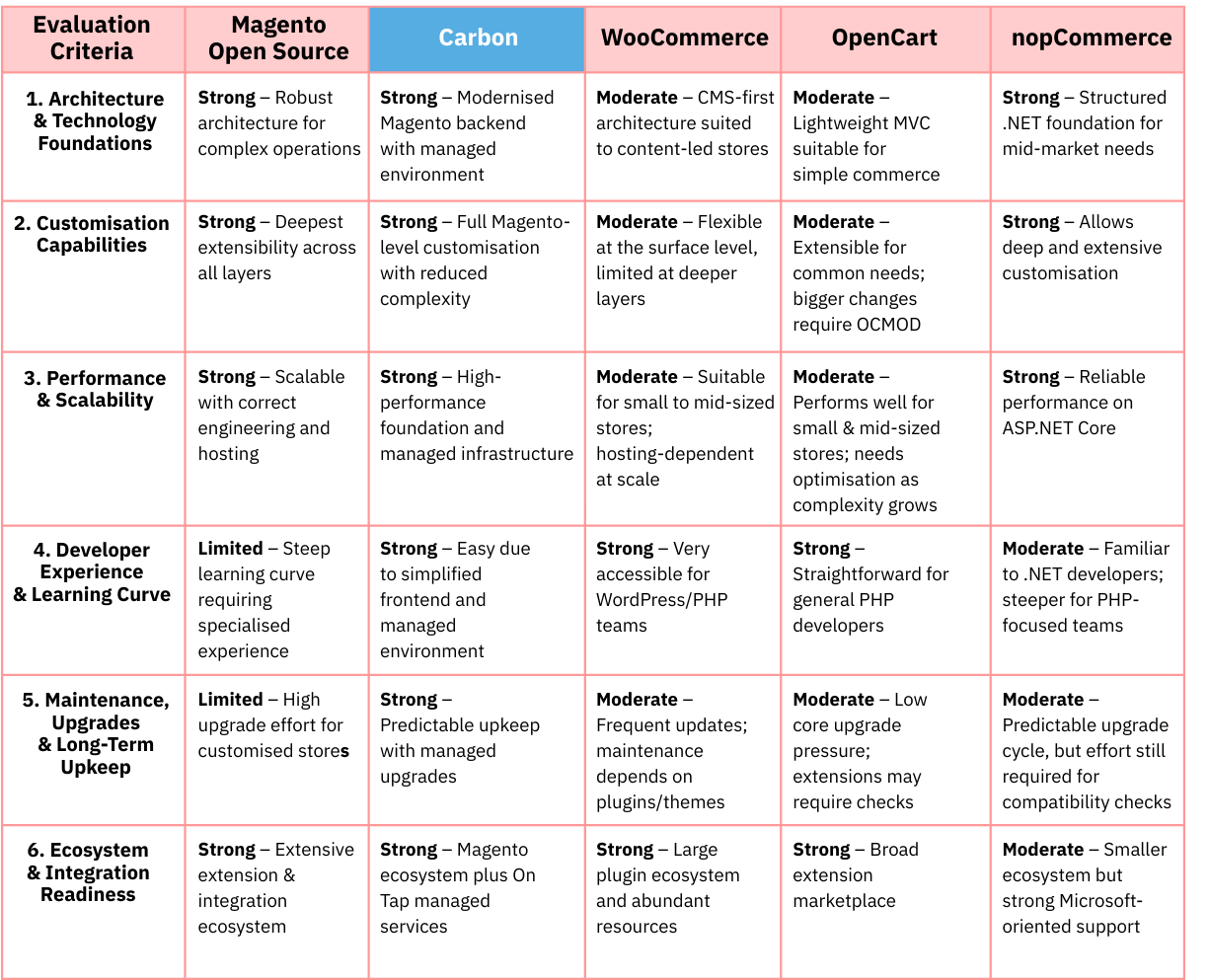
The table below provides a high-level comparison of the five platforms evaluated in this guide, using the rating framework Strong, Moderate and Limited. These labels do not indicate absolute capability; rather, they reflect the relative strengths of each platform within the context of this comparison.
Summary:
-
From an architectural perspective, Magento Open Source remains the strongest core among open source platforms, offering unmatched depth for complex workflows, multi-store setups, B2B logic and large catalogue structures. Its main drawback is the high development complexity and ongoing maintenance cost that come with this level of flexibility.
-
Carbon offers the strongest overall balance across the evaluation criteria. It retains the enterprise-grade capabilities of Magento while removing much of the associated complexity through a simplified frontend, predefined architecture and managed ecosystem. The result is a platform that delivers high performance, faster implementation and predictable long-term ownership, positioning it as the most complete open source option for merchants seeking both power and operational efficiency.
-
In terms of developer experience and learning curve, WooCommerce and OpenCart provide the easiest starting point for small teams with limited engineering capacity, but require ongoing plugin management and frequent conflict resolution. They are better suited for small to mid-sized businesses with simpler commerce needs.
Conclusion
Selecting the right platform is rarely straightforward. It requires a deep understanding of each system’s architecture and how those design choices behave in real implementation scenarios. This expertise typically comes from years of hands-on work, not just documentation reviews. This is where On Tap’s eCommerce consulting service comes in. With nearly two decades of practical experience across the platforms discussed in this article, we help you match each platform’s strengths and limitations to your business requirements and technical resources so you can make a confident, well-informed decision.
For tailored advice on choosing the right platform for your needs, contact us to speak with an expert.